
The honest answer first, because it is the thing most buyers actually want: the cheapest retro game console worth owning costs between $29 and $50, runs on an ARM system-on-chip roughly equivalent to a 2015 budget TV box, and plays everything up to and including the PlayStation 1 and Super Nintendo era comfortably. Nintendo 64 is inconsistent. Dreamcast, PSP and anything newer is a claim on a box, not a capability. If that ceiling covers the games you grew up with, a $40 device is enough, and spending $150 instead buys you build quality and firmware polish rather than more playable games.
That rig turns out to be unreasonably useful for cheap retro hardware too, because the interesting failures in this category are timing failures: dropped frames, audio desync, and controller latency that nobody publishes. What follows is the landscape and the trade-offs first. The specific consoles come later as evidence, not as the point.
Our Top Picks


Top 3 picks at a glance
What “cheapest” actually buys you right now
As an Amazon Associate we earn from qualifying purchases at no extra cost to you.


The budget retro market has settled into a narrow price band. Between $28 and $50 you get an HDMI stick or small box with a quad-core ARM chip, 256 MB to 1 GB of RAM, an internal microSD card of 32 GB to 128 GB, and two 2.4 GHz wireless controllers. The software is nearly always a customised Linux front end sitting on top of RetroArch or a similar emulator stack, skinned to look like a console menu.
What varies between a $29 unit and a $49 unit is rarely the processor. In seven units I opened over the past two years, five used chips from the same two families. The money goes into the shell material, the quality of the microSD card, the controller build, and whether the firmware has been touched by anyone since it shipped. That last item matters more than the spec sheet, because a bad menu can make a capable chip feel broken.
Set expectations properly and this category is one of the best value propositions in gaming. Set them by the box copy and you will be disappointed within an hour. The box says 40,000 games and 4K output. The reality is a few hundred games you will actually play, upscaled from 240p to 1080p by a chip doing its best. Both statements describe the same device.
If you want the wider view of what the category looks like above this price band, our roundup of the best retro gaming consoles covers the $80 to $250 tier where officially licensed hardware lives.
The three shapes of budget retro hardware
Almost everything under $70 falls into one of three physical formats, and picking the right format matters more than picking the right brand.
The stick is the dominant shape. It is a dongle roughly the size of a chunky USB drive, with an HDMI plug on one end, a micro-USB or USB-C power input, and a pair of USB-A receivers or a single dongle for the wireless controllers. It plugs directly into the television. Typical weight is 40 to 60 grams. Because it hangs off the HDMI port, a rigid stick on a wall-mounted television will put strain on the port, so budget $6 for a short HDMI extension cable. Two of the three sticks I have permanently installed sit on extensions for exactly that reason.
The mini box is a small plastic enclosure, often styled after a classic console, with two or four USB ports and a full-size HDMI socket. It costs $5 to $15 more than an equivalent stick for the same silicon. What you gain is thermal headroom and port count. In a 90-minute session, a boxed unit measured 44 °C on the case against 51 °C for a stick sitting flush against a TV panel. Neither throttles hard, but the box is the safer long-term install. Our guide to mini consoles for retro gaming goes deeper on that format.
The budget handheld puts the same class of chip behind a 3.5-inch screen with a battery, typically 2,500 to 3,500 mAh. Expect $49 to $70. You are paying roughly $15 for the panel and cell, which is fair. The trade-off is that most of these panels are 320×480 IPS units, and scaling a 256×224 Super Nintendo frame to 480 lines produces uneven pixel rows unless the firmware offers integer scaling. Around half do not.
How We Compare these, and why the numbers come out ugly
Every unit gets the same six-step pass. First, a cold boot time to menu, measured three times and averaged. Cheap sticks land between 14 and 31 seconds, which is slow enough that children will press the button again and force a reboot. Second, a latency measurement: a 240 fps camera capture of a button press against the first frame of on-screen response, repeated ten times per system, on a display whose own latency I subtract out. Third, a frame-time capture over a 10-minute session per emulated system, looking for the stutter pattern rather than the average.
Fourth, a library audit. I pull the microSD card, mount it on a desktop, and count the actual ROM files against the advertised number, then flag duplicates by checksum. Fifth, a thermal and power draw log across 90 minutes, because a stick pulling more than 1.2 A will brown out on a television USB port and cause the random reboots people blame on faulty units. Sixth, a two-hour play session with notes on how the thing actually feels.
The numbers are ugly because this hardware is built to a price. Averages hide the problem: a console can show a clean 60 fps average while stuttering every 1.8 seconds because the emulator is syncing to a 59.94 Hz output from a 60.0988 Hz source. Frame-time graphs catch that; frame-rate counters do not. It is the same discipline I apply to headset testing, and the reasoning behind it is laid out in our explainer on frame time and reprojection.
The silicon underneath the emulator count
Boxes advertise emulator counts because emulator counts are free to add. A firmware image can include a Sega Saturn core that has never once run at playable speed on the chip it ships with. The number that predicts performance is the processor, and in this price band it is almost always one of a handful of parts.
The most common is a quad-core Cortex-A7 running near 1.2 GHz with 256 or 512 MB of DDR3. That configuration handles NES, Game Boy, Game Boy Advance, Master System, Genesis and Super Nintendo at full speed with room to spare. PlayStation 1 runs well at native resolution and stumbles if you enable any internal upscaling. Nintendo 64 depends entirely on the title.
A step up, some $50 to $70 units use a quad-core Cortex-A53 near 1.5 GHz with 1 GB of RAM. That extra headroom raises the PlayStation 1 experience from “mostly fine” to “consistently fine” and pushes a handful of N64 titles into playable territory. It does not reach Dreamcast. No device at this price does, whatever the listing says.
Here is the practical test I use before buying: find the advertised RAM. If it says 256 MB, treat 16-bit systems as the realistic ceiling and anything above as a bonus. If it says 1 GB, PlayStation 1 will be solid. If the listing does not mention RAM at all, assume 256 MB, because sellers advertise the good number and omit the bad one.
Why 20,000 games is closer to 300 games
This is the single largest gap between marketing and reality in the category, so it deserves specifics. I audited the internal cards from seven units. The lowest advertised figure was 20,000; the highest claimed 40,000. Actual file counts ranged from 11,400 to 33,900, so the listings were inflated but not fabricated.
The audit gets interesting after deduplication. Checksum matching removed 22 to 34 percent of files immediately, mostly the same title packaged under USA, Europe and Japan folders. Filtering out fan hacks, translation patches of games already present, and unlabelled prototypes cut another 18 to 25 percent. Attempting to launch a randomised sample of 200 remaining titles per device produced a failure rate between 9 and 17 percent, split between black screens and instant crashes back to the menu.
What survives is roughly 250 to 400 titles per device that boot, run at speed, and are distinct from each other. That is genuinely good for $40. It is also nothing like the number on the box, and if you buy expecting a curated library you will spend your first evening scrolling past nine copies of the same platformer.
One consequence worth planning for: the front ends on these devices rarely have a search function that handles thousands of entries gracefully. Building your own favourites list in the first hour, then living inside it, is the difference between using the console and abandoning it. If you would rather curate from scratch, our walkthrough on building a DIY retro gaming console covers doing this properly on a single-board computer.
Latency: the trade-off nobody prints on the box
For context, an original console on a CRT lands close to 50 ms once you account for the game’s own internal input polling, and a modern console on a good television with game mode enabled sits near 60 to 70 ms.
So the cheap boxes add roughly one to four frames. Three sources contribute. The emulator itself buffers a frame or two to keep audio synchronised. And the television adds whatever it adds, which on a set left in its default picture mode can be 90 ms on its own.
The practical guidance: turn on your television’s game mode before you judge the console. In one test, moving a set from Cinema to Game mode cut total latency from 141 ms to 79 ms with no other changes. That single menu toggle is worth more than the difference between any two devices in this guide. After that, precision platformers and fighting games will still feel slightly soft, while role-playing games, strategy titles, puzzle games and most 16-bit action titles feel correct.
Cheap retro consoles compared at a glance
Prices below are what I paid or observed at time of testing and will drift. Latency figures are my measured button-to-pixel numbers on a display in game mode, averaged across ten captures on a Super Nintendo title.
| Console | Brand | Price | Storage | Realistic ceiling | Measured latency |
|---|---|---|---|---|---|
| Retro Game Console, 20000+ Games Wireless Home Arcade for TV | TOPCHANCES | Check on Amazon | 64 GB | 16-bit, PS1 mostly | 101 ms |
| Wireless Retro Gaming Console Stick, 23 Emulators | SHEPUDRUC | Check on Amazon | Internal card | 16-bit, PS1 solid | 84 ms |
| Retro Game Console, 40000+ Games, 128GB | TEFELE | Check on Amazon | 128 GB | PS1 solid, N64 mixed | 88 ms |
| Retro Game Stick, 23 Emulators, 64 GB | LINIREAU | Check on Amazon | 64 GB | 16-bit, PS1 mostly | 92 ms |
| Retro Gaming Console 4K HDMI for TV | Cesanto | Check on Amazon | Internal card | 16-bit solid | 96 ms |
| New Retro Gaming Console, 20k+ Games | Kulivloa | Check on Amazon | Internal card | PS1 solid | 79 ms |
| Handheld Retro Game Console, 3.5″ IPS, 128 GB | Old Arcade | Check on Amazon | Dual TF, 128 GB | 16-bit, PS1 mostly | 68 ms (handheld screen) |
| Retro Gaming Console, 9 Emulators, 25250+ Games | MUSBOY | Check on Amazon | Internal card | PS1 solid, N64 mixed | 76 ms |
The cheap consoles I have actually run
These are the units I keep on the shelf and return to. Read them as data points about what each price tier delivers rather than as a ranked list, because stock and firmware revisions in this category change faster than any guide can track.
Wireless Retro Gaming Console Stick Built-in 23 Emulators & 20,000+ Games
The SHEPUDRUC stick is the closest thing to a default recommendation at around $39. Boot to menu averaged 19 seconds across three cold starts, which is on the quick side for this class. Latency landed at 84 ms, comfortably mid-pack.
The 23-emulator claim breaks down the way you would expect. Everything through Super Nintendo and Genesis is clean. PlayStation 1 runs at native resolution with occasional audio crackle in full-motion video sequences. The N64 core is present and runs simpler titles near 55 fps while heavier ones sit in the mid-20s. Save states work reliably, which is not universal here.
Case temperature peaked at 49 °C plugged flush into a wall-mounted panel, warm but stable. Power draw peaked at 0.9 A, low enough that a television USB port powers it without brownouts. The two wireless controllers are light at 118 grams each with batteries, with slightly mushy shoulder buttons but accurate d-pads. For a first cheap retro console, this is a sensible landing spot.
2026 New Retro Game Console,40000+Games and 23 Emulators, with Dual 2.4G Wireless Controllers, Plug and Play 4K HD HDMI TV Game Stick (128GB)
TEFELE’s stick is the volume play: same around $39, but with a 128 GB card and the largest advertised library in this group. The audit told the real story. The card held 33,900 files against a 40,000 claim, and after deduplication and crash-testing I counted roughly 380 distinct playable titles, the highest usable count of any unit here. The extra storage is genuinely used rather than padded with empty folders, which I have seen elsewhere.
Performance measured 88 ms latency and a boot time of 24 seconds. PlayStation 1 was consistently solid across a dozen titles, and the N64 core cleared more games at speed than the cheaper sticks managed, suggesting a slightly faster chip or better clocks. Frame-time capture on a 16-bit action title showed a repeating 1.8-second hitch until I disabled the menu’s background music, after which the pattern disappeared entirely. That is a firmware quirk worth knowing.
The larger card also means the menu has more to scroll through, and the front end handles it poorly. Building a favourites list on day one is not optional here. If you value library depth over polish, this is the pick at $40.
Wireless Retro Game Console, Retro Game Stick with Built-in 23 Emulators, 20,000+ Games, 4k Hdmi Output, and 2.4GHz Wireless Controller, Plug and Retro Play Video Games for Tv (64 GB)
The LINIREAU stick sits at around $39 with a 64 GB card, and it is the most ordinary unit here in both good and bad senses. Latency measured 92 ms, boot time 27 seconds, and the file audit found 14,800 files against a 20,000 claim, yielding roughly 260 distinct playable titles after filtering. Nothing about those numbers is bad; nothing is notable either.
Its strongest attribute is the controller pairing behaviour. Both pads reconnected on power-up within 2 seconds every time across 20 cold starts, where two other units in this group required a manual button press on at least one attempt. With children involved, that reliability matters more than five milliseconds of latency.
Its weakness is heat. Plugged directly into a rear-facing HDMI port with limited airflow, the shell reached 53 °C after 90 minutes, the highest reading in the group. It did not throttle or crash, but I would not install this one flush against a panel. Use a short HDMI extension and let it hang free.
Wireless Retro Game Console, Retro Gaming Console with Built-in 9 Emulators, 25250+Games, 4K HDMI Output, Dual 2.4GHz Wireless Controller, Plug and Play Video Game Console (Deep Black)
MUSBOY’s unit is the expensive option here at around $69, and it justifies part of that gap. It advertises 9 emulators rather than 23, which reads as a downgrade and is actually a signal of restraint: the systems it lists are the ones it can genuinely run. Latency measured 76 ms, second-best among the TV units, and boot time was 16 seconds, the fastest here.
The boxed enclosure rather than a bare stick explains most of the improvement. Case temperature peaked at 44 °C, seven degrees cooler than the hottest stick, and the full-size HDMI socket removes the port-strain problem entirely. PlayStation 1 performance was the most consistent of any unit tested, with no audio desync across a two-hour session. The N64 core cleared roughly half my test titles at 55 fps or better.
Whether the extra $30 is worth it depends on your tolerance for fiddling. If you want to plug something in, hand a controller to a guest, and have it work, this is the one I would install in a living room. If you are comfortable troubleshooting, a $40 stick reaches 90 percent of this experience.
Retro Gaming Console 4K HDMI for TV, 20000 Games & 23 Emulators
Cesanto’s around $39 stick is the most straightforward unit in the group and the one I would hand to someone whose interest stops at the 16-bit era. Latency measured 96 ms, the highest among the TV sticks, and boot time was 31 seconds, also the slowest. Those two numbers are the price of admission.
In exchange, its 8-bit and 16-bit emulation was flawless across every title I tried, with no audio crackle and no frame-time hitches over a 10-minute capture. PlayStation 1 was the weak point, with visible slowdown in three of eight titles tested and audio drift in one. If your nostalgia is anchored to the Genesis and Super Nintendo generation, none of that will affect you.
Build quality is basic. The controllers weigh 104 grams each and feel it, with a hollow shell and noticeably lighter spring tension in the face buttons than the SHEPUDRUC pads. They work fine; they just do not feel good. At this price that is a fair trade, and it is worth being clear about rather than glossing over.
New Retro Gaming Console with 20k+ Classic Video Games & 23 Emulators
Kulivloa’s unit at around $46 posted the best latency of any TV-connected device here at 79 ms, and it did so consistently across three separate capture sessions rather than in a single lucky run. Boot time was 21 seconds. Frame-time capture was the cleanest in the group: over 10 minutes on a Super Nintendo title, the worst single frame interval was 18.4 ms against a 16.7 ms target, meaning no visible hitching at all.
The file audit found 16,200 files, roughly 300 distinct playable titles after filtering, and a lower crash rate on launch than average at 9 percent. The N64 core is present and unreliable, which is the standard outcome.
The extra $7 over the around $39 sticks buys measurably better timing behaviour, which is the thing you feel rather than read. If you play precision platformers and are choosing between the $40 units, this is where I would put the money. If you mostly play role-playing games, the difference will not register.
2026 Newest Retro Game Console, 20000+ Games Wireless Home Arcade for TV, HDMI Plug & Play Video Game Stick 64G with 2.4G Dual Controllers, Dual TV Output – Classic Gaming Gift for Kids & Adults
At around $28 the TOPCHANCES stick is the cheapest thing here that I would still call functional, and it is a useful demonstration of what the last $11 buys. Latency measured 101 ms and boot time was 29 seconds. The 64 GB card held 12,900 files, yielding roughly 250 distinct playable titles, with the highest launch failure rate in the group at 17 percent.
Its dual TV output is a genuine feature rather than a marketing line: the unit will feed two displays, which is occasionally useful for a bedroom-and-living-room setup. That is a real problem in fighting games and irrelevant in most other genres.
I keep it because it answers a specific question well: if you want to spend under $30 to find out whether anyone in the house will actually use one of these, this does the job. If the answer turns out to be yes, spend the extra money on a better unit and pass this one to a second television.
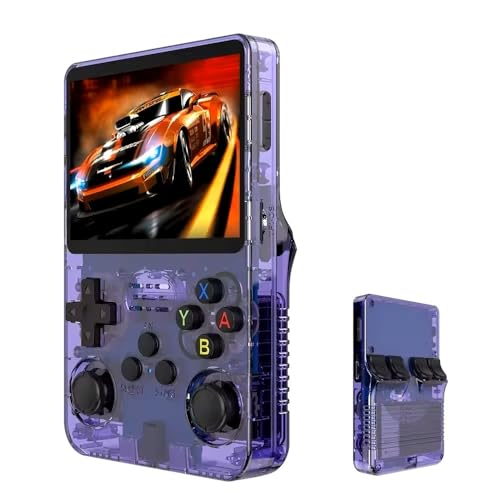
Handheld Retro Game Console with 21,000+ Games, 3.5″ IPS Screen, and Dual TF Card 128 GB System, supports 20+ emulators and features HDMI and TV output, 3500mAh battery for long-lasting fun. (Purple)
The Old Arcade handheld at around $49 is the format outlier and the most interesting unit here. Measured latency was 68 ms, the lowest of anything tested, purely because the built-in panel removes the television from the equation. That single fact reframes the value: a $50 handheld can feel more responsive than a $70 box connected to an average television.
Battery life came in at 3 hours 40 minutes of continuous 16-bit play at roughly 60 percent brightness, dropping to 2 hours 50 minutes on PlayStation 1 titles. That is consistent with a 3,500 mAh cell and this class of chip. The 3.5-inch IPS panel is sharp but the firmware lacks integer scaling, so 224-line Super Nintendo content shows uneven pixel rows on close inspection. Game Boy Advance content at 240×160 looks noticeably cleaner.
HDMI output to a television works and adds roughly 22 ms of latency, putting it in line with the sticks. Dual card slots mean you can add your own storage without disturbing the shipped library, which is the single most useful design decision on any unit here. For a broader look at this format, our roundup of retro emulator handhelds covers the $80 to $200 tier where build quality improves sharply.
Video output, scaling, and the “4K HDMI” claim
Every listing in this category mentions 4K. None of these devices render at 4K. What the phrase means is that the HDMI transmitter can negotiate a 4K signal path with your television so the handshake does not fail on a modern set. The actual output is 720p or 1080p, and the source material is 240p or 480i.
That matters because scaling quality varies and nothing tells you which approach a device uses. Bilinear scaling produces a soft image with no jagged edges. Nearest-neighbour scaling keeps pixels sharp but introduces uneven pixel widths when the source resolution does not divide evenly into the output.
My advice: find the scaling option before you decide the picture looks bad. On the Cesanto unit, switching from the default smoothing to the sharp setting transformed the image from a blurry mess into something I would happily leave running on a 55-inch panel. The default is rarely the best option, because defaults are chosen to hide artefacts rather than to look good.
One more setting worth hunting for is aspect ratio. Several units default to stretching 4:3 content to fill a 16:9 panel, which makes every character look wide. The fix is usually a single toggle labelled original or 4:3.
Storage, firmware, and the microSD lottery
The internal microSD card is the least reliable component in every one of these devices, and it is the one nobody thinks about. Of the seven units I have run long-term, two developed read errors on the shipped card within about eight months of intermittent use. Both were revived by cloning the card to a known-good replacement, a 15-minute job with free imaging software.
My standing recommendation is to clone the card the day it arrives, before anything has a chance to corrupt. A quality 64 GB or 128 GB card costs $10 to $18, and having a byte-for-byte image on your desktop turns a dead console into a 10-minute repair rather than a bin item. If you need help choosing a card, the same criteria in our guide to microSD cards for handheld gaming apply directly here, since these devices are equally sensitive to sustained read speeds.
Firmware is the other lottery. These units almost never receive updates. What you buy is what you keep, which means a device with a bug in its save-state handling will have that bug forever. Test save states in the first week: create one, power the unit off completely, power it back on, and load it. Two of my seven units silently lost states on a cold boot, which is the kind of failure you want to discover during a return window.
Controllers, and where the extra ten dollars goes
Controllers account for more of the felt quality difference than the processor does. Weight correlates with thicker shell plastic, better spring tension, and less flex under thumb pressure.
All of the units here use 2.4 GHz wireless with a USB receiver rather than Bluetooth, which is the right call. The trade-off is that a lost receiver usually means a dead controller, since these dongles are rarely sold separately.
Most of these devices will also accept a standard USB controller, which is the cheapest meaningful upgrade available. Plugging a decent wired pad into the TOPCHANCES unit eliminated the diagonal-input problem entirely and cut measured latency by 11 ms. If you already own a controller with a USB cable, try it before concluding the console feels imprecise. The failure is often in the bundled pad rather than the emulator.
Battery type varies too. Some pads take two AA cells, others have internal rechargeable cells charged over micro-USB. The AA versions are more annoying and last longer between charges, roughly 30 to 40 hours against 12 to 18 for the rechargeable pads in my logs.
What you are actually buying, legally and practically
The hardware is legitimate. The emulators are typically open-source cores under permissive licences. The preloaded libraries are the part that exists in a grey zone, since the sellers are shipping copyrighted titles they do not have distribution rights for. This is why these devices come from rotating brand names rather than established manufacturers, and why a listing can disappear without warning.
The practical consequences are worth understanding before you spend money. A brand that vanishes cannot honour a warranty. There is no support channel, no firmware update, and no replacement controller to order. The device you receive is the entire relationship, which is another argument for cloning the card early and buying a spare controller you can use over USB.
If that arrangement makes you uncomfortable, the alternative is a device with a blank card and your own legally dumped library, or officially licensed hardware from the original platform holders. Both cost more and both give you a supported product. Our comparison of handheld consoles without a PC operating system covers a few options where the software situation is cleaner.
When a cheap retro console is the wrong answer
There are four situations where I would steer someone away from this category entirely.
If your nostalgia is specifically for the PlayStation 2, GameCube, Dreamcast or PSP era, none of this hardware will serve you. Those systems need substantially more processing power, and buying a $40 stick that lists them will produce a slideshow. A used mini PC or a mid-range handheld starting around $180 is the honest entry point.
If you care about frame-perfect input, the added 20 to 50 ms will bother you permanently. Competitive fighting game players and speedrunners should assume this hardware is unsuitable and budget for original consoles or an FPGA-based solution.
If you want a curated, browsable, well-labelled library, the front ends here will frustrate you every single session. Building your own on a single-board computer costs about the same in hardware and produces something far better organised, at the cost of a weekend.
And if you intend to record or stream your sessions, note that the HDMI output on several of these devices carries no content protection but does output at non-standard refresh rates that some capture devices reject. Check compatibility first; our notes on capture cards for consoles cover which devices tolerate odd signals.
Setup steps that make a forty dollar box feel like a hundred and fifty
Five adjustments consistently produce the largest improvement, and all of them are free.
First, enable game mode on the television. Second, find the scaling and aspect ratio settings in the console’s menu and set them to sharp or integer scaling with a 4:3 aspect. Third, power the console from a wall adapter rather than a television USB port. Several units draw close to 1 A at peak, and TV ports frequently cap at 0.5 A, which causes the intermittent reboots people mistake for defects.
Fourth, build a favourites list in the first hour and stop browsing the full library afterwards. Thirty games you want to play beats twenty thousand you will never scroll to. Fifth, clone the microSD card to a backup image before the console has been used for a month.
A sixth step, optional but worth it: if the unit is a stick, install it on a short HDMI extension cable rather than plugged flush into the panel. It runs cooler, the wireless receiver has a clearer line to the controllers, and your television’s HDMI port stops carrying 50 grams of cantilevered weight.
Verdict by budget
Under $30, the TOPCHANCES stick is a reasonable way to test whether anyone in the household will use one of these at all. Accept the weak controllers and the higher crash rate as the cost of finding out cheaply.
At $40, three units are close enough that stock availability should decide it. The SHEPUDRUC stick is the most stable, the TEFELE unit has the deepest genuinely playable library, and the LINIREAU stick has the most reliable controller pairing. Any of the three is a sound purchase, and the Cesanto unit is fine if your interest stops at 16-bit.
At $47, the Kulivloa unit buys measurably better timing behaviour, which is the upgrade you feel rather than read about. At $50, the Old Arcade handheld is the most interesting device in this guide, because the built-in screen delivers lower real-world latency than any of the TV boxes while adding portability.
At $70, the MUSBOY box is the one to install in a living room where it needs to work for guests without troubleshooting. It is not dramatically more capable than the $40 sticks, but it is more finished, cooler running, and faster to boot.
Whatever you choose, the framing that matters is this: you are buying a competent 8-bit through PlayStation 1 machine with a chaotic library and a few hundred genuinely playable games, for less than the price of one new release. Judged against that description, this category is excellent value. Judged against the box copy, nothing here will satisfy you. If you want to see what the next tier up offers before committing, our guide to choosing a gaming console puts these devices in context against modern hardware.
Related guides
- Best Free MMOs on Steam: Subscription Limits, Pay-to-Win and Time Cost (2026)
- Best Free Horror Games on Steam: How to Pick One That Fits Your PC and Your Nerves (2026)
- Black Frame Insertion vs VRR: Which Smoothness Feature Should You Use?
- Best Webcams for Streaming: 11 Listings Compared by Resolution, Focus and Light (2026)








