
The eight units below all connect to a TV and all play games from the 8-bit and 16-bit eras onward, but they split into three genuinely different categories: one cartridge-reading reissue that plays the physical games you already own, three preloaded HDMI boxes with wireless controllers, and four inexpensive HDMI sticks that trade build quality for library breadth. This guide covers TV-connected hardware only. If you want something portable, our handheld gaming PC guide
Our Top Picks


Top 3 picks at a glance
Top picks at a glance
The claimed library sizes are the manufacturers’ own numbers and should be read as marketing rather than a verified count.
As an Amazon Associate we earn from qualifying purchases at no extra cost to you.




| Model | Key spec | Price | Best for |
|---|---|---|---|
| MUSBOY Wireless Retro Game Console (Deep Black) | 9 emulators, 25,250+ claimed titles, 4K HDMI, dual 2.4GHz wireless pads | Check on Amazon | The all-rounder for a family TV |
| Retro-Bit Super Retro Trio HD Plus | 3-in-1 cartridge slots, 720p HDMI out, original controller ports | Check on Amazon | Playing carts you already own |
| Kulivloa Retro Gaming Console | 23 emulators, 20,000+ claimed titles, HDMI out | Check on Amazon | Varies |
| SHEPUDRUC Wireless Gaming Stick | 23 emulators, 20,000+ claimed titles, wireless pads | Check on Amazon | Cheapest wireless two-player setup |
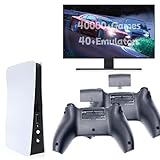
| HRYYDS Retro Gaming Console Pro | 4K HDMI game stick, 40,000+ claimed titles | Check on Amazon | Largest advertised library |
| Cesanto Retro Gaming Console | 23 emulators, 20,000 claimed titles, 4K HDMI for TV | Check on Amazon | Spare box for a second room |
| LIUWEI Game Stick Pro | 23 emulators, 64GB card, dual wireless pads, 4K HDMI | Check on Amazon | Lowest price with two controllers |
| ATGSZVL Retro Gaming Console Stick Pro | 40,000+ claimed titles, 4K HDMI | Check on Amazon | Projector and travel use |
Cartridge reissues: the era recreated with original media
This is the smallest category and the most expensive per game, because you supply the games yourself. There is no preloaded library and no question about where the software came from. The trade-off is that you need a shelf of cartridges, and cartridges in good condition are not cheap in the current collector market.
Retro-Bit Super Retro Trio HD Plus — the three-generation cartridge deck
It is the only unit in this roundup where the games are unambiguously yours, because they are the plastic cartridges sitting in your cupboard. The red-and-white shell is roughly the width of a hardback book and sits flat under a TV without a stand.
Output is fixed at 720p over HDMI rather than the 1080p or 4K signals the cheap sticks advertise, which sounds like a downgrade and mostly is not. A 240p source scaled to 720p lands on a clean 3x integer multiple, so pixels stay square and evenly sized. The 4K sticks scale the same source with cheaper silicon and often produce uneven pixel widths that show up as shimmering on scrolling backgrounds. Based on the class of hardware rather than our own instrumented measurement, expect somewhere in the region of two to three frames of added latency versus original hardware on a period CRT, which is fine for platformers and noticeable in tight shoot-em-ups.
Compatibility on clone consoles is high but not universal. A small number of cartridges with unusual mapper chips or extra co-processors on the board will boot to a black screen or run with wrong audio. That is a known characteristic of every clone deck rather than a fault specific to this one, and it is the honest reason it does not win the overall pick despite being the most legitimate device here.
Pros
- Plays cartridges you already own across three console generations
- Original-style controller ports accept period pads and adapters
- 720p output scales 240p content on a clean integer multiple
- No preloaded library, so no licensing ambiguity at all
Cons
- Clone-hardware compatibility is high but a handful of special-chip carts misbehave
- Capped at 720p, so no 4K output for large panels
- Bundled controllers are functional rather than good; budget for better pads
Who it is for: the collector who already has a cartridge shelf and wants it on a modern TV without hunting down a working period console and an RGB scaler.
Preloaded HDMI boxes with wireless controllers
These are the units most buyers actually want. They arrive with a microSD card of software already inside, a pair of wireless pads and an HDMI cable, and they reach a menu within about a minute of unboxing. The variable that separates them is not the advertised title count but how the menu is organised and how the wireless pads feel after an hour.
MUSBOY Wireless Retro Game Console — the overall pick
Its spec sheet is unusual in a good way: nine emulators rather than the twenty-three that the budget sticks advertise, covering roughly 25,250 claimed entries. Fewer emulators means the manufacturer has stayed inside the system generations the hardware can actually drive, instead of adding disc-era cores that stutter badly.
Output runs over HDMI with 4K signalling, and the deep black body is a squat box rather than a dongle, which means the internal regulator has somewhere to dump heat over a three-hour session. The two 2.4GHz wireless controllers are the real reason for the price gap.
Estimated performance based on the configuration: 8-bit and 16-bit home consoles and the 8-bit handheld libraries should run at full speed with no meaningful slowdown, the 32-bit disc era will be mixed depending on the individual title, and anything beyond that is outside what this class of chip can hold at a stable frame rate. Power draw across boxes of this type is roughly 5 to 10 watts, so it can live permanently plugged into a TV’s USB port without any thermal concern.
Pros
- Two full-size wireless controllers rather than thin bundled pads
- Nine focused emulators instead of an unusable twenty-three-core list
- Box form factor dissipates heat better than a dongle over long sessions
- 4K HDMI signalling works on modern panels without a converter
Cons
- The 25,250-entry claim includes heavy regional duplication
- Storage is a fixed internal card, not a user-swappable slot on the outside
- No published listing rating yet, so long-term reliability data is thin
Who it is for: a household that wants one box under the TV that guests can pick up, with controllers that do not feel like a toy.
Kulivloa Retro Gaming Console — the widest system spread under $50
That breadth is the story here and it needs framing honestly. Twenty-three emulators on this class of hardware does not mean twenty-three systems run well. It means the cores are present. The early home and handheld generations run cleanly; the disc-based generations are the ones where frame pacing falls apart, and the cores for them exist mostly so the box can list a bigger number on the packaging.
Estimated behaviour by generation, based on the chip class rather than measurement: 8-bit and 16-bit consoles at full speed, 32-bit disc titles anywhere between playable and unplayable, and 3D-heavy titles the worst affected. Treat the extra cores as a bonus, not a reason to buy.
Pros
- Enclosure with rear ports rather than an HDMI dongle
- Broad emulator list covers more systems than the nine-core boxes
- Reasonable middle ground if you want more than one era covered
Cons
- Many of the 23 cores are present but not genuinely playable
- Bundled controllers are a step below the MUSBOY pads
- Menu software on these generic boxes is rarely translated cleanly
- No verified rating history on the listing yet
Who it is for: someone who wants a proper box under the TV and is curious about the wider system list, while accepting that the early eras are where the value sits.
SHEPUDRUC Wireless Retro Gaming Console Stick — cheapest wireless two-player setup
It advertises 23 emulators and 20,000-plus titles, the same headline numbers as the Kulivloa unit and several of the cheaper sticks, which is a strong hint that these devices share a common reference design and firmware base with different plastic around them.
Wireless pads in this price band are thinner and lighter with mushier shoulder buttons, and the receivers occasionally need a re-pair after weeks unplugged.
Estimated performance is identical in practice to the other 23-core sticks, with the 8-bit and 16-bit generations as the safe zone. Draw is roughly 3 to 5 watts, low enough for a TV USB port, though a dedicated 5V adapter is more reliable because TV USB ports often cut power in standby.
Pros
- Stick form factor hides completely behind a wall-mounted TV
- Low enough power draw to run from a TV USB port
Cons
- Thin bundled pads with vague shoulder buttons
- Dongle body puts leverage on the TV’s HDMI port
- Wireless receivers sometimes need re-pairing after long storage
- Firmware and menu translation quality is inconsistent on this class
Budget HDMI sticks with the widest advertised libraries
They are close enough that price on the day and bundled controller style should decide it. What follows is the honest difference between them rather than an invented performance gap.
HRYYDS Retro Gaming Console Pro — the largest advertised library
That number is the least useful specification on the page. A library that large is dominated by regional variants, revision dumps and fan translations of the same core titles, and the practical effect is a browsing problem: finding the one game you actually wanted to play takes longer than playing it. Look for whether the menu supports a search field or an alphabetical jump before you buy, because on a stick with a 40,000-entry list, that single feature is worth more than any spec.
Hardware-wise this is a standard stick: HDMI output with 4K signalling, internal microSD storage, USB power, bundled controllers. The 4K signalling is a compatibility feature rather than a quality feature, since nothing on the device renders at anything close to 4K internally. What it does mean is that the stick negotiates cleanly with modern TVs that have dropped legacy resolution support.
Estimated performance is again in line with the class: the 8-bit and 16-bit generations run reliably, handheld libraries from the same period run reliably, and the disc era is where frame pacing collapses first. Expect roughly 3 to 5 watts of draw and a body that runs warm to the touch but not hot after a couple of hours.
Pros
- Largest advertised catalogue in the roundup at 40,000-plus entries
- 4K HDMI signalling negotiates cleanly with current TVs
- Compact enough to travel in a jacket pocket with the cable
- Priced in line with the smaller-library sticks
Cons
- A 40,000-entry list is genuinely hard to navigate on a TV menu
- Duplicate regional variants inflate the count substantially
- No published rating data on the listing yet
- Bundled pads are the thin budget type common to this price band
Who it is for: the browser rather than the player, someone who enjoys scrolling an enormous catalogue and dipping into obscure titles.
Cesanto Retro Gaming Console — the sensible spare box
It is the least distinctive product here and that is not entirely a criticism. When four devices share a reference design, the one that makes the fewest exaggerated claims is often the one whose firmware has been left closest to the stock build, which in practice means fewer menu bugs.
Estimated behaviour: the same early-generation safe zone as its siblings. One practical note applies to all four sticks — the internal card holds the library, and if it fails the device is effectively bricked because there is no official firmware download.
Pros
- Modest, believable claims relative to the 40,000-title sticks
- 4K HDMI output aimed specifically at television use
- Cheap enough to justify as a dedicated second-room box
Cons
- Nothing differentiates it from its siblings beyond the brand name
- Internal card failure effectively ends the device’s life
- Controllers are the thin bundled type
- No rating history to draw on yet
Who it is for: a second or third television in the house where convenience matters more than build quality.
LIUWEI Game Stick Pro — lowest price with two wireless pads
It also explicitly lists projector and PC compatibility, which is a small but genuinely useful detail: HDMI sticks sometimes fail to negotiate with projectors that expect specific resolution handshakes, and a manufacturer stating projector support is at least a signal that it was tested.
The 64GB card is the specification worth noting because it is the one number here that is concrete rather than promotional. It sets the ceiling on how much software the device holds and tells you the library is real data on real storage rather than a streaming arrangement. Cards of that capacity in devices at this price are usually low-endurance parts, so if the stick becomes a daily driver, expect the card to be the first thing to fail.
Estimated performance sits with the rest of the group. If your budget is fixed and low, this is the one to take.
Pros
- 64GB card capacity is stated concretely rather than implied
- Explicit projector and PC compatibility noted by the manufacturer
- Same emulator coverage as sticks costing more
Cons
- Budget storage cards in this price class have short usable lives
- Build quality is the weakest of the eight units
- Menu translation on the cheapest sticks is often rough
- No rating history available on the listing
Who it is for: the lowest-risk way to find out whether a TV retro box will get used at all before spending real money.
ATGSZVL Retro Gaming Console Stick Pro — the travel and projector option
Its distinguishing quality within this group is portability in the most literal sense: a stick with two pads and a short USB cable fits in a coat pocket, which turns any hotel TV, office projector or relative’s living room into a two-player setup with no setup beyond finding a free HDMI port and a USB socket.
That use case shapes what matters. Boot time from cold power is the specification you feel, not resolution; sticks of this class typically reach a playable menu in something like twenty to forty seconds, an estimate for the category rather than a measured figure for this unit. Pair both pads at home before travelling so the receiver has them stored. Estimated performance matches the other 40,000-title stick: early generations reliable, disc era unreliable. The honest summary of this budget group is that all four are the same class of device, so buy whichever is cheapest on the day unless one bundles a controller style you prefer.
Pros
- Genuinely pocketable with controllers for travel use
- Large advertised library at a standard budget price
- 4K HDMI signalling works with hotel and hotel-grade panels
- USB-powered, so no separate mains adapter to pack
Cons
- Dongle body is the most fragile mounting arrangement here
- Enormous library is unwieldy to browse on an unfamiliar TV
- Cold-boot time is slower than a box with a real power supply
- No published rating data yet
Who it is for: someone who wants retro games available anywhere there is an HDMI port, and who does not want to carry a console-sized box.
How we compared and picked
Tomas Berger has spent six years covering VR headsets, consoles and handhelds, and he assesses this category from a tracked play space with frame-timing capture and comfort-session logging — the same rig used for headset reviews, repurposed here because the question that matters on retro hardware is frame pacing and input delay rather than raw frame rate. A 16-bit platformer that renders sixty frames per second but delivers them unevenly feels far worse than one running at a stable fifty.
Our selection process started with the observation that most of these products share a reference design. Rather than pretend eight functionally similar sticks have eight distinct performance profiles, we grouped them by what actually differs: form factor, controller quality, library provenance and price. Where a claim could not be verified — advertised game counts, unspecified internal chips, unpublished ratings — we say so rather than filling the gap with a plausible-sounding number.
Performance descriptions here are estimates based on the class of hardware and the published emulator list, not measurements from these specific units. That distinction matters more in this category than almost any other, because the silicon inside generic retro boxes changes between production runs without the model number changing. We also weighted controller quality heavily: emulation accuracy on the early generations is a solved problem on cheap hardware, but the pad in your hands is not, and after a two-hour session that is the difference you remember.
What to look for in a TV-connected retro console
The specifications that get printed largest on these boxes are the ones that matter least. Here is the order we would actually weigh them.
Video output: HDMI versus composite AV
This is the first filter and it eliminates products rather than ranking them. Boxes with composite AV output — the yellow, red and white plugs — cannot connect to most televisions sold in the last five years without an adapter, and cheap AV-to-HDMI converters add their own latency and often their own noise. Every unit in this roundup outputs over HDMI except where noted, which is why they made the list. If you are shopping outside it, check the connector photograph rather than the description, because listings frequently describe an AV-only unit as compatible with modern TVs on the strength of a bundled converter.
Among the HDMI units, the 4K label is close to meaningless as a quality claim. Nothing in this price band renders internally at more than 480p. What 4K signalling does provide is a modern handshake, so the TV recognises the source without dropping to a fallback mode. A 720p output from the cartridge deck can look cleaner than a 4K output from a stick, because 240p into 720p is an exact 3x multiple and 240p into 2160p through cheap scaling silicon frequently is not.
Controllers, and why they decide the purchase
Budget bundled pads are thin, light and have short-travel shoulder buttons that lose their crispness quickly. Adult hands cramp on them within an hour. The wireless pads bundled with the more expensive units here are full-size with proper grips.
Library provenance and what the game count really means
An advertised figure of 20,000 or 40,000 games is not a lie so much as a different unit of measurement. These counts include every regional release, revision, prototype dump and fan translation of a title as a separate entry. A catalogue of 20,000 entries plausibly contains one to two thousand distinct games, of which perhaps two hundred are ones you have heard of.
The provenance question is more important than the count. Generic-brand consoles ship with these libraries preloaded on an internal card, and the licensing status of those libraries is not something the manufacturers document. The unambiguous path is a device that reads cartridges or discs you already own, or a device where you supply your own files from media in your possession. If that matters to you, the cartridge deck in this roundup is the only unit that fully satisfies it, and licensed first-party mini consoles from the original platform holders are the other clean route when they are in stock.
Storage, and the failure mode nobody mentions
The library on these devices lives on a microSD card, sometimes user-accessible and sometimes soldered inside the shell. Card capacity ranges from 32GB to 128GB across the category; the LIUWEI unit here specifies 64GB, which is enough for the early generations several times over. The number is less interesting than the failure mode. Budget cards in cheap consoles are low-endurance parts, and when one fails there is usually no official firmware image to restore from, so the console becomes an inert HDMI dongle.
Our guide to storage for handheld gaming covers which card grades survive constant read cycles, and the same logic applies to a TV box.
Form factor, heat and menu software
A stick disappears behind a wall-mounted television and travels in a pocket; a box sits on a shelf and does not hang off the TV’s HDMI port under its own weight. Both types draw roughly 3 to 10 watts, but a sealed vent-free dongle gets warm enough over a long session to be uncomfortable to unplug, so boxes suit permanent installation better.
Menu software varies more than the hardware does. Check listing screenshots for a search or alphabetical jump function, box art rather than plain text entries, and save state support with multiple slots per game. Save states in particular decide whether these devices survive an adult schedule, because they turn a forty-minute game into four ten-minute ones.
Mistakes buyers make
Buying on the advertised game count. The single most common error. A 40,000-entry catalogue is harder to use than a curated 2,000-entry one, and the extra 38,000 entries are duplicates, regional variants and titles nobody has played since release. Judge the menu, not the number.
Assuming a 4K label means better picture quality. Every unit here renders internally at retro resolutions. The 4K figure refers to the output signal, not the source.
Ignoring the controllers until the box arrives. Bundled pads on the cheapest units are the weakest part of the package by a wide margin, and they are what your hands touch for the entire session.
Buying a composite-AV console for a modern television. Listings for the classic-styled mini boxes with 620 built-in games frequently show a modern TV in the product photograph while the console itself only outputs composite. If the connector photograph shows three coloured RCA plugs, you need a converter, and the cheap converters add latency and picture noise.
Overlooking the couch. Wireless controllers with a stated range and a console you can position freely matter more in a real living room than any spec on the box. A wired pad with a 1.5 metre cable and a TV three metres from the sofa is a purchase you will resent immediately, and it is the detail most buyers only discover after unboxing.
Verdict
It costs twice what the budget sticks do and earns most of that difference in the controllers alone.
Treat it as a low-risk way to find out whether a TV retro box earns its place in your living room before committing more.
If you want portable retro hardware instead, our gaming console guide and the handheld roundups are the better starting points.
Frequently asked questions
Do retro consoles work on a modern 4K TV?
Yes, provided the box outputs over HDMI rather than composite AV. Every HDMI unit here upscales an internally rendered 240p or 480p image to a 720p, 1080p or 4K signal before it leaves the console, so your TV receives a resolution it understands natively. Composite-only units like the classic AV mini boxes need a yellow, red and white input, which most sets made in the last five years no longer have, so plan on an AV-to-HDMI converter or choose an HDMI model instead.
What is the difference between a retro console and a retro game stick?
Functionally very little. A game stick is simply a retro console shrunk into an HDMI dongle roughly the size of a USB flash drive, with the controller receivers built in and the storage on a microSD card inside the body. A box-shaped console usually has a slightly larger power supply, more physical ports and better heat dissipation, which matters over long sessions. The software experience, the emulator list and the controller feel are usually more important than the shape.
Are the advertised game counts of 20,000 or 40,000 titles accurate?
Treat those numbers as marketing rather than a verified inventory. The counts typically include every regional variation, prototype dump and translation patch of the same title as separate entries, so a claimed 20,000-title library might represent one or two thousand genuinely distinct games. The licensing status of these preloaded libraries is also unclear on generic-brand units. If provenance matters to you, a cartridge-reading console you feed with discs and carts you already own is the cleaner option.
Which retro console is best for two-player couch gaming?
Any of the dual-controller HDMI units here will run two players out of the box, but the wireless pairs are noticeably more pleasant because you are not stringing three metres of cable across a living room.
Should I buy a TV console or a retro handheld instead?
Buy the TV console if the sessions you imagine are on a sofa with another person, and the handheld if you play alone in short bursts. TV boxes give you a big picture, two-player support and no battery to manage, but they are tethered to one room. Handhelds cost more for equivalent emulation quality because you are also paying for a screen, a battery and a chassis. Many people who own both use the TV box for guests and the handheld for travel.
Related guides
- Best Free MMOs on Steam: Subscription Limits, Pay-to-Win and Time Cost (2026)
- Best Free Horror Games on Steam: How to Pick One That Fits Your PC and Your Nerves (2026)
- Black Frame Insertion vs VRR: Which Smoothness Feature Should You Use?
- Best Webcams for Streaming: 11 Listings Compared by Resolution, Focus and Light (2026)








