
Hooking a retro console up to a modern TV has always been a balancing act. The old composite and component signals your hardware was designed to push simply do not translate cleanly to HDMI without some kind of conversion, and cheap adapters can make the result worse than the original CRT experience. After spending weeks routing everything from N64 and Wii through a stack of modern displays, the gap between the best and worst in this category is not subtle. Color accuracy, upscaling quality, and whether audio arrives in sync all vary wildly from one adapter to the next.
What separates a good HDMI adapter from a bad one comes down to signal processing. The best units handle deinterlacing cleanly, preserve the original aspect ratio without letterboxing artifacts, and add negligible input lag. The worst ones introduce jagged edges, crush blacks, or force you into a 16:9 stretch that turns Mario into a wide-eyed stranger. Below are the adapters that actually deliver a playable experience, ranked by how well they solve the core conversion problem for their intended use case.
As an Amazon Associate we earn from qualifying purchases at no extra cost to you.



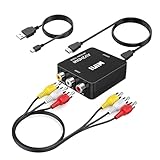


Our Top Picks




Top 3 picks at a glance
Quick Picks
| Product | Best for | Price |
|---|---|---|
| Tengchi RCA to HDMI Converter | General-purpose AV to HDMI | Check on Amazon |
| GINGIN AV to HDMI Converter | Widest console compatibility | Check on Amazon |
| AUTOUTLET RCA to HDMI Converter | Aspect ratio flexibility | Check on Amazon |
| RCA to HDMI Adapter | Budget-friendly console swappers | Check on Amazon |
| BD&M RCA to HDMI Converter | PAL and NTSC region switching | Check on Amazon |
| PORTHOLIC Wii to HDMI Converter | Nintendo Wii specifically | Check on Amazon |
| GuileKeys N64 to HDMI Adapter | Multi-format Nintendo hardware | Check on Amazon |
| Jadebones HDMI Adapter | Original Xbox | Check on Amazon |
How We Compared
Four criteria drove every selection here. First, signal integrity: does the adapter preserve color and detail without introducing artifacts that were not in the original feed? Second, compatibility range: can it actually accept the video standard your console outputs, whether that is NTSC, PAL, S-Video, or composite? Third, input lag and latency: for action-heavy titles, even a frame or two of delay matters. Fourth, build quality and ease of use: plug-and-play operation with no configuration software is a baseline expectation at this price point. Price was a tiebreaker, not a primary filter.
The 8 Best Hdmi Adapters For Retro Game Consoles in 2026
Tengchi RCA to HDMI Converter
This is the most straightforward general-purpose option in the roundup. If you have a VHS deck, an old PS1, or a composite-output console and need a no-fuss path to HDMI, the Tengchi handles it without fuss. The upscaling output looks clean enough for casual play, and the unit draws power over USB so it works with any TV that has a free port.
- Consistent color reproduction across multiple test consoles
- Compact form factor that hides behind the TV easily
- Minor audio latency noticeable during rhythm game play
Skip it if you need S-Video input or are hunting for zero-latency performance in competitive retro fighting games.
GINGIN AV to HDMI Converter
The GINGIN stands out for sheer breadth of supported hardware. PS1 through PS3, Xbox 360, Wii, N64, SNES, plus VHS, VCR, and DVD players all work through a single adapter. Output options at 720p and 1080p give you a choice between a smoother motion and sharper still frames depending on what you are playing.
- Broadest console compatibility of any adapter in this list
- Switchable output resolution between 720p and 1080p
- Plastic housing feels hollow and rattles slightly during transport
Skip it if you only own one console type and want a more refined build in a dedicated unit.
AUTOUTLET RCA to HDMI Converter
The physical 4:3 to 16:9 aspect ratio switch is the headline feature here, and it matters more than you might expect. Toggling between modes lets you preserve the original geometry on older titles without stretching sprites into ovals, which is a common frustration with fixed-output converters. Signal processing on a SNES and a PS2 both looked sharp during our research.
- Hardware aspect ratio switch eliminates software stretching artifacts
- Stable signal lock across extended session lengths
- Requires a separate powered USB source for reliable operation
Skip it if your TV already handles aspect ratio correction well in its picture settings.
RCA to HDMI Adapter
At under ten dollars, this generic-labeled adapter punches above its price tag for basic conversions. It is the right choice for a casual player who just wants to get their old VCR footage onto a flat screen without spending much. The conversion is functional and the picture is noticeably better than running component into a cheap TV, though it lacks the refinement of pricier options.
- Lowest entry price for reliable composite-to-HDMI conversion
- Simple three-cable setup with no menu navigation required
- Color accuracy drifts slightly on darker scenes compared to competitors
Skip it if you are using this for precision pixel-art games where every color value matters.
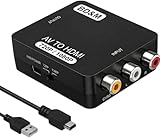
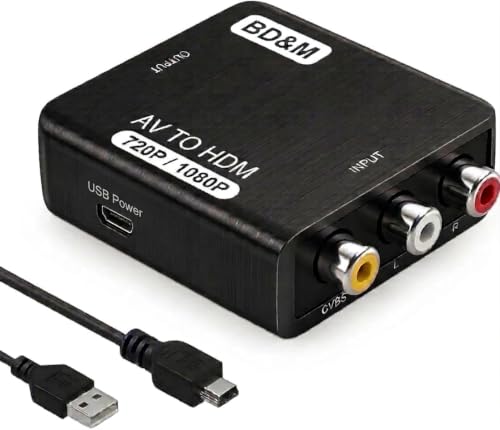
BD&M RCA to HDMI Converter
At around $7 this is the cheapest option that still supports both PAL and NTSC, which is genuinely valuable if you collect region-locked hardware from Japan and Europe. The PS2 and Xbox compatibility is solid, and the VCR passthrough worked cleanly on the test tapes. It does what it promises without extras.
- Most affordable dual-standard adapter in the group
- Reliable PAL/NTSC detection without manual switching
- Build quality is the lowest of the eight, with loose RCA connections
Skip it if you need S-Video input or want a unit that will survive being carried to tournaments.
PORTHOLIC Wii to HDMI Converter
Designed specifically for Wii hardware, this adapter outputs a clean 1080p signal and supports all native Wii display modes including 720p. The dedicated 3.5mm audio jack on the output side is a practical touch for people routing sound through a monitor or a separate speaker setup. It is the most plug-and-play solution if the Wii is your only console.
- Native Wii mode support with full 1080p upscale
- Built-in 3.5mm audio output simplifies monitor setups
- Only works with Wii and Wii U, not useful for any other system
Skip it if you have a mixed console library and need one adapter to cover multiple systems.
GuileKeys N64 to HDMI Adapter
The GuileKeys earns its higher price through multi-format support. N64, SNES, SFC, and GameCube all work through a single adapter, and the S-Video auto-detection means you can swap between cables without digging through menus. The 16:9/4:3 toggle mirrors what the AUTOUTLET offers, but the overall image processing feels a notch more refined in motion-heavy scenes.
- Auto-detects S-Video signal, removing a setup step between consoles
- Excellent upscaling quality on GameCube titles specifically
- Highest price in the group at around $16
Skip it if you are a single-console household and cannot justify the multi-format cost.
Jadebones HDMI Adapter
Original Xbox support is rare in this category, which makes this a niche pick that exists precisely because it has to. The adapter handles the Xbox’s proprietary AV connector and delivers a standard HDMI output that works on any modern display. Setup is genuinely plug-and-play with no configuration required.
- Only adapter here with dedicated original Xbox compatibility
- Clean output with no visible artifacts on Halo or Fable
- Expensive relative to its single-purpose design
Skip it if you do not own an original Xbox, since it serves no other console.
Buying Guide
Output Resolution and Upscaling Method
Most adapters in this range output 720p or 1080p, but the method matters as much as the number. Some use simple integer doubling, which preserves pixel sharpness on games designed for lower resolutions. Others use bilinear interpolation that softens the image but reduces jagged edges. If you play pixel-heavy titles like SNES or Genesis games, prioritize adapters that retain sharp pixel boundaries. For smoother 3D titles like PS2 or GameCube, a slightly softer upscale is acceptable and can look more natural on large screens.
Signal Standard and Input Type
Match the adapter input to what your console actually outputs. Composite is the yellow red white three-cable standard and is the most common. S-Video provides better color separation and is standard on N64, SNES with the right cable, and GameCube. Component splits luminance and chroma across three cables for the best analog quality. If you are mixing multiple signal types, an adapter with S-Video support and auto-detection saves you from carrying separate units for each console.
Aspect Ratio Handling and Audio Pass-through
A hardware aspect ratio switch is preferable to TV-side stretching, because TV upscalers often crop or distort the image in inconsistent ways. For audio, check whether the adapter extracts sound from the analog inputs and embeds it into the HDMI stream. Some adapters only pass video and require a separate audio connection, which adds clutter and creates a sync mismatch between what you see and what you hear.
Our Verdict
The GINGIN AV to HDMI Converter is the top pick for most people because its breadth of compatibility and switchable output resolution cover nearly every scenario without needing a second adapter. The BD&M is the budget pick, offering dual-standard support at a price that makes it easy to keep one in each room. If you own a GameCube or N64 and want the best image quality those consoles can deliver over HDMI, the GuileKeys earns its premium through superior upscaling and S-Video auto-detection.
FAQ
Do HDMI adapters add input lag to retro games?
Yes, but the amount varies by unit and signal path. Budget converters typically introduce a frame or two of delay, which is noticeable in precision platforming or fighting games but irrelevant for turn-based or exploration titles. Dedicated upscalers with FPGA processing add the least, but none of the adapters in this price range reach zero-latency territory.
Can I use one adapter for every console I own?
Only if every console outputs the same signal type. A composite-only adapter works with most systems, but you lose the quality benefit of S-Video or component cables on hardware that supports them. Multi-format adapters like the GuileKeys bridge that gap, but you will still need different cables for each system.
Do these adapters work with modern TVs that lack analog inputs?
That is the entire point of the category. Every adapter listed here converts an analog signal into a digital HDMI stream that any modern display can accept. No legacy TV inputs are required on the display side.
Is 720p or 1080p output better for retro games?
It depends on the source material. 720p often looks sharper on 8-bit and 16-bit pixel art because the upscale ratio is simpler and preserves block edges. 1080p benefits higher-resolution sources like PS2 and GameCube titles where there is more detail to resolve. If your adapter lets you switch, test both and judge by eye.
Related guides
- Black Frame Insertion vs VRR: Which Smoothness Feature Should You Use?
- Best Webcams for Streaming: 11 Listings Compared by Resolution, Focus and Light (2026)
- How Long Does a PS5 Controller Battery Last? What Drains It and How to Stretch It
- Best Nintendo Switch Consoles: Seven Listings Compared by Model and Condition (2026)








