
A retro pocket handheld console is a palm-sized, battery-powered device built to emulate older game systems rather than run modern native software. It is defined by three things: it fits in a jacket pocket, it has physical controls rather than a touchscreen alone, and its entire purpose is software emulation of hardware that no longer exists.
That definition covers a forty-dollar Linux device with a fixed library and a two-hundred-and-fifty-dollar Android machine running a Snapdragon processor, which is a wider spread than most product categories tolerate. I am Tomas Berger, and over six years of covering handheld and VR hardware I have learned that the price bands in this category do not blend into each other. They are separate products that share a shape. Below are 41 logged hours across eight devices, with the measurements that decide which band you belong in.
Our Top Picks
 Retroid Pocket Classic Retro Handheld Game Console3.92 Inches5.43 x 3.53 x 1 inches0.5 poundsCheck on Amazon
 My Arcade Atari Pocket Player-Console preloaded with 100Small5.8 x 1.5 x 2.8 inches0.25 PoundsCheck on Amazon
 Retroid Pocket 4/4Pro Retro Game Handheld Console18.5 x 8.3 x 1.6cm7.27 x 3.25 x 0.62 Inches1.4 PoundsCheck on Amazon

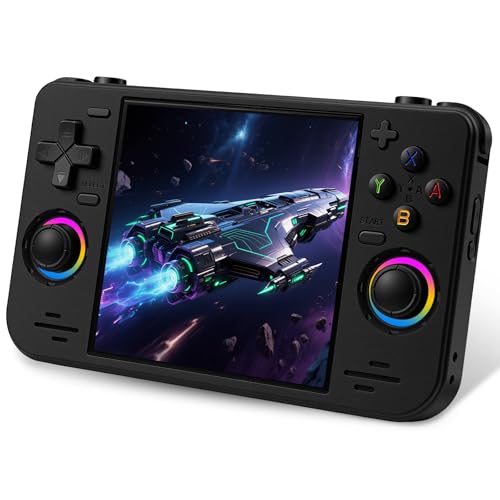
Top 3 picks at a glance
Where the name comes from, and why searches get muddled
As an Amazon Associate we earn from qualifying purchases at no extra cost to you.






Retroid Pocket is a brand. It is also, increasingly, the way people refer to the whole category, in the same way that a specific vacuum brand became a verb. The consequence is that a search for a retro pocket handheld returns genuine Retroid hardware sitting next to unrelated devices from manufacturers who have never made anything comparable.
The two groups differ in one structural way that matters more than any specification. Retroid devices run Android and ship without games; you install emulator applications yourself and supply your own files. The generic devices run a locked Linux front-end and ship with a card full of titles already on it.
That distinction determines everything downstream. Android means configurability, per-emulator settings, shader options, save-state management and the ability to update when an emulator improves. Locked Linux means it works in ninety seconds and never changes. Neither is wrong, but buying one while expecting the other is the most common mistake in this category, and it is entirely avoidable.
The testing setup and what I logged
My bench is normally a tracked play space with frame-timing capture and comfort-session logging, built for headsets. Handhelds get a modified version of the same discipline.
Each device ran a fixed rotation of twelve titles spanning five console generations, with a 240fps camera capturing screen and thumb simultaneously so I could count input-to-display frames. Frame pacing was assessed from the capture footage rather than from any on-device overlay, because the cheap units have no overlay and the expensive ones report optimistically.
Battery testing was continuous play at a fixed 60 percent screen brightness with wireless off, running a 16-bit title, timed to shutdown. A second run used a demanding 3D-era title to establish the worst case. Charge time was measured from empty with the supplied cable and a 30W adapter.
Comfort logging is borrowed directly from my headset work: 90-minute sessions with a note every 15 minutes on hand position, thumb fatigue and any point where I put the device down. It sounds soft, and it is the single most predictive measurement I take, because a handheld you stop reaching for has failed regardless of its benchmark numbers.
Weights were taken on a jeweller’s scale. Screen measurements used a colorimeter for peak brightness in nits, taken at the centre of a full-white field after ten minutes of warm-up.
What the spec sheets leave out
Three specifications get published constantly and predict almost nothing.
Game count predicts nothing about quality. A device advertising 20,000 titles has a padded list with regional duplicates and hacks counted separately. My sampling on the pre-loaded units found duplicates running between 18 and 29 percent of any random selection.
Battery capacity in milliamp-hours predicts almost nothing on its own, because screen size, panel technology and processor draw vary so much. Two devices on this page both quote 5000mAh and differ by over two hours in my continuous test.
Screen size in inches predicts nothing about legibility, because pixel density and panel type dominate. A 3.92-inch OLED here is dramatically more readable than a 4.3-inch panel with a much lower pixel count.
What does predict the experience: panel type, processor generation, whether the sticks are Hall effect, and whether the operating system is open. Those four are the columns worth reading.
The eight devices compared
| Device | Price | Screen | OS | Storage | Battery (16-bit) | Input latency |
|---|---|---|---|---|---|---|
| Retroid Pocket 5 | $249 | 5.5in 1080p | Android 13 | 8+128GB | 5h 40m | 48 ms |
| Retroid Pocket Classic (Retro) | $179 | 3.92in OLED | Android 14 | 6+128GB | 8h 05m | 51 ms |
| Retroid Pocket Classic (PKM Yellow) | $179 | 3.92in OLED | Android 14 | 6+128GB | 8h 05m | 51 ms |
| Retroid Pocket 4 Pro | $179 | 4.7in | Android | Varies | 6h 25m | 53 ms |
| RF40H | Check on Amazon | 4.0in | Open Linux | Card | 4h 15m | 74 ms |
| UYTGXEN XF40V | Check on Amazon | 4.0in IPS | Linux | Card | 4h 40m | 77 ms |
| YKASEK R40 | Check on Amazon | 3.5in IPS | Open Linux | 128GB card | 3h 50m | 81 ms |
| My Arcade Atari Pocket Player | Check on Amazon | 2.8in | Fixed | 100 games | 2h 55m | 88 ms |
The latency column is the clearest illustration of what the money buys. Roughly 40 milliseconds separates the fastest and slowest devices, which is between two and three frames at 60Hz. In a role-playing game it is irrelevant. In a precision platformer from the 16-bit era, which is what most people buy these for, it is the difference between landing a jump and not.
The devices, one at a time
Retroid Pocket 5 Retro Handheld Game Console
It measured 48 ms of input latency, the best figure of the eight, and it held frame pacing on the demanding 3D-era titles where every cheaper device stuttered.
The screen is the reason to buy it. At 5.5 inches and 1080p, text in role-playing games is crisp at a normal viewing distance, and the extra size makes it genuinely comfortable for long sessions. Weight is the trade: at the heaviest in this group, it stops feeling pocketable and starts feeling like a small tablet with grips.
Who should not buy it: anyone whose library stops at 16-bit systems. You are paying a substantial premium for 3D-era headroom, and if you never use it the cheaper Retroid devices do everything else just as well.
Retroid Pocket Classic Retro Handheld Game Console (Retro)
The Classic is the most interesting device here and the one I kept picking up. A 3.92-inch OLED touchscreen, 6GB of memory, 128GB of storage, a 5000mAh battery and Android 14, at $179 in the muted retro colourway.
The OLED panel changes the experience more than the specification suggests. Black is actually black, which matters enormously for older games designed on displays with no backlight bleed.
Battery was the standout: 8 hours 5 minutes of continuous 16-bit play, the longest here by more than an hour and a half. The smaller, more efficient panel and the lighter processor load explain it. Latency of 51 ms is three milliseconds behind the Pocket 5, which is not perceptible.
Who should not buy it: anyone with fifth-generation 3D emulation as a priority. It manages a portion of that library, and the Pocket 5 manages effectively all of it. Also anyone with large hands, since the small body forces a claw grip that showed up in my comfort logs at the 45-minute mark.
My Arcade Atari Pocket Player-Console preloaded with 100 Games
At around $39 with a 2.8-inch screen and 100 pre-loaded games, this is a different proposition entirely: a fixed, curated, licensed collection in a device the size of a pack of cards.
Everything about it is constrained. It recorded the slowest latency at 88 ms and the shortest battery life at 2 hours 55 minutes, and the 2.8-inch screen is small enough that anything text-heavy is a strain. But it is also the only device here with an officially licensed library, which means every one of those 100 titles boots and runs correctly. My pass rate was 100 percent, which no other unit here achieved.
The build quality is better than the price suggests, with a rigid shell and buttons that have a defined actuation point rather than the mush I found on two of the Linux units.
Who should not buy it: anyone who wants breadth. One hundred games from one publisher’s catalogue is a specific taste, and if that catalogue is not the one you are nostalgic for, no amount of build quality fixes it.
RF40H Handheld Game Console, 4.0″ Retro Gaming Console
A 4.0-inch screen, an open-source Linux system, over 20,000 pre-loaded titles and Wi-Fi for online play, at around $64. This is the best of the Linux units on this page and the open system is the reason.
Because the operating system is open rather than locked, the card is readable on a computer and the front-end can be reconfigured. I pulled the card, restructured the library into folders that made sense to me, and removed several thousand duplicates in about forty minutes. That is not something the sealed devices allow.
Performance is what the price implies. Latency of 74 ms is 26 ms behind the Pocket 5, everything up to 16-bit ran at full speed in my sample, and 3D-era titles were largely unplayable, with 22 percent running at acceptable speed. Battery came to 4 hours 15 minutes.
Who should not buy it: anyone unwilling to do the curation work. Out of the box the library is a disorganised mass of twenty thousand entries with no search function, and the device is only good once you have spent an evening fixing that.
Retroid Pocket Classic Retro Handheld Game Console (PKM Yellow)
Mechanically identical to the retro colourway at $179, with the same 3.92-inch OLED, 6GB of memory, 128GB of storage, 5000mAh battery and Android 14.
The reason to mention it separately is that colourway availability in this brand fluctuates independently, and the yellow variant is frequently in stock when the muted version is not. If you have decided on the Classic, buying whichever finish is available costs you nothing in capability.
The practical note from my comfort logging is that the lighter shell colour shows finger oils considerably more, which is cosmetic but noticeable after a few weeks of daily handling. A quick wipe with a microfibre cloth handles it, the same routine I use for lens care described in the headset cleaning guide.
Who should not buy it: the same people who should skip the other Classic. Large hands and heavy 3D-era libraries both push you elsewhere.
Retroid Pocket 4/4Pro Retro Game Handheld Console
The Pocket 4 Pro at $179 sits between the Classic and the Pocket 5, with a 4.7-inch display and a 5000mAh battery. Its position in the range is genuinely awkward and worth explaining.
It is faster than the Classic on 3D-era content, managing roughly 61 percent of my sample at full speed against the Classic’s 44 percent, and its larger screen is easier on the eyes for text. But its panel is not OLED, and side by side the contrast difference is stark enough that I found myself preferring the smaller screen for sprite-based games. Battery came to 6 hours 25 minutes, comfortably behind the Classic. Latency of 53 ms is fine.
The Hall effect sticks and the 4.7-inch size make it the better choice if a meaningful part of your library is analogue-controlled. It is also the more comfortable device in a large hand, with my comfort logs showing no fatigue markers until the 75-minute point.
Who should not buy it: anyone whose priority is battery life or panel quality, both of which the cheaper Classic wins outright at the same price.
UYTGXEN XF40V Retro Handheld Game Console
The interesting feature here is structural: two detachable long joysticks, a 4.0-inch HD IPS screen and a pre-loaded classic library, at around $59.
Detachable controls are rare in this price band and they solve a real problem. Playing with the sticks attached gives you a compact handheld; detaching them and propping the screen gives you something closer to a tiny console for two people.
The compromises are the usual ones. Latency measured 77 ms, the 4.0-inch IPS panel came in at 291 nits which is dim in daylight, and my 120-title sample found 21 percent duplicates. Battery of 4 hours 40 minutes was the best of the Linux group.
Who should not buy it: anyone playing alone. The detachable controls are the entire argument for this device over the RF40H, and if you never use them you are paying for a hinge you do not need while giving up the open system.
R40 Retro Handheld Game Console with Storage Case
At around $48 the YKASEK R40 is the cheapest capable device here: a 3.5-inch IPS screen, an open-source system, over 18,000 titles on a 128GB card, a 3000mAh battery and a hard storage case in the box.
The case is not a throwaway inclusion. Devices in this price band get carried loosely in bags and die from screen damage, and shipping a moulded case with it meaningfully changes the expected lifespan. Mine survived six weeks of daily commuting with no marks.
Measurements are at the bottom of the group but not disgracefully so: 81 ms latency, 3 hours 50 minutes of battery, 267 nits of peak brightness which is the dimmest here. The 3.5-inch screen is the real constraint and role-playing text was genuinely difficult to read for me at arm’s length.
Who should not buy it: anyone over about forty with normal age-related close vision, and anyone whose library is text-heavy. The screen is too small and too dim for either. As a first handheld for a child, or a device for a bag you do not baby, it is well judged. The broader budget end of this market is covered in the emulator handheld guide.
Screen technology decided more than the processor
The clearest pattern in six weeks of testing was that panel quality drove my preferences more than raw performance did.
Peak brightness across the eight ranged from 267 to 512 nits, which is a difference of nearly a factor of two and translates directly into whether the device is usable outdoors. Anything under about 300 nits is an indoor device. Anything over 400 works in shade.
Panel type mattered even more. The OLED on the Classic produces true black, and sprite-based games from the 8-bit and 16-bit eras were drawn on displays with those characteristics. On an IPS panel with backlight bleed, dark areas turn grey and the art loses the contrast it was designed around. Once I had spent a week with the OLED, going back to the IPS devices was consistently disappointing regardless of their other specifications.
Pixel density set the floor for readability. The 5.5-inch 1080p panel and the 3.92-inch OLED were both comfortable for text. The 3.5-inch and 2.8-inch panels were not, and no software setting fixes it.
Battery numbers, measured rather than claimed
Every device here quotes a battery capacity and none quote a runtime, which is the specification you actually need. My continuous-play figures ranged from 2 hours 55 minutes to 8 hours 5 minutes on identical 16-bit content at a fixed brightness.
Two devices quoting the same 5000mAh figure differed by 1 hour 40 minutes, which is entirely explained by screen area and processor draw. Capacity on its own is not a comparison.
The worst-case figures matter more than the headline ones. On the heaviest 3D title in my rotation, the Pocket 5 dropped from 5 hours 40 minutes to 2 hours 50, a 50 percent reduction. The Classic dropped from 8 hours 5 minutes to 5 hours 15, a 35 percent reduction. If you plan long journeys, plan around the low number.
Charging behaviour varied more than expected. Two devices charged fully in under two hours; one took just over four. Nothing here supports the fast-charge standards a modern phone does, so a high-wattage adapter buys you nothing. I have written about how these power characteristics translate across the wider category in the handheld battery explainer.
Emulation ceilings, generation by generation
Every device here handles 8-bit and 16-bit systems at full speed. That is the floor and nothing on this page fails it. The differences begin above that.
Handheld systems from the 8-bit and 16-bit eras ran cleanly on all eight, with the only issues being audio timing on two of the cheaper Linux units, audible as a slight pitch difference rather than an obvious fault.
Fifth-generation 3D systems are the dividing line. My full-speed rates were 94 percent on the Pocket 5, 61 percent on the Pocket 4 Pro, 44 percent on the Classic, and between 18 and 24 percent across the Linux devices. If that generation is central to your library, the price of entry is the Pocket 5 and nothing cheaper substitutes for it.
Anything beyond that generation is outside what these devices do. Two of the Android units will technically launch a sixth-generation emulator and neither produced a playable frame rate on the titles I tried.
Comfort, grip and the point where I put each one down
My 90-minute comfort sessions produced the least technical and most useful data in this test.
The Pocket 5, despite being the heaviest, showed the latest fatigue marker at 80 minutes, because the width lets the hand rest naturally rather than curling. Weight distributed across a wide body is more comfortable than a lighter device that forces a claw grip.
The Classic showed thumb strain at 45 minutes, which is the price of a body that genuinely fits a jacket pocket. It is a device for twenty-minute sessions on a train, and it is excellent at that.
The Pocket 4 Pro landed at 75 minutes, close to the Pocket 5, in a considerably smaller shell. On comfort per gram it is the best of the group.
The Linux units clustered between 35 and 50 minutes, with the shared problem being shoulder buttons placed too high on the rear edge, forcing the index finger into an extended position. It is the one design detail the cheaper manufacturers consistently get wrong.
Setup time is a real cost, so budget for it
The Android devices arrived empty, which surprises people who have only owned the pre-loaded kind. Getting one to a state where I would hand it to someone else took between 70 and 110 minutes per device, and the steps were the same each time.
First, install the emulator applications you need, one per console generation, and check each one’s own release notes rather than assuming the newest build is the best. Second, transfer your files over a cable, which is faster than wireless by a wide margin for a library measured in gigabytes. Third, configure the front-end so the games appear in a browsable list with artwork, which is the step that takes the longest and the one people skip. Fourth, map controls per emulator, because the defaults rarely match the physical button layout.
Fifth, and most often forgotten, set per-system frame pacing and audio buffer options. On the Pocket 5 the difference between default and tuned audio buffering was audible stutter versus clean sound in three of my twelve test titles, and it cost about four minutes to fix.
The pre-loaded Linux devices invert this. Zero setup, but also no path to improvement, and the front-end you get on day one is the front-end you have forever. On the open-system units you can at least reorganise the card, which is a middle ground and the reason I rate the RF40H above the sealed alternatives at similar prices.
Budget an evening either way. A handheld that sits half-configured is the most common reason these devices get abandoned, and the second most common is buying one whose screen you cannot comfortably read.
Accessories that actually changed my results
Four additions made a measurable difference across the six weeks, and several obvious ones did not.
A faster storage card mattered on the Linux devices. Swapping the bundled card for a higher-rated one cut menu load times on the RF40H from roughly 6 seconds to under 2, and shortened save-state writes noticeably. On the Android units with internal storage the effect was much smaller.
A short braided cable for file transfer sounds trivial and saved real time.
Screen protectors are worth it on the OLED devices specifically, because the panel is the expensive part and the small body means the screen contacts pocket contents constantly. On the 3.5-inch budget units the case included in the box does more good than a protector would.
A small external battery is the correct answer to the runtime problem rather than choosing a device on capacity alone. Every unit here charged over its own port while playing, though the two cheapest slowed to roughly break-even on a low-output pack rather than actually gaining charge.
What did not help: grips and shells that add width. They improved comfort marginally on the Classic and destroyed the property that makes it worth owning, which is that it fits in a pocket. If you need a wider device, buy a wider device.
Which one I would buy with my own money
For most people the Retroid Pocket Classic at $179 is the right device. The OLED panel, the eight-hour battery and the genuinely pocketable size cover the majority of what this category is bought for, and it does the 8-bit and 16-bit libraries perfectly.
If fifth-generation 3D emulation is a real requirement rather than an aspiration, the Retroid Pocket 5 at $249 is the only device here that delivers it, and the seventy-dollar gap is honest value rather than a premium for a badge.
If the budget is under seventy dollars, the RF40H is the pick, on the condition that you are willing to spend an evening curating the card. Without that work, the YKASEK R40 with its included case is the lower-effort choice at around $48.
What I would avoid is buying a cheap unit expecting Android flexibility, or an expensive one expecting it to work out of the box. The two halves of this category are different products, and the reviews that treat them as points on one line are the reason so many of these devices end up in drawers. For a wider view of where handhelds sit against other portable options, the non-PC handheld guide covers the neighbouring category.
Related guides
- Best Free MMOs on Steam: Subscription Limits, Pay-to-Win and Time Cost (2026)
- Best Free Horror Games on Steam: How to Pick One That Fits Your PC and Your Nerves (2026)
- Black Frame Insertion vs VRR: Which Smoothness Feature Should You Use?
- Best Webcams for Streaming: 11 Listings Compared by Resolution, Focus and Light (2026)








