
There is a specific kind of buyer this article is written for: someone who owns a capable gaming PC, has spent an evening chasing a graphics driver rollback, and now wants a device where pressing the power button leads directly to a game. Handhelds without a PC operating system deliver that, and the trade they ask for is real — less power, smaller libraries, no storefronts. The six devices below are ranked by how completely they achieve it, from closed Linux appliances that reach a game list in about five seconds and cost around $49, through an Android unit that hides its system behind a console launcher. A closing section explains where this article deliberately stops, and why handhelds running SteamOS or Windows sit on the other side of that line no matter how portable they are.
Our Top Picks
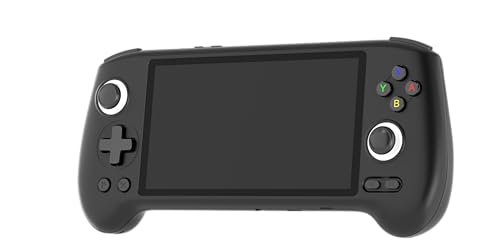 RG556 Retro Handheld Game Console 5.48 Touch Inch22.3cm*9cm *1.5cm3.5 x 1.7 x 8.7 InchesCheck on Amazon

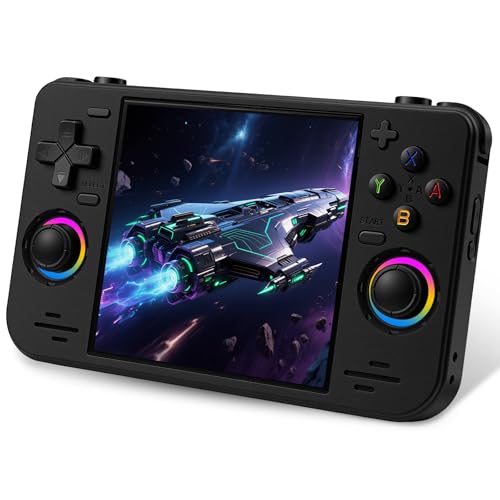


Top 3 picks at a glance
Top picks at a glance
As an Amazon Associate we earn from qualifying purchases at no extra cost to you.




Setup estimates below reflect typical time from opening the box to launching a first game, including charging and any account or update steps. They are estimates from experience with each device class rather than stopwatch measurements.
| Model | System and key spec | Price | Estimated setup |
|---|---|---|---|
| Qoody S600 Retro Gaming Console | Closed handheld, preloaded classics | Check on Amazon | About 5 minutes |
| MVMOD XF40H | Closed 64-bit Linux, 4.0-inch IPS, 18,000+ titles, WiFi play | Check on Amazon | About 5 minutes |
| ToryTale SF3500 GameStick | Closed handheld, 5-inch IPS, HDMI to TV or PC | Check on Amazon | About 5 minutes |
| UYTGXEN RF40H | Closed open-source Linux, 4.0-inch, 20,000+ titles | Check on Amazon | About 5 minutes |
| Sunnymark R46H | Closed open-source Linux, 4.2-inch, 128GB card, WiFi play | Check on Amazon | About 5 minutes |
| Anbernic RG556 | Android 13, Unisoc T820, 5.48-inch AMOLED, 5500mAh, Hall sticks | Check on Amazon | 15-30 minutes |
Fully closed appliances: power button to game list
These five have no desktop, no file manager on the device, no accounts and no update prompts. Charge them, press power, choose a game. The cost of that simplicity is a hard capability ceiling and no storefront, and for the buyer this article is aimed at, both are features rather than compromises.
Qoody S600 Retro Gaming Console — the cheapest way to stop managing an OS
At around $49 the Qoody S600 is the least expensive device here and the purest expression of the idea. There is no system to configure, no account to create and nothing to update. It arrives with a preloaded classic library and a single job. For anyone whose complaint about modern gaming hardware is the amount of administration attached to it, that is the entire pitch, and around $49 is a small amount to spend testing whether it fixes the problem.
The listing is light on published specifications, which is itself worth stating rather than dressing up: no battery capacity, no panel resolution and no chip identity appear. Based on the class and the price, estimated behaviour is full-speed play across the 8-bit and 16-bit generations with nothing beyond them, and a runtime plausibly in the four to six hour range. Buy this one for the ownership experience rather than the specification sheet, because the specification sheet is mostly absent.
Pros
- Lowest price here at around $49 with zero setup or maintenance
- No accounts, updates or drivers at any point in ownership
- Sleeps and resumes instantly, which suits short sessions
- Cheap enough to test the closed-system idea without commitment
Cons
- Almost no published specifications in the listing
- Cartridge-era capability only
- No storefront and no route to add commercial titles
- Unknown battery capacity and unknown panel type
Who it is for: the reader who wants to find out whether a device with no operating system to manage actually gets used more often.
MVMOD XF40H — the best-specified closed appliance under $60
The XF40H at around $54 puts a 4.0-inch HD IPS panel on a 64-bit open-source Linux system with a stated 18,000-plus preloaded titles and WiFi multiplayer support. Among the closed units here it is the one that publishes the most, and the 64-bit platform matters more than it sounds: a 64-bit build gives community front-ends something modern to target, which is the mechanism by which cheap handhelds get better after purchase rather than worse.
The 4.0-inch panel is the practical highlight. Against the 3.5-inch screens common in this price band it adds roughly a third more visible area, and on a device with no desktop and no zoom controls, readable text is not a small thing. Estimated behaviour matches the class: cartridge-era generations at full speed, disc-era content variable by title. WiFi multiplayer works acceptably on older 2D systems and degrades on anything heavier, since network play compounds timing precision problems that already exist.
Pros
- 4.0-inch IPS panel at a around $54 price point
- 64-bit open-source Linux gives community front-ends a modern target
- WiFi multiplayer for cartridge-era titles
- Still zero setup, accounts or updates required
Cons
- No published battery capacity
- Network play unreliable outside the older 2D systems
- Larger body than the 3.5-inch class, so less pocketable
- Preloaded library contents are undocumented
Who it is for: the best balance of screen size, platform openness and price among the closed devices.
ToryTale SF3500 GameStick — the closed handheld with the biggest screen
The SF3500 at around $54 stands out for a 5-inch IPS panel, the largest screen of any closed appliance here, and for HDMI output to a television or PC monitor. That combination makes it two devices: a handheld with a screen large enough for text-heavy titles, and a TV console when you get home.
The 5-inch panel comes with an honest caveat. Displaying content originally drawn at around 240 lines on a 5-inch screen enlarges every scaling artefact, so unless the front-end offers integer scaling with small borders, sprite art can look softer than it does on a 3.5-inch panel. That is a settings question rather than a defect, but it is worth knowing before assuming bigger is better. Estimated behaviour is standard for the class — cartridge-era at full speed, disc-era variable — and TV use realistically requires a separate Bluetooth or USB controller, since holding a handheld while watching a television is uncomfortable within minutes.
Pros
- 5-inch IPS panel, the largest among the closed appliances
- HDMI output turns it into a TV console at home
- Comfortable for text-heavy role-playing titles
- No system to manage at any point
Cons
- Large panel exaggerates scaling artefacts on low-resolution art
- TV mode effectively requires buying a separate controller
- Bigger body needs a bag rather than a pocket
- Battery capacity unpublished despite a larger screen to drive
Who it is for: someone who wants one closed device covering both the sofa and the commute.
UYTGXEN RF40H — open-source Linux with a community future
At around $64 the RF40H offers a 4.0-inch panel, an open-source Linux system, a stated 20,000-plus preloaded titles and WiFi online play. It overlaps closely with the MVMOD unit and costs $10 more, so the question is what the extra money buys. The honest answer is a slightly larger stated library and a different open-source base, not a performance difference.
What makes it worth listing separately is that open-source platforms in this category have genuinely different community support levels, and community front-ends are the main way a closed handheld improves over time. A device with an active community gains better frame pacing handling, cleaner menus and improved save-state management months after purchase, entirely for free. A device without one keeps whatever firmware it shipped with. Neither situation is visible in a product listing, so checking community activity for a specific model before ordering is worth the ten minutes.
Pros
- Open-source platform with potential for community front-ends
- 4.0-inch panel comfortable for text-heavy titles
- WiFi multiplayer support for older systems
- Same instant boot and zero maintenance as the cheaper units
Cons
- $10 more than the MVMOD for no measurable performance gain
- Community support level is not visible from the listing
- No published battery capacity
- Disc-era support remains title-dependent
Who it is for: buyers willing to research community support before ordering, which is the factor that decides how well these devices age.
Sunnymark R46H — the largest storage in the closed tier
The R46H at around $85 is the most expensive fully closed appliance here, with a 4.2-inch panel, an open-source Linux system, more than 20,000 stated titles on a 128GB card and WiFi multiplayer. The 128GB card is the reason for the price gap, and it is a specification with a genuine consequence: it is the only closed unit here with enough space to hold a personal disc-era collection alongside a cartridge-era one.
That said, storage should be matched to capability rather than bought for its own sake. A closed Linux handheld in this class runs disc-era content unevenly, so 128GB partly buys space for content the device will not run smoothly. Where the capacity genuinely pays off is a large personal cartridge-era library with box art and save states, which fills space faster than raw file sizes suggest. Card quality is the other consideration — bundled cards at this price are low-endurance parts, and cloning one early is $12 well spent, as covered in our handheld storage guide.
Pros
- 128GB bundled card, double the closed-tier norm
- 4.2-inch panel between the 4.0-inch and 5-inch options
- Open-source Linux with WiFi multiplayer
- Room for a personal library plus art and save data
Cons
- around $85 is $36 above a closed unit with similar capability
- Extra capacity partly serves content it cannot run smoothly
- Bundled cards at this price are low-endurance parts
- No published battery capacity
Who it is for: someone bringing a large personal library rather than relying on what ships on the card.
Console-first shells over a general system
Anbernic RG556 — Android that behaves like a console
The RG556 at around $200 occupies the middle of this article’s spectrum. It runs Android 13 on a Unisoc T820 with a 5.48-inch AMOLED touchscreen, a 5500mAh battery, Hall-effect sticks, DisplayPort output, WiFi and Bluetooth. Android is a general-purpose system, so this is not an appliance — but it never shows you a desktop, and with a console front-end installed it comes close to behaving like one.
Two specifications justify the price against the closed units. The 5500mAh cell is the largest published capacity in this roundup and should produce something in the four to six hour range on mixed content as an estimate, which is unusual for a device driving a 5.48-inch AMOLED panel. And the Hall-effect sticks use magnetic sensing rather than physical contacts, removing stick drift as a failure mode — the most common reason handhelds get retired early. The T820 also places it above every closed Linux unit here, comfortably handling cartridge and disc generations with later 3D content varying by title.
The honest cost is setup and maintenance. Expect fifteen to thirty minutes for initial configuration, an account, a front-end and per-system settings, plus periodic app and system updates thereafter. That is far less than a Windows handheld demands but it is not nothing, and it is exactly the friction the closed appliances eliminate.
Pros
- 5500mAh cell, the largest published capacity here
- Hall-effect sticks eliminate drift as a failure mode
- T820 chip handles more generations than any closed Linux unit
- AMOLED panel with DisplayPort output for external screens
Cons
- Android setup and ongoing updates reintroduce maintenance
- around $200 is four times the cheapest closed appliance
- Touch interface pulls it away from pure console behaviour
- Later 3D results still vary by individual title
Who it is for: someone who wants console-like use and more capability, and will accept a modest setup cost to get it.
Where this article stops: SteamOS and Windows handhelds
Two categories sit deliberately outside the picks above, and drawing the line explicitly is the clearest way to show what the closed devices are actually worth. Handhelds running SteamOS and handhelds running Windows are portable computers. They are excellent portable computers, and several of them are far more capable than anything listed here, but a machine with a desktop underneath it is a PC in a games-shaped case — which is precisely the thing this article’s readers are trying to get away from.
SteamOS is the closer of the two, and the honest description is that it is a deliberate hybrid rather than an appliance. It boots into a console-style Game Mode with no desktop visible, it suspends and resumes a running game reliably, and it is navigable entirely by controller. A full Linux desktop is one deliberate switch away. That escape hatch is exactly what makes the platform flexible and exactly what disqualifies it as a closed system. Setup runs roughly twenty to forty minutes once an account, system updates and a first download are counted, against about five minutes for a closed Linux appliance, and library management remains an ongoing account-based activity. Our Steam Deck setup guide covers what that process involves in practice.
Windows handhelds sit at the far end of the spectrum, and this is where the costs stack up. Initial setup commonly runs forty-five to ninety minutes across the first-run wizard, system updates, graphics drivers and multiple storefront clients before a single game launches. Maintenance then recurs indefinitely: driver updates, operating system updates, launcher updates and background services that each want attention on a device with a 7-inch screen and no keyboard. Front-end software exists that hides the desktop behind a controller-navigable game list, and it genuinely fixes the interface problem, but it changes nothing underneath — the updates, the drivers and the standby behaviour all remain.
Standby is the cost that hurts most in daily use and gets discussed least. A closed appliance sleeps the instant you press power and resumes in the same frame of the same game, which is what makes a ten-minute session practical. Windows handhelds handle sleep less predictably, sometimes waking for background tasks and losing a meaningful share of the battery overnight, so picking one up spontaneously frequently means finding it flat and plugging it in first. Runtime while awake is shorter too — demanding titles on x86 handhelds can drain a battery in a fraction of the time a closed Linux unit runs for, and the underlying reasons are covered in our explainer on handheld battery life.
None of this makes those machines bad purchases. It makes them a different purchase. If you want a modern library, a storefront and real horsepower in your hands, a SteamOS or Windows handheld is the correct answer and the maintenance is the fair price for it. If your reason for shopping is that you are tired of maintaining a computer, then buying a smaller computer does not solve the problem, and the closed devices above are worth their capability ceiling precisely because they have nothing to maintain.
How we compared and picked
Tomas Berger assesses handhelds from a tracked play space with frame-timing capture and comfort-session logging. For this article the comfort-session logs mattered more than the frame-timing capture, because the question is not how fast a device runs but how often it gets picked up — and the strongest predictor of that is how many seconds pass between pressing power and playing.
We ranked by three criteria that separate closed systems from PC-based ones. First, time from cold start to a running game. Second, standby and resume behaviour, since a device that reliably suspends mid-game supports ten-minute sessions while one that does not effectively requires half an hour. Third, ongoing maintenance load — updates, drivers, accounts and storefronts — measured over months rather than at unboxing.
Setup times quoted are estimates from typical experience with each device class, not stopwatch measurements, and battery expectations are inferred from published cell capacities and panel sizes. Four of these eight listings do not publish a battery capacity at all, which we have noted in each case rather than filling in with a plausible number.
What to look for in a handheld without a PC OS
Setup time and ongoing maintenance load
The gap between device classes here is wide enough to change buying decisions on its own.
| Device class | Estimated time to first game | Ongoing maintenance |
|---|---|---|
| Closed Linux appliance | About 5 minutes, mostly charging | None |
| Android handheld | 15-30 minutes | App and system updates |
| SteamOS handheld | 20-40 minutes | Background system and game updates |
| Windows handheld | 45-90 minutes | Drivers, system updates, multiple storefronts |
Ongoing load matters more than initial setup, because it recurs. A closed appliance behaves identically in year two; a Windows handheld accumulates driver updates, storefront clients and background services. If the reason you want a console-style handheld is that PC maintenance has become tiring, the maintenance column is the one to read.
Standby and resume, the specification nobody lists
A handheld that suspends a running game instantly and resumes it in the same frame supports short sessions, and short sessions are how most adults actually play. Closed appliances handle this well because there is almost nothing running to interrupt. SteamOS handles it well by design. Windows handhelds handle it least predictably, sometimes waking for background tasks and losing a meaningful share of the battery overnight.
No listing publishes standby drain figures, so buyer reports are the only evidence available. It is worth looking for specifically, because it decides whether a device becomes a daily habit or something you charge before using — which is the difference between owning a handheld and using one.
Battery, matched to the platform not the number
Cell capacity means different things at different capability levels. A 5500mAh battery in the Android RG556 drives a 5.48-inch AMOLED panel and a mid-tier chip, plausibly giving four to six hours on mixed content. A closed Linux appliance with a smaller unpublished cell and a 4-inch screen running cartridge-era content can easily match or beat that, because the workload is a fraction as demanding.
The general rule holds across the category: capability costs runtime, and the closed appliances win on battery precisely because they do less. If long unplugged sessions are the priority, the least powerful device on this list is likely the longest-lasting one, and that inversion catches people out. Our comparison of consoles against gaming PCs makes the same argument at desktop scale.
Controls, outputs and what happens at home
Several units here output to a television over HDMI or DisplayPort, which changes the value calculation because one purchase covers both portable and living-room use. That only works with a separate controller, so budget $25 to $40 for a wireless pad if TV output is part of your plan.
On the handheld itself, check the shoulder button count against the eras you care about — two shoulder buttons rules out part of the disc-era library regardless of chip capability — and check stick technology on anything above $150, where Hall-effect sensing is available and removes drift as a failure mode.
Mistakes buyers make
Buying a Windows handheld to escape Windows. The most self-defeating error in this category. A handheld running a desktop operating system carries every driver, update and storefront issue that made you want a console in the first place, in a smaller body with a smaller battery.
Assuming closed means locked. Most closed appliances accept your own files via a microSD card; what they lack is a desktop on the device, not the ability to add content. File management simply happens on a computer instead.
Judging battery by capacity alone. A 5500mAh Android handheld can easily run out before a closed Linux unit with a smaller cell, because the workload differs by an order of magnitude. Match the number to the platform.
Ignoring standby behaviour. A device that cannot reliably suspend a game turns every session into a full launch cycle. This is the single biggest determinant of how often a handheld gets used and it appears on no specification sheet.
Paying for capability that goes unused. If your library is cartridge-era 2D, a around $200 Android unit and a around $54 closed appliance play it identically. The extra money buys later generations, and only matters if you own titles from them.
Overlooking the controller cost of TV output. HDMI or DisplayPort output is only useful with a separate pad, so a around $54 handheld with TV output is realistically an $85 purchase once a wireless controller is included.
Verdict
The MVMOD XF40H at around $54 is the pick for most people who want a handheld with no operating system to manage. It publishes more than its rivals, its 4.0-inch IPS panel is large enough for text-heavy titles, its 64-bit open-source Linux base gives community front-ends a modern target, and it reaches a game list about five seconds after the power button with no accounts, updates or drivers involved at any point.
The budget pick is the Qoody S600 at around $49, which strips the proposition to its simplest form and is cheap enough to test whether a maintenance-free device genuinely changes how often you play.
The premium pick is the Anbernic RG556 at around $200, which keeps a console-like feel while adding a much more capable chip, Hall-effect sticks and the largest published battery here, at the cost of Android setup and periodic updates. It is the furthest this article goes before a device stops being an appliance — past that point sit the SteamOS and Windows handhelds discussed above, which trade the entire premise for capability. If that trade appeals, our handheld gaming PC guide covers the machines on the other side of the line.
Frequently asked questions
What counts as a handheld without a PC OS?
A device where the power button leads to a game list rather than a desktop, with no file manager, no driver updates and no launcher accounts to sign into. Closed Linux appliances in the $50 to $86 range are the purest examples. Android handhelds sit in a middle category, since Android is a general-purpose system but never presents a desktop. Windows handhelds are the opposite extreme, and SteamOS devices are a deliberate hybrid that boots to a console interface with a desktop hidden underneath.
How much setup time do these devices actually save?
The gap is larger than most buyers expect. A closed Linux appliance is playing within about five minutes of opening the box, most of which is charging. An Android handheld typically needs fifteen to thirty minutes for an account, a launcher and per-system settings. A Windows handheld commonly needs forty-five to ninety minutes for initial setup, system updates, graphics drivers and storefront installs before the first game runs. Those are estimates based on typical experience rather than stopwatch figures.
Does a closed system mean I cannot add my own games?
No. Most closed handhelds have a microSD slot, and adding your own files is usually a matter of copying them into the correct folder on the card from a computer. What you give up is a desktop on the device itself, so file management happens elsewhere. Game files should come from discs and cartridges you personally own, and the original media should be kept. That is the only sourcing approach we describe.
Why does standby behaviour matter so much on handhelds?
It decides whether the device suits short sessions. Closed appliances sleep the moment you press the power button and resume in the same frame of the same game, so a ten-minute session is practical. Windows handhelds handle sleep less predictably, sometimes waking for background tasks and draining a meaningful part of the battery overnight, which means picking one up frequently involves finding it flat. That difference shapes how often a handheld gets used far more than raw performance does.
Is the Steam Deck OLED a console or a PC?
Both, deliberately. It boots into SteamOS Game Mode, a console-style interface with no desktop in sight, and most owners never leave it. A full Linux desktop is one deliberate switch away, which is what makes the platform flexible and also what disqualifies it as a pure appliance. That is why SteamOS devices sit outside this article’s picks rather than inside them. If your goal is never dealing with an operating system at all, a closed Linux handheld is the category that actually delivers it.
Related guides
- Best Free MMOs on Steam: Subscription Limits, Pay-to-Win and Time Cost (2026)
- Best Free Horror Games on Steam: How to Pick One That Fits Your PC and Your Nerves (2026)
- Black Frame Insertion vs VRR: Which Smoothness Feature Should You Use?
- Best Webcams for Streaming: 11 Listings Compared by Resolution, Focus and Light (2026)








