Our Short List of 3
- Best for: Single-card training and inference on the largest models that fit in 32GB
- Graphics coprocessor: NVIDIA GeForce RTX 5090
- Memory: 32GB GDDR7
- CUDA cores: 21,760
- AI performance: 3,593 AI TOPS

- Best for: Shared workstations running long, unattended training jobs
- Graphics coprocessor: NVIDIA GeForce RTX 5090
- Memory: 32GB GDDR7
- Memory speed: 2,437 MHz
- Interface: PCIe 5.0

- Best for: Training mid-size models and fine-tuning on a proven CUDA platform
- Graphics coprocessor: NVIDIA GeForce RTX 4090
- CUDA cores: 16,384
- Memory: 24GB GDDR6X, 384-bit bus
- Boost clock: 2,535 MHz
All 3 Picks at a Glance
| Product | Specs | Action |
|---|---|---|
| ASUS ROG Astral GeForce RTX 5090 White OC Edition |
| Check price on Amazon |
| ASUS TUF Gaming GeForce RTX 5090 |
| Check price on Amazon |
| ZOTAC Gaming GeForce RTX 4090 Trinity OC |
| Check price on Amazon |
Buying a graphics card for deep learning is really a decision about memory first and raw speed second. A model that cannot fit its weights, optimizer states, and activations into VRAM simply will not train, no matter how fast the chip is, while a card with generous memory and strong tensor cores turns overnight experiments into same-day results. Cooling and power delivery matter just as much, because training loads run the card at full output for hours rather than in short bursts.
This guide serves three kinds of buyers: independent researchers and students training vision and language models at home, small teams building a shared workstation for fine-tuning and inference, and practitioners who want one powerful card now with a sensible path to a second card later. Every pick below was chosen from its Amazon listing name and stated specifications, with priority given to VRAM capacity, CUDA core counts, and the AI performance figures printed on the product page.
Our Top Picks
Top 3 picks at a glance
Quick Picks
As an Amazon Associate we earn from qualifying purchases
| Product | Best for | Key spec from title |
|---|---|---|
| ASUS ROG Astral GeForce RTX 5090 White OC Edition | Maximum single-card training and large-model inference | 32GB GDDR7 |
| ASUS TUF Gaming GeForce RTX 5090 | Long unattended training runs in a workstation build | 32GB GDDR7 |
| ZOTAC Gaming GeForce RTX 4090 Trinity OC | Proven CUDA training on the previous flagship generation | 24GB GDDR6X |
How to Choose
VRAM Capacity for Model Size
VRAM is the hard ceiling on what you can train. Model weights, gradients, optimizer states, and activations all compete for the same pool, so a fine-tuning job that looks modest on paper can exhaust a small card once batch sizes grow. The 32GB cards in this guide hold noticeably larger models and batches than the 24GB card, and that gap decides whether you quantize aggressively or work comfortably. Start from the largest model you realistically plan to run, add room for the optimizer, and only then compare speed. Choosing memory first prevents the most expensive mistake in this category: a fast card that cannot load your workload at all.
CUDA and Tensor Support per the Listing
Deep learning frameworks lean on CUDA cores for general compute and on tensor cores for the matrix math that dominates training and inference. Read the listing carefully: the ASUS ROG Astral card states 21,760 CUDA cores and an AI performance figure of 3,593 AI TOPS, while the ZOTAC card lists 16,384 CUDA cores and fourth-generation tensor cores. Those printed figures are the safest comparison points because they come straight from the product page. Newer architectures also add newer tensor formats that recent frameworks exploit, so a current-generation card can pull ahead of its core count in supported workloads.
Cooling and Power in Long Training Runs
A training run holds a card near its power limit for hours, which punishes weak cooling and marginal power supplies. Look for vapor chambers, multiple fans, and protective board construction in the listing, like the quad-fan vapor chamber design on the Astral card and the vapor chamber with axial-tech fans on the TUF card. Check the stated power figures too: the ZOTAC listing names a 450-watt maximum consumption and recommends a 1,000-watt power supply. A card that throttles midway through an epoch quietly stretches every project, so thermal headroom is a training feature, not a luxury.
Single Versus Multi-GPU Scaling
One large card is simpler: no interconnect worries, no sharding code, and all VRAM in a single pool that any framework can use directly. Adding a second card helps data-parallel training, but consumer cards split memory per card rather than pooling it, and wide multi-slot designs can physically block the neighboring slot you planned to fill. The 3.8-slot Astral and 3.6-slot TUF cards leave little room beside them, while slimmer cards pair more easily. Decide honestly whether your framework workflow actually scales across cards before paying for a board and case layout built around two of them.
The 3 Best Options
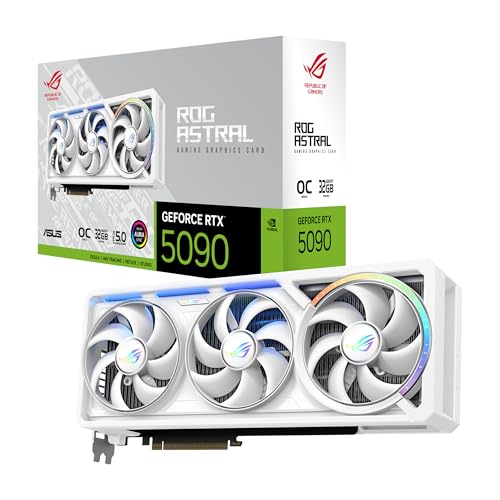
ASUS ROG Astral GeForce RTX 5090 White OC Edition
- Best for: Single-card training and inference on the largest models that fit in 32GB
- Graphics coprocessor: NVIDIA GeForce RTX 5090
- Memory: 32GB GDDR7
- CUDA cores: 21,760
- AI performance: 3,593 AI TOPS
Single-card training and inference on the largest models that fit in 32GB
The 3.8-slot body is enormous, so measure case clearance and confirm your power supply cabling before ordering
This is the single-card ceiling in this roundup: 32GB of GDDR7 memory, 21,760 CUDA cores, and a stated AI performance of 3,593 AI TOPS from the Blackwell architecture. That combination suits researchers who fine-tune larger language models locally and run heavy inference without splitting work across machines. The quad-fan cooler, patented vapor chamber, and phase-change thermal pad are built for sustained loads, and the white finish makes it the natural pick for a showcase workstation that also happens to train models all week.
ASUS TUF Gaming GeForce RTX 5090
- Best for: Shared workstations running long, unattended training jobs
- Graphics coprocessor: NVIDIA GeForce RTX 5090
- Memory: 32GB GDDR7
- Memory speed: 2,437 MHz
- Interface: PCIe 5.0
Shared workstations running long, unattended training jobs
At 3.6 slots wide it will cover neighboring expansion slots, which matters if you planned a second card or a capture card beside it
The TUF card brings the same RTX 5090 chip and 32GB of GDDR7 memory in a build that emphasizes durability: military-grade components, a protective PCB coating, axial-tech fans, and a vapor chamber. That formula fits a workstation that trains unattended overnight, where component toughness matters more than lighting or finish. It keeps PCIe 5.0 and HDMI and DisplayPort 2.1 outputs, so it drops into a current-generation build without adapters. For a small team equipping one shared training machine, this is the card aimed squarely at reliability over long, hot runs.
ZOTAC Gaming GeForce RTX 4090 Trinity OC
- Best for: Training mid-size models and fine-tuning on a proven CUDA platform
- Graphics coprocessor: NVIDIA GeForce RTX 4090
- CUDA cores: 16,384
- Memory: 24GB GDDR6X, 384-bit bus
- Boost clock: 2,535 MHz
Training mid-size models and fine-tuning on a proven CUDA platform
The listing recommends a 1,000-watt power supply, so check your current unit and its 12VHPWR cabling before buying
The previous-generation flagship remains a serious training card: 16,384 CUDA cores, 24GB of GDDR6X memory on a 384-bit bus, and fourth-generation tensor cores that the listing credits with up to double the AI performance of the prior design. It suits students and independent researchers whose models fit in 24GB and who value a mature platform with a deep pool of community troubleshooting knowledge. IceStorm 3.0 cooling, a metal backplate, and dual BIOS support steady behavior during long sessions, and the PCIe 4.0 interface drops into a wider range of existing builds.
Which One Fits Your Situation
You Fine-Tune Language Models at Home
Pick the ASUS ROG Astral RTX 5090 White OC Edition. Its 32GB of GDDR7 gives your fine-tuning jobs the most headroom of any card here, and the stated 3,593 AI TOPS figure points to fast iteration when you are sweeping hyperparameters after work. The quad-fan vapor chamber design also helps when a run stretches across an entire weekend in a warm room.
Your Team Shares One Training Workstation
Choose the ASUS TUF Gaming RTX 5090. The same 32GB memory pool serves the whole team, while military-grade components and the protective PCB coating suit a machine that different people load heavily around the clock. Nobody on a shared box wants a card that fades during an overnight queue, and this build is specified for exactly that kind of steady punishment.
Your Models Fit in 24GB and the Build Is Older
Take the ZOTAC RTX 4090 Trinity OC. A PCIe 4.0 interface suits the previous-generation motherboard many researchers already own, and 24GB still covers a wide range of vision models, smaller language models, and quantized fine-tuning. Its printed power guidance makes planning easy: confirm the recommended supply rating, and the rest of the existing build can usually stay in place.
You Plan to Add a Second Card Later
Start with the card whose width your case and motherboard can actually double. Both RTX 5090 picks here are wider than three slots, so a two-card future may mean choosing the slimmer long-term layout now or accepting a single-card ceiling. If scaling out is certain rather than hypothetical, plan the chassis, slot spacing, and power supply around that second card before the first one arrives.
Common Mistakes
- Shopping by clock speed alone and ignoring VRAM, then discovering the target model cannot fit in memory at a usable batch size
- Assuming two cards pool their memory into one large space, when standard training setups keep a separate pool on each card
- Reusing an older power supply without checking the wattage and connector type the listing recommends for sustained full-load runs
- Buying the widest flagship card for a compact case, only to find it blocks the slot reserved for a second GPU or a network card
- Skipping the framework check: confirming that your library versions support the card’s architecture generation before the hardware arrives
Frequently Asked Questions
How much VRAM does deep learning actually need?
It depends on model size, precision, and batch size. Small vision models train comfortably in the 24GB offered by the RTX 4090 card here, while fine-tuning larger language models pushes toward the 32GB on the RTX 5090 cards. Optimizer states can multiply memory use well beyond the raw weight size, so extra headroom is rarely wasted.
Can these gaming-branded cards really train models?
Yes. The listings state CUDA core counts and tensor core generations, and those are the same hardware blocks that frameworks such as PyTorch and TensorFlow use for training. The ROG Astral listing even prints an AI performance figure in TOPS. Branding targets gamers, but the silicon, drivers, and CUDA support are what your training stack actually talks to.
Is one 32GB card better than two 24GB cards?
For most home and small-team work, yes. A single card presents one unified memory pool, needs no multi-GPU code changes, and avoids synchronization overhead. Two cards help when your framework and workflow already scale across devices and your models are sharded deliberately. Buy the second card when the workload demands it, not as a default assumption.
What should I check before installing a card this large?
Confirm physical fit first, including slot width and length, since these cards occupy between 3.5 and 3.8 slots. Then verify the power supply against the listing’s recommendation and connector type, check that your case airflow can exhaust hours of full-load heat, and update your framework and drivers to versions that support the card’s architecture.
Related guides
More from Amazon
Programs that pair well with the guide above. Offers and eligibility are set by Amazon and may change.
Free shipping on eligible items, Prime Video and more. Eligible new members can start with a free trial.
Start a Prime free trialAd-free music streaming. Eligible new subscribers can start with a free trial.
Try Music Unlimited freeA Prime membership for ages 18-24 with a trial period. Eligibility is set by Amazon.
See Prime for Young AdultsAudiobooks and podcasts to listen to on the go. Eligible new members can start with a free trial.
Try Audible freeAs an Amazon Associate we earn from qualifying purchases.