Our Short List of 3

- Best for: Most After Effects desks, from 1080p motion graphics to layered 4K compositions.

- Best for: Compact builds, second machines, and lighter compositions where 16GB of memory matters more than maximum compute.

- Best for: Heavy 3D compositions, large particle systems, and artists who render daily and bill by the hour.
All 3 Picks at a Glance
| Product | Specs | Action |
|---|---|---|
| ASUS Prime GeForce RTX 5070 Ti 16GB — ASIN B0DS6WFRBP |
| Check price on Amazon |
| ASUS Dual GeForce RTX 5060 Ti 16GB GDDR7 OC Edition — ASIN B0F7WB6LSH |
| Check price on Amazon |
| ASUS Prime GeForce RTX 5080 16GB — ASIN B0DTPG3B1N |
| Check price on Amazon |
The best graphics cards for After Effects pair at least 16GB of video memory with strong CUDA compute, and the ASUS Prime GeForce RTX 5070 Ti 16GB is the balanced choice for most motion graphics work, with 16GB of GDDR7 memory and 8,960 CUDA cores. After Effects leans on the GPU for its 3D renderer, GPU-accelerated effects and fast playback, so memory capacity and CUDA core count matter more than gaming frame rates. The four cards below cover a compact value option, a certified workstation card and a step up for heavy 3D compositions.
After Effects is a different workload from video editing and from gaming. A timeline in Premiere Pro is mostly decode and playback, and a game is mostly rasterization at high frame rates. A composition in After Effects is layers of footage, vector shapes, particle systems, camera moves and 3D geometry, and the GPU is asked to hold all of it in memory while it renders effects in real time. When the card runs out of memory, playback drops to lower resolution, cached playback shortens, and renders fall back to slower paths. That is why the specification sheet matters more here than in almost any other creative application: VRAM capacity, CUDA core count and memory bandwidth decide whether a complex composition plays smoothly or stutters.
Our top pick: ASUS Prime GeForce RTX 5070 Ti 16GB. Runner-up: ASUS Dual GeForce RTX 5060 Ti 16GB GDDR7 OC Edition. This guide compares published specifications only: every figure below comes from the manufacturer specification sheet or the Amazon product listing, and no performance claim is based on informal observation.
Top 3 picks at a glance
At a Glance
| Product | Best for | Key specification |
|---|---|---|
| ASUS Prime GeForce RTX 5070 Ti 16GB | Most After Effects desks | 16GB GDDR7, 8,960 CUDA cores, 896 GB/s bandwidth |
| ASUS Dual GeForce RTX 5060 Ti 16GB GDDR7 OC Edition | Compact builds and lighter compositions | 16GB GDDR7, 4,608 CUDA cores, 9.0-inch length |
| PNY NVIDIA RTX A4000 16GB | Certified workstation use and multi-display desks | 16GB GDDR6 with ECC, 6,144 CUDA cores, single-slot design |
| ASUS Prime GeForce RTX 5080 16GB | Heavy 3D compositions and fast renders | 16GB GDDR7, 10,752 CUDA cores, 960 GB/s bandwidth |
How to Choose
1. VRAM capacity comes first
Video memory is the first specification to check for After Effects, because compositions hold frames, layers, masks and effect buffers in GPU memory at the same time. A 1080p composition with a modest effects stack can work with 12GB, but 16GB is the sensible floor for 4K compositions, long timelines and layered motion graphics. Cards with 8GB of memory force the application to page data in and out of memory during playback, which shows up as stuttering and shortened cached playback. All four cards in this guide carry 16GB, which is the capacity that keeps a modern composition resident in memory.
2. CUDA cores and the Mercury GPU pipeline
After Effects accelerates a long list of effects through the GPU, and on NVIDIA hardware that acceleration runs on CUDA cores. Effects such as Gaussian Blur, Lumetri Color, Turbulent Displace and the 3D renderer all use the GPU, and more CUDA cores shorten the time each frame takes to render. The cards in this guide range from 4,608 CUDA cores at the value end to 10,752 at the top, and that spread maps directly onto how heavy an effects stack can get before playback slows down. CUDA core count is the single most useful number for comparing two cards from the same generation.
3. Memory bandwidth and bus width
Capacity is only half the memory story. Bandwidth decides how quickly the GPU can move frames and textures in and out of memory, and it is set by the memory type and the bus width together. A 16GB card on a 256-bit bus moves data roughly twice as fast as a 16GB card on a 128-bit bus, which matters when a composition scrubs through high-resolution footage or stacks several GPU effects on one layer. The 5070 Ti and 5080 pair 16GB of GDDR7 with a 256-bit bus for 896 GB/s and 960 GB/s respectively, while the 5060 Ti keeps the same 16GB capacity on a narrower 128-bit bus. Check both numbers on the specification sheet, not capacity alone.
4. The 3D renderer and third-party plugins
The native 3D renderer in After Effects and popular third-party plugins such as Element 3D and Trapcode Particular are GPU-heavy in ways that ordinary 2D animation is not. The 3D renderer uses the GPU to draw geometry, lights and shadows, and particle plugins generate thousands of sprites per frame. These workloads reward raw compute and memory bandwidth, and they are the reason a card that feels fast for simple lower thirds can still struggle with a 3D scene. If the workflow includes 3D layers, cameras and particle systems, weight the CUDA core count and bandwidth figures more heavily than anything else.
5. Power supply and case fit
Graphics cards for After Effects range from compact dual-fan models to long triple-fan cards, and the power draw ranges from 140W to 360W across the picks in this guide. Measure the case before ordering: card length, slot width and clearance around the PCIe slot all decide whether a card fits, and a 2.5-slot card needs a free slot beneath it for airflow. Power supply requirements follow the same logic. A 180W card runs on a modest power supply, while the 360W card at the top of this guide realistically wants an 850W-class unit with the correct connector. Check the connector type as well, since some cards use standard 8-pin PCIe power and others use the newer 12V-2×6 connector.
6. Outputs and multi-display setups
Motion graphics work often spans two or three displays: a composition viewer, a timeline and a full-screen output. Count the outputs on the card and match them to the monitors on the desk. The workstation card in this guide carries four DisplayPort outputs, which suits a multi-display desk without adapters, while the consumer cards in this guide carry three DisplayPort outputs and one HDMI output. DisplayPort 2.1 support matters for high-refresh 4K monitors, and HDMI 2.1b covers a living-room display or a client monitor. Plan the display layout before choosing the card, not after.
7. Studio drivers and long sessions
NVIDIA maintains a Studio driver branch validated against creative applications, including After Effects, and it is the branch to install on a machine whose main job is motion graphics. Studio drivers go through additional validation with creative software, while the gaming driver branch prioritises new game releases. Stability matters more than a new feature here: a driver crash in the middle of a render wastes more time than any driver update ever recovers. Install the Studio driver, keep it updated on a schedule that fits between projects, and avoid changing drivers in the middle of a deadline.
Our Picks
ASUS Prime GeForce RTX 5070 Ti 16GB — ASIN B0DS6WFRBP
- Best for: Most After Effects desks, from 1080p motion graphics to layered 4K compositions.
Most After Effects desks, from 1080p motion graphics to layered 4K compositions.
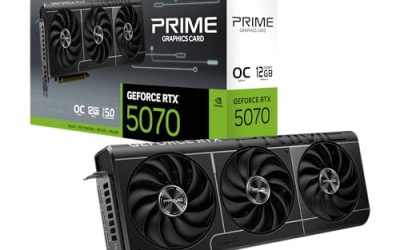
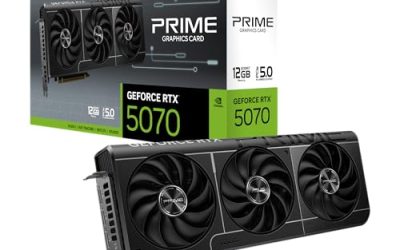
The Prime RTX 5070 Ti pairs 16GB of GDDR7 memory on a 256-bit bus, rated at 896 GB/s of bandwidth, with 8,960 CUDA cores. That combination is the current sweet spot for After Effects: enough memory for layered 4K compositions, enough CUDA compute for GPU-accelerated effects and the 3D renderer, and the full Blackwell media feature set. The card is a 2.5-slot design with three Axial-tech fans, a dual BIOS switch, HDMI 2.1b and DisplayPort 2.1 outputs, and ASUS lists the Prime line as SFF-ready, which makes it one of the easier 5070 Ti cards to fit into a compact workstation.
Consideration: Rated at 300W, so a good 750W-class power supply is the realistic pairing, and the triple-fan length needs a mid-tower case with room to spare.
ASUS Dual GeForce RTX 5060 Ti 16GB GDDR7 OC Edition — ASIN B0F7WB6LSH
- Best for: Compact builds, second machines, and lighter compositions where 16GB of memory matters more than maximum compute.
Compact builds, second machines, and lighter compositions where 16GB of memory matters more than maximum compute.
The Dual RTX 5060 Ti carries the same 16GB of GDDR7 memory as the cards above it, on a narrower 128-bit bus with 448 GB/s of bandwidth and 4,608 CUDA cores. For playback smoothness, which is governed more by memory capacity than by raw compute, that makes it a far stronger After Effects card than its gaming reputation suggests. The dual-fan design measures 9.0 inches long, carries three DisplayPort 2.1b outputs and one HDMI 2.1b output, uses 0dB fan technology that stops the fans at low load, and draws 180W, which suits smaller power supplies and quieter cases.
Consideration: Heavy 3D compositions, large particle systems and 6K timelines will expose the narrower memory bus and smaller core count, and no driver setting changes that ceiling.
PNY NVIDIA RTX A4000 16GB — ASIN B09G21MBW2
The RTX A4000 is a professional workstation card built on the Ampere architecture, with 16GB of GDDR6 memory with ECC on a 256-bit bus, 448 GB/s of bandwidth, 6,144 CUDA cores, 192 Tensor cores and 48 RT cores. Error-correcting memory protects long renders against single-bit memory errors, and the card carries ISV-certified drivers validated for professional creative applications. Its single-slot design and four DisplayPort 1.4a outputs suit a multi-display desk, and at 140W it runs on a modest power supply while leaving room in the case for capture cards or additional storage.
Best for: Certified workstation use, multi-display desks, and artists who value error-correcting memory and validated drivers over raw gaming silicon.
Consideration: The Ampere architecture is a generation behind the Blackwell cards in this guide, so its media engines and power efficiency trail the newer cards, and the single blower-style fan runs louder under sustained load than a dual or triple-fan design.
ASUS Prime GeForce RTX 5080 16GB — ASIN B0DTPG3B1N
- Best for: Heavy 3D compositions, large particle systems, and artists who render daily and bill by the hour.
Heavy 3D compositions, large particle systems, and artists who render daily and bill by the hour.
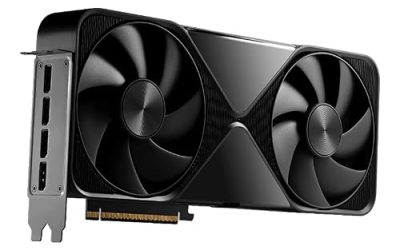
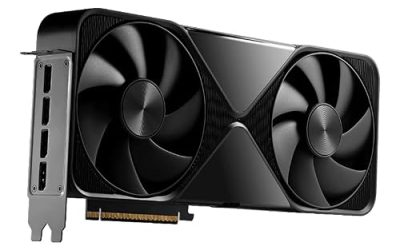
The RTX 5080 keeps the same 16GB memory capacity as the 5070 Ti but feeds it faster and surrounds it with substantially more compute: 16GB of GDDR7 at 30 Gbps on a 256-bit bus for 960 GB/s, and 10,752 CUDA cores. The card lists a 2.62 GHz boost clock and carries two NVENC encoders, which shortens exports from Media Encoder when a composition is rendered out to H.264 or H.265. ASUS fits a vapour chamber cooler in a 2.5-slot body with three DisplayPort outputs and one HDMI output, in the same plain black Prime styling as the 5070 Ti above.
Consideration: Rated at 360W, it realistically wants an 850W-class power supply and a case with genuine airflow, and the step up in compute only pays off when the workload is heavy enough to use it.
Which One Is Right for You?
Match the card to the heaviest work the machine will do, not the lightest. If the day is mostly 2D motion graphics, lower thirds, kinetic type and logo animation at 1080p or 4K, the ASUS Dual RTX 5060 Ti 16GB covers the work with 16GB of memory in a compact, quiet card. If the work mixes 2D animation with 3D layers, cameras and GPU effects, the ASUS Prime RTX 5070 Ti 16GB is the balanced default, with the memory, bandwidth and CUDA count to keep playback smooth. If the desk runs certified workstation software, drives four displays, or renders long sequences where memory integrity matters, the PNY RTX A4000 earns its place with ECC memory and validated drivers. If the compositions are heavy 3D scenes with particle systems and daily render deadlines, the ASUS Prime RTX 5080 is the step up that shortens the render queue.
Frequently Asked Questions
How much VRAM does After Effects need?
For 1080p compositions with a modest effects stack, 12GB is workable, and for 4K compositions with layered effects, 16GB is the sensible floor. Compositions that outgrow the card memory fall back to slower paths and shorter cached playback, so capacity is the first specification to check. All four cards in this guide carry 16GB.
Does After Effects use the GPU or the CPU more?
Both, in different parts of the pipeline. The CPU handles most of the compositing math, expression evaluation and frame preparation, while the GPU accelerates effects, the 3D renderer and Mercury GPU acceleration. A strong CPU with plenty of system memory remains essential, and the GPU decides how smoothly effects and 3D scenes play back and render.
Is a workstation card better than a gaming card for After Effects?
A workstation card such as the RTX A4000 brings error-correcting memory and drivers validated for professional applications, which matter for long renders and certified workflows. A consumer card from the same generation usually carries more raw compute and newer media engines for the same memory capacity. Choose the workstation card when certification and memory integrity are priorities, and the consumer card when raw compute and current-generation features matter more.
Do AMD cards work well with After Effects?
After Effects runs on AMD hardware through OpenCL and Metal acceleration, and AMD cards handle 2D motion graphics and GPU effects competently. The deciding factor is software support: Adobe Mercury GPU acceleration and many third-party plugins are built around NVIDIA CUDA, so an NVIDIA card is the lower-risk choice for an Adobe-centred workflow. If the workflow already leans on software that favours AMD, the decision can be made on memory and compute alone.
Should I use Studio drivers or Game Ready drivers for After Effects?
Install the Studio driver branch. It is validated against creative applications including After Effects, and it prioritises stability over new game support. Keep the driver updated between projects rather than during a deadline, and avoid changing drivers in the middle of active work.
Bottom Line
The ASUS Prime GeForce RTX 5070 Ti 16GB is the balanced default for most After Effects work, pairing 16GB of GDDR7 memory with 8,960 CUDA cores and the bandwidth to keep layered compositions smooth. The ASUS Dual RTX 5060 Ti 16GB covers lighter work and compact builds with the same 16GB capacity, the PNY RTX A4000 serves certified workstation desks with error-correcting memory, and the ASUS Prime RTX 5080 shortens renders for heavy 3D compositions. Whichever card fits the desk, check the memory capacity first, the CUDA core count second, and the power supply and case fit before ordering.
Disclosure: As an Amazon Associate, this site earns from qualifying purchases.
Related guides
More from Amazon
Programs that pair well with the guide above. Offers and eligibility are set by Amazon and may change.
Free shipping on eligible items, Prime Video and more. Eligible new members can start with a free trial.
Start a Prime free trialAd-free music streaming. Eligible new subscribers can start with a free trial.
Try Music Unlimited freeA Prime membership for ages 18-24 with a trial period. Eligibility is set by Amazon.
See Prime for Young AdultsAudiobooks and podcasts to listen to on the go. Eligible new members can start with a free trial.
Try Audible freeAs an Amazon Associate we earn from qualifying purchases.