A movie PC fails in different ways than a gaming rig. The picture can stutter when a player hands a modern codec to a card that cannot decode it in hardware, the TV can refuse the refresh rate you expected because the output is an older HDMI revision, and a loud cooler becomes the most audible thing in a quiet scene. The real decision is not raw frame rate. It is whether the card decodes your files and streams smoothly, connects to your display properly, and stays unobtrusive in the room.
This guide serves three kinds of buyers: people reviving an older desktop as a theater machine, builders assembling a compact PC for a TV stand, and owners of small office systems who want reliable 4K playback. The cards below were chosen from their listing names and stated specifications, with weight given to AV1 and HEVC hardware decode, HDMI and DisplayPort outputs, power draw, cooler design, and physical size rather than gaming bundles or headline clock speeds.
Quick Picks
As an Amazon Associate we earn from qualifying purchases
| Product | Best for | Key spec from title |
|---|---|---|
| ASRock Intel Arc A380 Challenger ITX 6GB OC | AV1 playback in a compact theater PC | 6GB GDDR6 |
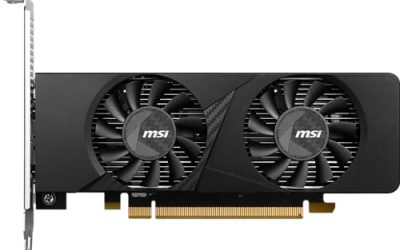
| MSI GeForce RTX 3050 LP 6G OC | A low-profile card with HDMI output for 4K at higher refresh | 6GB GDDR6 |
| Sparkle Intel Arc A380 ELF | A single-fan Arc card for a simple movie build | 6GB GDDR6 |
How to Choose
Hardware Decode Support for Current Codecs
Check the codec list before anything else, because hardware decode decides whether playback stays smooth when the processor is modest. A card that decodes HEVC handles most 4K discs and files, while AV1 support matters increasingly for streamed video delivered in that format. The Arc A380 cards in this guide list AV1 hardware encoding, and their listings present them for media and home theater use, which signals the decode block is a headline feature rather than an afterthought. If your library is mostly older H.264 material, almost any modern card copes. If you mix local HEVC files with AV1 streams, prioritize the card whose listing names those codecs explicitly.
HDMI and DisplayPort Outputs for a 4K TV
Count the outputs on the bracket and read their revisions, because a theater PC usually connects to one large display and sometimes a receiver. The MSI card lists two HDMI outputs that support 4K at 120Hz as specified in HDMI 2.1, plus one DisplayPort 1.4a, which suits a TV-first setup. The ASRock Challenger instead lists three DisplayPort 2.0 outputs and one HDMI 2.0b port, a layout aimed more at monitors. The Sparkle ELF lists three DisplayPort 2.0 outputs and one HDMI 2.0 connection. Match the card to the input you will actually use, and remember that adapters for mini or full-size ports can add clutter behind a TV stand.
Power Draw and Noise in a Living Room
A theater PC sits close to the seating, so watts and fan behavior matter more than benchmark headroom. The MSI low-profile card lists power consumption of 70 W and a recommended supply of 300 W, and it draws that without the cabling demands of larger cards. The ASRock Challenger lists a single 8-pin power connector and a recommended 500 W supply, which is a different commitment for an older small system. Its 0dB silent cooling does stop the fan at low load, which helps during quiet passages. Compare the stated power requirement against the supply already in your case before assuming any compact card is a drop-in upgrade.
Physical Size for Small HTPC Cases
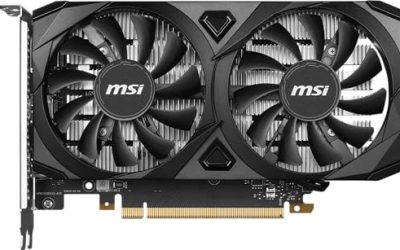
Measure the slot, the length, and the height before ordering, because theater cases and slim office desktops reject many ordinary cards. The MSI card is a low-profile design listed at 174 by 69 by 42 millimeters, built to save space in slim systems. The ASRock Challenger uses a compact ITX form with a single fan, aimed at small form factor builds rather than full towers. The Sparkle ELF uses a single-fan, dual-slot design. Check that the bracket height matches your case, that a second slot is free where a dual-slot cooler needs one, and that cables can still reach the outputs once the card is seated.
The 3 Best Options
ASRock Intel Arc A380 Challenger ITX 6GB OC
This Challenger ITX model suits a compact theater build that plays a mixed library of local files and streamed video. Its listing highlights AV1 hardware encoding alongside the Arc media block, a 2250 MHz GPU clock, and 0dB silent cooling that stops the single fan under low load. Three DisplayPort 2.0 outputs give flexibility with monitors, while the HDMI 2.0b port handles a direct TV connection. Buyers should note the power requirement carefully, because this compact card still asks for an 8-pin connector and a 500 W supply recommendation, which older slim desktops may not provide.
Specs
- Graphics coprocessor: Intel Arc A380
- Memory: 6GB GDDR6, 96-bit interface
- GPU clock: 2250 MHz
- Memory speed: 15.5 Gbps
- Interface: PCI Express 4.0
- Outputs: 3x DisplayPort 2.0, 1x HDMI 2.0b
- Cooling: Single fan with 0dB silent cooling
- Power: 1x 8-pin connector, 500 W recommended supply
- Maximum resolution: 7680 x 4320, 8K support stated
Best for: A compact theater PC that needs AV1 and HEVC playback with several DisplayPort outputs.
Watch out for: Confirm your power supply has the 8-pin connector and wattage the listing recommends before buying.
MSI GeForce RTX 3050 LP 6G OC

The MSI low-profile card fits the classic living-room upgrade: a slim desktop that needs a proper HDMI connection to a 4K TV and quiet manners while it plays. Its listing states two HDMI outputs supporting 4K at 120Hz as specified in HDMI 2.1, which is the strongest TV connection in this guide, plus a DisplayPort 1.4a output for a monitor. Power consumption is listed at 70 W with a 300 W recommended supply, so it suits modest systems. The dual-fan, low-profile body measures 174 by 69 by 42 millimeters and is presented for slim and small form factor builds.
Specs
- Graphics coprocessor: NVIDIA GeForce RTX 3050
- Cores: 2304 units
- Boost clock: 1492 MHz
- Memory: 6GB GDDR6, 96-bit interface, 14 Gbps
- Interface: PCI Express Gen 4 x16, using x8
- Outputs: 1x DisplayPort 1.4a, 2x HDMI supporting 4K at 120Hz as specified in HDMI 2.1
- Power consumption: 70 W
- Recommended supply: 300 W
- Dimensions: 174 x 69 x 42 mm, low-profile design
- Maximum resolution: 7680 x 4320
Best for: A slim desktop connected directly to a 4K TV over HDMI in the living room.
Watch out for: Check that your case accepts the 42 mm dual-slot thickness and low-profile bracket arrangement.
Sparkle Intel Arc A380 ELF
Sparkle built the ELF as a straightforward single-fan Arc card, and its listing leads with AV1 hardware encode and the same 6GB of GDDR6 found on the other Arc pick. For a movie machine, the appeal is simplicity: three DisplayPort 2.0 outputs ready for up to 8K at 60Hz, one HDMI 2.0 output, and a dual-slot cooler with one fan to keep the layout uncomplicated. It suits a builder who wants Intel media handling in a conventional small tower rather than the shortest possible card, and who connects a TV over HDMI while keeping DisplayPort options open for a desk monitor.
Specs
- Graphics coprocessor: Intel Arc A380
- Model: SA380E-6G
- Memory: 6GB GDDR6, 96-bit interface
- Memory speed: 15.5 Gbps
- GPU clock speed: 2000 MHz
- Outputs: 3x DisplayPort 2.0, 1x HDMI 2.0
- Cooling: Single fan, dual-slot design
- Feature stated: AV1 hardware encode
Best for: A simple small-tower movie build that wants Arc media features and several DisplayPort outputs.
Watch out for: The HDMI output is version 2.0, so check your TV connection plan if you wanted an HDMI 2.1 link.
Which One Fits Your Situation
Your Older Desktop Is Becoming a Dedicated Theater PC
Pick the MSI GeForce RTX 3050 LP 6G OC if the donor machine is a slim desktop with a modest power supply. Its listed 70 W consumption and 300 W supply recommendation are the easiest fit here, the low-profile body suits office cases, and the two HDMI outputs connect a TV without adapters. It turns an ordinary small PC into a credible movie source without rebuilding the whole system around the graphics card.
You Play Local Files and AV1 Streams in a Compact Case
Choose one of the Arc A380 cards when codec coverage leads your decision. The ASRock Challenger ITX adds a higher 2250 MHz clock, 0dB fan stop, and three DisplayPort 2.0 outputs for a compact build that also sits on a desk. Verify the 8-pin power connector first. If your case is a small tower with a suitable supply already fitted, its media feature set and quiet low-load behavior match a mixed local and streamed library well.
You Want the Simplest Single-Fan Arc Build
Take the Sparkle Intel Arc A380 ELF when you prefer a conventional layout and a single fan. It keeps the Arc media features and 6GB memory of the other Intel pick, offers three DisplayPort 2.0 outputs plus HDMI 2.0, and avoids the Challenger power discussion being your first concern, though you should still confirm supply and slot space. It is the calmer choice for a small tower that lives under a TV and mostly plays films.
Your TV Connection Matters More Than Anything Else
Let the output bracket decide. The MSI card is the pick when the TV is the main display, because its listing states HDMI support for 4K at 120Hz as specified in HDMI 2.1 and provides two such outputs. The Arc cards lean toward DisplayPort, which suits monitors and mixed desk setups. If a receiver sits between PC and TV, confirm that the whole chain supports the resolution and refresh combination you plan to send.
Common Mistakes
- Buying for gaming frame rates instead of checking hardware decode support for the codecs in your own library and streaming apps.
- Assuming every HDMI port is the same revision, then discovering the TV connection cannot carry the resolution and refresh pairing you expected.
- Ignoring the power connector and supply recommendation on a compact card, especially in a slim desktop with no spare 8-pin lead.
- Measuring only card length and forgetting bracket height, dual-slot thickness, and clearance for cables behind a TV stand.
- Choosing a multi-monitor output layout for a single-TV room, or a TV-focused layout for a desk that actually needs several DisplayPort connections.
Frequently Asked Questions
Do I need AV1 decode for watching movies on a PC?
You need it when the services or files you use are delivered in AV1, because hardware decode keeps playback smooth on a modest processor and leaves the system responsive. For a library of older H.264 and HEVC files, the cards here still cover playback through their media engines. Choosing a card whose listing names AV1 support is the safer long-term move as more streamed video adopts the format.
Can these cards drive a 4K TV properly?
Yes, within the limits of their stated outputs. The MSI card lists HDMI support for 4K at 120Hz as specified in HDMI 2.1, while the Arc cards list HDMI 2.0 or 2.0b alongside DisplayPort 2.0 and maximum resolutions of 7680 x 4320. Match the port revision to your TV input, use a cable rated for the job, and set the display mode in your operating system after installation.
Will a low-profile card fit my slim desktop?
Often, but measure first. Low-profile describes bracket height, not a guarantee about length or thickness. The MSI card is listed at 174 by 69 by 42 millimeters and takes two slots, so check length, slot count, and neighboring cards or drive cages. Also confirm the low-profile bracket is included or fitted, and that your power supply meets the stated recommendation for the specific card you choose.
Is 6GB of memory enough for movie playback?
For playback, yes. Video decode uses the dedicated media engine rather than filling memory the way a demanding game fills it with textures, and all three cards here carry 6GB of GDDR6. Memory size becomes a bigger concern for gaming or creative work. For films, prioritize codec support, the right output revision, power draw, and physical fit over chasing a larger memory figure you will not use.
Related guides
More from Amazon
Programs that pair well with the guide above. Offers and eligibility are set by Amazon and may change.
Free shipping on eligible items, Prime Video and more. Eligible new members can start with a free trial.
Start a Prime free trialAd-free music streaming. Eligible new subscribers can start with a free trial.
Try Music Unlimited freeA Prime membership for ages 18-24 with a trial period. Eligibility is set by Amazon.
See Prime for Young AdultsAudiobooks and podcasts to listen to on the go. Eligible new members can start with a free trial.
Try Audible freeAs an Amazon Associate we earn from qualifying purchases.