3D modeling is a different workload from 3D rendering, and it deserves its own shortlist. Rendering rewards raw core throughput over long, unattended jobs. Modeling rewards something else: a viewport that stays fluid while you orbit, pan, and zoom around dense geometry, enough video memory to hold large scenes, textures, and modifiers without paging out, and display outputs that drive multiple high-resolution monitors without complaint. A card that is brilliant for final-frame rendering is not automatically the card that makes daily modeling work pleasant, and the reverse is just as true.


This guide is built only from graphics cards whose Amazon US product pages were opened and checked for this article, with every specification taken from those pages. Two cards passed that verification: one true workstation card built for professional 3D work, and one flagship consumer card whose listing explicitly positions it for content creation as well as gaming. That is a deliberately short list. Rather than pad it with cards we could not verify, we explain exactly what each of the two does for modeling work, where each one stops being the right tool, and how to judge any other card against the same criteria.
One availability note up front, stated plainly: the opened copies of both listings did not show a buy box, so availability for both cards is unconfirmed at the time of writing. Treat the Amazon links below as the listings to check for current stock and seller details before you plan a build around either card.
As an Amazon Associate, we earn from qualifying purchases.
Quick answer
If your modeling work is professional and scene size is your limiting factor, the NVIDIA RTX PRO 6000 Blackwell Workstation Edition (ASIN B0F7Y644FQ) is the verified pick: 96 GB of GDDR7 ECC memory, 24,064 CUDA cores, and four DisplayPort 2.1 outputs make it a card built to hold very large scenes in memory and drive a multi-monitor modeling desk. If you model seriously but also game or create video on the same machine, the MSI Gaming RTX 5090 32G Gaming Trio OC (ASIN B0DT7L98J1) is the crossover option: 32 GB of GDDR7 on a 512-bit bus, with a listing that positions it for content creation alongside gaming. Both listings showed unconfirmed availability in the copies we opened, so check the live listing before committing.
Key takeaways
- Modeling performance is mostly about viewport fluidity and VRAM headroom, not render throughput; this guide judges both cards on those terms.
- The RTX PRO 6000 carries 96 GB of ECC GDDR7 — three times the memory of the RTX 5090 — which matters when scenes, textures, and simulation caches grow large.
- The RTX 5090’s 32 GB of GDDR7 covers most independent and small-studio modeling work, and its page positions it for content creation as well as gaming.
- Both cards are Blackwell-generation NVIDIA parts with DisplayPort 2.1 outputs for multi-monitor setups.
- Only two cards met this article’s verification standard; specifications below come solely from their opened Amazon US pages.
- Availability was unconfirmed in the opened copies of both listings — verify stock on the live page before purchasing.
The picks
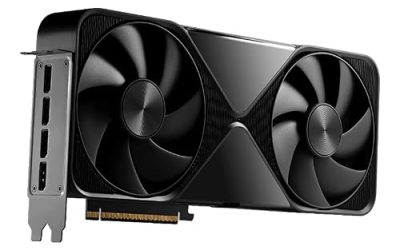
NVIDIA RTX PRO 6000 Blackwell Workstation Edition — B0F7Y644FQ
This is the workstation card of the pair, and its listing (sold through Empowered PC, in OEM packaging) reads like a specification sheet aimed at professional 3D pipelines rather than gaming rigs. The headline figure for modeling is the memory: 96 GB of GDDR7 with ECC (error-correcting code) support. For modeling work, that capacity is what lets a scene with high-polygon meshes, dense texture sets, and multiple subdivision levels stay resident in GPU memory while you work in the viewport, instead of spilling into slower system memory and turning every orbit into a stutter. ECC adds protection against silent memory errors during long sessions, which matters more the longer a project file stays open and the more geometry passes through the card.
The compute side is equally workstation-grade. The page lists 24,064 CUDA cores, 752 fifth-generation Tensor Cores, and 188 fourth-generation RT Cores, with published figures of 4000 AI TOPS and 380 TFLOPS of RT core performance. In modeling terms, the CUDA and RT core counts support the viewport shading, real-time preview modes, and geometry processing that modern modeling applications lean on, while the Tensor Cores serve the AI-assisted features increasingly built into 3D software. The card also supports Multi-Instance GPU partitioning — up to four 24 GB instances, two 48 GB instances, or a single 96 GB instance — which is a workstation feature aimed at shared or virtualized environments rather than a single-artist desk.
Specs
- Graphics processor: NVIDIA RTX PRO 6000 Blackwell Workstation Edition
- Memory: 96 GB GDDR7 ECC
- CUDA cores: 24,064
- Tensor Cores: 752 (5th generation)
- RT Cores: 188 (4th generation)
- Published AI performance: 4000 AI TOPS
- Published RT core performance: 380 TFLOPS
- Interface: PCI Express 5.0 x16
- Outputs: 4× DisplayPort 2.1
- Form factor: dual-slot, 5.4″ H × 12″ L
- Power consumption: 600 W
- Multi-Instance GPU: up to 4× 24 GB, 2× 48 GB, or 1× 96 GB
- Warranty: 3-year manufacturer warranty (per the listing)
See the NVIDIA RTX PRO 6000 Blackwell listing on Amazon
Practical considerations are real. The card draws 600 W and is a dual-slot, full-length design at 12 inches, so it needs a workstation-class case and power supply, not a compact gaming enclosure. The listing we opened is an OEM-packaging offer from a third-party seller rather than a retail boxed unit, and availability was unconfirmed in the opened copy — the listing deserves a careful read of its seller and stock details before purchase. For a professional whose bottleneck is genuinely scene size, though, this is the only card in this guide whose memory capacity removes VRAM as a planning constraint for typical modeling projects.
MSI Gaming RTX 5090 32G Gaming Trio OC — B0DT7L98J1
The RTX 5090 is NVIDIA’s flagship consumer Blackwell card, and MSI’s Gaming Trio OC listing is relevant to modelers for one specific reason: the page positions the card for gaming and content creation, and its 32 GB of GDDR7 memory is the largest VRAM allocation in the consumer line. For modeling, 32 GB on a wide 512-bit bus is a substantial working space — enough for complex scenes, high-resolution texture work, and viewport-heavy workflows at resolutions well beyond what most modeling desks run — while the card’s gaming pedigree means it also serves double duty in a mixed-use machine.
Cooling and outputs suit long modeling sessions. The TRI FROZR 4 thermal design with STORMFORCE fans and ZERO FROZR fan-stop behavior is built to sustain clocks under load and stay quiet at idle, which matters when a card sits a few feet from you all day. Display connectivity is 3× DisplayPort 2.1a plus 1× HDMI 2.1b, comfortably covering a multi-monitor modeling setup, and the page lists a maximum display resolution of 7680×4320. The title publishes an Extreme Performance clock of 2497 MHz. At 6.15 lb, this is a large, heavy card, so case clearance and support are worth planning for.
Specs
- Graphics processor: NVIDIA GeForce RTX 5090 (Blackwell)
- Memory: 32 GB GDDR7, 512-bit
- Published clock: Extreme Performance 2497 MHz
- Outputs: 3× DisplayPort 2.1a + 1× HDMI 2.1b
- Cooling: TRI FROZR 4, STORMFORCE fans, ZERO FROZR fan-stop
- Maximum display resolution: 7680×4320
- Item weight: 6.15 lb
- Model: G5090-32GTC
- Manufacturer: MSI
See the MSI Gaming RTX 5090 Gaming Trio OC listing on Amazon
The honest limits: 32 GB is generous but finite, and scenes that justify the PRO 6000’s 96 GB will not fit here. This is also a consumer card — its listing makes no ECC or workstation-partitioning claims, and we do not make any on its behalf. Availability was unconfirmed in the opened copy of this listing as well. For independent artists, small studios, and anyone whose PC also games, it is the more flexible of the two verified options; for pure professional modeling at scale, the workstation card above is the purpose-built tool.
How to choose
Start with your scenes, not with core counts. The single most useful question in modeling GPU selection is how much memory your typical project needs: open your largest recent scene, check its texture resolution and geometry density, and be honest about whether it is still growing. If your work regularly pushes past what a 32 GB card can hold — architectural visualization with full environments, dense sculpting work, large simulation caches — the RTX PRO 6000’s 96 GB is the deciding specification in this guide. If your scenes sit comfortably below that, the RTX 5090’s memory is unlikely to be your bottleneck, and its flexibility becomes the better argument.
Second, separate modeling from rendering in your own workflow. If your machine spends its days in viewports and its nights rendering, weight the viewport factors: memory capacity, display outputs, and cooling behavior under sustained mixed loads. Both cards here offer DisplayPort 2.1 connectivity for multi-monitor desks — four outputs on the workstation card, three plus HDMI on the MSI — so either drives a typical modeling setup.
Third, check the physical and electrical fit before anything else. The PRO 6000 is a 600 W, 12-inch dual-slot card; the RTX 5090 is a 6.15 lb flagship that needs generous case clearance. Neither belongs in a small or underpowered enclosure, and both deserve a power supply chosen with real headroom.
Finally, verify the listing itself. Both cards in this guide were included because their Amazon US pages could be opened and read; both also showed unconfirmed availability in those copies. Before buying, confirm the exact model name and ASIN on the live listing, check the seller, and confirm stock — flagship and workstation cards attract lookalike listings, and the ASIN is the reliable identifier.
Who should skip
Skip both of these cards if your modeling work is light — student projects, hobbyist scenes, low-poly game assets. Neither card’s strengths address that workload, and both demand workstation-class power and case budgets. Skip the RTX PRO 6000 if your PC is primarily a gaming machine that occasionally opens a modeling application; its value is concentrated in memory capacity and workstation features a gaming-first build will not use. Skip the RTX 5090 if your scenes already exceed consumer-card memory or your pipeline depends on ECC memory and workstation support arrangements — that is exactly the gap the PRO 6000 exists to fill. And skip either purchase until you have confirmed live availability, since neither opened listing copy showed a buy box.
FAQ
Is a workstation card actually better for modeling than a flagship gaming card?
For the viewport side of modeling, the practical difference is memory and intended use. The RTX PRO 6000 in this guide carries 96 GB of ECC GDDR7 and workstation features such as Multi-Instance GPU partitioning; the RTX 5090 carries 32 GB. If your scenes fit in 32 GB, the flagship card serves modeling work well. If they do not, no clock speed compensates for memory that is not there — the workstation card is better for that specific, common professional constraint.
How much VRAM do I need for 3D modeling?
It depends entirely on your scenes: geometry density, texture resolution, and how many applications share the GPU. The two verified tiers in this guide bracket the realistic range — 32 GB for most independent and small-studio work, 96 GB when large environments, dense meshes, or heavy caches make memory the limiting factor. Judge by your largest current project, with headroom for growth, rather than by an average scene.
Can I use the RTX 5090 for professional modeling work?
Its listing positions it for content creation as well as gaming, and 32 GB of GDDR7 is a substantial modeling workspace. The limits are the ones stated in this article: no ECC memory claim, no workstation partitioning features, and a hard ceiling at 32 GB. For many professionals those limits never bite; for those working at the largest scene scales, they are the reason the workstation card exists.
Why does this guide list only two cards?
Because only two cards met the standard applied here: an Amazon US product page that could be opened and read, with specifications taken from that page and the product type confirmed as suitable for 3D modeling. Other cards were researched but their pages could not be opened to that standard, so they were excluded rather than described from second-hand information. A short, verified list serves modeling buyers better than a long, unverified one.
Final verdict
For professional modeling where scene size decides what is possible, the NVIDIA RTX PRO 6000 Blackwell Workstation Edition (B0F7Y644FQ) is the verified recommendation: 96 GB of ECC GDDR7, four DisplayPort 2.1 outputs, and workstation partitioning features make it the purpose-built tool, provided your case and power supply can host a 600 W card and the OEM-packaging listing suits you. For serious modelers who also game or create on the same machine, the MSI Gaming RTX 5090 32G Gaming Trio OC (B0DT7L98J1) offers 32 GB of GDDR7 and flagship Blackwell performance in a more flexible package. Confirm live availability on either listing before purchasing — both were unconfirmed in the copies opened for this guide — and buy by ASIN to be sure you are looking at the exact card described here.
Product and ASIN Reference
| Product | ASIN | Memory | Role in this guide |
|---|---|---|---|
| NVIDIA RTX PRO 6000 Blackwell Workstation Edition | B0F7Y644FQ | 96 GB GDDR7 ECC | Workstation pick for large-scene modeling |
| MSI Gaming RTX 5090 32G Gaming Trio OC | B0DT7L98J1 | 32 GB GDDR7 | Creator crossover for modeling and gaming |
Related guides
More from Amazon
Programs that pair well with the guide above. Offers and eligibility are set by Amazon and may change.
Free shipping on eligible items, Prime Video and more. Eligible new members can start with a free trial.
Start a Prime free trialAd-free music streaming. Eligible new subscribers can start with a free trial.
Try Music Unlimited freeA Prime membership for ages 18-24 with a trial period. Eligibility is set by Amazon.
See Prime for Young AdultsAudiobooks and podcasts to listen to on the go. Eligible new members can start with a free trial.
Try Audible freeAs an Amazon Associate we earn from qualifying purchases.