The real decision when buying a graphics card for design work is not raw speed. It is whether the card keeps large Photoshop files, layered Illustrator artwork and InDesign spreads responsive while driving a high-resolution, color-accurate monitor all day. Memory capacity, driver support for creative applications and the right display outputs matter more than gaming frame rates, and a card that looks strong on a gaming chart can still stumble when a canvas grows to hundreds of layers.


This guide is for freelance designers, small studio teams and in-house creatives who build or upgrade their own workstations. Some need a certified professional card for client work, others need a compact card for a small case, and some split time between design and video. Every card below was chosen from the names and specifications on its Amazon product page, with memory size, outputs and form factor checked against design workloads.
Quick Picks
As an Amazon Associate we earn from qualifying purchases.
| Product | Best for | Key spec from title |
|---|---|---|
| PNY NVIDIA RTX A4000 | Professional design workstations | 16GB GDDR6 memory |
| ASUS ProArt GeForce RTX 4060 Ti 16GB | Designers who also edit video | 16GB GDDR6 memory |
| NVIDIA RTX 2000 Ada Generation | Compact low-profile builds | 16GB GDDR6 ECC memory |
| PNY NVIDIA RTX A2000 12GB | Entry professional setups | 12GB GDDR6 memory |
How to Choose
Memory Capacity Comes First
Start with memory capacity, because it decides how large a file you can work on comfortably. Layered Photoshop documents, placed images and undo history all live in graphics memory once GPU acceleration is on. Eight gigabytes handles everyday layout work, but 12 to 16 gigabytes keeps high-resolution photo composites and multi-artboard Illustrator files smooth. Every card in this guide carries at least 12 gigabytes, so the real question is whether your biggest files justify stepping up to a 16-gigabyte model for headroom.
Professional Drivers and Certification
Professional cards and gaming cards differ most in their drivers. NVIDIA’s professional boards use a driver branch validated for stability in applications like Photoshop, Illustrator, InDesign and major CAD tools, and some software vendors certify specific professional models for support. Gaming-derived cards can use NVIDIA Studio drivers, which are tested with creative applications and updated less aggressively than gaming releases. If your studio relies on a certified configuration for client or technical work, choose a professional card; if your tools are mainstream Creative Cloud applications, a Studio-driver card is a sound route.
Display Outputs and Color Work
Design work is judged on screen, so the connection between card and monitor matters. Look for DisplayPort outputs, which drive 4K and 5K design monitors at full refresh without adapters in most setups, and check the maximum resolution in the listing against your panel. Cards here support up to 7680 by 4320 on paper, comfortably covering dual 4K displays. Also confirm how many connectors the card carries if you run two or three monitors, and whether mini DisplayPort ports will need adapter cables for your existing screens.
Size, Power and Cooling Fit
Finally, match the card to the machine you actually own. Measure the slot space in your case: the professional cards here include single-slot and low-profile designs for compact workstations, while the ProArt card uses a conventional desktop cooler. Check power next. The two compact cards draw 70 watts and need no extra power cable, which suits office PCs with modest power supplies. The A4000 draws up to 140 watts and uses an auxiliary power connector, so confirm your supply has the right cable before ordering.
The 4 Best Options
PNY NVIDIA RTX A4000
The RTX A4000 is the card here built squarely for professional design workstations. Its 16GB of GDDR6 memory gives layered Photoshop documents and large Illustrator files room to breathe, while the Ampere chip’s 6,144 CUDA cores keep filters, previews and GPU-accelerated effects responsive. Because it is a professional board, it runs NVIDIA’s professional driver branch aimed at stability in creative and CAD applications. The single-slot, full-length design is unusual at this performance level and helps in crowded cases, though the blower cooler is tuned for workstation airflow rather than silence.
Specs
- Graphics processor: NVIDIA RTX A4000
- Memory: 16GB GDDR6
- CUDA cores: 6,144
- Tensor cores: 192, third generation
- RT cores: 48, second generation
- Outputs: 4 x DisplayPort 1.4a
- Form factor: single-slot, full length
- Max power consumption: 140W
- Maximum resolution: 7680 x 4320
Best for: professional designers running a full workstation for client work, large files and light 3D.
Watch out for: availability on this listing is limited and the seller is not confirmed, so check who is fulfilling the order and the return terms before buying.
ASUS ProArt GeForce RTX 4060 Ti 16GB
ASUS builds the ProArt line for creators, and this RTX 4060 Ti pairs 16GB of GDDR6 memory with a quiet, compact cooler that suits a desk-side design PC. The Ada Lovelace chip handles Photoshop and Illustrator acceleration easily and adds modern encoders that help when the same machine cuts video in Premiere Pro or exports social clips. It supports NVIDIA Studio drivers, which are the branch tuned and validated for creative applications. Designers who want one card for layout work by day and motion work after hours will find this the most flexible option here.
Specs
- Graphics processor: NVIDIA GeForce RTX 4060 Ti
- Memory: 16GB GDDR6
- Interface: PCI Express 4.0
- Outputs: HDMI 2.1a, DisplayPort 1.4a
- Edition: OC Edition with DLSS 3 support
Best for: designers who split their week between layout work and video editing.
Watch out for: it is a creator-finished gaming chip, so it has no ECC memory and no professional ISV certification; confirm the card length fits your case.
NVIDIA RTX 2000 Ada Generation
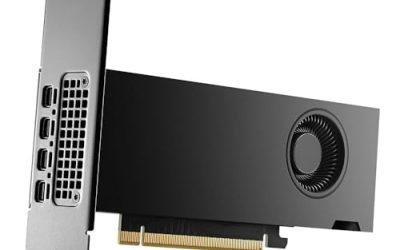
The RTX 2000 Ada Generation packs 16GB of ECC GDDR6 memory into a half-height, dual-slot card that fits the compact workstations many studios buy off the shelf. ECC memory guards against silent data errors during long sessions, and the low power draw means it runs from the PCIe slot without extra power cables. Its Ada-generation cores are a step newer than the Ampere cards here, which helps with AI-assisted features in Creative Cloud. For designers in small cases who refuse to give up memory capacity, this is the natural pick.
Specs
- Graphics processor: NVIDIA RTX 2000 Ada Generation
- Memory: 16GB GDDR6 with ECC
- Model number: 900-5G192-2541-000
- Form factor: dual slot, half height, 6.6 x 2.7 inches
- Cooling: blower active fan
Best for: compact or small form factor workstations that still need 16GB of memory.
Watch out for: the seller on this listing is not confirmed, and the card uses mini DisplayPort connectors, so verify your monitor cables or add adapters.
PNY NVIDIA RTX A2000 12GB
The RTX A2000 12GB is the entry point into NVIDIA’s professional line, and for pure 2D design work it covers the essentials: 12GB of GDDR6 memory, professional drivers and a low-profile, dual-slot cooler that sips power at 70 watts with no external connector. It drives high-resolution displays up to 7680 by 4320, so a 4K or 5K design monitor is well within reach. This OEM version keeps the same silicon as the retail card; what changes is the packaging. Studios adding seats for layout and production art will appreciate how easily it drops into existing office PCs.
Specs
- Graphics processor: NVIDIA RTX A2000
- Memory: 12GB GDDR6, 192-bit bus
- CUDA cores: 3,328
- Tensor cores: 104; RT cores: 26
- Maximum resolution: 7680 x 4320
- Interface: PCI Express 4.0 x16
- Max power consumption: 70W, no external power connector
- Form factor: dual-slot, low profile
Best for: upgrading office PCs and adding design seats without replacing the whole machine.
Watch out for: this is the OEM version, which can ship in plain packaging with fewer accessories than the retail box; the seller is not confirmed, so check the listing contents before ordering.
Which One Fits Your Situation
You Run a Studio Workstation All Day
If your machine runs client work eight hours a day, choose the PNY RTX A4000. Its 16GB of memory, professional drivers and single-slot design suit a serious workstation that may also handle light 3D or rendering. It is the card here most aligned with certified professional workflows, and its memory headroom delays the next upgrade.
You Split Time Between Design and Video
Choose the ASUS ProArt RTX 4060 Ti 16GB if design is your main job but video keeps landing on your desk. The 16GB of memory covers large design files, Studio drivers keep Creative Cloud applications stable, and the Ada-generation encoders speed up Premiere Pro exports. It is also the easiest card here to live with in a standard desktop case.
Your Case Is Small or Low-Profile
Pick the NVIDIA RTX 2000 Ada Generation when your workstation is a small form factor model with a half-height bracket. It delivers 16GB of ECC memory at 70 watts with no power cable to route, and its blower cooler exhausts heat in tight chassis. For a compact studio machine that still opens heavy files, nothing else here matches that combination.
You Are Upgrading an Older Office PC
Take the PNY RTX A2000 12GB if you are upgrading an existing office PC rather than building new. Its low-profile bracket fits many prebuilt cases, the 70-watt draw works with modest power supplies, and 12GB of memory is plenty for layout, photo editing and production art. The OEM packaging keeps the focus on the card itself rather than extras.
Common Mistakes
- Buying a card with too little memory, then watching large layered files slow down once GPU acceleration is enabled.
- Ignoring display outputs and discovering your color-critical monitor needs an adapter the card does not include.
- Assuming any professional-looking card is certified for your application; check the software vendor’s certified hardware list.
- Forgetting slot width, bracket height and power connector clearance in a compact workstation case.
- Choosing the smaller memory variant of a card family when a 12GB or 16GB version exists for design work.
Frequently Asked Questions
How much video memory do I need for graphic design?
For everyday layout and web graphics, 8 gigabytes is workable, but 12 to 16 gigabytes is the safer target for high-resolution photo work, large layered files and multiple open applications. Memory also matters when you run two high-resolution monitors. All four cards here carry at least 12 gigabytes, which keeps design files responsive without constant reloading.
Is a professional card better than a gaming card for Photoshop?
For most Photoshop and Illustrator tasks, both work well, because the same GPU acceleration features are available. The professional cards add driver branches validated for stability, ECC memory on some models and certification for certain technical applications. A creator card on Studio drivers is a practical middle ground for mainstream design work.
Can these cards drive a 4K or 5K color-accurate monitor?
Yes. Each card here lists a maximum resolution of 7680 by 4320 or carries DisplayPort and HDMI outputs suited to current design monitors, so 4K and 5K panels run at their native resolution. Check whether your monitor uses full-size or mini DisplayPort, and order the right cable or adapter with the card if needed.
Do I need ECC memory in a graphics card for design work?
ECC memory corrects single-bit errors before they can corrupt data, which matters most during very long renders, scientific work and unattended batch jobs. For interactive design work its benefit is small, and many successful studios run non-ECC cards. Treat ECC as a welcome extra on the RTX 2000 Ada Generation, not a requirement for buying.
Related guides
More from Amazon
Programs that pair well with the guide above. Offers and eligibility are set by Amazon and may change.
Free shipping on eligible items, Prime Video and more. Eligible new members can start with a free trial.
Start a Prime free trialAd-free music streaming. Eligible new subscribers can start with a free trial.
Try Music Unlimited freeA Prime membership for ages 18-24 with a trial period. Eligibility is set by Amazon.
See Prime for Young AdultsAudiobooks and podcasts to listen to on the go. Eligible new members can start with a free trial.
Try Audible freeAs an Amazon Associate we earn from qualifying purchases.