Our Short List of 3

- Best for: 4K gaming with ray tracing on, and high-refresh 1440p at maximum settings.
- Memory: 16GB GDDR7 on a 256-bit bus
- Memory bandwidth: around 896 GB/s
- Board power: 300W-class, 16-pin power connector
- Interface: PCIe 5.0, DisplayPort 2.1b and HDMI 2.1b

- Best for: 1440p gaming with 16GB of memory in a compact or small-form-factor case.
- Memory: 16GB GDDR7 on a 128-bit bus
- Boost clock: 2692 MHz as listed
- Board power: 180W-class, single 8-pin power connector
- Interface: PCIe 5.0, HDMI and DisplayPort 2.1

- Best for: 1440p gaming with ray tracing for upgraders leaving GTX 10-series or RTX 20-series cards behind.
- Memory: 12GB GDDR6X on a 192-bit bus
- Architecture: Ada Lovelace
- Interface: PCIe 4.0, DisplayPort and HDMI
- Cooler: three WINDFORCE fans
All 5 Picks at a Glance
| Product | Specs | Action |
|---|---|---|
| MSI GeForce RTX 5070 Ti 16G Ventus 3X OC |
| Check price on Amazon |
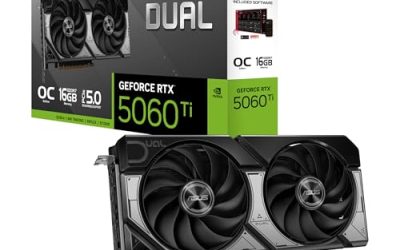
| PNY GeForce RTX 5060 Ti 16GB OC Dual-Fan |
| Check price on Amazon |
| GIGABYTE GeForce RTX 4070 WINDFORCE OC 12G |
| Check price on Amazon |
 ASUS Dual GeForce RTX 4060 OC Edition 8GB |
| Check price on Amazon |
 MSI GeForce RTX 3060 Ventus 2X 12G OC |
| Check price on Amazon |
Buying an RTX card is a decision about how much ray tracing you want to turn on, and at which resolution. A card that handles ray-traced lighting at 1080p can still run out of memory at 1440p, and one that is comfortable at 1440p can still struggle at 4K with ultra textures on. The model number alone does not settle it: memory capacity, bus width and power draw matter as much as the chip name, and a previous-generation 12GB card can suit some buyers better than a current-generation 8GB one.
This guide covers only Nvidia’s GeForce RTX line, across three generations, picked from the Amazon listings. It is for 1080p, 1440p and 4K gamers who want ray tracing and DLSS rather than raw raster speed alone, including upgraders moving off a GTX card or an older RTX model. It differs from the budget-framed and VR-framed graphics card guides on this site by sorting the RTX line itself, generation by generation, instead of sorting by spending tier or headset.
Our Top Picks
Top 3 picks at a glance
Quick Picks
As an Amazon Associate we earn from qualifying purchases.
| Product | Best for | Key spec |
|---|---|---|
| MSI GeForce RTX 5070 Ti 16G Ventus 3X OC | 4K gaming with ray tracing on | 16GB GDDR7, 256-bit bus |
| PNY GeForce RTX 5060 Ti 16GB OC Dual-Fan | 1440p with 16GB in a compact case | 16GB GDDR7, 2692 MHz boost |
| GIGABYTE GeForce RTX 4070 WINDFORCE OC 12G | A proven 12GB step up from older cards | 12GB GDDR6X, 192-bit bus |
| ASUS Dual GeForce RTX 4060 OC Edition 8GB | Entry-level RTX for 1080p builds | 8GB GDDR6, DLSS 3 |
| MSI GeForce RTX 3060 Ventus 2X 12G OC | Budget 1080p with generous memory | 12GB GDDR6, 1807 MHz boost |
How to Choose
Match the card to your monitor, not the model number
Start from the display you already own, because that decides how much work the card does every frame. An 8GB card is a reasonable match for a 1080p monitor at high refresh rates, where textures and render targets stay modest. At 1440p, 12GB is the comfortable middle ground for high settings, and at 4K, 16GB is the safer choice once ray tracing and high-resolution textures are both switched on. A higher model number bought for a 1080p screen spends most of its life idle, while a lower one bought for a 4K screen will force compromises in the first week. Check your monitor’s resolution and refresh rate first, then pick the tier that serves it.
Treat VRAM as a ray tracing budget
Ray tracing costs memory as well as compute, because the acceleration structures and denoising buffers the card keeps resident grow with output resolution. That is why two cards with similar shader counts can feel very different with ray tracing enabled: the one with more memory and a wider bus stays smooth, while the one with a narrow bus stutters when textures stream in. A 128-bit bus with 16GB, like the 5060 Ti, is well suited to 1080p and 1440p but is not a 4K card, while a 256-bit bus with 16GB, like the 5070 Ti, is built for the higher end. Read capacity and bus width together, never one alone.
Count the power and the case before you order
Every card on this list has a different appetite and footprint, and both can quietly force extra spending. The 3060 and 4060 class cards run on modest supplies with a standard 8-pin connector, while the 5070 Ti class needs a stronger supply and a 16-pin connector, either native or through an adapter that must be seated fully. Measure the card length against your case clearance, and check the slot thickness: a 2-slot card fits where a 2.5-slot card will not, and a triple-fan cooler needs more length than a dual-fan one. Confirm the power connector type and the recommended supply on the listing before you commit.
Weigh the generation, not just the tier
RTX generations differ in which upscaling features they can run, and that changes the value of older cards. The 50-series cards support the newest DLSS frame generation, the 40-series cards support DLSS 3 frame generation, and the 30-series cards rely on earlier DLSS upscaling without frame generation. That means a 40-series 12GB card can be the better buy for a 1440p player who values frame generation, while a 30-series 12GB card suits a 1080p player who wants maximum memory for the lowest outlay. Do not assume a newer 8GB card always beats an older 12GB one; the right answer depends on your resolution and settings.
The 5 Best Options
MSI GeForce RTX 5070 Ti 16G Ventus 3X OC
- Best for: 4K gaming with ray tracing on, and high-refresh 1440p at maximum settings.
- Memory: 16GB GDDR7 on a 256-bit bus
- Memory bandwidth: around 896 GB/s
- Board power: 300W-class, 16-pin power connector
- Interface: PCIe 5.0, DisplayPort 2.1b and HDMI 2.1b
4K gaming with ray tracing on, and high-refresh 1440p at maximum settings.
the 300W-class draw and 16-pin connector need a stronger power supply and a case with room for a triple-fan card; confirm both before ordering.
This is the flagship tier of this list, and the card to buy when 4K with ray tracing switched on is the goal rather than a someday upgrade. Its 16GB of GDDR7 on a 256-bit bus gives it the memory headroom that 4K ray tracing demands, and the triple-fan Ventus cooler is built to sustain long sessions without throttling. It also suits high-refresh 1440p players who want every setting at its highest and a card that will stay relevant for several years.
Watch out for: the 300W-class draw and 16-pin connector need a stronger power supply and a case with room for a triple-fan card; confirm both before ordering.
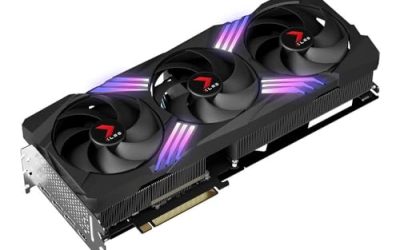
PNY GeForce RTX 5060 Ti 16GB OC Dual-Fan
- Best for: 1440p gaming with 16GB of memory in a compact or small-form-factor case.
- Memory: 16GB GDDR7 on a 128-bit bus
- Boost clock: 2692 MHz as listed
- Board power: 180W-class, single 8-pin power connector
- Interface: PCIe 5.0, HDMI and DisplayPort 2.1
1440p gaming with 16GB of memory in a compact or small-form-factor case.
the 128-bit bus limits 4K usefulness despite the large buffer, so do not buy it expecting high-refresh 4K.
The PNY 5060 Ti is the sensible mainstream pick for anyone who wants 16GB without a large card or a large power supply. Its dual-fan, 2-slot design is SFF-Ready, so it fits compact cases that reject triple-fan cards, and the 2692 MHz boost clock listed on the Amazon page is paired with the same 16GB of GDDR7 found in bigger designs. It is built for 1080p and entry 1440p gaming with high textures, where the large memory pool keeps frame times steady.
Watch out for: the 128-bit bus limits 4K usefulness despite the large buffer, so do not buy it expecting high-refresh 4K.
GIGABYTE GeForce RTX 4070 WINDFORCE OC 12G
- Best for: 1440p gaming with ray tracing for upgraders leaving GTX 10-series or RTX 20-series cards behind.
- Memory: 12GB GDDR6X on a 192-bit bus
- Architecture: Ada Lovelace
- Interface: PCIe 4.0, DisplayPort and HDMI
- Cooler: three WINDFORCE fans
1440p gaming with ray tracing for upgraders leaving GTX 10-series or RTX 20-series cards behind.
12GB is a real ceiling at 4K with ultra textures, and newer 16GB models sit close to it, so confirm your resolution before choosing it over a 5060 Ti.
The 4070 WINDFORCE is the previous-generation card that still makes sense, because 12GB of GDDR6X on a 192-bit bus remains a strong match for 1440p gaming with ray tracing. Its triple-fan WINDFORCE cooler runs quietly at moderate loads, and it supports DLSS 3 frame generation, which the 30-series cards below cannot run. It suits upgraders coming from a GTX 10-series or RTX 20-series card who want a clear step up without jumping to a current-generation flagship tier.
Watch out for: 12GB is a real ceiling at 4K with ultra textures, and newer 16GB models sit close to it, so confirm your resolution before choosing it over a 5060 Ti.
ASUS Dual GeForce RTX 4060 OC Edition 8GB
- Best for: first-time RTX buyers building a 1080p PC on a modest power supply.
- Memory: 8GB GDDR6
- Interface: PCIe 4.0, HDMI 2.1a and DisplayPort 1.4a
- Cooler: dual Axial-tech fans, 2.5-slot, 0dB Technology
- Features: DLSS 3, hardware ray tracing
first-time RTX buyers building a 1080p PC on a modest power supply.
8GB fills quickly in newer titles with high texture packs, so expect to lower texture settings in demanding games.
The ASUS Dual 4060 is the entry point into the RTX line, and the right choice when the build is 1080p and the power supply is modest. Its 8GB of GDDR6 is enough for most 1080p titles at high settings, and the dual Axial-tech fans with 0dB idle stop keep it quiet in a living-room PC. It supports DLSS 3, which lifts frame rates in supported games, and the 2.5-slot design fits nearly any mid-tower case without fuss.
Watch out for: 8GB fills quickly in newer titles with high texture packs, so expect to lower texture settings in demanding games.
MSI GeForce RTX 3060 Ventus 2X 12G OC
- Best for: budget 1080p builds and older PCs where 12GB of memory matters more than the newest features.
- Memory: 12GB GDDR6 at 15 Gbps on a 192-bit bus
- Boost clock: 1807 MHz as listed
- Architecture: Ampere
- Interface: PCIe 4.0, HDMI and DisplayPort
budget 1080p builds and older PCs where 12GB of memory matters more than the newest features.
it is an older generation without DLSS 4 support, and it can trail newer 8GB cards in raw speed in some games despite the larger memory pool.
The 3060 Ventus 2X is the budget pick that still earns its place, because 12GB of GDDR6 at this tier is rare and genuinely useful for texture-heavy 1080p games. Its twin Torx fans keep the card short enough for older cases, and the 1807 MHz boost clock listed on the Amazon page pairs with a 192-bit bus that moves data faster than the narrow buses on newer entry cards. It is an Ampere-generation card, so it relies on earlier DLSS upscaling rather than frame generation.
Watch out for: it is an older generation without DLSS 4 support, and it can trail newer 8GB cards in raw speed in some games despite the larger memory pool.
Which One Fits Your Situation
You play at 4K and want ray tracing on
Buy the MSI RTX 5070 Ti Ventus 3X. It is the only card on this list with the 16GB capacity and 256-bit bus that 4K ray tracing genuinely needs, and its triple-fan cooler is built for sustained high loads. Before ordering, confirm your power supply handles a 300W-class card with a 16-pin connector and that your case fits a triple-fan design.
You play at 1440p in a compact case
Buy the PNY RTX 5060 Ti 16GB. Its 2-slot, SFF-Ready design fits cases that reject larger cards, while 16GB of GDDR7 keeps high textures smooth at 1440p. The single 8-pin connector also keeps the power supply requirement modest, which matters in small builds where a large supply may not fit.
You are upgrading from a GTX card on a mid-range supply
Buy the GIGABYTE RTX 4070 WINDFORCE if your monitor is 1440p, or the ASUS Dual RTX 4060 if it is 1080p. Both bring DLSS 3 frame generation that your old card cannot run, and both are proven designs with wide game compatibility. The 4070 is the bigger leap; the 4060 is the easier fit for a modest supply.
You want the most memory for the least outlay
Buy the MSI RTX 3060 Ventus 2X 12G OC. Its 12GB pool handles texture-heavy 1080p games that choke 8GB cards, and its short twin-fan design drops into older PCs without a case or power supply change. Accept that you give up the newest DLSS frame generation in exchange for that memory.
Common Mistakes
- Buying an 8GB card for 4K ray tracing, where memory runs out before the GPU does.
- Assuming every RTX 5060 Ti has 16GB: an 8GB variant exists, so read the memory figure on the listing, not just the model name.
- Ignoring the 16-pin connector and power supply requirement on 5070 Ti class cards, then discovering the adapter problem after delivery.
- Ordering a triple-fan card without measuring case clearance, especially length and slot thickness.
- Expecting DLSS 4 multi-frame generation on a 30-series or 40-series card: frame generation support varies by generation, so check the feature list for the card you buy.
Frequently Asked Questions
Do I need an RTX card for ray tracing?
Ray tracing runs best on RTX hardware because Nvidia built dedicated ray tracing cores into the line, and DLSS upscaling is the feature that makes ray tracing playable at higher resolutions. A non-RTX card can render ray-traced scenes in some games, but it will do so more slowly and without DLSS support, so an RTX card is the practical choice for anyone who wants ray tracing switched on.
Is 8GB of VRAM enough in 2026?
It is enough for most 1080p gaming at high settings, where texture and render-target demands stay modest. It becomes a limitation at 1440p with ultra textures and at 4K, where 12GB or 16GB is the safer choice. If you play newer titles with high-resolution texture packs, treat 8GB as a floor you will outgrow rather than a comfortable long-term pick.
Will a PCIe 5.0 graphics card work in a PCIe 4.0 motherboard?
Yes. PCIe 5.0 cards are backward compatible with PCIe 4.0 slots, and current games do not saturate a PCIe 4.0 x16 link, so the performance difference is negligible. The card will run at PCIe 4.0 speeds on an older board, which is fine for every card on this list.
Should I buy a last-generation RTX 4070 or a current-generation RTX 5060 Ti?
Choose the 4070 if you play at 1440p and value its wider 192-bit bus and proven triple-fan design, and choose the 5060 Ti 16GB if you want more memory, a smaller card, lower power draw and the newest DLSS features. Both support frame generation, so the decision comes down to resolution, case size and how much memory your games need.
Related guides
More from Amazon
Programs that pair well with the guide above. Offers and eligibility are set by Amazon and may change.
Free shipping on eligible items, Prime Video and more. Eligible new members can start with a free trial.
Start a Prime free trialAd-free music streaming. Eligible new subscribers can start with a free trial.
Try Music Unlimited freeA Prime membership for ages 18-24 with a trial period. Eligibility is set by Amazon.
See Prime for Young AdultsAudiobooks and podcasts to listen to on the go. Eligible new members can start with a free trial.
Try Audible freeAs an Amazon Associate we earn from qualifying purchases.