The best graphics cards for VR are the ones that match your headset’s resolution and refresh rate, with at least 12GB of video memory for modern PC VR. A 16GB card such as the GeForce RTX 5060 Ti 16GB or Radeon RX 9060 XT 16GB is the safest mainstream pick, and a Radeon RX 9070 XT suits high-resolution headsets.
Our Top Picks
 ASUS Dual GeForce RTX 5060 Ti 16GB GDDR7RTX5060Ti|OC|16GB9 x 4.7 x 2 inches1.4 poundsCheck on Amazon


Top 3 picks at a glance
Our Picks at a Glance
- Best all-round VR card: ASUS Dual GeForce RTX 5060 Ti 16GB.
- Best compact VR card for small cases: PNY GeForce RTX 5060 Ti 16GB OC Dual-Fan.
- Best 16GB card from the AMD side: XFX Swift Radeon RX 9060 XT 16GB.
- Best for high-resolution headsets: PowerColor Reaper Radeon RX 9070 XT 16GB.
- Best 12GB step-up from older cards: GIGABYTE GeForce RTX 4070 WINDFORCE OC 12G.
- Best entry card for Quest-class headsets: ASUS Dual GeForce RTX 4060 OC Edition 8GB.
- Best budget card with 12GB: MSI GeForce RTX 3060 Ventus 2X 12G OC.
- Best low-cost AMD starter: ASRock Radeon RX 7600 Challenger Pro 8GB OC.
Comparison Table
| Graphics card | Memory | Interface | VR tier | Budget tier |
|---|---|---|---|---|
| ASUS Dual RTX 5060 Ti 16GB OC | 16GB GDDR7 | PCIe 5.0, 2.5-slot | High-resolution headsets, 90Hz | Upper mid |
| PNY RTX 5060 Ti 16GB OC Dual-Fan | 16GB GDDR7 | PCIe 5.0, 2-slot | High-resolution headsets, 90Hz | Upper mid |
| XFX Swift RX 9060 XT 16GB | 16GB GDDR6 | RDNA 4, triple fan | High-resolution headsets, 90Hz | Mid |
| PowerColor Reaper RX 9070 XT 16GB | 16GB GDDR6 | RDNA 4 | Top-end headsets, 120Hz and up | High |
| GIGABYTE RTX 4070 WINDFORCE OC 12G | 12GB GDDR6X | 3 fans, 192-bit | Quest 3 class, 90Hz | Upper mid |
| ASUS Dual RTX 4060 OC 8GB | 8GB GDDR6 | PCIe 4.0, 2.5-slot | Quest 2 class, 72 to 90Hz | Lower mid |
| MSI RTX 3060 Ventus 2X 12G OC | 12GB GDDR6 | PCIe 4.0, twin fan | Quest 2 class, Index at moderate settings | Low to mid |
| ASRock RX 7600 Challenger Pro 8GB OC | 8GB GDDR6 | PCIe 4.0, triple fan | Entry VR, lighter games | Low |
Why Headset Resolution Decides Which Graphics Card You Need
A VR headset draws a separate image for each eye, so the card renders roughly twice the pixels of a monitor, at a refresh rate that cannot dip without making you feel it. That is why a card that runs a 1440p monitor comfortably can still struggle in a headset.
Use the per-eye resolution of your headset as the starting point, then add the resolution scaling a game applies on top. Most PC VR titles render above the panel’s native size to keep edges clean, so the real load is higher than the table suggests.
| Headset (maker-listed per-eye panel) | Refresh rate | Card tier to aim for |
|---|---|---|
| Meta Quest 2 (about 1832 x 1920) | 72 to 120Hz | 8GB card is workable; 12GB is safer |
| Valve Index (1440 x 1600) | 80 to 144Hz | 12GB card, and a higher tier for 144Hz |
| Meta Quest 3 (about 2064 x 2208) | 72 to 120Hz | 12GB to 16GB card |
| HP Reverb G2 (2160 x 2160) | 90Hz | 16GB card or better |
Treat these figures as a guide and confirm them on the maker’s page, because headsets get revised. Wireless headsets add one more factor: the PC has to encode the video stream while it renders, which uses spare GPU headroom.
The Best Graphics Cards for VR
1. ASUS Dual GeForce RTX 5060 Ti 16GB OC: Best All-Round VR Card
As an Amazon Associate we earn from qualifying purchases at no extra cost to you.

The ASUS Dual GeForce RTX 5060 Ti 16GB OC Edition pairs 16GB of GDDR7 with PCIe 5.0, HDMI 2.1b and DisplayPort 2.1b outputs. The listing describes a 2.5-slot design with Axial-tech fans, 0dB fan stop and a dual BIOS switch.
- Memory: 16GB GDDR7 gives room for high-resolution textures and supersampling.
- Cooling: dual fans with fan stop at idle, helpful in a quiet VR room.
- Outputs: HDMI 2.1b and DisplayPort 2.1b for wired headsets and monitors.
Best for: players with a Quest 3, Reverb G2 or similar who want one card that handles most PC VR titles.
Skip if: your case is very short or you have a small power supply; check the card length and power connector with the maker first.
Pros: large memory pool; modern output standards; quiet at idle; dual BIOS option; works across most current VR runtimes.
Cons: sits at the upper end of the mid-range; thick for compact cases.
2. PNY GeForce RTX 5060 Ti 16GB OC Dual-Fan: Best Compact VR Card

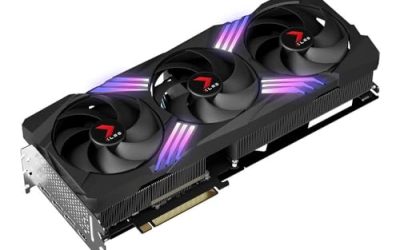
The PNY GeForce RTX 5060 Ti 16GB OC uses the same 16GB GDDR7 on a 128-bit bus, with a 2692 MHz boost speed listed. The listing marks it SFF-ready with a 2-slot design, PCIe 5.0 and HDMI/DisplayPort 2.1, built on NVIDIA’s Blackwell architecture.
- Size: 2-slot cooler fits cases where 2.5-slot cards will not.
- Memory: 16GB GDDR7, matching the larger designs.
- Features: DLSS support and current display outputs.
Best for: small-form-factor builds and shared living-room PCs where the VR rig has to fit in a compact chassis.
Skip if: you want a heavy-duty triple-fan cooler for long sessions in a warm room.
Pros: slimmer than many 16GB cards; same memory capacity as pricier designs; modern ports; boost clock listed by the maker.
Cons: a dual-fan cooler may run louder under sustained load; fewer cooling extras than larger designs.
3. XFX Swift Radeon RX 9060 XT 16GB: Best 16GB Card From AMD

The XFX Swift RX 9060 XT OC Triple Fan Gaming Edition carries 16GB of GDDR6, HDMI and dual DisplayPort outputs, and the RDNA 4 architecture. A triple-fan cooler is listed for the overclocked edition.
- Memory: 16GB matches the NVIDIA 16GB cards for texture-heavy games.
- Architecture: RDNA 4 with current video encoding for wireless streaming.
- Cooling: triple-fan layout for steadier clocks over long sessions.
Best for: shoppers who want 16GB for VR and prefer AMD’s driver software and pricing approach.
Skip if: you rely on NVIDIA-only features some VR mods and tools use; check your favorite games first.
Pros: large memory pool; triple-fan cooler; recent architecture; often priced below comparable NVIDIA cards.
Cons: a few VR tools favor NVIDIA; wireless streaming behavior varies by headset and driver.
4. PowerColor Reaper Radeon RX 9070 XT 16GB: Best for High-Resolution Headsets

The PowerColor Reaper Radeon RX 9070 XT carries 16GB of GDDR6. The listing is brief, so confirm the length, cooler and power connector requirements on PowerColor’s product page before you order.
- Class: top of the RDNA 4 mainstream lineup in this guide.
- Memory: 16GB GDDR6, enough for heavy supersampling.
- Use: high refresh rates and demanding sims.
Best for: sim racing and flight sim players with high-resolution headsets who want extra rendering headroom.
Skip if: you play lighter games on a Quest 2; this is more card than you need.
Pros: strongest raster performance in this list; 16GB memory; headroom for higher render scales.
Cons: needs a stronger power supply and a roomy case; the listing gives few details; higher cost.
5. GIGABYTE GeForce RTX 4070 WINDFORCE OC 12G: Best 12GB Step-Up

The GIGABYTE GeForce RTX 4070 WINDFORCE OC 12G uses 12GB of GDDR6X on a 192-bit bus with three WINDFORCE fans. It is an older-generation card that still handles Quest 3 class headsets well.
- Memory: 12GB GDDR6X on a 192-bit bus.
- Cooling: three fans for lower noise at moderate loads.
- Platform: Ada Lovelace with DLSS 3 frame generation support.
Best for: upgrading from a GTX 10-series or RTX 20-series card to a smooth Quest 3 experience.
Skip if: you want a 16GB card for future-proofing; newer 16GB models cost close to this one.
Pros: proven platform; triple-fan cooler; good Quest 3 performance; wide game compatibility.
Cons: 12GB limits very high render scales; older generation than the Blackwell cards above.
6. ASUS Dual GeForce RTX 4060 OC Edition 8GB: Best Entry Card for Quest-Class Headsets
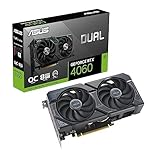
The ASUS Dual GeForce RTX 4060 OC Edition has 8GB of GDDR6, PCIe 4.0, HDMI 2.1a and DisplayPort 1.4a, with a 2.5-slot design and a 3-year warranty listed.
- Memory: 8GB GDDR6, enough for many Quest 2 class games.
- Warranty: 3-year coverage listed by the seller.
- Features: DLSS 3 and 0dB fan technology.
Best for: first-time VR players on a Quest 2 or Quest 3 using moderate settings.
Skip if: you plan to run sims at high render scales; 8GB fills quickly.
Pros: low power draw; compact enough for most cases; quiet; DLSS support.
Cons: memory is tight for newer titles; you may lower render scale in demanding games.
7. MSI GeForce RTX 3060 Ventus 2X 12G OC: Best Budget Card With 12GB

The MSI GeForce RTX 3060 Ventus 2X 12G OC uses 12GB of GDDR6 at 15 Gbps on a 192-bit bus, with a 1807 MHz boost clock and a Torx twin-fan cooler on the Ampere architecture.
- Memory: 12GB gives more texture room than most cards at its tier.
- Cooling: twin Torx fans.
- Interface: PCIe 4.0 with HDMI and DisplayPort.
Best for: budget builders pairing a Quest 2 with an older PC.
Skip if: you want new-generation features such as DLSS 4 support.
Pros: generous 12GB; widely compatible; small twin-fan design; low cost for the memory.
Cons: older generation; lower raw performance than newer 8GB cards in some games.
8. ASRock Radeon RX 7600 Challenger Pro 8GB OC: Best Low-Cost AMD Starter

The ASRock Radeon RX 7600 Challenger Pro 8GB OC lists RDNA 3, 8GB GDDR6, PCIe 4.0, a triple-fan cooler with 0dB silent mode and a 2695 MHz boost clock.
- Memory: 8GB GDDR6.
- Cooling: triple fans with silent mode at idle.
- Architecture: RDNA 3.
Best for: casual players who want VR on a tight budget and mostly play lighter games.
Skip if: you want high-resolution headset performance; step up to a 12GB or 16GB card.
Pros: low cost; quiet triple-fan cooler; low idle noise.
Cons: limited memory and performance for modern VR; best at lower render scales.
Matching a Card to Your Headset and Games
The same card feels very different depending on what you play. A rhythm game and a flight sim both run in VR, but they sit at opposite ends of the load scale. Use the scenarios below to place yourself before you read the picks again.
| What you play | What limits the card | Where to aim |
|---|---|---|
| Rhythm, fitness and arcade games | Almost nothing; these titles are built for standalone headsets | Any 8GB card in this list |
| Social VR and mixed library | Avatars and worlds with large textures | 12GB card |
| Half-Life style shooters and adventure games | Shader load and shadow detail | 12GB to 16GB card |
| Sim racing | High refresh rate and many cars on track | 16GB card, stronger tier if possible |
| Flight sims and large open worlds | Memory use and draw distance | 16GB card, plus a strong processor |
If your library is mostly standalone games with an occasional PC session, buying the biggest card on the list is rarely the best use of money. If you spend most of your time in sims, the opposite is true: a stronger card pays back in smoother head tracking and sharper distant detail.
Settings That Reduce the Load on Any VR Card
Before upgrading, check whether a few settings changes get you the smoothness you want. They cost nothing and show how much headroom your current card really has.
- Render scale: lowering it a notch reduces pixels per eye and is the single biggest lever. Raise it only after frame delivery is stable.
- Refresh rate: running at 72 or 90Hz instead of 120Hz gives the card more time per frame. Pick the lowest rate that still feels comfortable to you.
- Edge smoothing and shadows: these have outsized costs in VR. Reduce shadow quality before texture quality, since textures mostly use memory rather than processing time.
- Upscaling and reprojection: upscaling modes and motion smoothing features can keep the headset comfortable when a game drops below target. They are a safety net, not a substitute for the right card.
- Background apps: close browsers and overlays that use the GPU while you play.
What Else Matters Besides the Card
A graphics card is only one link in the chain. A strong GPU paired with a weak processor or slow memory still stutters, and VR makes stutter far more noticeable than a monitor does.
- Processor: VR games often lean on one or two fast cores. A recent six-core or eight-core chip is a sensible partner for the cards in this guide.
- System memory: 16GB is the practical floor; 32GB is more comfortable if you keep a browser, voice chat and a mod manager open.
- Storage: install VR games on an SSD to cut load times and texture pop-in.
- Cooling and airflow: VR sessions run long. A case with free airflow keeps clocks steady and fans quieter.
- Cables and ports: wired headsets need the right port and cable; Link-style use depends on a good USB port or a solid Wi-Fi router. Check the headset maker’s guidance.
Common Mistakes When Buying a VR Graphics Card
- Buying on monitor performance alone. A card rated for 1440p gaming is not automatically right for a headset with two high-resolution panels.
- Ignoring physical size. A long, thick card may not fit your case or may block a needed slot.
- Underestimating the power supply. Check wattage and connector type before you order, not after the box arrives.
- Paying for memory you cannot use. If your games are light and your headset is a Quest 2, a 16GB card may be more than you need.
- Skipping the processor. If your processor is several generations old, upgrade plans may need to cover it as well.
Also Consider
- GIGABYTE GeForce RTX 5060 WINDFORCE OC 8G: new-generation 8GB GDDR7 card; fine for lighter VR but the 8GB limit applies.
- ASUS Prime Radeon RX 9070 GRE 12GB: a 12GB RDNA 4 option between the 9060 XT and 9070 XT; check the maker’s page for power needs.
- ASRock Radeon RX 9070 XT Steel Legend 16GB: another 9070 XT design if the PowerColor card is out of stock.
How We Chose These Graphics Cards
This list is research-based. We did not use the cards ourselves. We compared maker specifications and listing details, focusing on video memory, interface generation, cooling design, physical size and display outputs, then matched each card to the headset resolution it suits.
Every pick had to be a real, currently listed new card from a major brand. We limited each brand to two entries, skipped renewed and used units, and left out cards where the listing was missing basics. Where details were thin, we say so and point to the maker’s page. Benchmark figures are not quoted, because VR results depend on the game, the headset and the settings.
We also weighed how forgiving each card is when a headset is upgraded later. A 16GB card tends to stay useful through a headset change, while an 8GB card often becomes the bottleneck the moment you move to a sharper panel or a heavier sim. That future-proofing logic is why the 16GB models lead the list, and why the 8GB cards are framed as entry choices rather than long-term ones.
Graphics Card Buying Guide for VR
How much video memory do you need for VR?
Aim for 12GB or more for current headsets. Eight gigabytes works for lighter games on a Quest 2, but textures and supersampling fill it quickly. Choose 16GB for Quest 3, Reverb G2 and sim titles.
| Headset or use | Minimum memory | Comfortable memory |
|---|---|---|
| Quest 2, lighter games | 8GB | 12GB |
| Valve Index, mixed games | 8GB to 12GB | 12GB to 16GB |
| Quest 3, mixed games | 12GB | 16GB |
| High-resolution sims | 16GB | 16GB or more |
Do wired and wireless headsets need different cards?
Wired headsets need a compatible output port; wireless and Link-style headsets use a video encoder. Current NVIDIA and AMD cards both include encoders, but quality and latency vary, so read the headset maker’s notes.
Which brand works best for VR?
Both NVIDIA and AMD work with mainstream VR runtimes. NVIDIA is more common in VR tools and mods; AMD often offers more memory for the price. Choose on memory, size and your game list.
Case length, slot width and power supply
- Length: compare card length with your case’s maximum graphics card length before ordering.
- Slot width: 2.5-slot cards block adjacent expansion slots; a 2-slot model leaves more room.
- Power supply: confirm the recommended wattage and connector type on the maker’s page, especially for the RX 9070 XT.
- PCIe generation: newer cards work in older slots, but a PCIe 3.0 board may cap some bandwidth on x8 cards.
Refresh rate and render scale thresholds
Stable frame delivery matters more than peak frame rate in VR. If you want 90Hz or higher at a render scale above native, step up one tier from the minimum in the table above.
Frequently Asked Questions
What is the best graphics card for VR?
For most buyers it is a 16GB card such as the GeForce RTX 5060 Ti 16GB. It handles Quest 3 and Reverb G2 class headsets and leaves room for higher render scales.
How much VRAM do I need for VR?
Plan on 12GB for current headsets and 16GB for high-resolution sims. Eight gigabytes still works for lighter games on a Quest 2 but leaves little headroom.
Is an RTX 4060 good enough for VR?
Yes for Quest 2 class headsets and lighter games at moderate settings. For a Quest 3 or demanding sims, a 12GB or 16GB card is more comfortable.
Is AMD or NVIDIA better for VR?
Neither is universally better. NVIDIA is more widely supported by VR tools and mods; AMD often gives more memory for the price. Check your headset and games before you decide.
Do I need a new graphics card for Quest 3 PC VR?
A card with 12GB or more of memory is a good target. Older 8GB cards run Quest 3 at lowered render scales, which can soften the image.
Will a PCIe 5.0 graphics card work in my older motherboard?
Yes. PCIe is backward compatible, so a PCIe 5.0 card runs in an older slot at that slot’s speed. VR performance is rarely limited by slot speed on x16 cards.
Can I use two older cards instead of one new one?
No. Multi-GPU setups are no longer supported by current VR runtimes and games, so a single stronger card is the right path. Sell or reuse the old card elsewhere.
How big a power supply do I need for a VR graphics card?
It depends on the card. Check the maker’s recommended power supply wattage and the required power connectors on the product page before buying.
Is it worth waiting for the next generation of cards?
Only if your current card already runs your games acceptably. Prices and availability shift, and VR players who wait often lose months of use. Buy for the games you play now, and keep the old card for resale or a second PC.
Which Graphics Card Should You Buy?
- Choose the ASUS Dual RTX 5060 Ti 16GB for the best mainstream balance of memory and features.
- Choose the PNY RTX 5060 Ti 16GB if case size is the main limit.
- Choose the XFX RX 9060 XT 16GB if you prefer AMD and want 16GB.
- Choose the PowerColor RX 9070 XT for high-resolution headsets and sims.
- Choose the GIGABYTE RTX 4070 for a proven 12GB upgrade.
- Choose the ASUS RTX 4060 or MSI RTX 3060 if you are starting VR on a tight budget.
- Choose the ASRock RX 7600 only for the lightest games.
Pick the memory capacity first, then the physical size your case allows, then the brand and cooler you like.
Sources
- NVIDIA GeForce graphics card product pages
- AMD Radeon graphics card product pages
- Meta Quest and Valve Index headset specification pages
- ASUS, PNY, XFX, PowerColor, GIGABYTE, MSI and ASRock product listings
Last updated: November 2026
Related guides
More from Amazon
Programs that pair well with the guide above. Offers and eligibility are set by Amazon and may change.
Free shipping on eligible items, Prime Video and more. Eligible new members can start with a free trial.
Start a Prime free trialAd-free music streaming. Eligible new subscribers can start with a free trial.
Try Music Unlimited freeA Prime membership for ages 18-24 with a trial period. Eligibility is set by Amazon.
See Prime for Young AdultsAudiobooks and podcasts to listen to on the go. Eligible new members can start with a free trial.
Try Audible freeAs an Amazon Associate we earn from qualifying purchases.