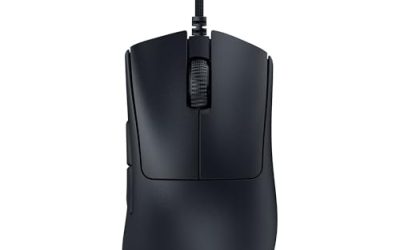
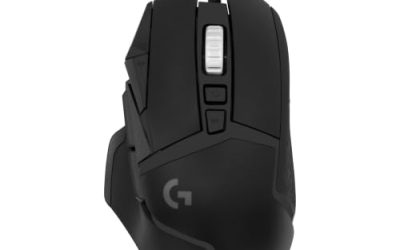
Minecraft asks different things of a mouse than a shooter does. You live on the scroll wheel and the hotbar, you hold buttons down to mine and place, you click in long repetitive bursts when bridging or fighting, and sessions run for hours. A wireless gaming mouse for Minecraft needs a precise, well-stepped wheel, side buttons worth binding, switches that stay consistent under rapid clicking, and battery life that survives a weekend of play. These four mice cover the main ways people play, from a light all-rounder to a button-heavy command centre.
One honest note before the picks: clicking technique is part of Minecraft culture, and some mice register rapid clicking styles more readily than others. Server rules vary and some servers restrict macros and modified click behaviour, so whatever you choose, play within the rules of the server you are on. The mice below are standard retail models with standard firmware; what they offer is good hardware, not an exploit.
As an Amazon Associate, we earn from qualifying purchases.
Top 3 picks at a glance


Quick Picks
| Product | Best for | Key point |
|---|---|---|
| Logitech G305 LIGHTSPEED (Black) | Most Minecraft players, especially younger players and laptop setups | 250-hour battery, simple shape, nothing to configure |
| Razer Orochi V2 (Black) | Players who travel or play on a laptop away from a desk | Under 60 g before its battery, Bluetooth plus 2.4 GHz, up to 950 hours in Bluetooth mode |
| Logitech G502 LIGHTSPEED | Survival and modded players who bind everything | 11 buttons and a free-spinning wheel for long hotbar and inventory work |
| Razer Basilisk V3 Pro (Black) | Players who want the best wheel and full customisation | Tilt wheel with free-spin mode, 11 programmable buttons, three connection modes |
How to Choose
The scroll wheel is a primary input, not a detail. In Minecraft the wheel cycles the hotbar constantly, and it is also clicked as a button. Look for distinct, tactile steps rather than a smooth free glide for hotbar work, or a wheel that can switch between stepped and free-spin modes if you also fly through long inventories and creative builds. A wheel with side tilt adds two more inputs you can bind to things like perspective toggle or screenshot.
Side buttons earn their keep. Two thumb buttons are the minimum worth having: common bindings are sprint, perspective, drop item or a push-to-talk key. Players in modded packs or on servers with menus often use far more, which is where the 11-button mice in this list come in. Decide honestly how many bindings you will actually maintain; unused buttons are just weight.
Click feel matters more than headline DPI. Minecraft runs happily at modest DPI settings, and every sensor here is far beyond what the game needs. What you feel is switch consistency during rapid clicking and long holds. Optical and quality mechanical switches both work; what you want is a mouse whose clicks register the same way on the first click of a session and the thousandth, and whose debounce behaviour in software is left at sensible defaults.
Battery strategy differs by mouse. One pick here runs for months on a single AA battery. Others use internal rechargeable cells that last days to weeks and charge over USB-C or micro-USB. Neither is better in the abstract: AA models never need a cable but add battery weight, rechargeable models are lighter and cheaper to run but can die mid-session if you ignore them. Match the mouse to your habits.
Weight and size for long sessions. Building sessions are long and mostly low-intensity, so comfort beats the last gram. Small hands and younger players suit the compact G305 and the smaller Orochi V2. Bigger hands and palm grips suit the G502 LIGHTSPEED and Basilisk V3 Pro, which are full-size ergonomic shells with room to rest on.
Best Options
Logitech G305 LIGHTSPEED (Black)

The G305 is the default Minecraft mouse for a reason. It is a compact, simple shape with six buttons, a well-stepped wheel, and a HERO sensor that is far more accurate than the game requires. Its party trick is endurance: up to 250 hours of play from a single AA battery, which in practice means months between battery changes, and the USB receiver stores inside the mouse for laptop bags and school desks.
At 99 g with its battery it is not light by esports standards, but for Minecraft’s pace it feels solid and controlled, and the shape suits smaller hands and every grip style. There is no Bluetooth and no RGB, and the clicks use mechanical switches that some rapid-click players find firmer than average. As a first gaming mouse or a family PC mouse that also does homework, it is the easiest recommendation in this guide.
Specs
- HERO optical sensor, 200 to 12,000 DPI; LIGHTSPEED 2.4 GHz wireless, 1 ms report rate; 6 programmable buttons; up to 250 hours on one AA battery (included); weight 99 g; compact symmetrical shape, about 117 x 62 x 38 mm; onboard memory for one profile; receiver storage inside the shell.
Best for: Most players, especially younger players, laptop users and anyone who hates charging things.
Watch out for: No Bluetooth, a firmer mechanical click feel, and the shape runs small for large hands.
Razer Orochi V2 (Black)
The Orochi V2 is built for the way a lot of Minecraft actually gets played: on a laptop, at a kitchen table, at a friend’s house. It weighs under 60 g before you fit a battery, takes either an AA or an AAA cell depending on how light you want it, and connects by HyperSpeed 2.4 GHz for gaming or Bluetooth for everything else. Battery life is the headline: up to 950 hours in Bluetooth mode and up to 425 hours on HyperSpeed with an AA, figures no rechargeable mouse approaches.
The sensor is Razer’s 5G optical rated to 18,000 DPI, the switches are second-generation mechanical units rated to 60 million clicks, and the shell is a small symmetrical shape that fingertip and claw players can flick around a hotbar build with very little effort. The compromises are size, it is genuinely small, and the lack of a rechargeable cell, which some players will see as a feature. For portable play it has no real rival in this list.
Specs
- Razer 5G optical sensor, up to 18,000 DPI; HyperSpeed 2.4 GHz and Bluetooth dual wireless; weight under 60 g excluding battery, runs on one AA or one AAA; up to 950 hours (Bluetooth, AA) or 425 hours (HyperSpeed, AA), maker figures; 2nd-gen Razer mechanical switches rated to 60 million clicks; 6 programmable buttons; compact symmetrical shape, about 108 x 63 x 38 mm.
Best for: Laptop and travel play, small hands, and anyone who wants to forget batteries exist.
Watch out for: The small shell cramps large palm grips, and disposable batteries are an ongoing cost if you play daily on HyperSpeed.
Logitech G502 LIGHTSPEED
If your Minecraft involves modpacks, server menus, voice chat and a dozen keybinds, the G502 LIGHTSPEED is the mouse that absorbs all of it. Eleven programmable buttons, including a sniper button and wheel tilt, cover hotbar slots, minimap controls and push-to-talk without touching the keyboard. The metal wheel switches between tactile steps for hotbar cycling and a free-spinning mode that flies through creative inventories and long crafting lists, which is the single most Minecraft-specific feature in this guide.
The HERO 25K sensor is beyond overkill for the game, battery runs up to 48 hours with lighting or 60 with it off, and the shell takes optional weights so you can tune the 114 g base up by as much as 16 g if you prefer a heavier, planted feel. It is also compatible with Logitech’s POWERPLAY charging pad. The size is the filter: this is a large right-handed mouse, and small hands will find both the shell and the button layout a stretch.
Specs
- HERO 25K optical sensor, 100 to 25,600 DPI; LIGHTSPEED 2.4 GHz wireless; 11 programmable buttons; dual-mode hyper-fast scroll wheel with tilt inputs; weight 114 g plus up to 16 g of optional weights; up to 48 hours of battery with default lighting, 60 hours with lighting off; large right-handed shape, about 132 x 75 x 40 mm; POWERPLAY wireless charging compatible.
Best for: Modded, server and creative players who bind many actions and live in inventories.
Watch out for: It is big and heavy for small hands, and the rechargeable battery needs a top-up every few days of heavy play.
Razer Basilisk V3 Pro (Black)

The Basilisk V3 Pro is the premium all-rounder here, and its wheel is the reason it belongs in a Minecraft guide. The HyperScroll tilt wheel offers tactile and free-spin modes, with a smart-reel setting that shifts into free-spin when you flick it hard and settles back into steps when you stop, which maps beautifully onto hotbar cycling plus long inventory scrolls. Thirteen-zone RGB is decoration, but the eleven programmable buttons and onboard profiles are not.
Underneath, the Focus Pro 30K sensor and Gen-3 optical switches deliver consistent clicks rated to 90 million, battery runs up to 90 hours on HyperSpeed or 100 on Bluetooth, and the mouse also works wired over USB-C and supports Qi wireless charging with a dock or puck sold separately. At 112 g in a 130 mm right-handed shell it is a full-size mouse for medium and large hands. It is the most expensive route in this list, but if Minecraft is your main game and you also play other genres, it covers everything without compromise.
Specs
- Razer Focus Pro 30K optical sensor, up to 30,000 DPI, 750 IPS; HyperSpeed 2.4 GHz, Bluetooth and wired USB-C connections; 11 programmable buttons; HyperScroll tilt wheel with tactile, free-spin and smart-reel modes; Razer Optical Switches Gen-3 rated to 90 million clicks; up to 90 hours (HyperSpeed) or 100 hours (Bluetooth) of battery; weight 112 g; right-handed shape, about 130 x 75 x 43 mm; Qi charging support.
Best for: Players who want the best scroll wheel in the category and one mouse for every game they own.
Watch out for: Premium pricing, a large shell that excludes small hands, and the charging dock and puck cost extra.
Which One Fits
Most players should buy the G305 LIGHTSPEED: it is simple, lasts for months on a battery and does everything Minecraft needs. Choose the Orochi V2 if you play on a laptop in more than one place or have small hands. Choose the G502 LIGHTSPEED if your play is modded or menu-heavy and you will genuinely use eleven buttons and the free-spinning wheel. Choose the Basilisk V3 Pro if you want the best wheel and switches here and one premium mouse for your whole library.
Common Mistakes
Buying a shooter mouse for a block game. Ultralight esports mice are excellent hardware, but Minecraft rewards wheels and buttons over grams. A 54 g mouse with a mediocre wheel is a worse Minecraft mouse than a 99 g mouse with a great one.
Binding everything, then forgetting it all. Begin with two side-button bindings you will use every session, sprint and perspective are the classics, and add more only when a real need appears.
Ignoring server rules on clicking. Some servers treat certain clicking methods and all macros as cheating, and enforcement can mean a ban. Use standard hardware settings, skip macro software tricks, and check your server’s rules before experimenting.
Letting a rechargeable mouse die mid-session. Internal-battery mice in this list last days, not months. Build a charging habit, or pick the AA models and stop thinking about it.
Setting DPI far too high. Minecraft menus and inventory work punish a twitchy cursor. Most players settle between 800 and 1600 DPI with default in-game sensitivity; if your hotbar aim feels wild, this is usually why.
FAQ
What DPI should I use for Minecraft?
Somewhere between 800 and 1600 DPI with the in-game mouse sensitivity near its default suits most players. Minecraft aiming is about controlled turns and precise block placement rather than flick shots, so stability beats speed. Adjust in small steps and give each change a few sessions.
Is a wireless mouse responsive enough for Minecraft PvP?
Yes. The 2.4 GHz connections in this list report every millisecond, the same as a wired mouse, and Minecraft’s tick-based gameplay is far less latency-sensitive than a competitive shooter. You will not lose a fight because of LIGHTSPEED or HyperSpeed wireless.
Which mouse here is best for small or young hands?
The Orochi V2 is the smallest and lightest, and the G305 is close behind with a simple, safe shape. Both avoid the stretched button layouts of the two large mice, which are the ones small hands struggle with.
Can I use these mice on a laptop without a receiver port?
The G305 and G502 LIGHTSPEED need their USB receivers, so a USB-C-only laptop needs an adapter. The Orochi V2 and Basilisk V3 Pro also offer Bluetooth, which pairs directly with most laptops and is fine for casual and survival play, though the 2.4 GHz mode is the better choice for PvP.
Final Verdict
For Minecraft, buy the wheel and the buttons first and the spec sheet second. The G305 LIGHTSPEED is the right answer for most players, the Orochi V2 owns portable play, the G502 LIGHTSPEED is the modded player’s command centre, and the Basilisk V3 Pro is the premium pick with the best scroll wheel of the four. Any of them will outlast the world you build with it.
Related guides
More from Amazon
Programs that pair well with the guide above. Offers and eligibility are set by Amazon and may change.
Free shipping on eligible items, Prime Video and more. Eligible new members can start with a free trial.
Start a Prime free trialAd-free music streaming. Eligible new subscribers can start with a free trial.
Try Music Unlimited freeA Prime membership for ages 18-24 with a trial period. Eligibility is set by Amazon.
See Prime for Young AdultsAudiobooks and podcasts to listen to on the go. Eligible new members can start with a free trial.
Try Audible freeAs an Amazon Associate we earn from qualifying purchases.