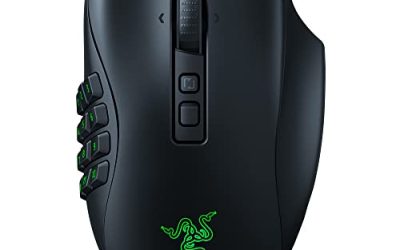
The best gaming mouse for World of Warcraft is the one that puts your most-used abilities within reach of your thumb. World of Warcraft fills the action bar with interrupts, cooldowns, utility spells, and targeting macros, and reaching all of them on the keyboard alone slows you down in raids and Mythic+ dungeons. A mouse built for MMO play moves a full row of abilities onto a thumb panel, so your keyboard hand can focus on movement while your thumb handles the rotation.
That does not mean every World of Warcraft player needs a twelve-button mouse. Some players bind most abilities to the keyboard and want a light, precise mouse for camera control and cursor work. Others run complex rotations and want every cooldown one thumb-press away. This guide explains how to choose between those approaches, what to check before you buy, and covers one dedicated MMO mouse in detail so you can see how the key features work together.
How to Choose the Best Gaming Mouse for World of Warcraft
1. Decide how many thumb buttons you need
Count the abilities you press constantly in combat: your main rotation, interrupts, defensive cooldowns, and movement tools. If that list runs past eight or ten abilities, a mouse with a twelve-button thumb grid earns its place, because it maps a full action bar to your thumb. If you only need a few extra binds, a mouse with five to nine buttons is easier to learn and less likely to cause mis-presses. More buttons are not automatically better. A grid you can navigate by touch after a week of practice beats a larger grid you keep looking down at.
2. Check the button layout and spacing
A thumb grid only helps if you can tell the buttons apart without looking. Buttons with distinct shapes, spacing, or a raised pattern are easier to find by touch during a busy fight. An adjustable side panel that slides forward or back to match your thumb length makes a real difference, since a grid set too far forward strains the thumb and a grid set too far back forces you to stretch. Before you buy, look at the layout closely: buttons in straight rows are easy to learn, while curved or staggered layouts suit some hands better than others.
3. Sensor quality for camera and cursor work
World of Warcraft asks less of a sensor than a fast shooter, but camera control still needs to feel smooth. A modern optical sensor with consistent tracking, no acceleration, and no jitter will keep camera turns and cursor movements predictable at any sensitivity. Maximum DPI matters little here, since most players run moderate sensitivity for camera work. What matters is that the sensor feels the same at the start of a long session as it does at the end, with no drift or skipping on your desk mat.
4. Weight and comfort for long sessions
Raids and long questing sessions can run for hours, so weight and shape matter as much as buttons. A lighter mouse reduces wrist fatigue during constant camera movement, while a heavier mouse can feel steadier for players who rest their palm fully on the body. MMO mice tend to be heavier than minimalist shooter mice because of the side panel, so check the listed weight before you buy. A shape that supports your grip style, palm, claw, or fingertip, will keep your hand relaxed through a full evening of play.
5. Wireless or wired
Wireless MMO mice free you from cable drag and keep the desk tidy, but they need charging or battery swaps. A wireless mouse with a long battery life and a fast 2.4 GHz receiver suits players who hate cables, while a wired mouse suits players who never want to think about power. Bluetooth adds flexibility for use with other devices, but a dedicated receiver usually gives the most consistent connection for gaming. If you choose wireless, check whether the mouse can charge while you keep playing, so a low battery never ends a session early.
6. Software profiles and onboard memory
World of Warcraft players often run different button layouts for different characters or specializations, so profile support matters. Configuration software lets you assign abilities, macros, and sensitivity steps to each button, and onboard memory stores those profiles on the mouse itself. Onboard memory is useful if you play on more than one computer, since your layout travels with the mouse. Check how many profiles the mouse stores and whether you can switch between them with a button on the mouse, without opening any software.
7. Build quality and the scroll wheel
The scroll wheel gets constant use in World of Warcraft, for zooming the camera and for bound abilities, so it should feel firm and precise, not loose or mushy. A wheel with distinct steps helps you count zoom levels and ability presses by feel. The main clicks should feel consistent across thousands of presses, and the side buttons should survive repeated thumb use without going soft. A mouse that feels solid on arrival and keeps that feel after months of daily play is worth more than one with extra features that wear out quickly.
Top Picks
1. Corsair Scimitar Elite Wireless MMO Gaming Mouse

View the Corsair Scimitar Elite Wireless on Amazon
The Corsair Scimitar Elite Wireless is a dedicated MMO mouse built around one idea: give your thumb a full action bar. Sixteen programmable buttons cover the main clicks, the scroll wheel, and a twelve-button side panel, so a whole row of abilities sits under your thumb. The patented Key Slider side panel adjusts to fit your hand, sliding the twelve-button grid forward or back so your thumb reaches every button without strain. That adjustment matters more than it sounds, because a grid that matches your thumb length is far easier to learn by touch.
The sensor reaches 26,000 DPI, and the mouse connects over SLIPSTREAM WIRELESS with sub-1 ms response and 2,000 Hz hyper-polling, which keeps camera movement and clicks responsive. Bluetooth and wired USB connections are also available, so the mouse works across devices and can charge while you play. Battery life runs up to 150 hours on a single charge, which covers many evenings of play before you need the cable. The mouse works with iCUE software for assigning abilities and macros, and it measures 4.69 by 2.89 inches with a listed item weight of 0.25 pounds.
This mouse fits players who run complex rotations in raids and Mythic+ content and want a full thumb grid with an adjustable fit. Its strongest points are the button count, the sliding side panel, and the long battery life. The main limitation is size and learning time: a twelve-button grid takes practice to navigate by touch, and players who bind most abilities to the keyboard may find the panel more than they need. It is also a right-handed design, so left-handed players should look for a symmetrical alternative.
- Sensor: Optical sensor, up to 26,000 DPI
- Connection: SLIPSTREAM WIRELESS with sub-1 ms response, 2,000 Hz hyper-polling, Bluetooth, and wired USB
- Buttons: 16 programmable buttons, including a 12-button Key Slider side panel
- Battery: Up to 150 hours on a single charge
- Software: iCUE compatible
- Size: 4.69 x 2.89 inches
- Weight: 0.25 pounds as listed
Comparison Table
| Mouse | Connection | Sensor | Buttons | Thumb Panel | Battery |
|---|---|---|---|---|---|
| Corsair Scimitar Elite Wireless | Wireless, Bluetooth, wired USB | Up to 26,000 DPI | 16 | 12-button Key Slider, adjustable | Up to 150 hours |
Use this table as a checklist when you compare any MMO mouse. The thumb panel decides how many abilities your thumb can reach, the sensor decides how camera control feels, and the connection and battery decide how the mouse fits your desk. A mouse that leads on buttons but feels wrong in your hand will lose to a simpler mouse that fits, so weigh comfort alongside the numbers.
Which One Is Right for You?
The Corsair Scimitar Elite Wireless suits a World of Warcraft player who wants a full thumb grid for raids, dungeons, and any content where abilities pile up faster than keyboard binds can cover them. It is the right pick if you play a specialization with a long rotation, manage interrupts and defensive cooldowns yourself, and are willing to spend a week learning the side panel by touch. The adjustable Key Slider helps the grid fit your thumb, and the long battery life means charging rarely interrupts play.
If you bind most of your abilities to the keyboard and mainly need a mouse for camera control, cursor work, and a few extra buttons, a lighter mouse with five to nine buttons may suit you better. It will feel faster in the hand, cost less effort to learn, and still cover interrupts and mounts on the side buttons. If you play left-handed, look for a symmetrical mouse instead, since this pick is built for right-handed use.
Either way, the decision starts with your action bar. Count the abilities you press in every fight, then choose the button count that covers them without forcing you to relearn your whole setup.
Frequently Asked Questions
Do I need a twelve-button mouse for World of Warcraft?
Not necessarily. A twelve-button thumb grid helps if you press many abilities in combat and want them on your thumb, but many players do fine with five to nine buttons and keyboard binds for the rest. Count the abilities you use constantly, then choose the button count that covers them. A grid you can navigate by touch is useful; a grid you keep mis-pressing is not.
Can I use an MMO mouse for other games?
Yes. The side buttons can be assigned to any command in other games, and the sensor and wireless connection work the same outside World of Warcraft. In fast shooters, though, the extra weight and wide body of an MMO mouse can feel slower than a light minimalist mouse, so some players keep a second mouse for those games.
How long does it take to learn a thumb grid?
Most players need about a week of regular play to find the buttons by touch without looking. Start by binding your most-used abilities to the easiest buttons, such as the top row and the middle column, then add more binds as the layout becomes familiar. An adjustable side panel that matches your thumb length shortens the learning time.
Is wireless good enough for World of Warcraft?
Yes. Modern wireless gaming mice with a dedicated 2.4 GHz receiver respond quickly enough for MMO play, where timing matters but the pace is slower than a competitive shooter. A wired connection is still the simplest option if you never want to think about batteries, while a wireless mouse with long battery life and charging while playing covers the same ground without a cable.
Disclosure: As an Amazon Associate, we may earn from qualifying purchases.
Related guides
More from Amazon
Programs that pair well with the guide above. Offers and eligibility are set by Amazon and may change.
Free shipping on eligible items, Prime Video and more. Eligible new members can start with a free trial.
Start a Prime free trialAd-free music streaming. Eligible new subscribers can start with a free trial.
Try Music Unlimited freeA Prime membership for ages 18-24 with a trial period. Eligibility is set by Amazon.
See Prime for Young AdultsAudiobooks and podcasts to listen to on the go. Eligible new members can start with a free trial.
Try Audible freeAs an Amazon Associate we earn from qualifying purchases.