Our Short List of 3

- Best for: Builders who want a simple, discreet anti-sag pillar for a standard horizontal build.
- Size: L, 74-120mm height range
- Type: GPU stand / sag holder bracket
- Brand: nkomax
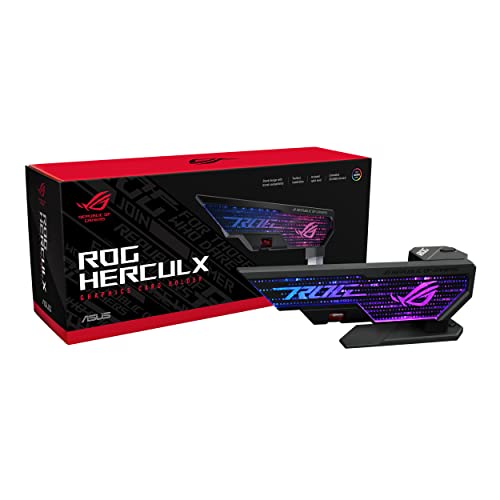
- Best for: Windowed builds where a level check and sturdy zinc alloy construction matter.
- Construction: Solid zinc alloy
- Installation: Toolless, with included spirit level
- Height: Adjustable
- Compatibility: Wide compatibility

- Best for: Showcase builds that want the support itself to be a lit visual feature.
- Model: MCA-U000R-AGSBTG-00
- Materials: Aluminium stand, ARGB tempered glass
- Design: Infinity mirror, dual-axis mode vertical or horizontal
- Support positioning: Up to RTX 4090 support
All 4 Picks at a Glance
| Product | Specs | Action |
|---|---|---|
| Graphics Card GPU Brace Support, Video Card Sag Holder Bracket, GPU Stand (L, 74-120mm) |
| Check price on Amazon |
| ASUS ROG Herculx GPU Anti-Sag Holder |
| Check price on Amazon |
| Cooler Master Atlas ARGB GPU Support Bracket |
| Check price on Amazon |
 Cooler Master Vertical GPU Holder Kit V3 |
| Check price on Amazon |
A Radeon RX 9070 XT is a long, heavy graphics card, so the accessories around it matter more than most buyers expect. The real decision is not decoration: it is whether the card stays level in its slot, whether it mounts horizontally or vertically, and whether your case floor, fans, and cables leave room for the support you choose. A card left drooping puts constant strain on the slot, while the wrong accessory simply will not fit.
This guide is for RX 9070 XT owners and builders finishing a new system around the card. It covers simple anti-sag pillars, a showcase support, and a full vertical mounting kit. Every pick was chosen from the names and specifications printed on its Amazon product page, with universal fit covering this card, so you can match each option against your own case measurements before buying anything.
Our Top Picks
Top 3 picks at a glance
Quick Picks
As an Amazon Associate we earn from qualifying purchases.
| Product | Best for | Key spec from title |
|---|---|---|
| Graphics Card GPU Brace Support, Video Card Sag Holder Bracket, GPU Stand (L, 74-120mm) | A simple, low-profile anti-sag fix | L size, 74-120mm height range |
| ASUS ROG Herculx GPU Anti-Sag Holder | Toolless setup with a leveling check | Solid zinc alloy, included spirit level |
| Cooler Master Atlas ARGB GPU Support Bracket | Showcase builds with lighting | Infinity mirror design, dual-axis mode |
| Cooler Master Vertical GPU Holder Kit V3 | Mounting the card vertically | 165 mm PCIe 4.0 riser cable included |
How to Choose
Support Style and Mounting Direction
Start by deciding how the card will sit. A horizontally mounted RX 9070 XT needs support under its far end, which a floor-standing pillar or a standing bracket provides. A vertically mounted card needs a completely different accessory: a holder kit that relocates the card and connects it through a riser cable. Buying a pillar for a vertical build, or a vertical kit for a standard layout, wastes the purchase entirely. Check your case layout, expansion slot arrangement, and display cable routing first, then match the accessory type to that single mounting direction.
Height Range and Case Clearance
Every support lists a height range, and that range has to match the gap between your case floor or power supply shroud and the underside of the installed card. Measure that gap before ordering, accounting for bottom intake fans that raise the effective floor or block a pillar altogether. A large size pillar covering 74 to 120 millimetres suits many mid-tower layouts, while taller showcase stands reach much higher. If the support cannot extend far enough, it does nothing; if it extends too far, it can push the card upward and strain the slot instead of relieving it.
Base Grip and Contact Point
How a support stays in place matters as much as how tall it gets. Magnetic bases grip a steel shroud quickly and reposition easily, but they will not hold on aluminium, glass, or a fan-covered floor. Non-slip pads and sheets add friction where magnets cannot work. At the top, the contact point should meet a solid part of the card shroud rather than a fan blade, a cable, or a fragile fin edge. Look for an adjustable or sliding contact so you can place support near the card end, where sag is greatest, instead of accepting a fixed position.
Extra Features Versus Simple Function
Some supports add lighting, mirrors, and spirit levels, while others are plain metal pillars that disappear inside the case. Decide honestly whether you will use the extras. A spirit level genuinely helps confirm the card sits flat, and addressable lighting can complete a windowed showcase build, but neither changes how much weight the support carries. Materials matter more: solid zinc alloy and thick steel resist flexing under a heavy card over time. If your case has no window, a simple pillar usually serves better than paying for effects nobody will see.
The 4 Best Options
Graphics Card GPU Brace Support, Video Card Sag Holder Bracket, GPU Stand (L, 74-120mm)
- Best for: Builders who want a simple, discreet anti-sag pillar for a standard horizontal build.
- Size: L, 74-120mm height range
- Type: GPU stand / sag holder bracket
- Brand: nkomax
Builders who want a simple, discreet anti-sag pillar for a standard horizontal build.
Measure the gap under your card first; the 74mm minimum means very low gaps need a smaller size instead.
This is the straightforward fix for most RX 9070 XT builds: a single adjustable pillar that stands on the case floor or shroud and props up the far end of the card. Its large size covers a 74 to 120 millimetre height range, which fits the gap found in many mid-tower cases without adapters or modification. There is no lighting, no software, and nothing to configure, so it suits builders who want the sag gone and the accessory forgotten. If your case floor is partly covered by fans, its compact footprint is easier to place than a wide showcase stand.
ASUS ROG Herculx GPU Anti-Sag Holder
- Best for: Windowed builds where a level check and sturdy zinc alloy construction matter.
- Construction: Solid zinc alloy
- Installation: Toolless, with included spirit level
- Height: Adjustable
- Compatibility: Wide compatibility
Windowed builds where a level check and sturdy zinc alloy construction matter.
Confirm your motherboard lighting setup supports Aura Sync if you want the illumination to match the rest of the system.
The Herculx takes the same pillar idea and builds it from solid zinc alloy, with toolless installation and an included spirit level so you can confirm the card actually sits flat rather than guessing by eye. Its adjustable height and wide compatibility positioning make it a fit for a heavy card like the RX 9070 XT, and Aura Sync RGB lets it join the lighting scheme of a windowed build. It suits owners who adjust or move their systems and want setup to stay quick, and anyone who prefers a sturdier metal body over a basic stand.
Cooler Master Atlas ARGB GPU Support Bracket
- Best for: Showcase builds that want the support itself to be a lit visual feature.
- Model: MCA-U000R-AGSBTG-00
- Materials: Aluminium stand, ARGB tempered glass
- Design: Infinity mirror, dual-axis mode vertical or horizontal
- Support positioning: Up to RTX 4090 support
Showcase builds that want the support itself to be a lit visual feature.
The magnetic base needs a suitable metal surface; check your shroud material and available floor space before ordering.
The Atlas treats GPU support as a showcase piece. An aluminium stand with a magnetic base carries an ARGB tempered glass column with an infinity mirror design, so the bracket becomes part of the build presentation while it holds the card level. Its dual-axis design works in vertical or horizontal mode, which gives it a wider role than a fixed pillar, and Cooler Master positions it for support up to RTX 4090 class cards, a weight class that comfortably covers an RX 9070 XT. Choose it when the interior of the case is on display and a plain pillar would look unfinished.
Cooler Master Vertical GPU Holder Kit V3
- Best for: Builders who want a vertical display mount with the riser cable included in the kit.
- Model: MCA-U000R-KFVK03
- Material: Thick SGCC steel
- Case support: E-ATX, ATX, Micro ATX
- Riser cable: PCIe 4.0 x16, 165 mm, included
Builders who want a vertical display mount with the riser cable included in the kit.
Vertical mounting uses your expansion slot area and limits CPU cooler height in some cases; confirm case and cooler clearance first.
This kit changes how the card mounts rather than just propping it up. Built from thick SGCC steel for E-ATX, ATX, and mATX cases, it holds the RX 9070 XT vertically and connects it with the included 165 millimetre PCIe 4.0 riser cable. The modular bracket adjusts in two directions, up to 65 millimetres toward the front panel and up to 30 millimetres toward the side panel, and it supports graphics cards up to three slots wide of any length. It suits builders with a windowed case who want the card face on display and the slot strain of a heavy horizontal card removed entirely.
Which One Fits Your Situation
Your Card Sags in a Standard Mid-Tower
Pick the nkomax GPU brace in the large size. Its 74 to 120 millimetre range matches the shroud-to-card gap in many mid-towers, the footprint is small enough to work around cables, and there is nothing to configure afterward. Measure your gap first, because a pillar only helps when its range actually covers the distance in your specific case and fan layout.
You Want Proof the Card Sits Level
Choose the ASUS ROG Herculx. The included spirit level turns leveling from guesswork into a quick visual check, the zinc alloy body feels suited to a heavy card, and toolless adjustment makes small corrections easy after the system is assembled. It also adds Aura Sync lighting for owners whose windowed builds already use that ecosystem.
Your Build Is a Windowed Showcase
The Cooler Master Atlas fits here. Its infinity mirror tempered glass column and addressable lighting make the support part of the presentation, and the dual-axis design covers both horizontal and vertical card orientations. Just confirm the magnetic base has a proper metal surface to grip, since showcase cases sometimes use glass or aluminium floors instead.
You Want the Card Mounted Vertically
Take the Cooler Master Vertical GPU Holder Kit V3. It replaces propping with relocation: the steel bracket holds the card upright, the included PCIe 4.0 riser cable makes the connection, and two-direction adjustment helps with display cable access. Check that your case has the slot space and that a vertical card will not crowd your CPU cooler.
Common Mistakes
- Buying a support before measuring the gap between the case floor or shroud and the underside of the installed card.
- Placing a pillar under a fan, a cable, or the middle of the card instead of near the sagging far end.
- Assuming a magnetic base will grip any case, when aluminium, glass, and fan-covered floors give it nothing to hold.
- Choosing a vertical mount kit without checking expansion slot space, display cable access, and CPU cooler clearance.
- Tightening or extending a support until it pushes the card upward, trading slot sag for slot strain in the other direction.
Frequently Asked Questions
Does a Radeon RX 9070 XT really need a support bracket?
Many board partner versions are long, heavy, multi-slot cards, and that weight hangs from the PCIe slot and the rear bracket. Over time an unsupported card can visibly droop at its far end. A correctly sized support removes that lever effect, so for most tower builds with a horizontal card, a simple pillar is a sensible precaution rather than decoration.
Will these accessories fit any RX 9070 XT model?
Supports and holders here use universal fit rather than a model-specific mount, so they work by height range, footprint, and contact position instead of by brand. That means the accessory generally covers different RX 9070 XT variants, but your case decides the final fit. Always compare the listed height range with your measured gap, and check floor space, fan positions, and shroud material before ordering.
Does a riser cable in a vertical kit affect the card connection?
The Cooler Master kit includes a PCIe 4.0 x16 riser cable of 165 millimetres, and the RX 9070 XT connects through that link when mounted vertically. Use the cable supplied with the kit, route it without sharp folds, and seat both ends fully. If a vertically mounted system fails to display, reseating the riser at the motherboard and card ends is the first check to make.
Can I use a support bracket with bottom intake fans fitted?
Often yes, but placement gets tighter. A pillar needs a stable patch of floor or shroud, and a fan frame is not that surface. Look for a gap between fans, a free section of shroud, or consider a stand with a smaller footprint. If every position is covered, a vertical mount kit or a different support style may fit your layout better than forcing a pillar in.
Related guides
More from Amazon
Programs that pair well with the guide above. Offers and eligibility are set by Amazon and may change.
Free shipping on eligible items, Prime Video and more. Eligible new members can start with a free trial.
Start a Prime free trialAd-free music streaming. Eligible new subscribers can start with a free trial.
Try Music Unlimited freeA Prime membership for ages 18-24 with a trial period. Eligibility is set by Amazon.
See Prime for Young AdultsAudiobooks and podcasts to listen to on the go. Eligible new members can start with a free trial.
Try Audible freeAs an Amazon Associate we earn from qualifying purchases.