Our Short List of 3


All 3 Picks at a Glance
| Product | Specs | Action |
|---|---|---|
| ASUS Prime GeForce RTX 5070 Ti 16GB: The Balanced Default for Editing Desks | Check price on Amazon | |
| MSI GeForce RTX 5060 Ti 16G Ventus 2X OC Plus: 16GB Without the Flagship Tier | Check price on Amazon | |
 ASUS Prime GeForce RTX 5080 16GB: The Step Up for Heavy Timelines | Check price on Amazon |
As an Amazon Associate we earn from qualifying purchases.
A graphics card for editing is judged by different evidence than a graphics card for gaming. Frame rates do not matter here. What matters is whether a 4K timeline scrubs without dropping to half resolution, whether an export finishes before a client call rather than during it, and whether the card can decode the footage your camera actually records — including the 10-bit 4:2:2 H.265 files that many mirrorless cameras produce and many older cards cannot decode in hardware at all.
Every pick in this guide is a standard, creator-sensible version of its GPU: plain black reference-style coolers from the Prime, Ventus, Titan and Swift lines rather than design editions or showcase models. Editing performance comes from the chip, the memory and the media engines, and those are identical whether the shroud is plain or illuminated. The five cards below split into a balanced default, a value 16GB option, a flagship step-up, a budget media-engine specialist from Intel, and one AMD card for editors whose software favours it.
The short version: the ASUS Prime GeForce RTX 5070 Ti 16GB is the balanced default for most editing desks, pairing 16GB of fast memory with NVIDIA’s current encode and decode hardware. The MSI GeForce RTX 5060 Ti 16G Ventus 2X OC Plus keeps the same 16GB capacity and the same Blackwell media features in a smaller, lighter card. The ASUS Prime GeForce RTX 5080 is the step up for heavy timelines and fast exports, the Sparkle Intel Arc B580 Titan OC is the budget route into hardware AV1 and strong codec decode, and the XFX Swift Radeon RX 9070 XT serves DaVinci Resolve editors who want 16GB on the AMD side.
Our Top Picks
Top 3 picks at a glance
How to Choose a Graphics Card for Editing
VRAM is the first specification, not the last
Video editing loads footage, effects and frames into video memory, and when a project outgrows the card’s memory, the software falls back to slower paths or forces lower-resolution playback. For 1080p timelines with modest effects, 12GB is workable. For 4K timelines — the normal case now — 16GB is the sensible floor, because a 4K timeline with noise reduction, a colour grade and a title layer holds far more in memory than the raw footage figures suggest. Editors working in 6K or 8K, or stacking GPU effects heavily in DaVinci Resolve, should treat 16GB as a minimum rather than a comfort zone.
Photo editing is lighter on memory but not indifferent to it. Lightroom and Photoshop GPU acceleration uses the card for previews, AI masking and denoise, and large panoramas or high-megapixel files benefit from the same headroom. A card bought for video will cover photo work easily; the reverse is not always true.
CUDA decides the NVIDIA question, and your software decides CUDA
Adobe Premiere Pro’s Mercury Playback Engine and a long list of its effects are built around NVIDIA CUDA, and many third-party plugins assume it. DaVinci Resolve is more even-handed: it uses the GPU heavily for colour, effects and noise reduction, and runs well on AMD and Intel hardware as well as NVIDIA, though its most demanding tools still reward raw compute and memory bandwidth. The practical rule is simple. If Premiere Pro is the centre of the workflow, an NVIDIA card is the low-risk choice. If Resolve is the centre, all three brands are in play and the decision can be made on memory and media engines.
Encode and decode hardware is where generations separate
Modern editing is codec work. NVIDIA’s NVENC encoder accelerates H.264 and H.265 exports, and the Blackwell generation in the RTX 50 series adds hardware decoding for 4:2:2 H.264 and H.265 — the chroma format many cameras record internally and earlier generations had to decode on the CPU, which is a common hidden cause of choppy timelines. The RTX 5080 carries two NVENC encoders where the 5070 Ti and 5060 Ti carry one, which matters for fast-turnaround exports and for editors who export while they keep cutting.
Intel’s Arc cards take a different route to the same desk: their Xe media engines handle AV1, H.265 and VP9 encode and decode in hardware, and AV1 is increasingly the delivery format for online video. AMD’s RDNA 4 cards also encode AV1 and are strong in Resolve, but they offer no CUDA, which is the dividing line for Adobe-heavy workflows.
Check the boring details before ordering
Card length and slot width decide whether the card fits the case: the picks here run from compact dual-fan designs to a long triple-fan card that needs a roomy mid-tower. Power supply requirements range from modest to a firm 850W-class recommendation at the top end, and connector types differ — some cards use standard 8-pin PCIe power, others the newer 12V-2×6 connector with an adapter in the box. Finally, use the Studio driver branch on NVIDIA cards for editing work; it is the branch validated against creative applications.
The Picks at a Glance
| Pick | Memory | Platform | Encoders / media | Best for |
|---|---|---|---|---|
| ASUS Prime GeForce RTX 5070 Ti 16GB | 16GB GDDR7 | NVIDIA CUDA | 1x NVENC, 4:2:2 decode, AV1 | Most editing desks, 4K Premiere and Resolve |
| MSI GeForce RTX 5060 Ti 16G Ventus 2X OC Plus | 16GB GDDR7 | NVIDIA CUDA | 1x NVENC, 4:2:2 decode, AV1 | 16GB value, compact builds, 4K timelines |
| ASUS Prime GeForce RTX 5080 16GB | 16GB GDDR7 | NVIDIA CUDA | 2x NVENC, 4:2:2 decode, AV1 | Heavy timelines, fast exports, 6K work |
| Sparkle Intel Arc B580 Titan OC | 12GB GDDR6 | Intel Xe | Dual media engines, AV1 encode/decode | Budget editing, AV1 delivery, codec decode |
| XFX Swift Radeon RX 9070 XT | 16GB GDDR6 | AMD RDNA 4 | AV1 encode, strong Resolve compute | Resolve editors wanting 16GB on AMD |
ASUS Prime GeForce RTX 5070 Ti 16GB: The Balanced Default for Editing Desks
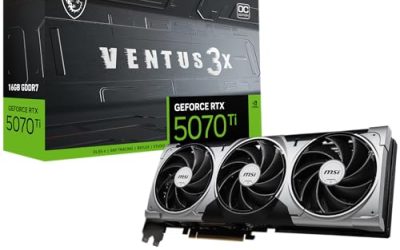
The Prime RTX 5070 Ti pairs 16GB of GDDR7 memory on a 256-bit bus — 896 GB/s of bandwidth — with 8,960 CUDA cores. For editing, that combination is the current sweet spot: enough memory for layered 4K timelines, enough CUDA compute for Premiere Pro effects and Resolve grades, and the full Blackwell media feature set, including hardware decode of 4:2:2 H.264 and H.265 footage and AV1 encode and decode. Editors whose cameras record 10-bit 4:2:2 internally will feel that decode support in every scrub of the timeline.
The Prime card itself is the sensible container for the chip: a 2.5-slot design with three Axial-tech fans, a dual BIOS switch, HDMI 2.1b and DisplayPort 2.1 outputs, and a plain black shroud with no lighting programme to manage. It is rated at 300W, so a good 750W-class power supply is the realistic pairing. ASUS lists the Prime line as SFF-ready, which makes this one of the easier 5070 Ti cards to fit into a compact editing workstation.
Choose the Prime RTX 5070 Ti if the workflow is 4K-first, split between Premiere Pro and Resolve, with exports that need to be quick but not extreme. Step down to the 5060 Ti below only if the budget is firm; step up to the 5080 if timelines regularly run to 6K, heavy noise reduction, or export-while-you-edit working.
MSI GeForce RTX 5060 Ti 16G Ventus 2X OC Plus: 16GB Without the Flagship Tier
The important fact about this card is the memory figure in its name: this is the 16GB version of the RTX 5060 Ti, not the 8GB version that shares the same GPU name. Its 16GB of GDDR7 sits on a narrower 128-bit bus, and it carries 4,608 CUDA cores — roughly half the 5070 Ti’s compute — but it keeps the same Blackwell media hardware: one NVENC encoder, AV1 support, and hardware 4:2:2 decode. For timeline smoothness, which is governed more by decode and memory than by raw compute, that makes it a far better editing card than its gaming reputation suggests.
The Ventus 2X OC Plus is a compact dual-fan card with three DisplayPort 2.1b outputs and one HDMI 2.1b, a metal backplate, and a modest 180W power draw that suits smaller power supplies and quieter cases. It is the natural fit for a second editing machine, a photo-first desk that also cuts 4K video, or a compact build where the larger cards on this page will not fit.
Choose it if the projects are 4K with moderate effects stacks and the budget or the case rules out the tier above. Be honest about its ceiling: heavy Resolve noise reduction, large Fusion compositions and 6K timelines will expose the narrower memory bus and smaller core count, and no driver setting changes that.
ASUS Prime GeForce RTX 5080 16GB: The Step Up for Heavy Timelines
The RTX 5080 keeps the same 16GB memory capacity as the 5070 Ti but feeds it faster and surrounds it with substantially more compute: 16GB of GDDR7 at 30 Gbps on a 256-bit bus for 960 GB/s, and 10,752 CUDA cores. The editing-specific upgrade is at the media block: two NVENC encoders instead of one, which shortens H.264 and H.265 exports and suits editors who render one sequence while cutting the next. The 4:2:2 hardware decode and AV1 support carry over from the rest of the Blackwell line.
ASUS’s Prime version runs a vapour chamber cooler in a 2.5-slot body with a listed boost clock of 2.62 GHz, three DisplayPort outputs and HDMI, in the same plain black Prime styling as the 5070 Ti above. The cost of the step up is power and supporting hardware: the card is rated at 360W and realistically wants an 850W-class power supply, and it deserves a case with genuine airflow rather than a sealed front panel.
Choose the Prime RTX 5080 if editing is the machine’s main job and time is billable: multicam 4K, 6K camera originals, aggressive noise reduction, or daily export deadlines. If the workload is single-camera 4K with a normal grade, the 5070 Ti delivers the same memory capacity and media features, and the difference is better spent on storage or system memory.
Sparkle Intel Arc B580 Titan OC: The Budget Media-Engine Pick
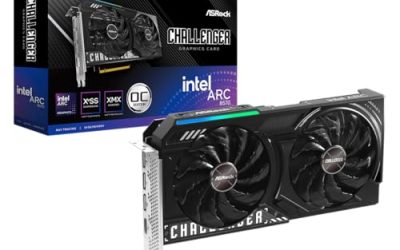
The Arc B580 is in this guide for its media engines rather than its gaming pace. Intel’s Battlemage design gives the card 12GB of GDDR6 on a 192-bit bus, 2,560 shader cores across 20 Xe cores, and dual Xe media engines with hardware encode and decode for AV1, H.265 and VP9. For an editor whose bottleneck is codec handling — scrubbing H.265 camera files, producing AV1 deliverables, transcoding batches — that is a disproportionately strong specification at the budget end, and it is why this card earns a place beside 16GB models with far more compute.
Sparkle’s Titan OC version adds a factory overclock to a 2,760 MHz boost clock, the Torn Cooling 2.0 dual-fan cooler, a metal backplate, and a 190W power rating that keeps power supply requirements modest. It connects over PCIe 4.0 x8, so it suits recent systems best; very old platforms without Resizable BAR support will not get its full performance.
The limits need stating plainly. There is no CUDA, so Premiere Pro leans on less mature acceleration paths, and Resolve performance, while usable, trails the NVIDIA picks at the same desk. Driver maturity for creative applications has improved steadily but remains the youngest of the three platforms. Choose the B580 if the budget is the binding constraint, the work is codec-heavy, or it is a dedicated ingest and export station — and choose an NVIDIA card instead if Premiere Pro stability is the first priority.
XFX Swift Radeon RX 9070 XT: 16GB on the AMD Side for Resolve Editors
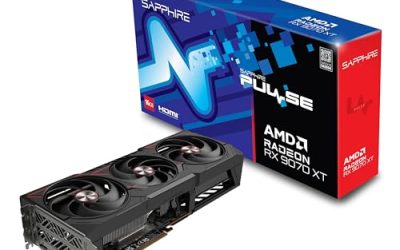
The RX 9070 XT is AMD’s RDNA 4 flagship tier: 16GB of GDDR6 on a 256-bit bus for 640 GB/s, 64 compute units with 4,096 stream processors, boost clocks listed up to 2,970 MHz, and hardware AV1 encode. In DaVinci Resolve, where the GPU carries colour processing, effects and noise reduction through OpenCL-class compute rather than CUDA, that specification translates into genuinely strong timeline and grading performance, and the 16GB capacity suits 4K work with headroom to spare.
XFX’s Swift Triple Fan version is the plain, standard cooler in the range: three fans, a black shroud, one HDMI and three DisplayPort outputs, and a 304W board power that calls for a good 750W-class supply and a case that can take a long card. Confirm the length against your case before ordering; triple-fan Swift cards are among the longer designs in their class.
The deciding factor is software, not hardware. Premiere Pro’s CUDA-centred acceleration means this card cannot match the NVIDIA picks in an Adobe workflow, and some plugins simply will not use it fully. In a Resolve-centred studio, that objection disappears. Choose the Swift RX 9070 XT if Resolve is the main application and you want 16GB and flagship-tier AMD compute in a standard, non-showcase card.
Which Card Fits Which Editor
For a Premiere Pro desk cutting 4K, start with the Prime RTX 5070 Ti and only move if a specific pressure appears: budget or case size points down to the Ventus 5060 Ti 16GB, while export volume, multicam work or 6K originals point up to the Prime RTX 5080. For a Resolve desk, the same 5070 Ti is the safe default, the XFX Swift RX 9070 XT is the AMD alternative at the same memory capacity, and the Sparkle Arc B580 is the budget or second-station option whose media engines punch above its tier.
Two checks apply to every pick. First, match the card to the footage, not the marketing: if your camera records 4:2:2 H.265, the Blackwell cards’ hardware decode is worth more than a small difference in core counts. Second, budget the supporting hardware honestly — power supply capacity, case length and a fast scratch drive all decide whether a strong card performs like one.
Frequently Asked Questions
How much VRAM do I need for 4K video editing?
Treat 16GB as the sensible floor for 4K timelines with effects and grading. 12GB, like the Arc B580 in this guide, can handle 4K work with lighter effects stacks and is comfortable at 1080p and 1440p, but heavily layered 4K projects will push against it.
Is an NVIDIA card required for Premiere Pro?
Not required, but strongly favoured. Premiere Pro’s Mercury Playback Engine and many effects and plugins are built around CUDA, so NVIDIA cards take the smoothest path. Resolve is the more brand-neutral application and runs well on the AMD and Intel picks here.
What does hardware 4:2:2 decode actually change?
Many cameras record 10-bit 4:2:2 H.264 or H.265 internally. Cards without hardware decode for that format hand the work to the CPU, and timelines stutter even on strong processors. The Blackwell-generation NVIDIA cards in this guide decode it in hardware, which is one of the most noticeable day-to-day upgrades an editor can make.
Can these cards handle photo editing as well as video?
Yes. Photoshop and Lightroom use the GPU for previews, masking, denoise and other accelerated tasks, and every card here has more than enough capacity for photo work, including high-megapixel files and large panoramas.
Should I install gaming or studio drivers?
On NVIDIA cards, use the Studio driver branch for an editing machine. It is the branch tested against creative applications and updated for them, rather than for day-one game releases.
Disclosure
Disclosure: This article contains affiliate links. If you buy through those links, a commission may be earned at no additional cost to you. Product information was taken from the listings and manufacturer details available at the time of writing, and specifications should be confirmed on the live listing before purchase.
Related guides
More from Amazon
Programs that pair well with the guide above. Offers and eligibility are set by Amazon and may change.
Free shipping on eligible items, Prime Video and more. Eligible new members can start with a free trial.
Start a Prime free trialAd-free music streaming. Eligible new subscribers can start with a free trial.
Try Music Unlimited freeA Prime membership for ages 18-24 with a trial period. Eligibility is set by Amazon.
See Prime for Young AdultsAudiobooks and podcasts to listen to on the go. Eligible new members can start with a free trial.
Try Audible freeAs an Amazon Associate we earn from qualifying purchases.