Controllers multiply quietly. A second pad for co-op, a pro controller for ranked sessions, a headset that never quite fits on the TV stand, and suddenly the space around the console is a tangle of plastic and cables. A dedicated gaming storage cabinet fixes that by giving every controller, game case and headset a fixed shelf, hook or holder in one piece of furniture, instead of scattering them across the room.
The four options below cover the main shapes that storage takes: a full-height media cabinet for serious libraries, a tall metal tower with adjustable shelves, a compact tiered stand with a drawer for small accessories, and a slot-style tower with dedicated controller holders. Each one is sold for gaming or media storage, and each one gives controllers a defined place to live between sessions.
Our Top Picks

Top 3 picks at a glance

Quick Picks
As an Amazon Associate we earn from qualifying purchases.
| Product | Best for | Key spec from title |
|---|---|---|
| Atlantic Elite XL Media Storage Cabinet | Large game libraries | 9 fixed shelves |
| YILFANA 55″ Media Storage Cabinet | Adjustable metal shelving | 6 adjustable shelves |
| Hongtamoya 4-Tier AV Media Stand | Consoles plus small accessories | 4 tiers with drawer |
| Nargos Video Game Storage Tower | Games with controller holders | 46 cases with controller holders |
How to Choose
Shelf Layout Versus Fixed Slots
The first decision is whether your storage should be open shelves or fixed slots. Open shelves, like the ones on the two cabinets in this guide, accept anything that fits the shelf height: controllers lying flat, headset stands, boxed collector editions, even a console itself. Fixed slots, like the Nargos tower, hold each game case upright in its own divider, which keeps a disc library tidy and browsable but does nothing for oddly shaped items. If controllers are your main problem, shelves and dedicated holders matter more than disc slots, so weigh the layout against what you actually own rather than the headline capacity.
Controller Storage: Holders, Hooks or Shelves
Controllers reach a cabinet in three ways. Dedicated holders and side hooks keep pads upright, visible and off flat surfaces, and they are the fastest option to grab from mid-session. Open shelves are more flexible — a shelf can hold two controllers today and a headset tomorrow — but pads can slide and stack untidily. A drawer, like the one on the Hongtamoya stand, suits the small loose items that surround controllers: charging cables, thumbstick caps, batteries and dongles. Think about which of those three jobs you need done, because few units do all of them well.
Footprint and Height
Gaming storage ranges from a desktop tower under knee height to a cabinet over 70 inches tall, and the wrong footprint wastes the space you were trying to save. Measure the gap beside your TV stand or desk before ordering, including depth: media cabinets are often shallow, around 9 inches, because they are designed for disc cases, which is fine for controllers laid flat but tight for a console. Tall units also need a level floor and, where the maker supplies one, a wall anchor kit, because a top-heavy tower of game cases can tip when a controller is yanked from the top shelf.
Charging Pass-Throughs and Cable Routing
A storage cabinet becomes far more useful when controllers can charge where they live. Few furniture units include electronics, so charging usually means routing a USB cable from a nearby powered hub or console into the cabinet. Open-backed designs and tiered stands make that easy; enclosed cabinets with solid backs need a gap at the rear or a shelf left partly empty for the cable run. Check the back panel design before buying, and plan the cable path so doors close and shelves sit flush with controllers plugged in, not just placed.
The 4 Best Options
Atlantic Elite XL Media Storage Cabinet
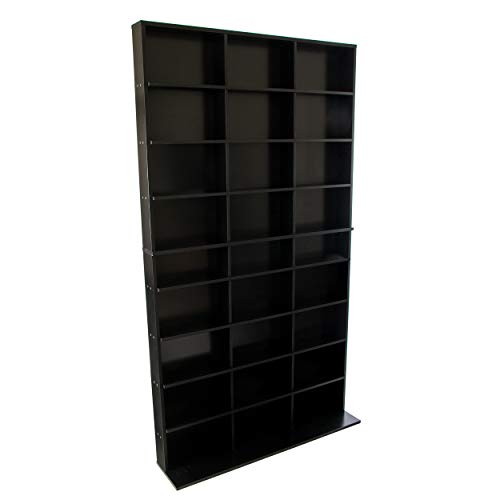
The Elite XL is the library option: a full-height cabinet with nine fixed shelves that Atlantic lists as holding up to 624 PS4 game cases, with the same shelves taking Blu-ray discs, DVDs and CDs. For controller storage, the open shelves are the point — each shelf is wide enough to line up several controllers, a headset stand or a charging hub alongside the game cases, and the cabinet format keeps the whole collection behind one tidy front profile. Atlantic includes a wall anchor kit, which matters for a unit this tall. It is furniture first and a gaming accessory second, so plan the floor space properly.
Specs
- Capacity: up to 624 PS4 game cases, as listed (also listed for 630 Blu-ray discs, 531 DVDs or 837 CDs)
- Shelves: 9 fixed shelves
- Dimensions: 40 x 9.14 x 71.15 in (W x D x H)
- Model: 38408117 (PN38408117)
- Includes a wall anchor kit, as listed
Best for: Players with a large physical game library who want controllers, headsets and cases in one full-height cabinet.
Watch out for: The shelves are fixed, not adjustable, and the cabinet is only about 9 inches deep, so check shelf spacing against your tallest items and lay controllers flat rather than standing consoles inside.
YILFANA 55″ Media Storage Cabinet
The YILFANA cabinet takes the opposite approach to the Elite XL: a metal frame with six adjustable shelves, so shelf height follows whatever you store instead of the other way round. The listing pitches it directly at gamers as a dedicated spot for game discs, controllers and accessories, and the adjustable layout is what makes that work — drop one shelf low for game cases, raise another for controllers on stands or a headset. At 55 inches tall it is a tower rather than a full wall unit, which suits corners and the space beside a TV stand. The maker describes assembly as a short, simple build.
Specs
- Shelves: 6 adjustable shelves
- Height: 55 in, as listed
- Material: metal frame with black finish, as listed
- Capacity: listed as holding up to 300–400 CDs, with shelves for DVDs, video games and books
- Assembly: listed as easy to assemble, around 15 minutes
Best for: Mixed collections of games, controllers and accessories that need shelf heights you can rearrange as the setup changes.
Watch out for: Adjustable metal shelves need their pins or brackets seated evenly on both sides; level each shelf before loading it, and confirm the listing’s per-tier weight guidance against how many consoles or cases you plan per shelf.
Hongtamoya 4-Tier AV Media Stand
The Hongtamoya stand is the compact console-side option: four open tiers sized for consoles and media, a fabric-style drawer for items that usually vanish, and two hooks on the side for hanging a headset or a controller. The listing gives dimensions of 16.5 x 11.4 x 27.5 inches, small enough to sit beside a TV unit, and each tier is described as holding roughly 37 CDs or 27 DVDs or game discs, so a modest library fits alongside the hardware. Casters are listed among the components, which makes it easy to roll the stand out when you need to reach the cables behind your consoles.
Specs
- Tiers: 4 tiers with a drawer
- Dimensions: 16.5 x 11.4 x 27.5 in (L x W x H)
- Extras: 2 side hooks, as listed
- Included components: casters, as listed
- Model: CD-YXJ01-US
Best for: Smaller setups that need console shelves, controller hooks and a drawer for cables and small accessories in one compact stand.
Watch out for: Four tiers fill quickly once consoles take the wide shelves; count your consoles and controller hooks first, and note the hooks suit one headset or pad each rather than a full controller collection.
Nargos Video Game Storage Tower

The Nargos tower is the slot-style option, built around upright dividers for game cases with controller storage built in rather than added on. The listing describes capacity for up to 46 game cases across PlayStation, Xbox, Wii and Switch formats, plus DVD and Blu-ray cases, and the included components list controller or headphone holders, so two of the items that usually live on the sofa get a fixed home on the tower itself. The body is ABS plastic in a tiered-shelf design, which keeps it light enough to move between a desk, a shelf top and the floor beside the TV as your setup changes.
Specs
- Capacity: up to 46 game cases, as listed
- Material: Acrylonitrile Butadiene Styrene (ABS)
- Included components: controller or headphone holders, as listed
- Shelf type: tiered shelf, as listed
- Model: TP-23
Best for: Players whose main clutter is game cases, who also want a built-in holder for a controller or headset on the same tower.
Watch out for: Slot towers only fit standard case sizes, so steelbooks and oversized editions may not slide in; check your case widths, and remember the holders cover a controller or headset, not a whole multi-pad collection.
Which One Fits Your Situation
You Have a Big Physical Library
Choose a full cabinet. Hundreds of game cases need real shelving, and a tall cabinet like the Elite XL keeps the library, the controllers and the headset in a single footprint against the wall. Anchor it, put the most-played games and the daily controllers at hand height, and let the top shelves take the rarely touched part of the collection.
Your Setup Changes Often
Adjustable shelves earn their keep here. A metal cabinet with movable shelves lets you re-space the interior when a new console arrives, a controller stand joins the setup, or the game library shrinks as you go digital. Fixed-slot towers cannot adapt that way, so if your gear turns over regularly, flexibility beats maximum disc capacity.
You Play in a Small Room or Dorm
A compact tiered stand or desktop tower respects limited floor space. The Hongtamoya stand adds a drawer and hooks without a cabinet’s footprint, while the Nargos tower turns a narrow vertical strip beside the TV into storage for the library and a controller. Measure the gap first; both options work in spaces a full cabinet would overwhelm.
Controllers Are the Main Mess
Prioritise holders, hooks and a drawer over disc capacity. Dedicated controller holders keep pads upright and grabbable, side hooks take the headset, and a drawer swallows the cables and small parts that make a setup look untidy. A cabinet full of empty disc slots will not fix controller clutter, so match the storage type to the item causing the mess.
Common Mistakes
- Buying by disc capacity when your real problem is controllers, headsets and cables with no home.
- Skipping the depth measurement, then finding the cabinet is too shallow for a console or a controller charging dock.
- Leaving a tall cabinet unanchored on an uneven floor, where a tug on a top-shelf controller can tip it.
- Routing charging cables through a closed cabinet with no rear gap, so doors or shelves will not sit flush.
- Mixing fixed-slot towers with steelbooks and oversized editions that were never going to fit the slots.
Frequently Asked Questions
Can a media cabinet really store controllers, or only game cases?
Both, as long as the shelves are open. Controllers, headset stands and charging hubs sit on the same flat shelves that hold game cases, and adjustable shelves make it easier to fit taller items. Fixed-slot towers are the exception: their dividers only take standard cases, so look for models with separate controller holders if you choose that style.
How do I charge controllers inside a storage cabinet?
Run a USB cable or a small powered hub into the cabinet from the console or a nearby outlet, and leave the shelf with the charging controllers partly open at the back for the cable. Open-backed stands make this simple. Enclosed cabinets need a rear gap, so check the back panel design before you buy rather than after you build.
Should I anchor a tall gaming cabinet to the wall?
Yes, if the maker supplies an anchor kit, use it. Tall, narrow cabinets loaded with game cases are top-heavy, and pulling a controller from an upper shelf adds exactly the kind of sideways force that tips furniture. The Elite XL in this guide lists a wall anchor kit among its contents, which is the right pattern to follow.
What size cabinet do I need for two consoles and four controllers?
Work in shelves, not headline capacity. Two consoles need two wide, tall shelves or tiers; four controllers fit comfortably on one open shelf or across dedicated holders; the game library takes whatever shelves remain. A four-tier stand covers a compact two-console setup, while collectors with a large disc library should step up to a full-height cabinet.
Related guides
More from Amazon
Programs that pair well with the guide above. Offers and eligibility are set by Amazon and may change.
Free shipping on eligible items, Prime Video and more. Eligible new members can start with a free trial.
Start a Prime free trialAd-free music streaming. Eligible new subscribers can start with a free trial.
Try Music Unlimited freeA Prime membership for ages 18-24 with a trial period. Eligibility is set by Amazon.
See Prime for Young AdultsAudiobooks and podcasts to listen to on the go. Eligible new members can start with a free trial.
Try Audible freeAs an Amazon Associate we earn from qualifying purchases.