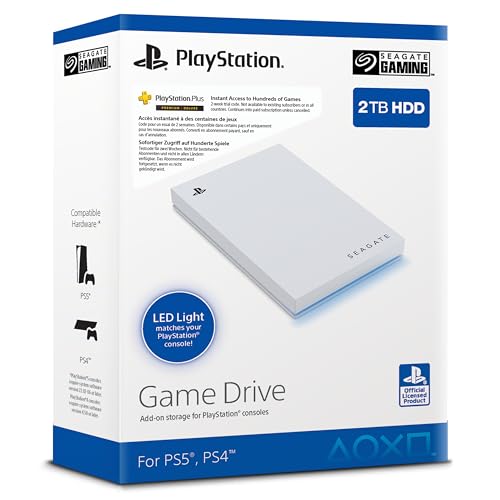
The best PS5 external storage on this list is the Seagate Game Drive 2TB, a licensed 2.5-inch USB 3.0 drive built to work with PS4 and PS5 consoles. It suits players who want a large, simple parking lot for PS4 games and archived PS5 titles. A key rule applies to every pick here: PS5 external storage over USB lets you play PS4 games directly, but PS5 games must be moved back to the console’s internal SSD to run. Every drive below is a hard drive, so think of them as library shelves, not speed upgrades.
Our Top Picks



Top 3 picks at a glance
Quick List
- Seagate Game Drive 2TB (STLV2000202) – best for a licensed, console-focused 2TB library
- Seagate Portable 2TB (STGX2000400) – best for large capacity that also serves a PC or laptop
- Seagate Portable 1TB (STGX1000400) – best for a mid-size archive that names PlayStation on the listing
- Avoluxion PRO-T5 2TB (Renewed) – best for buyers who want a 7200 RPM refurbished unit
- Tianken Ultra Slim 1TB – best for a thin drive with a flexible cable
- Ezekers Portable 500GB – best for a small, light drive that also fits phones
Which One Is Right for You?
| If you… | Choose |
|---|---|
| mostly play PS4 titles and archive PS5 downloads | Seagate Game Drive 2TB (STLV2000202) |
| also back up files from a Windows or Mac computer | Seagate Portable 2TB (STGX2000400) |
| need a mid-size drive and want PlayStation named in the listing | Seagate Portable 1TB (STGX1000400) |
| prefer a refurbished enterprise-class 7200 RPM drive | Avoluxion PRO-T5 2TB (Renewed) |
| want a slim body with a 2-in-1 cable | Tianken Ultra Slim 1TB |
| need only a small archive or keep a drive for a phone too | Ezekers Portable 500GB |
Capacity drives most of the decision, because the PS5 treats every compliant USB drive the same way. Pick the largest size you can justify, then choose between a console-branded drive and a general portable one based on whether you will also plug it into a computer. Plan to format whichever drive you buy on the console, which erases anything already on it. If you are undecided between two sizes, the larger one is usually the better value per gigabyte, and a library that grows has no good way to expand later except buying a second drive.
All 6 Picks in Detail
1. Seagate Portable 2TB (STGX2000400) – Best for Large Capacity Across Console and PC
As an Amazon Associate we earn from qualifying purchases at no extra cost to you.

The 2TB Seagate Portable is a plain USB 3.0 external hard drive with an 18-inch cable, plug-and-play setup and Windows and Mac support listed. The title does not mention PlayStation, so the match comes from the PS5’s general support for USB 5 Gbps drives with 250GB or more. It is the practical choice if the drive will move between a console and a computer. Keep in mind that once a drive is formatted for the console it is no longer ready to use as an ordinary computer drive, so a shared-use plan means reformatting each time or buying a second drive for files.
- Capacity: 2TB
- Interface: USB 3.0, 18-inch cable included
- Dimensions: 4.6 x 3.15 x 0.58 inches
- Weight: about 0.42 pounds
- Note: the listing says available capacity may vary
Pros
- Slim and light for its capacity
- Works as general backup storage on a computer
Cons
- No console branding or console-specific firmware claims
- Short cable can be awkward behind a console
Compared with the Game Drive, you give up console positioning in exchange for broader use.
2. Seagate Game Drive 2TB (STLV2000202) – Best for a Licensed Console Library

This listing is for a Seagate Game Drive made for PS4 and PS5, with 2TB of capacity, a 2.5-inch body, USB 3.0 and blue LED lighting. It is described as officially licensed, with matching firmware for all PS5 and PS4 models. One caution: the Dutch-language title calls it an external SSD, but Seagate and PlayStation materials list this model number as a hard drive, so confirm on the listing before assuming SSD speeds. In use, the setup is straightforward: plug it into a USB port on the console, open Storage in Settings, and format it as USB extended storage. After that, PS4 downloads can be directed to it and PS5 titles can be shelved there when you finish with them.
- Capacity: 2TB
- Form factor and interface: 2.5-inch, USB 3.0
- Lighting: blue LED (the specs field says white LED, so confirm)
- Weight: about 0.37 pounds per the listing field
- Licensing: officially licensed for PlayStation
Pros
- Built and positioned for PlayStation use
- 2TB holds a large mix of PS4 and archived PS5 games
Cons
- Listing language and title are inconsistent about drive type
- Still a hard drive, so PS5 games must be copied back to the internal SSD to play
It is the natural default over the Seagate Portable 2TB because it is positioned for consoles, while the portable model is more general-purpose.
3. Tianken Ultra Slim 1TB – Best for a Thin Drive with a 2-in-1 Cable

The Tianken is a 1TB USB 3.0 portable drive about 0.6 inch thick, with a plastic anti-scratch body and a 2-in-1 Micro-USB 3.0 cable that the listing says matches different ports. It is pre-formatted and lists PS4 and PS5 along with PCs, Macs, TVs and phones. It suits buyers who want a thin drive for occasional console use. The listing is generic about brand support, so treat the console claim as a general compatibility statement and confirm the warranty terms before relying on it for a large library.
- Capacity: 1TB
- Interface: USB 3.0, quoted up to 5 Gbps
- Dimensions: 5.06 x 3.15 x 0.62 inches
- Cable: 2-in-1 Micro-USB 3.0
- Colour: black
Pros
- Thin and easy to slip into a bag
- Quoted 5 Gbps interface meets the PS5’s USB requirement
Cons
- Lesser-known brand, so check warranty terms
- Micro-B cables are easy to strain if bumped
Against the Seagate 1TB, it trades brand recognition for a flexible cable arrangement.
4. Seagate Portable 1TB (STGX1000400) – Best for a Mid-Size Archive
This 1TB model uses the same body as the 2TB sibling, and its title names PC, Mac, PlayStation and Xbox plus a one-year rescue service. It suits players who keep only a handful of large games off the internal SSD at a time. The listing warns that Mac use may require reformatting, which is irrelevant on a PS5 since the console formats the drive itself. At this size it works well for someone who plays three or four big games at a time and treats the drive as overflow, deleting older titles when new ones arrive.
- Capacity: 1TB
- Interface: USB 3.0 with 18-inch cable
- Dimensions: about 4.6 x 3.15 x 0.58 inches
- Weight: about 0.42 pounds
- Service: one-year rescue service named in the title
Pros
- PlayStation named in the listing title
- Same compact body as the larger model
Cons
- 1TB fills quickly with large PS5 and PS4 games
- Same short cable
Choose it over the Tianken 1TB if you want a better-known brand label; choose the Tianken if you want the thinner cable-flexible bundle.
5. Avoluxion PRO-T5 2TB (Renewed) – Best for a Refurbished 7200 RPM Drive
The Avoluxion PRO-T5 is a refurbished product: a new case paired with a renewed 7200 RPM enterprise hard drive, according to the listing. It targets PS5 owners and spells out the correct workflow, in which PS5 games are moved to the drive and back, rather than played from it. It is larger and heavier than a pocket drive. The listing says the transfer takes about 3 to 5 minutes per game, which is the vendor’s figure, not ours, and it will vary with game size and the drive’s condition. The renewed status is the main thing to weigh against the faster stated spindle speed.
- Capacity: 2TB
- Drive: 7200 RPM enterprise HDD, renewed
- Interface: USB 3.0
- Dimensions and weight: 8 x 5 x 1.6 inches, 2 pounds per the listing field
- Power: confirm on listing whether it needs a separate adapter
Pros
- Higher stated spindle speed than most slim portable drives, which usually do not list one
- Clear instructions about moving PS5 games
Cons
- Renewed product with a warranty you should read on the page
- Bulky, not a pocket drive
Pick it over the Game Drive only if the 7200 RPM spec matters more to you than a licensed body and a new unit.
6. Ezekers Portable 500GB – Best for a Small, Light Drive

This 500GB portable drive supports USB 3.0 and USB-C and lists PC, Mac, PS4, Xbox and Android and iPhone use, while the title says PS5 is “storage only.” That wording matches the PS5’s rule that PS5 games are stored, not played, on USB. It is the smallest capacity here, so it fits light use or a second drive. A drive this size will hold perhaps three or four large games, so think of it as a staging area for the next title you plan to play. Because USB-C is available, it can double as a drive for a laptop or Android phone when it is not plugged into the console.
- Capacity: 500GB
- Interface: USB 3.0 and USB-C
- Form factor: 2.5-inch, 5 x 4 x 0.4 inches per the listing field
- Weight: about 0.33 pounds
- Console note: PS5 storage-only use
Pros
- USB-C option helps with phones and laptops
- Smallest and lightest of the six
Cons
- 500GB fills fast on a console
- Drive speed class is not stated; confirm on the listing
It is the runner-up for console use, because the Seagate 1TB gives double the room in a similar footprint.
Specs Compared
| Product | Capacity | Drive type | Interface | Form factor / size | Notes |
|---|---|---|---|---|---|
| Seagate Portable 2TB | 2TB | Hard drive | USB 3.0 | 4.6 x 3.15 x 0.58 in | 18-inch cable |
| Seagate Game Drive 2TB | 2TB | HDD per Seagate (title says SSD; confirm on listing) | USB 3.0 | 2.5-inch | Licensed for PlayStation, blue LED |
| Tianken Ultra Slim 1TB | 1TB | Hard drive | USB 3.0, up to 5 Gbps | 5.06 x 3.15 x 0.62 in | 2-in-1 Micro-USB 3.0 cable |
| Seagate Portable 1TB | 1TB | Hard drive | USB 3.0 | 4.6 x 3.15 x 0.58 in | One-year rescue service |
| Avoluxion PRO-T5 2TB | 2TB | 7200 RPM HDD, renewed | USB 3.0 | 8 x 5 x 1.6 in | Refurbished; 2 lb |
| Ezekers Portable 500GB | 500GB | Confirm on listing | USB 3.0 and USB-C | 2.5-inch, 5 x 4 x 0.4 in | PS5 storage only |
How We Chose These
We started with the six listings assigned to this page and read each for capacity, interface, form factor, platform claims and any stated limits. We then checked the console’s own rules for USB extended storage, including the minimum and maximum capacity, the 5 Gbps interface requirement and the PS4-versus-PS5 play rule. Picks were ordered by how closely the listing matches those rules, how much capacity it offers and how clear its claims are. Where a listing contradicted itself or left a value out, we say so. We did not run these drives and make no speed claims.
What to Look For
The rules the console sets
Sony’s published requirements for USB extended storage call for a SuperSpeed USB drive at 5 Gbps or faster, with a capacity from 250GB to 8TB. The drive must connect directly to a console port, not through a hub, and you can attach several drives but use one at a time. Formatting wipes the drive and converts it for console use. Any drive in this article that lists USB 3.0 and 500GB or more meets these numbers on paper, though Sony notes that not every device is guaranteed to work.
What can and cannot run from USB
PS4 games can run straight from the external drive. PS5 games can be stored there but must be copied back to the internal SSD to be played. Copying back is faster than downloading again, which is the main value of a PS5 external drive: it turns a cap on internal space into a shelf. If you want to run PS5 games from expanded storage, you need a compatible internal M.2 SSD, which is a separate product class and not covered here.
Capacity planning
Large modern releases can run from roughly 50GB to well over 100GB each, and PS4 titles are often 30GB to 90GB. A rule of thumb: multiply the advertised capacity by about 0.93 to estimate usable space, because formatting and decimal-versus-binary counting remove a slice. A 1TB drive then holds around 9 to 12 large games, and a 2TB drive roughly twice that. If you rotate games weekly, 1TB may do; if you collect a back catalog, buy 2TB.
HDD versus SSD
All six listings point to spinning hard drives, or leave the type unstated. They are inexpensive per terabyte and fine for PS4 games, but load times for PS4 titles from a hard drive may be longer than from an SSD. An external SSD is faster and more shock-tolerant but not what these listings describe. Hard drives should be placed on a stable surface and not moved while running, since impact can damage a spinning platter.
Cables and power
Portable drives draw power from the console’s USB port. Plug directly into the console, use the supplied cable and avoid hubs or long extensions, which can cause dropouts. If a drive has a Micro-B connector, handle it gently, since that connector is more fragile than USB-C. Bigger, heavier enclosures sometimes need a wall adapter, which is why you should confirm power needs on the page for the Avoluxion.
Reading compatibility claims
Listings use loose language. “Works with PS5” can mean the drive will mount as extended storage, or it can mean only that it will connect. Look for explicit statements about PS4 games playing from the drive and PS5 games being stored only. Treat claims of speed with caution: a quoted 5 Gbps figure is the interface ceiling, not what a mechanical drive will deliver, and a spinning drive typically reads well below that ceiling. Capacity wording matters too, since some titles say “available capacity may vary” because formatting uses part of the space.
A worked example
Say your internal SSD has about 650GB free and you own eight PS5 games averaging 80GB, plus six PS4 games averaging 50GB. The PS5 titles total roughly 640GB and the PS4 titles about 300GB, so the full library needs around 940GB beyond your core rotation. A 1TB drive barely covers that, with roughly 930GB usable and nothing to spare. A 2TB drive gives you room for the next dozen purchases. This is why 2TB is the safer default for anyone who buys games regularly, and 1TB works only for tight rotations.
Care and safety
Eject the drive properly by shutting the console down or using the console’s option to stop using extended storage before unplugging. Cutting power mid-write can corrupt data. Keep cables uncrimped, avoid bending the connector, and store the drive somewhere dry and cool. If a drive begins clicking or disconnecting, copy your data off immediately and plan a replacement, since mechanical failure tends to get worse, not better.
Questions
Can I play PS5 games from these drives?
No. PS5 games can be stored on a USB extended drive but must be moved to the internal SSD to play. PS4 games can be played straight from the external drive.
How much storage do I need for a PS5?
The console accepts USB drives from 250GB to 8TB. For most players, 1TB is a workable minimum and 2TB gives room to keep a larger back catalog.
Do I need to format the drive?
Yes. The console formats the drive when you set it up as extended storage, which erases existing contents. Back up anything you want to keep first.
Can I use a USB hub?
No. Sony says the drive must connect directly to the console, and hubs are not supported. Several drives can be attached, but only one is used at a time.
Is a hard drive slower than an SSD for PS4 games?
Generally yes, because a spinning disk reads data more slowly. The difference is most noticeable in load times, and it does not change what the drive can store.
Is a renewed drive a good idea?
It can be, if you read the seller’s warranty and condition grade. Renewed means previously used or refurbished, so keep backups of anything irreplaceable.
Update History
- October 14, 2026 – Initial publication; product set drawn from current catalog listings.
- Check the product page for current specifications and availability before buying.
Sources
- PlayStation support information on USB extended storage requirements
- Seagate support and product pages for Game Drive and Portable drives
- Retailer listing titles, bullet points and specification fields for each product
Related guides
- How to Check VRAM Usage in Windows 11: Task Manager, Game Bar and Overlay Methods
- How Much VRAM for 4K Gaming: 8GB, 12GB or 16GB, and What Actually Fills It
- How Many VRM Phases Do You Need? Match Phase Count and Power Stage Rating to Your CPU
- Best Gaming PCs for VR: Seven Prebuilts Compared by Graphics Card, CPU and Memory (2026)