Our Short List of 3

- Best for: Small cases and 1080p builds where length and width matter as much as frame rate.
- Best for: Players who want reliable 1080p Overwatch performance at the lowest power and size footprint in this guide.

- Best for: Players on 1440p high-refresh monitors who want the most memory and the most headroom in this guide.
All 3 Picks at a Glance
| Product | Specs | Action |
|---|---|---|
| MSI GeForce RTX 4060 Ventus 2X Black 8G OC — ASIN B0C7W8GZMJ |
| Check price on Amazon |
| XFX Speedster SWFT 210 Radeon RX 6600 CORE — ASIN B09HHLX543 |
| Check price on Amazon |
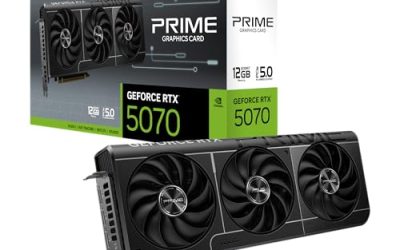
| GIGABYTE GeForce RTX 5070 WINDFORCE OC SFF 12G — ASIN B0DTQMLX4F |
| Check price on Amazon |
The best graphics cards for Overwatch are current mid-range GPUs with at least 8GB of video memory, a dual-fan or triple-fan cooler, and DisplayPort outputs for high-refresh monitors. Overwatch 2 places modest demands on a graphics card compared with newer large-scale titles, so an 8GB card holds high frame rates at 1080p, while a 12GB card adds headroom for 1440p and higher detail settings. The four cards below cover both resolutions, from a compact 1080p option to a 12GB card built for 1440p play.
Overwatch 2 rewards frame rate above almost everything else. Aiming, tracking, and reacting to fast hero movement all feel smoother when the game renders well above 60 frames per second, and a high-refresh monitor only helps when the graphics card can keep up. That makes the graphics card the single most important upgrade for most Overwatch players, ahead of a faster processor or extra system memory. The good news is that you do not need a flagship card: Overwatch 2 was built to run on a wide range of hardware, and the current mid-range cards in this guide sit far above the game’s recommended graphics class.
Our top pick: ASUS Dual GeForce RTX 5060 8GB GDDR7 OC Edition. Runner-up: GIGABYTE GeForce RTX 5070 WINDFORCE OC SFF 12G. The ASUS card leads because it pairs current-generation GDDR7 memory with DLSS 4 support and a compact dual-fan design that fits most cases, while the GIGABYTE card steps up to 12GB of memory and a triple-fan cooler for players pushing 1440p at high refresh rates. The other two picks round out the guide: a proven 1080p card with a small footprint and a value-focused AMD option for players who want solid 1080p performance without stepping up to the newest generation.
This guide compares published specifications only: memory size and type, boost clock, display outputs, cooling design, physical dimensions, and power requirements, so you can match a card to your monitor, your case, and your power supply without guesswork.
Our Top Picks
 ASUS Dual NVIDIA GeForce RTX 5060 8GB GDDR7RTX5060|8GB|OC9 x 4.8 x 2 inches1.4 poundsCheck on Amazon
Top 3 picks at a glance
At a Glance
| Product | Best for | Key specification |
|---|---|---|
| ASUS Dual GeForce RTX 5060 8GB GDDR7 OC Edition | High-refresh 1080p and entry 1440p | 8GB GDDR7, DLSS 4, dual Axial-tech fans, 2.5-slot |
| MSI GeForce RTX 4060 Ventus 2X Black 8G OC | Compact 1080p builds | 8GB GDDR6, boost clock up to 2505 MHz, dual TORX Fan 4.0 |
| XFX Speedster SWFT 210 Radeon RX 6600 CORE | Value-focused 1080p play | 8GB GDDR6, AMD RDNA 2, dual-fan, PCIe 4.0 |
| GIGABYTE GeForce RTX 5070 WINDFORCE OC SFF 12G | 1440p at high refresh rates | 12GB GDDR7, 192-bit bus, triple-fan WINDFORCE cooling |
How to Choose
1. Match the card to your monitor resolution
Resolution decides how much graphics power you need. At 1080p, every card in this guide has enough memory and throughput for high frame rates in Overwatch 2, and the choice comes down to cooler size, outputs, and how much headroom you want. At 1440p, the pixel count rises by roughly three quarters over 1080p, so the extra memory and bandwidth of a 12GB card like the RTX 5070 make a visible difference. If you play on a 1080p monitor today but plan to move to 1440p within the life of the card, buying the stronger card now avoids an early second upgrade.
2. Video memory: 8GB versus 12GB
Video memory holds textures, frame buffers, and render targets while the game runs. Overwatch 2 runs comfortably within 8GB at 1080p and at 1440p with high settings, so all four cards here clear that bar. The 12GB card adds margin for higher texture settings, for running a second monitor with a stream or browser open, and for other games in your library that demand more memory. If Overwatch is your main game and you play at 1080p, 8GB is enough; if you play a mix of titles at 1440p, 12GB is the safer long-term choice.
3. Frame rate targets and refresh rate
A 60 Hz monitor shows at most 60 frames per second, so any of these cards will saturate it in Overwatch 2. The picture changes with a 144 Hz or 240 Hz monitor: the card must render that many frames per second for the monitor to show its full benefit. The RTX 5060 and RTX 5070 are the strongest choices for 144 Hz and above at 1080p, and the RTX 5070 is the pick for 144 Hz at 1440p. Pairing a high-refresh monitor with a card that cannot feed it wastes the monitor, just as pairing a fast card with a 60 Hz monitor wastes the card.
4. Cooling design and noise
Every card here uses two or three axial fans, but cooler size and fan count change how loud the card runs under load. Dual-fan cards like the ASUS RTX 5060 and MSI RTX 4060 are shorter and fit smaller cases, while the triple-fan GIGABYTE RTX 5070 spreads heat across a larger heatsink and can run its fans slower for the same temperatures. The ASUS card adds 0dB technology, which stops the fans entirely at low load, so the card stays silent on the desktop and in menus. If your PC sits on your desk near your ears, a larger cooler or a fan-stop feature is worth prioritizing.
5. Display outputs: DisplayPort and HDMI
High-refresh gaming runs over DisplayPort. All four cards in this guide carry three DisplayPort outputs plus one HDMI port, so each one connects a high-refresh main monitor and a secondary display at the same time. DisplayPort 2.1 on the RTX 5060 and RTX 5070 adds bandwidth for future monitors, while the RTX 4060 and RX 6600 use DisplayPort 1.4a, which still covers 1080p and 1440p at high refresh rates. Check that your monitor cable matches the port: a DisplayPort cable is the right choice for a 144 Hz or faster display.
6. Case fit and power supply
Measure your case before ordering. The MSI RTX 4060 measures 7.83 inches long and 4.72 inches wide, making it the easiest fit of the four, while the GIGABYTE RTX 5070 measures 282 mm long and needs more clearance. The ASUS RTX 5060 uses a 2.5-slot design, so it needs two and a half expansion slots of width even though it is a dual-fan card. Power requirements rise with the card: the RX 6600 lists a 500W power supply, the RTX 4060 and RTX 5060 list 550W, and the RTX 5070 lists 750W. Confirm your power supply wattage and its available 8-pin connectors before you buy.
7. DLSS, FSR, and upscaling support
Upscaling renders the game at a lower internal resolution and reconstructs a sharper image, which raises frame rates without a visible loss in clarity. The two NVIDIA cards support DLSS: DLSS 3 on the RTX 4060 and DLSS 4 on the RTX 5060 and RTX 5070, alongside NVIDIA Reflex for lower input latency. The AMD RX 6600 supports FidelityFX Super Resolution, which works across a wide range of games. Overwatch 2 runs well enough on these cards that upscaling is optional rather than required, but it is a useful reserve for holding high frame rates at 1440p or when streaming while you play.
Our Picks
ASUS Dual GeForce RTX 5060 8GB GDDR7 OC Edition — ASIN B0F8PR9L3X
The ASUS Dual RTX 5060 is the strongest all-round pick for Overwatch, pairing 8GB of GDDR7 memory on a 128-bit bus with 448 GB/s of memory bandwidth and DLSS 4 support. Its dual Axial-tech fans and 0dB technology keep the card quiet at low load, and the 2.5-slot design fits standard mid-tower cases without the length of a triple-fan card. DisplayPort 2.1b and HDMI 2.1b outputs cover current high-refresh monitors, and PCIe 5.0 keeps the interface current for future builds.
Best for: Players who want high-refresh 1080p and solid 1440p performance from a compact current-generation card.
Consideration: The 8GB memory size is enough for Overwatch 2 but leaves less headroom than a 12GB card for other demanding titles at 1440p.
MSI GeForce RTX 4060 Ventus 2X Black 8G OC — ASIN B0C7W8GZMJ
- Best for: Small cases and 1080p builds where length and width matter as much as frame rate.
Small cases and 1080p builds where length and width matter as much as frame rate.
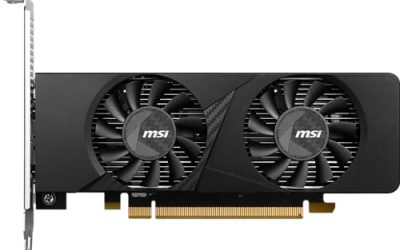
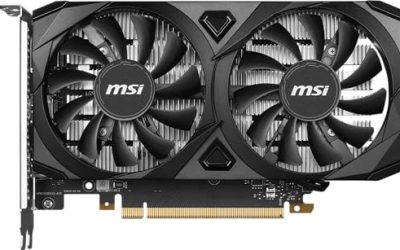
The MSI RTX 4060 Ventus 2X Black is the compact pick in this guide, measuring 7.83 inches long and 4.72 inches wide with a dual-fan TORX Fan 4.0 cooler. Its 8GB of GDDR6 memory runs on a 128-bit bus with a boost clock up to 2505 MHz, and it supports DLSS 3 and ray tracing through the Ada Lovelace architecture. Three DisplayPort 1.4a outputs and one HDMI 2.1a port cover a high-refresh main monitor plus a second display, and the card runs from a PCIe x16 slot with a 550W power supply listed.
Consideration: It is a previous-generation card, so it lacks DLSS 4 and the GDDR7 memory of the newer RTX 5060.
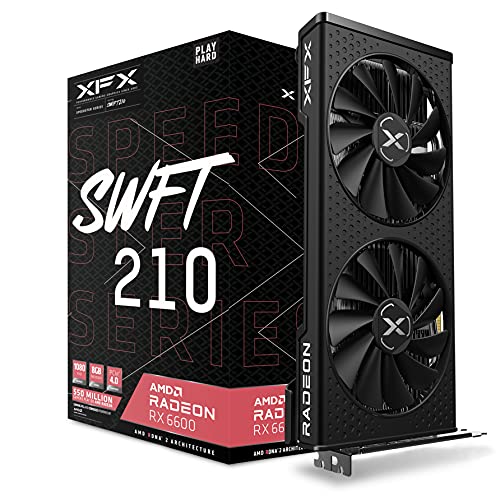
XFX Speedster SWFT 210 Radeon RX 6600 CORE — ASIN B09HHLX543
- Best for: Players who want reliable 1080p Overwatch performance at the lowest power and size footprint in this guide.
Players who want reliable 1080p Overwatch performance at the lowest power and size footprint in this guide.
The XFX Speedster SWFT 210 RX 6600 is the value pick for Overwatch at 1080p, built on AMD RDNA 2 architecture with 8GB of GDDR6 memory. Its dual-fan cooler and compact board fit the same small cases as the MSI card, and its outputs include one HDMI port and three DisplayPort connectors for a high-refresh monitor setup. The card runs on PCIe 4.0, supports FidelityFX Super Resolution and FreeSync, and lists a 500W power supply, the lowest requirement in this guide.
Consideration: It is an older-generation card without DLSS support, and availability can vary, so confirm the listing shows the card in stock before ordering.
GIGABYTE GeForce RTX 5070 WINDFORCE OC SFF 12G — ASIN B0DTQMLX4F
- Best for: Players on 1440p high-refresh monitors who want the most memory and the most headroom in this guide.
Players on 1440p high-refresh monitors who want the most memory and the most headroom in this guide.
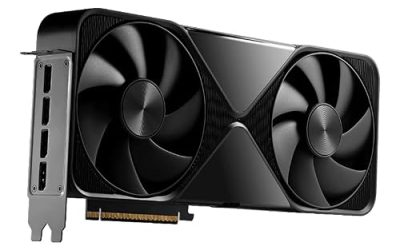
The GIGABYTE RTX 5070 WINDFORCE OC is the 1440p pick in this guide, with 12GB of GDDR7 memory on a 192-bit bus and DLSS 4 support. Its triple-fan WINDFORCE cooling system spreads heat across a larger heatsink, and the card measures 282 mm long with three DisplayPort 2.1a outputs and one HDMI 2.1b port. PCIe 5.0 and NVIDIA Reflex round out a specification sheet aimed at high-refresh play, and the card lists a 750W power supply.
Consideration: At 282 mm long with a 750W power supply listed, it needs the most case clearance and the strongest power supply of the four cards.
Which One Is Right for You?
Start with your monitor. If you play at 1080p on a 144 Hz or 240 Hz display, the ASUS RTX 5060 gives you current-generation memory and DLSS 4 in a compact dual-fan card, and it is the pick for most Overwatch players. If your case is small or your budget is tighter, the MSI RTX 4060 delivers the same 8GB of memory and the same resolution target in the shortest card here, with DLSS 3 as a bonus. If you want the lowest power draw and the simplest 1080p setup, the XFX RX 6600 covers the game with the smallest power supply requirement of the four. If you play at 1440p, or you play a mix of Overwatch and more demanding titles, step up to the GIGABYTE RTX 5070: its 12GB of GDDR7 memory and triple-fan cooler are built for that resolution, as long as your case and power supply can accommodate it.
Frequently Asked Questions
Do I need a powerful graphics card for Overwatch 2?
No. Overwatch 2 was designed to run on a wide range of hardware, and its recommended graphics class sits well below the cards in this guide. A current 8GB card holds high frame rates at 1080p, and the benefit of a stronger card shows mainly on high-refresh monitors and at 1440p.
Is 8GB of video memory enough for Overwatch 2?
Yes, 8GB is enough for Overwatch 2 at 1080p and at 1440p with high settings. The 12GB card in this guide adds margin for higher texture settings, for a second monitor running a stream or browser, and for other games in your library that use more memory.
Should I choose NVIDIA or AMD for Overwatch?
Both work well for Overwatch 2. NVIDIA cards in this guide add DLSS upscaling and Reflex low-latency technology, while the AMD card supports FidelityFX Super Resolution and FreeSync. Choose by memory size, cooler design, outputs, and fit for your case rather than by brand alone.
Will these graphics cards fit in a small case?
The MSI RTX 4060 is the shortest card here at 7.83 inches long, and the XFX RX 6600 and ASUS RTX 5060 are also compact dual-fan designs. The GIGABYTE RTX 5070 measures 282 mm long and needs more clearance. Measure the free length inside your case and compare it with the card dimensions before ordering.
What power supply do I need for these cards?
The listed power supply requirements are 500W for the XFX RX 6600, 550W for the MSI RTX 4060 and the ASUS RTX 5060, and 750W for the GIGABYTE RTX 5070. Check your power supply wattage and confirm it has the required 8-pin connectors for the card you choose.
Bottom Line
For most Overwatch players, the ASUS Dual GeForce RTX 5060 8GB GDDR7 OC Edition is the right balance of current-generation memory, DLSS 4 support, and a compact dual-fan design that fits ordinary cases. Players on 1440p high-refresh monitors should step up to the GIGABYTE RTX 5070 WINDFORCE OC SFF 12G for its extra memory and stronger cooler, while the MSI RTX 4060 and XFX RX 6600 cover 1080p play in smaller cases and at lower power draw. Match the card to your monitor resolution first, then check case length and power supply, and you will have a card that keeps Overwatch 2 running smoothly for years.
Disclosure: As an Amazon Associate, this site earns from qualifying purchases.
Related guides
More from Amazon
Programs that pair well with the guide above. Offers and eligibility are set by Amazon and may change.
Free shipping on eligible items, Prime Video and more. Eligible new members can start with a free trial.
Start a Prime free trialAd-free music streaming. Eligible new subscribers can start with a free trial.
Try Music Unlimited freeA Prime membership for ages 18-24 with a trial period. Eligibility is set by Amazon.
See Prime for Young AdultsAudiobooks and podcasts to listen to on the go. Eligible new members can start with a free trial.
Try Audible freeAs an Amazon Associate we earn from qualifying purchases.