Shopping for a Dell XPS is mostly a question of which XPS. The name now covers a 13.4-inch ultraportable line, a 14.5-inch mid-size line with OLED options, and a 16-inch machine with a dedicated graphics card, and the configurations inside each line vary by processor, memory, storage, and screen. The listings here are third-party configurations of those families, so two laptops that both say “XPS 14” can differ by a whole tier in RAM or display.
This guide is for buyers who want a premium aluminum-and-glass Windows laptop for work, school, or creative projects and need to separate the real differences from the marketing. It lists eight configurations and judges them only on the specifications written in their titles. Where a title is unclear, such as a listing that mentions two different processor families, the write-up says so rather than guessing.
Our Top Picks
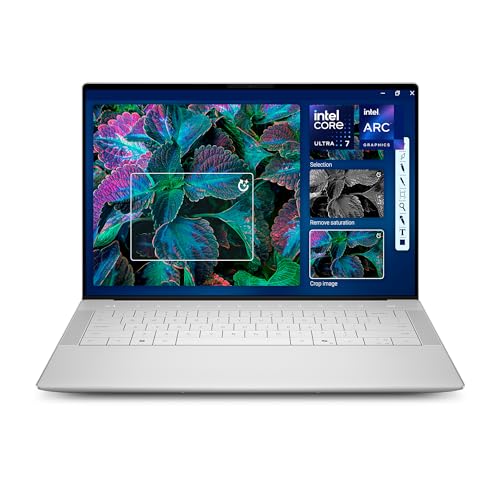 Dell XPS 14 Premium Laptop DA14250-14.5-inch Touch 3.2KXPS14|32GB|1TB8.5 x 12.6 x 0.71 inches3.79 poundsCheck on Amazon
 Dell XPS 13 2026 Ultra-Light Laptop8GB RAM | 512GB SSD PCIe11.69 x 7.9 x 0.5 inches2.2 poundsCheck on Amazon


Top 3 picks at a glance
Quick Picks
As an Amazon Associate we earn from qualifying purchases at no extra cost to you.


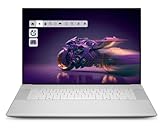


| Product | Best for | Key spec from the title |
|---|---|---|
| Dell XPS 14 (3.2K OLED, 32GB) | Creative work and heavy multitasking | 14.5-inch 3.2K OLED touch, Core Ultra 7 255H, 32GB, 1TB |
| Dell XPS 13 9345 | Battery-focused AI PC buyers | 13.4-inch FHD+ 120Hz, Snapdragon X Elite, 32GB/1TB |
| Dell XPS 13 Ultra-Light | Commuters who count ounces | 2.2 lbs, Core 5 320, Wi-Fi 7, 512GB |
| Dell XPS 13 2.5K (Home) | Entry XPS with a sharper screen | 2.5K touch 120Hz, Core 5 320, 8GB LPDDR5 |
| Dell XPS 14 (3.2K OLED, 16GB) | OLED screen without the top memory tier | 3.2K OLED touch, Ultra 7 255H, 16GB/1TB, 3x Thunderbolt 4 |
| Dell Premium 16 (XPS 16) | Creators who need a graphics card | Core Ultra 9 285H, RTX 5060 8GB, 4K OLED touch |
| Dell XPS 13 2.5K (Pro) | Students and professionals wanting Windows Pro | 2.5K touch, Windows 11 Pro, 8GB RAM, 1TB SSD |
| Dell XPS 14 (FHD+ 120Hz) | Video calls and sign-in security | FHD+ 120Hz, 1080p IR webcam, fingerprint reader |
How to Choose
Pick the size and line first
The 13.4-inch XPS is the carry-everywhere option, with titles citing roughly 2.2 pounds for one configuration. The 14.5-inch XPS adds screen area and more ports, and the 16-inch model is closer to a mobile workstation. Match the line to how you commute before you compare processors.
Screen type and refresh rate
OLED panels, like the 3.2K and 4K screens named here, deliver deep blacks and vivid color but can use more power and show reflections on glossy glass. A 120Hz refresh rate makes scrolling smoother. A 2.5K panel at 13.4 inches is already sharp, so a higher resolution matters more on the larger bodies.
Memory, storage, and processor tier
Eight gigabytes of RAM works for everyday tasks, but 16GB is the sensible floor for a premium machine you plan to keep for years, and 32GB suits creative work. Because memory in many thin laptops is soldered, it often cannot be upgraded later, so buy the amount you will need. For storage, 512GB is workable and 1TB is comfortable.
Ports, security, and what to ignore
Count the Thunderbolt 4 ports if you use docks or external displays, and look for a fingerprint reader or an IR webcam for fast sign-in. Be cautious with listings that stuff several processor names into the title, since only one can be inside the machine. In 2026, Wi-Fi 7 is nice to have but not essential unless your router supports it.
The 8 Best Options
Dell XPS 14 (3.2K OLED, 32GB)
This configuration of the XPS 14 lists a 14.5-inch 3.2K OLED touch display with a 48-120Hz range, an Intel Core Ultra 7 255H, Intel Arc graphics, 32GB of memory, and a 1TB SSD. On paper it is the most balanced premium configuration of the 14-inch group. It suits a developer, designer, or analyst who wants one machine for the office, the couch, and client meetings without worrying about running out of memory.
- Strength: 32GB of memory and a 1TB SSD leave headroom for editing, coding, and many open apps.
- Strength: the variable 48-120Hz OLED touchscreen is a premium display feature.
- Trade-off: it sits in a higher tier than the 16GB version of the same model.
Skip it if you only browse and write documents, since the extra memory would go unused.
Dell XPS 13 9345
The XPS 13 9345 lists a 13.4-inch FHD+ 120Hz display, a Snapdragon X Elite chip, and 32GB of memory with 1TB of storage. The title also mentions an Intel Ultra 7-155H and a 27-hour battery claim, which conflicts with the Snapdragon mention, so verify the processor before buying. If the Arm chip is what you receive, everyday web, Office, and video use is the natural fit, and the long battery claim is the reason to consider it.
- Strength: 32GB of memory and 1TB of storage are generous for a 13-inch machine.
- Strength: the listing positions it as a long-battery Copilot+ PC.
- Trade-off: Arm-based Windows can have compatibility gaps with some older software.
Skip it if you depend on legacy programs or specialist drivers.
Dell XPS 13 Ultra-Light (Core 5 320)
This one highlights a 13.4-inch 120Hz touchscreen, a 2.2-pound weight, and a claimed battery life of up to 17 hours, with an Intel Core 5 320, 8GB of DDR5, a 512GB SSD, and Wi-Fi 7. It is built for people who prize weight above all. Frequent flyers and students walking between buildings will notice the difference far more than a spec sheet suggests.
- Strength: the very light weight makes it easy to carry all day.
- Strength: Wi-Fi 7 and a backlit keyboard are modern touches.
- Trade-off: 8GB of RAM is thin for a premium laptop meant to last years.
Skip it if you multitask heavily or keep dozens of tabs open.
Dell XPS 13 2.5K (Core 5 320, Windows 11 Home)
This XPS lists a 13.4-inch 2.5K touchscreen at 120Hz, an Intel quad-core Core 5 320, 8GB of LPDDR5, 512GB of storage, a backlit keyboard, and Windows 11 Home. It overlaps heavily with the ultra-light model above, so the choice often comes down to which listing offers better seller terms, condition, and included accessories.
- Strength: a sharp 2.5K 120Hz touchscreen is a clear step up from budget panels.
- Strength: LPDDR5 memory and a backlit keyboard suit daily productivity.
- Trade-off: 8GB of memory limits long-term flexibility.
Skip it if you need Windows 11 Pro features or more memory.
Dell XPS 14 (3.2K OLED, 16GB)
This configuration keeps the 14.5-inch 3.2K OLED touchscreen and the Core Ultra 7 255H but drops to 16GB of memory with a 1TB SSD. The title mentions a 16-core CPU, three Thunderbolt 4 ports, a backlit keyboard, and a fingerprint reader. It is a sensible middle path between the top memory tier and the base configurations.
- Strength: three Thunderbolt 4 ports support docks and multiple displays.
- Strength: 16GB of RAM and 1TB of storage cover most professional needs.
- Trade-off: the OLED panel is glossy and may reflect bright rooms.
Skip it if you want the biggest memory tier.
Dell Premium 16 (XPS 16, RTX 5060)
The Premium 16 pairs a Core Ultra 9 285H with 32GB of RAM, a 1TB SSD, an Nvidia RTX 5060 with 8GB, and a 16.3-inch 4K OLED touchscreen at 120Hz with Windows 11 Pro. It is the only discrete-graphics option here. Anyone rendering video, working in CAD, or running creative suites will feel the benefit, and the large OLED screen doubles as a media-viewing display.
- Strength: a dedicated RTX 5060 helps with video editing, 3D, and creative software.
- Strength: the 4K OLED touch display is the most detailed screen on the list.
- Trade-off: the size and graphics hardware add weight and reduce portability.
Skip it if you want a featherweight travel laptop.
Dell XPS 13 2.5K (Windows 11 Pro, 1TB)
This XPS 13 lists a 13.4-inch 2.5K touchscreen, an Intel Core 5, Windows 11 Pro, 8GB of RAM, and a 1TB SSD, with an aluminum surface for students and home users. It trades memory for storage. That makes sense for someone who keeps big document archives, lecture recordings, or photo libraries locally and runs only a few apps at a time.
- Strength: Windows 11 Pro and 1TB of storage appeal to professionals who keep many files.
- Strength: the aluminum build and light weight suit daily carrying.
- Trade-off: only 8GB of RAM limits heavy multitasking.
Skip it if memory matters more than storage.
Dell XPS 14 (FHD+ 120Hz)
This XPS 14 uses a 14.5-inch FHD+ 120Hz display rather than OLED, with an Ultra 7 255H, 16GB of memory, 1TB of storage, three Thunderbolt 4 ports, a 1080p IR webcam, a backlit keyboard, and a fingerprint reader. It targets business buyers who value secure sign-in, docking flexibility, and a screen that stays smooth without the extra cost of OLED.
- Strength: IR webcam and fingerprint reader make secure sign-in quick.
- Strength: FHD+ at 120Hz keeps the screen smooth without the cost and power draw of OLED.
- Trade-off: the display is less vivid than the OLED siblings.
Skip it if you do color-critical work or want deep blacks.
Which One Fits Your Situation
You edit photos or video on the move
The Dell Premium 16 with the RTX 5060 and 4K OLED screen is the pick for creative workloads, provided you accept the extra weight in the bag and a charger that will likely be larger than those of the thin 13-inch models.
You want the best everyday premium laptop
The XPS 14 with 3.2K OLED and 32GB covers work, media, and multitasking without a dedicated graphics card.
You carry your laptop everywhere
The XPS 13 Ultra-Light at 2.2 pounds is the easiest to carry, if you can live with 8GB of RAM and mostly stay within browsers, documents, and video calls.
You need sign-in security and docking
The XPS 14 FHD+ with an IR webcam, fingerprint reader, and three Thunderbolt 4 ports fits shared or managed environments.
Common Mistakes
- Assuming every XPS 13 listing is the same machine when memory and processors differ.
- Ignoring listings that mix up processor families in the title.
- Choosing 8GB of RAM for a premium laptop meant to last several years.
- Paying for OLED when you mostly work in bright rooms with glare.
- Forgetting that a third-party seller’s warranty may differ from the manufacturer’s.
Related guides
- How To Check Motherboard Vrm Temperature In Hwinfo
- How To Clean Quest 3 Lenses And Facial Interface
- Micro Sd Cards For Samsung Galaxy Phones
Frequently Asked Questions
Can I upgrade the RAM in an XPS?
On most recent thin models the memory is soldered to the board, so you should choose the amount you need at purchase. Check the listing and Dell’s documentation for the exact model.
Is OLED worth it on a laptop?
It gives richer contrast and color, which helps with video and photos. It can also be glossier and draw more power than a standard IPS panel.
What does Copilot+ mean?
It is a Windows designation for laptops with a neural processing unit that meets Microsoft’s requirements for certain AI features. Not every XPS carries that label.
Which XPS is best for students?
The 13.4-inch models are the lightest and easiest to carry, and 16GB of memory is better than 8GB if you can find it.
Related guides
More from Amazon
Programs that pair well with the guide above. Offers and eligibility are set by Amazon and may change.
Free shipping on eligible items, Prime Video and more. Eligible new members can start with a free trial.
Start a Prime free trialAd-free music streaming. Eligible new subscribers can start with a free trial.
Try Music Unlimited freeA Prime membership for ages 18-24 with a trial period. Eligibility is set by Amazon.
See Prime for Young AdultsAudiobooks and podcasts to listen to on the go. Eligible new members can start with a free trial.
Try Audible freeAs an Amazon Associate we earn from qualifying purchases.