Buying one laptop for both business and personal use means accepting that the same machine will open a client spreadsheet at nine in the morning and a streaming service at nine at night. The typical mistake is to buy for only one of those roles. A model tuned for a company fleet can have a dull screen and little storage for family photos, while a media-focused model may lack the security features and operating system edition a workplace expects. The sensible goal is a balanced machine with enough memory, a good display, and a professional edition of Windows when work apps require it.
This guide suits freelancers, small-business owners, remote employees, and students with part-time jobs who need a single laptop for everything. Seven models from the current listings are compared using only what their titles state, such as processor, RAM, storage, display type, and Windows edition. Titles are truncated in places, so the notes flag details to confirm on the listing. Heading into 2026, the key splits are touchscreen versus non-touch, Windows Home versus Pro, and 16GB-and-up versus 8GB-and-under memory.
Our Top Picks
 Dell 15.6" FHD Touchscreen Business Laptop16GB RAM | 1TB SSD14.11 x 9.27 x 0.75 inches3.65 PoundsCheck on Amazon



Top 3 picks at a glance
Quick Picks
As an Amazon Associate we earn from qualifying purchases at no extra cost to you.





| Product | Best for | Key spec from the title |
|---|---|---|
| HP 17 Business Laptop (Ryzen 5) | Large-screen office work | Ryzen 5, 16GB RAM, 512GB SSD, 17.3-inch FHD |
| Lenovo Business 15.6 FHD | Basic office tasks | 8GB DDR5, 128GB storage, Wi-Fi 6, USB-C, anti-glare |
| HP 17 Ryzen 5 7430U | Business and student crossover | Ryzen 5 7430U, Copilot PC |
| Dell 16 Touchscreen (Core 7) | Heavy multitasking and a taller screen | Core 7 150U, 32GB DDR5, 1TB SSD, 16:10 FHD+ |
| Dell 15.6 Touchscreen (Ultra 7) | Fast processor with a touch display | Ultra 7 255U, 16GB DDR5, 1TB SSD |
| HP 15.6 Touchscreen (Ryzen 7) | Windows Pro workloads | Ryzen 7 7730U, 16GB, 512GB SSD, Windows 11 Pro |
| HP 15.6 (N200) | Basic tasks on a tight budget | Intel N200, 4GB RAM, 128GB SSD, S mode |
How to Choose
Windows edition matters for work
Windows 11 Pro adds features such as BitLocker drive encryption and domain join, which some employers require. Home covers personal use but may not satisfy a company policy. S mode, where it appears in a title, limits software installation to the Microsoft Store and is a poor fit for business apps. If you work for an employer, ask what edition their policy expects before buying.
Memory and storage for mixed workloads
Business apps, a browser with many tabs, video calls, and personal media all compete for memory. Treat 16GB as the comfortable target for a combined work-and-home laptop, and 8GB as the minimum. For storage, aim for at least 512GB of internal SSD; a 128GB drive fills quickly once Windows, Office, and personal files share the space.
Display, keyboard, and ports
You will stare at the screen for hours, so favor Full HD or better and look for IPS or anti-glare wording. A number pad helps with spreadsheets, and a backlit keyboard helps in dim rooms. USB-C and HDMI matter for docking to a monitor. A 16:10 aspect ratio, as in the Dell 16, shows more rows of a document than a 16:9 screen of similar width.
What to ignore and where budget models cut corners
Ignore “Copilot” or AI badges as a reason to pay more; they describe software features, not hardware strength. Budget models cut corners on RAM, drive size, and display quality, and may use low-power processors that struggle with video calls plus other apps. Read titles for an actual processor name and memory figure before trusting vague “business” labels.
For a quick tier view: the HP N200 is the budget option, the Lenovo and the HP Ryzen 5 models are the mid-range, and the two Dell laptops plus the Ryzen 7 HP are the premium picks. If you can only stretch to one step up from budget, choose more memory first, then storage, and only then a faster processor.
The 7 Best Options
HP 17 Business Laptop (Ryzen 5)
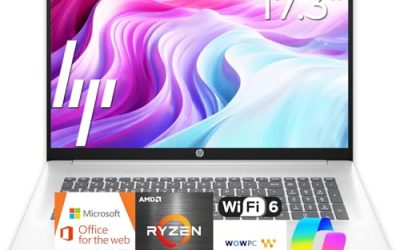
This is a straightforward large-screen workhorse. The title lists an AMD Ryzen 5, 16GB of RAM, a 512GB SSD, a 17.3-inch FHD display, a numeric keypad, and a long-battery claim. It suits people who work from a desk most days but want a machine that handles entertainment too. The large panel also makes split-screen work practical, with a document on one side and a video call or reference page on the other, which is a real advantage when one laptop serves two lives.
- Strength: 16GB of RAM and a 512GB SSD balance work and personal files well.
- Strength: the 17.3-inch display and number pad suit spreadsheets.
- Trade-off: a large body is awkward for frequent travel.
Skip it if you commute with your laptop every day.
Lenovo Business 15.6 FHD
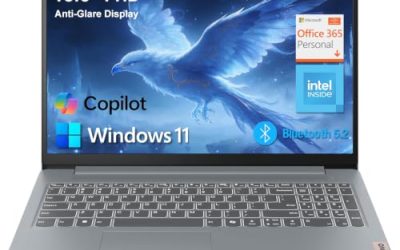
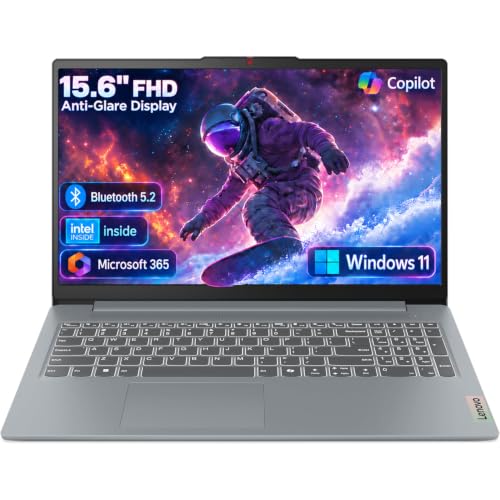
The Lenovo targets buyers who want a basic office machine with a modern connection set. The title lists a 15.6-inch FHD anti-glare screen, an Intel processor, 8GB of DDR5 memory, 128GB of storage, Office 365, Copilot AI, Wi-Fi 6, and USB-C.
- Strength: an anti-glare Full HD screen is easier on the eyes for long work sessions.
- Strength: USB-C and Wi-Fi 6 support modern docks and routers.
- Trade-off: 128GB of storage is small for combined work and personal files.
Skip it if you keep large media libraries on the laptop.
HP 17 Ryzen 5 7430U
This 17-inch HP crosses business and student use. The title lists an AMD Ryzen 5 7430U and a Copilot PC label, but it is short on memory and storage details, so check the listing for RAM and drive size. The Copilot PC label points to a laptop built around newer AI features, but for a buyer focused on business and personal use, the practical question is whether the memory and drive are large enough.
- Strength: Ryzen 5 is a capable mid-range processor family.
- Strength: the 17-inch size offers a roomy workspace.
- Trade-off: the title leaves out RAM and storage, so you must verify them.
Skip it if you want key specs confirmed from the title alone.
Dell 16 Touchscreen (Core 7)
The Dell 16 is the memory-and-storage heavyweight among these. The title lists a Core 7 150U, 32GB of DDR5 RAM, a 1TB SSD, a 16:10 FHD+ 300-nit IPS touch display, and a full-size backlit keyboard with number pad. It is the most future-proof listing here for someone who wants to buy once and keep the laptop for many years, juggling accounting software, browser tabs, and family photo libraries.
- Strength: 32GB of RAM and a 1TB SSD leave plenty of room for years of work and media.
- Strength: the taller 16:10 IPS panel shows more of a document.
- Trade-off: a 16-inch body is larger and heavier than a 14-inch ultrabook.
Skip it if you want a small, travel-first machine.
Dell 15.6 Touchscreen (Ultra 7)
This Dell pairs a high-end processor with a touch display. The title lists a 12-core Intel Core Ultra 7 255U up to 5.2GHz, 16GB of DDR5 RAM, a 1TB SSD, a backlit keyboard, and Windows 11. It is a good match for people who want speed headroom for video calls, exports, and multitasking, with a touch display for quick signatures and notes.
- Strength: the Ultra 7 processor is the strongest in this group on paper.
- Strength: 1TB of storage handles business files and personal media.
- Trade-off: the title does not state the Windows edition, so confirm Home or Pro.
Skip it if your employer requires Windows Pro and the listing shows Home.
HP 15.6 Touchscreen (Ryzen 7)
This HP is for buyers who need Windows 11 Pro. The title lists a Ryzen 7 7730U, 16GB of RAM, a 512GB SSD, an FHD IPS touchscreen, AMD Radeon graphics, Wi-Fi 6, a Copilot key, and a numeric keypad. Of the group, it is the one that most clearly lines up with workplace policies that expect Windows 11 Pro, while still offering enough memory for personal use after hours.
- Strength: Windows 11 Pro and a Ryzen 7 chip suit workplace requirements.
- Strength: the IPS touchscreen and number pad support varied tasks.
- Trade-off: a touchscreen can reduce battery life compared with non-touch models.
Skip it if you want the largest storage in the group.
HP 15.6 (N200)
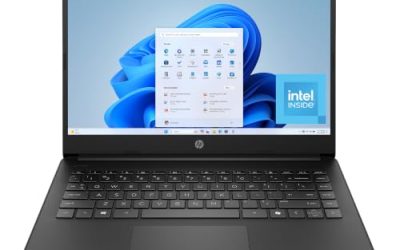
This is the entry-level model. The title lists an Intel 4-core N200, 4GB of RAM, a 128GB SSD, a long-battery claim, and Windows 11 Home in S mode, positioned for business and portability. Treat it as a budget companion for email, web apps, and documents rather than a main workstation, and consider the 8GB and 16GB models if your job involves specialized software.
- Strength: the low-power chip is aimed at battery life.
- Strength: the 15.6-inch size is easy to carry for light use.
- Trade-off: 4GB of RAM and S mode make it weak for real business software.
Skip it if you need to install desktop applications or multitask heavily.
Which One Fits Your Situation
You run a small business from home
The Dell 16 Touchscreen offers 32GB of RAM and a 1TB SSD, which will keep a busy accounting, email, and video-call routine smooth. The taller screen also means less scrolling through long reports and spreadsheets.
Your employer requires Windows Pro
The HP 15.6 Touchscreen (Ryzen 7) lists Windows 11 Pro, which makes it the cleanest match.
You want strong performance with a modern chip
The Dell 15.6 Touchscreen (Ultra 7) brings a fast processor and 1TB of storage, but verify the Windows edition. It suits a consultant or manager who wants maximum speed for exports, video calls, and presentations.
You need a simple, large-screen office laptop
The HP 17 Business Laptop (Ryzen 5) balances memory, storage, and a number pad on a big display. It works well for a person who wants a comfortable screen and a keypad for finance tasks, and it still has enough memory for personal photos and streaming.
Common Mistakes
- Buying a Home edition when an employer requires Pro features.
- Ignoring S mode and then discovering that desktop apps will not install.
- Choosing 4GB of RAM for a laptop that must handle business software and video calls.
- Prioritizing AI labels over memory, storage, and display quality.
- Skipping a check of ports, especially USB-C and HDMI, before relying on a docking setup.
Related guides
- How To Check Motherboard Vrm Temperature In Hwinfo
- How To Clean Quest 3 Lenses And Facial Interface
- Vr Facial Interfaces For Glasses Wearers
Frequently Asked Questions
Do I need Windows Pro for business use?
Not always, but Pro adds encryption and management features some employers require. Ask your IT team before buying.
Is a touchscreen worth it?
It is handy for notes, signing documents, and tablet-style use. It can slightly reduce battery life, so skip it if you rarely use touch. Buyers who mostly type and use a trackpad can save the extra cost for memory or storage instead.
How much RAM do I need?
16GB is a comfortable target for combined work and personal use. 8GB works for lighter tasks, while 4GB will struggle.
Is a 17-inch laptop practical?
It is practical for desk-based work and large spreadsheets. It is less convenient for daily travel, so choose a smaller size if you commute.