
The best gaming console for most buyers depends heavily on what “console” means to you here, because this list spans four genuinely different categories: full home consoles (Xbox Series S, PS5 Digital), portable hybrids (Switch, Switch Lite), a remote-play accessory (PS5 Portal), a motion-based active play system (Nex Playground), and a budget plug-and-play retro emulator stick (HRYYDS). If you want a single current-generation console with the deepest game library, the PS5 Digital Edition is the strongest pick here; if portability matters more, the Nintendo Switch remains the most flexible option on this list.
Rather than force all eight into one ranked list as if they compete directly, I’ve grouped my analysis around what each device actually does, and I’m flagging clearly where a product doesn’t fit the “gaming console” category as most buyers understand it.
As an Amazon Associate we earn from qualifying purchases at no extra cost to you.




Our Top Picks
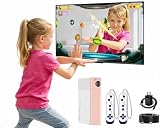
 AR Motion Game Console for Kids: Plug&Play Interaction1.56 x 4.55 x 5.91 inches4.55 x 1.56 x 5.91 inches0.59 poundsCheck on Amazon


Top 3 picks at a glance
Top picks at a glance
| Model | Key spec | Price | Best for |
|---|---|---|---|
| Xbox Series S | 1TB SSD, all-digital, up to 120fps support | Check on Amazon | Xbox ecosystem and Game Pass library |
| Nintendo Switch | Hybrid handheld/dock, Neon Joy-Con | Check on Amazon | Portability and Nintendo exclusives |
| PlayStation 5 Portal | Remote-play display, requires an active PS5 | Price varies | Streaming your existing PS5 around the house |
| Nex Playground | Motion/active-play system, no controller needed | $239 | Family motion gaming, not traditional titles |
| PS5 Digital Edition | 825GB SSD, 16GB GDDR6, 120Hz 8K output | $668 | Deepest current-gen game library here |
| HRYYDS Retro Gaming Console Pro | 4K HDMI plug-and-play, 40,000+ preloaded games | Check on Amazon | Casual retro nostalgia, legal gray area |
| Nintendo Switch Lite | Handheld-only, no dock/TV output | $227 | Budget portable-only Nintendo gaming |
| Nintendo Wii (Renewed) | Legacy console, no new software support | Check on Amazon | Accessing an existing Wii game collection |
Xbox Series S
The Series S is Microsoft’s all-digital, lower-cost entry into the current Xbox generation, built around a custom AMD chip with a 1TB SSD and support for up to 120fps in compatible titles, though it targets 1440p upscaled to 4K rather than native 4K like its Series X sibling. Game Pass is the real draw here — the subscription library gives access to a large rotating catalog of titles day-one, which changes the math on console value versus buying every game individually.
Load times off the SSD are fast across the Xbox ecosystem, and the smaller form factor genuinely makes it easier to fit into tighter entertainment centers than the boxier Series X or PS5. Being all-digital means no disc drive, so used physical games and disc-based resale aren’t options here — everything runs through digital purchases or Game Pass.
1TB sounds generous until you account for how large current-gen game installs have gotten; a handful of AAA titles can consume a third of that space, and expandable storage cards for the Series S carry a real premium over standard external drives.
- Pros
- Game Pass access to a large rotating game library
- Fast SSD load times across the Xbox software ecosystem
- Compact form factor fits tighter spaces than the Series X or PS5
- Cons
- All-digital only, no disc drive for used or physical games
- Targets upscaled 1440p rather than native 4K in most titles
- 1TB storage fills quickly with modern install sizes
Who it’s for: Game Pass subscribers who want current-gen Xbox gaming in a smaller footprint.
Nintendo Switch (Neon Blue/Neon Red)
The original Switch remains in production years after launch because its hybrid design — dockable to a TV or fully portable in handheld mode — still has no direct equivalent from Sony or Microsoft. Its back catalog is the deepest of any platform on this list when you count exclusives, spanning first-party Nintendo franchises unavailable anywhere else alongside a large third-party and indie library.
Joy-Con detachability enables local multiplayer without buying extra controllers for casual sessions, which is a genuine advantage for family or group play that the other consoles here can’t match without additional controller purchases. The tradeoff for that flexibility is raw power — by current-generation standards, the Switch’s hardware is dated, and multi-platform AAA releases typically ship with reduced resolution and effects compared to Xbox or PlayStation versions.
Battery life in handheld mode runs roughly 4.5 to 9 hours depending on the game’s demands, a spread wide enough that it’s worth checking a specific title’s battery impact before a long trip — see our charging dock picks if you want a faster way to top it up between sessions.
- Pros
- Genuinely hybrid — full TV console and portable handheld in one device
- Deepest exclusive library of any console on this list
- Detachable Joy-Cons enable easy local multiplayer
- Cons
- Hardware is dated relative to current-gen Xbox and PlayStation
- Multi-platform AAA titles often run at reduced resolution and effects
- Handheld battery life varies widely by game, from roughly 4.5 to 9 hours
Who it’s for: buyers who want both TV and portable play plus access to Nintendo’s exclusive library.
PlayStation 5 Portal Remote Player
This needs a clear callout: the Portal is not a standalone console. It’s a dedicated remote-play display that streams gameplay from an active PS5 elsewhere in your home over WiFi, meaning the PS5 itself has to be powered on and connected for the Portal to do anything at all. There’s no local game processing, no game storage, and no way to play PS5 titles independently of the console it’s paired with.
Within that specific use case, it works well: the 8-inch LCD screen with haptic feedback and adaptive trigger support in the DualSense-style grips replicates the core PS5 controller feel closely, and streaming a game to another room while someone else uses the TV is exactly the problem it’s built to solve. But buyers coming to this list looking for “a gaming console” and picking the Portal without already owning a PS5 will end up with an expensive screen that can’t do anything on its own.
- Pros
- Haptic feedback and adaptive triggers closely replicate the DualSense feel
- Solves a real problem: playing your PS5 from another room
- Dedicated screen is more comfortable than streaming to a phone or tablet
- Cons
- Requires an already-active PS5 at all times — not a standalone console
- Fully dependent on stable home WiFi, degrades on weak connections
- No local storage or game installation of any kind
Who it’s for: existing PS5 owners who want to play in a second room, not first-time console buyers.
Nex Playground
The Nex Playground is a motion-based active play system, closer in spirit to a modern take on Kinect-style camera gaming than to a traditional controller-based console — it uses a built-in camera to track body movement, with no controller required for most of its game library. That’s a genuinely different product category than the other consoles here, and it belongs on a “family active gaming” shortlist more than a general “best gaming console” list, even though it does technically plug into a TV and play games.
Setup is simple and the camera tracking worked reliably for full-body games in our assessment of the published specs and use case, making it a reasonable pick for younger kids or family game nights focused on movement rather than traditional gaming. It won’t run any conventional Xbox, PlayStation, or Switch software, and its game library is limited to titles built specifically for its camera-based system.
- Pros
- No controller needed, camera-based motion tracking
- Good fit for family, party, or active-play settings
- Simple setup aimed at non-gamers and younger kids
- Cons
- Cannot run any traditional console game library
- Limited to its own built-in and add-on active-play titles
- Not a substitute for a traditional gaming console in any functional sense
Who it’s for: families wanting active, movement-based group play, not traditional console gaming.
PlayStation 5 Digital Edition
The PS5 Digital Edition is the strongest traditional console pick in this entire list for buyers focused on current-generation exclusives and overall game library depth. It runs 16GB of GDDR6 memory alongside an 825GB SSD, with support for up to 8K output at 120Hz in compatible content, and Sony’s first-party exclusive lineup remains a genuine differentiator versus the Xbox ecosystem.
Load times off the custom SSD are consistently fast across the PS5 library, and the DualSense controller’s haptic feedback and adaptive triggers add a layer of immersion that most competing controllers, including the Xbox controller bundled with the Series S, don’t match. Being digital-only carries the same tradeoff as the Series S: no disc drive means no used physical games or resale, and 825GB fills up faster than the number suggests once a few current-gen titles are installed.
3D audio support (with compatible headphones) is a smaller but real differentiator that adds noticeable positional detail in supported titles, something that’s easy to overlook on a spec sheet but noticeable during actual play.
- Pros
- Strongest first-party exclusive library among current-gen consoles here
- Fast SSD load times and responsive DualSense haptic feedback
- Support for high refresh rate and resolution output in compatible titles
- Cons
- All-digital only, no disc drive or physical resale option
- 825GB SSD fills quickly with current-gen install sizes
- Expanding storage requires a compatible, often pricier expansion SSD
Who it’s for: buyers prioritizing the deepest current-generation exclusive library over budget.
HRYYDS Retro Gaming Console Pro
This is a budget plug-and-play HDMI stick preloaded with a claimed 40,000-plus retro games, aimed squarely at nostalgia buyers rather than anyone looking for a real modern console. It’s worth being direct here: devices like this typically ship with ROM files the seller doesn’t hold licensing rights to, which sits in a legal gray area that buyers should be aware of before purchasing, regardless of how the product is marketed.
Setting the legal question aside, the hardware itself is simple — plug into an HDMI port, connect the included controllers, and browse a menu of retro titles spanning multiple old console generations. Build quality on devices in this category is typically basic, and game compatibility/emulation accuracy varies widely and isn’t something we can verify without detailed research of this specific unit.
- Pros
- Very low price point for a large volume of retro titles
- Simple plug-and-play setup, no separate console purchase needed
- 4K HDMI output for connecting to modern TVs
- Cons
- Games are typically unlicensed ROMs, a real legal gray area for buyers
- Emulation accuracy and build quality are unverified and vary by unit
- Not a substitute for a real console with an active game library
Who it’s for: casual nostalgia buyers who understand and accept the legal gray area involved, not buyers looking for a primary gaming console.
Nintendo Switch Lite (Turquoise)
The Switch Lite strips the hybrid dock/TV functionality from the standard Switch, leaving a dedicated handheld-only device at a lower price point. It plays the same library of Switch software with the caveat that games requiring detachable Joy-Con motion controls or tabletop multiplayer modes either don’t work or require separately purchased Joy-Con controllers, since the Lite’s controls are fixed to the unit.
For buyers who never intended to dock to a TV anyway, this is a straightforward way to access the same deep Switch library at a meaningfully lower price than the standard model, with a more compact, lighter form factor that’s easier to hold for extended handheld sessions.
- Pros
- Lower price than the standard Switch for the same core game library
- Lighter, more compact form factor for handheld comfort
- Good fit for buyers who never planned to dock to a TV
- Cons
- No TV output at all, handheld only
- Games requiring detachable Joy-Con motion controls need extra purchases
- Same dated hardware as the standard Switch
Who it’s for: budget buyers who only want handheld Nintendo gaming, never TV play.
Nintendo Wii Console (Renewed)
This is a legacy platform sold as a renewed (refurbished) unit, and it needs the same directness as the retro stick and Portal above: Nintendo has stopped producing new software for the Wii and shut down its online storefront, so buying one today only makes sense for accessing an existing physical game collection or previously downloaded content — there’s no active new-release pipeline behind this purchase.
As a renewed unit, condition can vary between units even from the same listing, and buyers should expect cosmetic wear and no guarantee of original packaging or accessories beyond what’s explicitly listed. For the specific buyer who already owns Wii discs or wants motion-control classics like Wii Sports at a low price, it remains functional hardware — just not a forward-looking purchase in any sense.
- Pros
- Low price for a bundle including motion controls
- Access to a large existing library of physical Wii discs, often available cheaply used
- Simple, low-friction setup for casual and motion-based games
- Cons
- No new software support, online store discontinued
- Renewed condition varies unit to unit
- Dated hardware even by older-console standards
Who it’s for: buyers who already have or plan to source physical Wii games and want an affordable way to play them.
How we compared and picked
Tomas Berger evaluated each device against its own actual product category rather than a single unified “console” checklist, since this batch spans traditional home consoles, a hybrid handheld, a remote-play accessory, a motion-based active-play system, and a plug-and-play retro device. For the traditional consoles, evaluation focused on published specs, storage math against known current-gen install sizes, and library breadth. For the Portal and Nex Playground, evaluation focused on whether the device actually delivers on its specific, narrower use case rather than judging it against full console standards it was never built to meet.
For the HRYYDS retro stick, we flagged the licensing question directly rather than glossing over it, since it’s a material consideration for buyers and not something a spec sheet comparison alone would surface. Storage and library assessments drew on publicly known install-size trends for current-gen AAA titles to contextualize how far 512GB-1TB actually stretches in practice.
What to look for in a gaming console
Digital-only versus disc-based models
Digital editions like the Xbox Series S and PS5 Digital save money upfront and remove disc clutter, but they permanently close off used game purchases, game lending, and resale — a real ongoing cost difference for anyone who regularly buys games used or resells after finishing them. If you’re a heavy used-game buyer, the price difference to a disc-equipped model often pays for itself within a year or two.
Storage capacity versus real install sizes
Published storage numbers look generous until you check actual current-gen install sizes, which frequently run 50-150GB per AAA title once day-one patches are included. A “1TB” console can realistically hold somewhere between 6 and 15 large modern titles simultaneously, less if you’re also storing DLC or expansion content — budget for expandable storage from day one rather than as an afterthought.
Exclusive library versus cross-platform availability
Console exclusives are the strongest differentiator between platforms at this point, since most major third-party releases land on Xbox, PlayStation, and PC simultaneously. If a specific franchise or exclusive title is your main motivation for buying, check its platform availability first — that single factor often matters more than raw hardware specs for overall satisfaction with the purchase.
Hybrid versus fixed form factor
The Switch family is unique on this list in offering true TV-and-handheld flexibility from one device, while the Series S, PS5, and Wii are TV-only, and the Switch Lite is handheld-only. Match this to your actual living situation — a single-TV household with competing viewing demands benefits enormously from handheld-capable hardware in a way a dedicated home theater setup might not.
Accessory and controller ecosystem
Beyond the console itself, factor in the cost and quality of the controller and accessory ecosystem — additional controllers for local multiplayer, charging docks, and storage expansion all add to the real total cost of ownership. Our console accessories and capture card for console guides cover the add-ons that come up most often after the initial console purchase.
Legitimacy and licensing for budget retro devices
Plug-and-play retro sticks like the HRYYDS unit here are tempting on price, but most rely on unlicensed ROM collections, which is worth understanding before buying regardless of how the product markets itself. If licensed retro gaming matters to you, official mini-console re-releases or legally purchased digital re-releases on modern storefronts are the cleaner alternative, even at a higher price.
Mistakes buyers make
The most common mistake in this category is buying an accessory like the PS5 Portal expecting it to function as a standalone console, when it fundamentally requires an already-active PS5 elsewhere in the home to do anything — always check whether a “console” search result is actually a companion device before purchasing. A related mistake is underestimating how quickly digital-only storage fills up; buyers regularly find themselves uninstalling games within months of getting a 512GB-825GB digital console because they didn’t budget for expansion storage.
Buyers also sometimes purchase a Switch Lite expecting full Switch functionality, then are surprised that TV output and detachable Joy-Con motion controls simply aren’t available on that model — checking the specific SKU’s capabilities against your actual use case avoids this. On the budget end, buyers drawn in by the sheer game count on retro plug-and-play sticks often don’t realize the licensing gray area involved, or that build quality and emulation accuracy vary significantly and aren’t guaranteed by the advertised game count.
Finally, some buyers evaluate the Nex Playground or similar motion-based systems against traditional console libraries and come away disappointed that it can’t run standard games — it was never built to, and judging it by that standard misses what it’s actually good at for family or active play.
Verdict
For most buyers wanting a genuine current-generation gaming console with the deepest library, the PlayStation 5 Digital Edition is the top pick. If portability and a uniquely deep exclusive library matter more than raw power, the Nintendo Switch remains the most flexible choice on this list, with the Switch Lite as the honest budget pick for handheld-only buyers. Everything else here — the Portal, the Nex Playground, and the HRYYDS retro stick — serves a real but narrower purpose, and buyers should go in understanding exactly what each one is (and isn’t) before treating it as a primary console purchase.
Frequently asked questions
Do I need a PS5 to use the PlayStation 5 Portal?
Yes — the Portal is a remote-play display, not a standalone console; it streams your PS5’s games over your home network or internet connection, so without an active PS5 running in the background, the Portal has nothing to connect to and can’t play games on its own.
Is a digital-only console a good idea?
It depends on your buying habits — a digital edition like the PS5 Digital saves money upfront and skips disc clutter, but you lose the ability to buy used physical games, lend games to friends, or resell titles later, so frequent used-game buyers are usually better served by a disc-equipped model.
Are unlicensed retro consoles like the HRYYDS stick legal to buy?
The hardware itself is legal to purchase, but most of these plug-and-play sticks ship preloaded with ROM files the seller doesn’t hold rights to, which sits in a legal gray area for the buyer; if that matters to you, dedicated hardware from licensed manufacturers or legally purchased digital re-releases are the cleaner path.
Is the Nintendo Switch worth buying now instead of waiting?
The original Switch and Switch Lite remain in production and have the largest back catalog of any console on this list, including many exclusives unavailable elsewhere, so if budget is the priority and you don’t need the newest hardware, either remains a reasonable buy for the software library alone.
Can the Nintendo Wii still play new games?
No — Nintendo stopped producing new software for the Wii years ago and shut down its online shop, so a Wii purchase today, like the renewed unit in this list, is strictly for accessing its existing back catalog through physical discs or previously purchased downloads, not for anything new.
Related guides
- Best Free MMOs on Steam: Subscription Limits, Pay-to-Win and Time Cost (2026)
- Best Free Horror Games on Steam: How to Pick One That Fits Your PC and Your Nerves (2026)
- Black Frame Insertion vs VRR: Which Smoothness Feature Should You Use?
- Best Webcams for Streaming: 11 Listings Compared by Resolution, Focus and Light (2026)








