Once your sim racing rig has a wheel and pedals, a button box is the upgrade that makes it feel like a real cockpit. Instead of fumbling for wheel buttons mid-corner, you get dedicated switches, rotary encoders, and toggles for pit limiter, traction control, brake bias, and more—placed exactly where your hand can find them by feel. Here is how to choose one.
As an Amazon Associate we earn from qualifying purchases at no extra cost to you.

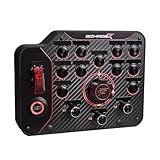

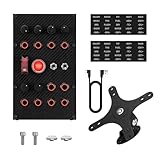
Our Top Picks

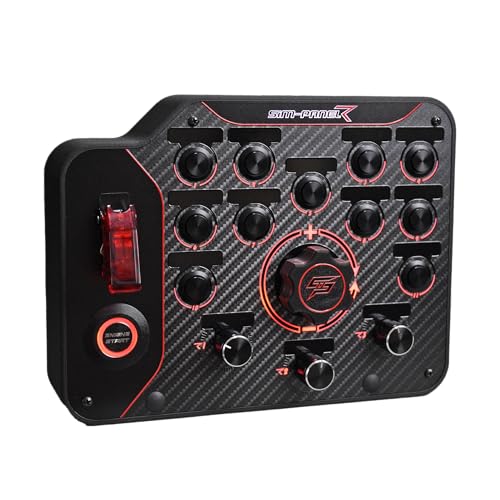


Top 3 picks at a glance
What a button box actually adds
Racing sims have far more functions than a controller or even a wheel rim has buttons: fuel mixture, MGU-K deployment, differential settings, wipers, lights, and dozens of car-specific toggles. A button box gives each a physical home, letting you adjust on the fly without pausing or diving into menus. For endurance and open-wheel racing especially, that tactile control is a genuine performance and immersion boost.
Key buying criteria
| Feature | Why it matters | Look for |
|---|---|---|
| Input count | Enough for your sims | 16–32 inputs typical |
| Rotary encoders | Cycle multi-state settings | 2–6 encoders |
| Toggle switches | On/off functions | Metal toggles with covers |
| Connection | Plug-and-play | USB (PC), check console support |
| Mounting | Rigid placement | Standard hole pattern / clamp |
Console compatibility is the catch
This is the most important thing to verify. PCs treat a button box as a standard USB controller, so almost any box works. Consoles are far more restrictive—they only accept licensed input devices, and a generic USB button box often will not be recognized. If you race on console, confirm the box is explicitly console-compatible or designed to piggyback on a licensed wheel; otherwise it is a PC-only accessory.
Build quality and switch feel
You will hit these controls hard, sometimes without looking. Metal toggle switches, quality rotary encoders with defined clicks, and illuminated or differently shaped buttons you can identify by feel separate a box that lasts from one that fails. Backlighting helps in a dark racing room.
Mounting and layout
A button box is only useful if it is rigidly mounted within reach. Look for a standard bolt pattern to fit rig brackets, or a clamp mount for desk setups. Plan the layout so your most-used functions (pit limiter, traction control) sit closest to your hand, and group related switches. Some racers run two smaller boxes—one per side—rather than one large panel.
FAQ
Do I need a button box if my wheel already has buttons?
Not strictly, but wheels rarely have enough inputs for serious sims, and reaching wheel buttons mid-corner is awkward. A button box adds capacity and keeps functions in a fixed spot that does not rotate with the wheel, which many find far easier to use by feel.
Can I build my own button box?
Yes—DIY boxes using a USB controller board, arcade switches, and encoders are a popular, cheaper project on PC, often costing $40–$80 in parts. The catch is the same as pre-built: a homemade box generally works only on PC, not on locked-down consoles.
Programming and software
A button box is only useful once each switch is mapped to a function. On PC, most sims let you bind inputs directly, and companion software can assign rotary encoders and even set up shift states so one physical control does double duty. Spend time on a sensible layout—grouping related functions and keeping the busiest ones near your hand—because muscle memory is what lets you adjust brake bias mid-corner without looking.
Encoders vs switches for the right jobs
Match the control type to the function. Rotary encoders suit anything with many steps—traction control levels, brake bias, fuel mixture—while toggle and push buttons suit on/off actions like the pit limiter, lights, or wipers. A box heavy on encoders is ideal for open-wheel and endurance racing; a simpler switch-heavy box is fine for arcade-leaning sims.
Growing your rig
Plan for expansion. If you later add a handbrake, shifter, or a second display, a button box with a standard mounting pattern and spare inputs slots into the rig without a rebuild. Buying slightly more capacity than you need now saves money later.
Will one button box work across multiple sims?
On PC, yes—the box presents as a generic controller, and you simply rebind its inputs in each game. The physical box is universal; only the software mapping changes per title, so you configure each sim once and you are set.
Bottom line
A button box with a healthy mix of toggles, buttons, and 2–6 rotary encoders, solid metal switches, and a rigid mount transforms sim racing ergonomics. The decisive factor is platform: on PC almost anything works, but on console you must confirm explicit compatibility before buying, or you will end up with a panel the console ignores.