A good pocket emulator handheld puts decades of gaming history in your jacket, from Game Boy classics to PlayStation-era 3D. The trick is matching the device to the systems you care about, because a $60 pocket unit that flies through 16-bit games will choke on anything demanding. This guide explains what to look for and which categories of handheld suit different retro libraries and budgets.
Our Top Picks
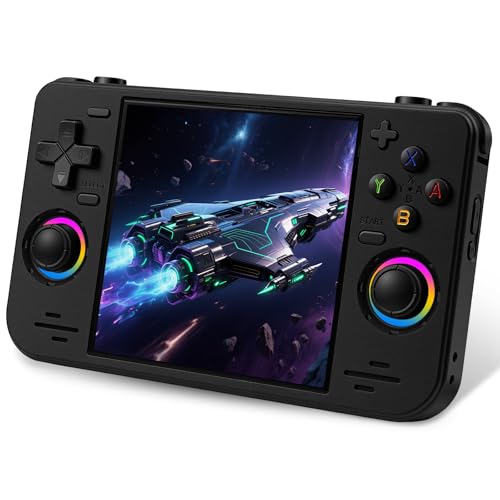
 Retroid Pocket 4/4Pro Retro Game Handheld3.25 x 7.27 x 0.62 inches7.27 x 3.25 x 0.62 inchesCheck on Amazon
 Retroid Pocket Flip 2 Retro Game Console5.5 Inches5.53 x 3.52 x 0.96 inches0.7 PoundsCheck on Amazon
 Retroid Pocket Classic Retro Handheld Game Console3.92 Inches5.43 x 3.53 x 1 inches0.5 PoundsCheck on Amazon
 UYTGXEN XF40V Retro Handheld Game Console with 2*Detachable14.8 X 8.5 X 3.7 Cm5.83 x 3.35 x 1.46 InchesCheck on Amazon

Top 3 picks at a glance
What “pocket” really means
Pocket handhelds are the smallest class, usually with screens between roughly 2.8 and 3.5 inches and a vertical or compact landscape layout. They prioritize portability and battery life over raw power. Expect four to eight hours of play depending on the chip and screen, and a price band that often lands between $50 and $120.
As an Amazon Associate we earn from qualifying purchases at no extra cost to you.



Screen and battery basics
A sharp IPS panel makes pixel art pop, and a 4:3 aspect ratio wastes no space on older consoles. Battery capacity in the 2500-4000mAh range is typical; larger cells add bulk but extend play. USB-C charging is now standard and worth insisting on.
| Tier | Screen size | Systems it handles | Price band |
|---|---|---|---|
| Entry pocket | 2.8-3.5 in | NES, SNES, Game Boy, Genesis | $50-90 |
| Mid pocket | 3.5 in | Add PS1, light N64, some PSP | $90-150 |
| Premium compact | 3.5-4 in | Dreamcast, PSP, some Saturn | $150-250 |
Match the device to your library
2D classics only
If your wishlist is NES, SNES, Genesis and Game Boy, the entry tier is all you need. These systems are trivial to emulate, so spend your money on a nicer screen and better buttons rather than a faster chip.
Into the 3D era
PS1, PSP and Dreamcast demand a mid or premium chip. N64 emulation is famously inconsistent, so if that system matters to you, read compatibility notes for the specific model rather than trusting a generic spec claim.
Controls, firmware and drift
Button feel makes or breaks a retro handheld, so favor devices with clicky face buttons and comfortable shoulder buttons. If a model offers Hall effect sticks, they resist the drift that ruins cheaper thumbsticks over months of use. Community custom firmware can dramatically improve the interface and add features like save-state management and box-art scraping.
FAQ
Do I need Android or is Linux fine?
For pure retro emulation up to the PS1 and PSP era, a Linux device is simpler, cheaper and boots straight into games. Choose Android only if you also want streaming, cloud gaming or heavier systems that need more flexible emulator apps.
How much storage should I get?
A 128GB microSD holds enormous 8-bit through PS1 libraries with room to spare. Only PSP and Dreamcast collections, with their larger disc images, push you toward 256GB or more.
Sourcing games legally
The ownership question
The device is only half the hobby; the games are the other half. The legally safe route is to dump your own cartridges and discs to ROM files using inexpensive dumping hardware, so you are playing backups of media you own rather than downloading copies. Organize your library with clean folder names and box-art scraping, which most custom firmware supports, so browsing hundreds of titles stays pleasant. Keep a backup of your microSD card, because a corrupted card can wipe your entire curated collection in an instant, and rebuilding save states and playlists from scratch is a frustrating waste of an evening.
Bottom line
The best pocket emulator handheld is the cheapest one that clears the hardest system you want to play. For 2D libraries, an entry unit with a great screen wins; for PS1, PSP and Dreamcast, step up to a mid or premium compact. Prioritize screen quality, button feel and drift-resistant sticks, and add a roomy microSD to hold your collection.