Our Top Picks






Top 3 picks at a glance
Best Mechanical Keyboards for Gaming Under $100: What to Buy
The best mechanical keyboard for gaming under $100 for most people is the Redragon hot-swappable wired board with Red linear switches — it is the only pick in this roundup that pairs a true mechanical switch with hot-swap sockets, 11 programmable backlight modes and anti-ghosting at a mid-tier price, which means you can change switch feel later instead of replacing the whole keyboard. If you want a full-size deck with extra dedicated hotkeys, the Redragon K668 is the closest step up. If desk space is the constraint, the GEODMAER 65% and the MageGee MK-Box 60% deliver the same gaming essentials in a footprint roughly a third narrower than a full-size board. If you care most about a solid, no-frills chassis and clean white backlighting, the Logitech G413 SE is the outlier worth considering.
To be clear about the ceiling: every board here is a sub-$100 proposition, and the “budget / mid-range / premium” tiers below describe position within that ceiling, not absolute price brackets. Nothing on this list requires a flagship budget, and street prices on all of them move week to week.
Quick Comparison
Every product covered in this roundup, with its tier position inside the under-$100 ceiling. Tiers are relative to each other, not to the wider keyboard market.
| Product | Best for | Key specs | Price tier |
|---|---|---|---|
| Redragon Hot-Swap Red Mechanical Keyboard | All-round value; switch tinkerers | Linear Red switches, hot-swap sockets, 11 backlight modes, anti-ghosting, wired USB | Mid-range |
| Redragon K521 Upgrade | Cheap full-size desk keyboard | 104 keys, rainbow LED, “mechanical feeling” key feel, multimedia keys, wired | Budget |
| RisoPhy RGB 104-Key | Click-feel fans on a mid budget | 104 keys, Blue clicky switches, RGB, ultra-slim profile, wired USB | Mid-range |
| Redragon K580 | Macro-heavy games and media control | Full-size layout, dedicated macro key, media wheel, RGB, wired | Premium |
| Logitech G413 SE | Durability and understated looks | Full-size, tactile mechanical switches, PBT keycaps, white backlight, aluminium-alloy top case | Premium |
| GEODMAER 65% | Compact budget desks | 68 keys, 65% layout, wired backlit, anti-ghosting, no-conflict, ultra-compact | Budget |
| MageGee MK-Box 60% | Ultra-compact portability | 68 keys, mini wired, LED backlit, compact chassis, office-friendly footprint | Budget |
| Redragon K668 | Full-size plus shortcut keys | 108 keys, hot-swap, RGB, 4 extra hotkeys, wired | Mid-range |
| AULA F2088 | Style-led setups | 104 keys, typewriter-style round keycaps, RGB, wired | Premium |
| Logitech G213 Prodigy | Quiet, spill-resistant everyday play | Full-size, mechanical-feel membrane, RGB zones, integrated palm rest, spill resistance | Premium |
| Rii RK100+ | Cheap multimedia keys | Large-size layout, rainbow LED, mechanical-feel membrane, multimedia keys, wired | Budget |
| Redragon K582 | Standard-layout simplicity | 104 keys, RGB, standard full-size layout, wired mechanical | Mid-range |
How We Chose
This list is built from published manufacturer specifications, the way each board is actually described at retail, and long-established facts about keyboard categories — not from a lab bench. Selection criteria, in order of weight:
- Category fit. The keyboard must be genuinely aimed at gaming: a wired connection, some form of anti-ghosting or rollover handling, and a layout that supports the keys you actually press in shooters, MOBAs and sims.
- Spec class honesty. Where a listing says “mechanical feeling”, we say so and explain what that means, rather than quietly filing a membrane board under mechanical.
- Use case spread. The list deliberately spans full-size, tenkeyless-adjacent, 65% and 60% footprints so a reader with a narrow desk and a reader with a big one both find a fit.
- Upgrade path. Hot-swap sockets, standard keycap sizing, and replaceable cables matter more than any single spec at this price point, because they decide whether the board is still yours in three years.
- Value inside the ceiling. A board earns a place by giving more per tier than its neighbours, not by being cheapest.
1. Redragon Hot-Swap Red Mechanical Keyboard – Best for All-Round Value
As an Amazon Associate we earn from qualifying purchases at no extra cost to you.

This is the board to buy if you want one keyboard that does everything competently and can be changed later without being replaced. It suits a first-time mechanical buyer who is not yet sure whether they like linear or tactile switches, and it suits the tinkerer who already knows they want to try something different in six months. The headline is the combination of hot-swappable Red switches and a genuinely useful backlight feature set at a mid-tier position.
Key specs
- Switches: Redragon Red-style linear mechanical switches, hot-swappable — the listing’s core selling point
- Backlighting: 11 programmable backlit modes, so you can set a single static colour or a moving pattern
- Rollover: anti-ghosting, which prevents phantom keypresses when several keys are held together
- Connection: wired USB, which removes battery, pairing and wireless-polling variables entirely
- Layout: standard Redragon gaming layout — check the listing page for the exact key count, since this family ships in more than one size
- Build: plastic chassis with a metal-look top plate, typical of the mid tier
Why it earns the top spot
Linear red switches are the default recommendation for competitive play for a reason: roughly 45 g actuation force and about 2 mm of pre-travel on a 4 mm total travel, with no tactile bump to push through. That means the key fires on the way down rather than at the bottom, and rapid double-taps and counter-strafing inputs feel consistent. The trade-off is that linear switches give you very little feedback that a press registered, which is why some players prefer tactile. The hot-swap sockets are what make that trade-off cheap to reverse — you pull the switch, push in a tactile or clicky one, and you have effectively bought a second keyboard for the price of a switch set.
The 11 programmable backlight modes are more useful than they sound. On a board with no per-key RGB software depth, a small number of well-chosen static or single-colour modes is easier to live with than a sprawling lighting suite you never open. Anti-ghosting matters more than any lighting feature here: in a game where you are holding shift, W, A and space at the same time while reaching for a fifth key, ghosting shows up as an input that simply does not happen, and it is one of the most frustrating failure modes a keyboard can have.
Pros
- Hot-swappable switches give a genuine upgrade path inside the under-$100 ceiling
- Linear red feel is the safest starting point for shooters and fast movement games
- Anti-ghosting plus wired USB keeps the input chain simple
- 11 backlight modes cover both “no distraction” and “show it off” preferences
- Straightforward software-free setup in most cases
Cons
- No per-key RGB depth if that matters to you
- Linear switches give little tactile confirmation for typing-heavy work
- Plastic chassis will not feel as planted as a metal-bodied board
- Exact key count and layout variant should be confirmed on the listing
Versus the nearest alternative: the Redragon K582 sits in the same brand, same tier and same broad layout family, but it is the fixed-switch version of the idea. Choose the K582 if you want the simplest possible 104-key standard board and never intend to change switches. Choose this hot-swap model if you want the option open — and at this price level, keeping an option open costs very little. Against the Redragon K668, this board gives up the extra hotkeys but keeps the switch-swapping flexibility in a more conventional layout.
2. Redragon K521 Upgrade – Best for a Cheap Full-Size Backlit Setup

The K521 Upgrade suits the buyer who wants a full-size 104-key desk keyboard with backlighting and multimedia keys for as little as possible, and who is not actually chasing mechanical switch feel. It is the honest budget option in this list: the listing describes it as “mechanical feeling”, which is a specific and important phrase. If you need a genuinely mechanical board, look at the Redragon K582 instead.
Key specs
- Layout: 104 keys, full-size with number pad
- Key feel: “mechanical feeling” — a membrane or hybrid mechanism with a stiffer, more defined press than a flat scissor keyboard
- Backlighting: Rainbow LED, typically static multi-colour rather than fully programmable per-key RGB
- Multimedia: dedicated multimedia key functions
- Connection: wired USB
- Tier position: budget — the lowest-cost way onto this list with a full-size footprint
What “mechanical feeling” actually means
This is the single most useful thing to understand before buying at the budget tier. A “mechanical feeling” keyboard uses a rubber dome or hybrid mechanism with a spring or plunger that stiffens the press, so it feels more like a mechanical switch than a laptop-style scissor keyboard does. It is not a mechanical switch: there is no discrete switch housing under each keycap, no hot-swap socket, and no meaningful switch-swap path. What you do get is a taller, chunkier keycap profile, a more definite bottom-out, and typically a longer key travel than a slim membrane board.
For gaming specifically, that is not a disaster. The properties that matter most in practice are rollover behaviour and consistency, and a well-made membrane board can handle multi-key input fine for most players. What you lose is the crisp, repeatable actuation point that makes mechanical switches feel predictable over thousands of presses, plus the longevity — a rubber dome degrades as the dome ages, while a mechanical switch keeps its feel far longer.
Pros
- Full-size 104-key layout with number pad at the lowest tier position
- Rainbow LED backlighting makes it usable in a dark room
- Multimedia keys save alt-tabbing for volume and playback
- Simple wired setup with nothing to charge or pair
- Cheap enough to be a second or backup keyboard
Cons
- Not a mechanical keyboard, despite the “mechanical feeling” label
- No hot-swap, no switch replacement, no real upgrade path
- Rainbow LED is usually less configurable than true per-key RGB
- Dome mechanisms wear faster than mechanical switches under heavy use
Versus the nearest alternative: the Rii RK100+ occupies almost exactly the same niche — large-format, rainbow-LED, mechanical-feel membrane, multimedia keys. The practical differences come down to exact key count, chassis size and which multimedia arrangement suits your desk. If you are comparing only these two, pick on layout and physical size rather than on performance, because neither is a mechanical board and neither will feel dramatically different in game. If you can stretch to the mid tier, the Redragon K582 is the real step up here: it is genuinely mechanical and remains inside the under-$100 ceiling.
3. RisoPhy RGB 104-Key – Best for Click-Feel Fans on a Mid Budget

The RisoPhy RGB 104-key suits players who actively want the loud, sharp, unmistakable press of a clicky Blue switch and want a slim, low-profile-looking full-size board to go with it. It also suits anyone who types a lot between matches, because clicky switches are the most satisfying type to type on — and the most annoying to everyone else in the room.
Key specs
- Switches: Blue clicky mechanical switches — tactile bump plus an audible click at actuation
- Layout: 104 keys, full-size with number pad
- Backlighting: RGB, LED backlit with multiple colour modes
- Profile: ultra-slim — a shallower chassis than a typical gaming board, closer to a low-profile look
- Connection: wired USB
- Tier position: mid-range
How Blue switches behave, and who should avoid them
Clicky blue switches typically need around 60 g to actuate and produce a two-stage feel: a bump you can feel and a click you can hear, both at roughly the 2 mm mark. For typing, that feedback is genuinely pleasant and it reduces accidental keypresses because you can feel exactly when the switch fires. For gaming, the picture is more mixed. The higher actuation force means slightly more work per press over a long session, and the audible click means anyone sharing a room or on voice chat will hear every input. If you play with an open mic, that click is a metronome of your movement.
There is also a mechanical consideration with an ultra-slim chassis: shallower cases usually mean shorter key travel or a lower-profile keycap set, which changes how the switch feels compared to a standard-height board using the same switch type. The click is still there, but the throw is shorter, so the switch tends to bottom out sooner. Some players love that — it feels fast and snappy — and others find it fatiguing because there is less cushioning travel after actuation.
Pros
- Genuine mechanical clicky switches at a mid-tier position
- Full-size 104-key layout with number pad
- RGB backlighting with multiple modes
- Slim profile takes up less vertical space and looks tidy on a desk
- Excellent typing feel if you split time between games and work
Cons
- Audible click is a problem for shared rooms and open mics
- Higher actuation force than a linear red switch
- Ultra-slim chassis may mean shorter travel than a standard-height board
- No hot-swap mentioned, so switch changes are not a casual upgrade
Versus the nearest alternative: the Redragon K582 is the natural head-to-head. Both are full-size 104-key mechanical boards in the mid tier, and the decision comes down almost entirely to switch character: the K582 family typically ships with linear red switches, which are quieter and lighter, while the RisoPhy is clicky and heavier. Pick the RisoPhy if you want feedback and do not care who hears it; pick the K582 if you want a quieter, lower-effort press. Against the Logitech G413 SE, the RisoPhy is louder, slimmer and less sturdily built, but it is also the more configurable of the two on lighting.
4. Redragon K580 – Best for Macro-Heavy Games and Media Control
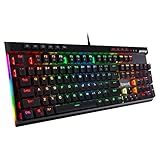
The K580 suits the player who binds a lot of actions — MMO rotations, sim cockpit controls, RTS build orders — and who wants physical macro keys and a volume wheel rather than software-only workarounds. It is the most feature-dense board on this list at the premium tier position, and it is aimed squarely at people who will actually use those extra controls.
Key specs
- Layout: full-size with number pad, plus dedicated macro keys and a media wheel
- Macro keys: on-board macro binding, typically without needing the driver running for stored profiles
- Media wheel: physical rotary control for volume and media navigation
- Backlighting: RGB with per-key control through Redragon’s software
- Switches: mechanical, commonly configured with linear red-type switches in this family
- Connection: wired USB
Why macro keys and a wheel still matter
Software macro layers work fine until you need something to happen while the game has focus and your overlay is not running. Dedicated macro keys sidestep that entirely: they are separate physical inputs that the game can see as distinct keys, so a rotation or a build sequence fires from muscle memory rather than from a layer you have to remember you are in. For MMO and sim players, that is the difference between a rotation you can execute under pressure and one you fumble.
The media wheel is a smaller but disproportionately useful addition. A rotary volume control is faster and more precise than two volume keys, and it works mid-match without pulling you out of the game. If you stream or take calls while playing, it is the kind of feature you stop noticing precisely because it works.
The trade-off is desk space and complexity. Adding macro keys and a wheel to a full-size layout makes this one of the wider boards in this roundup, so measure your desk before committing. You also inherit software configuration, which is more setup work than a plug-and-play board with no macros.
Pros
- Dedicated physical macro keys for MMO, RTS and sim players
- Media wheel is genuinely useful for volume control mid-game
- Full-size layout with number pad
- RGB with per-key configuration
- On-board macro storage means profiles survive a PC change
Cons
- Widest footprint on this list — check desk clearance
- Macro software adds setup time most buyers will not need
- Premium tier position without a metal-bodied feel to match
- Extra controls are wasted if you only play shooters
Versus the nearest alternative: the Redragon K668 is the closest sibling — both are full-size Redragon boards with extra controls, and both are hot-swap capable. The split is about what kind of extra you want. The K668 adds four extra hotkeys and keeps a more conventional width; the K580 adds a media wheel and a deeper macro setup. If you bind macros to keys you press with your left hand during combat, the K668’s arrangement is usually more practical. If you want a physical volume control and a media hub, the K580 wins. Against the Logitech G413 SE, the K580 gives you far more configuration and the G413 SE gives you a sturdier, simpler board.
5. Logitech G413 SE – Best for Durability and Understated Looks

The G413 SE suits the player who wants a keyboard to disappear into the desk and keep working for years — no RGB, no macro software maze, no gamer aesthetic. It is the pick for someone who values a metal top case, PBT keycaps and a tactile switch over lighting features, and who would rather buy once than tinker.
Key specs
- Switches: tactile mechanical switches — a bump at actuation without the audible click of a blue switch
- Keycaps: PBT, which resists the shine and wear that ABS caps develop
- Top case: aluminium-alloy, which adds rigidity and weight compared with a plastic chassis
- Backlighting: white LED only — no RGB
- Layout: full-size with number pad
- Connection: wired USB
Where the money goes
Nothing on this board is spent on lighting. That is the whole point. The budget goes into the parts that affect how the keyboard feels in three years: a metal top plate that stops the chassis flexing under heavy presses, and PBT keycaps that resist the greasy shine that ABS caps pick up after a few months of use. If you have ever looked at a two-year-old keyboard and noticed the WASD cluster has gone smooth and glossy, that is ABS wear, and PBT is the fix.
Tactile switches are the middle ground of switch feel. They give you a bump you can feel at the actuation point, which improves typing accuracy and gives confirmation that a press registered, without the audible click that makes blue switches a problem in shared spaces. The trade-off against linear switches is that there is a physical bump to push through on every press, which some competitive players find slows rapid repeated inputs.
The absence of RGB is worth being explicit about, because it is the most common reason people bounce off this board. If your setup is built around colour-matched lighting, this is the wrong keyboard. If your setup is built around a black desk and a black case, the white backlight is exactly enough to read the keys in a dark room.
Pros
- Aluminium-alloy top case gives a noticeably more solid feel than plastic rivals
- PBT keycaps resist shine and wear far better than ABS
- Tactile switches suit mixed gaming and typing use
- White backlighting is clean and distraction-free
- No software required for basic use
Cons
- No RGB at all — a dealbreaker for colour-matched setups
- No hot-swap, so switch feel is fixed for the life of the board
- Fewer programmable features than similarly tiered rivals
- Tactile bump is not ideal for players who want pure linear speed
Versus the nearest alternative: against the Redragon K580, the G413 SE trades configuration for build. The K580 gives you macros, a wheel and RGB; the G413 SE gives you a metal case and PBT caps and nothing else. If you will actually use the macro keys, take the K580. If you will not, the G413 SE is the better long-term object. Against the Logitech G213 Prodigy, the G413 SE is the true mechanical board and the G213 is the mechanical-feel membrane one — if switch type matters to you, this is the Logitech to pick.
6. GEODMAER 65% – Best for Compact Budget Desks

The GEODMAER 65% suits players with narrow desks, small apartments or a mouse arm that keeps clipping the number pad. A 68-key 65% layout keeps the arrow keys and the essential navigation cluster while cutting the width dramatically compared with a full-size board. It is a budget-tier pick, so the expectation should be set accordingly.
Key specs
- Layout: 65% with 68 keys — arrow keys retained, number pad removed
- Rollover: anti-ghosting with no-conflict handling for simultaneous keypresses
- Backlighting: wired backlit LED
- Profile: ultra-compact mini chassis
- Connection: wired USB
- Key mechanism: check the listing — at this tier, 65% boards are often membrane-based or use low-cost mechanical-clone switches
The desk-space argument, with numbers
Layout width is the most underrated spec in keyboard buying. A full-size 104-key board typically runs about 43–45 cm wide. A 65% 68-key board typically runs about 31–32 cm. That is a saving of roughly 12–13 cm, which does not sound like much until you work out what it buys you on the mouse side. Competitive mouse sensitivity settings commonly need 25–30 cm of horizontal travel to do a full 180-degree turn without lifting. On a 90 cm desk, a full-size keyboard plus a 30 cm mouse mat leaves you around 30 cm of usable swing — tight. Drop to a 65% and you gain enough width to place the mat properly and still keep your mouse hand at shoulder width rather than angled inward.
The cost of that saving is the number pad, plus usually some function-layer complexity. Number entry becomes a function-layer job, which is fine for most gamers and annoying for anyone who does spreadsheet work. The 65% layout is the sweet spot for people who need arrow keys and do not need a numpad.
Pros
- Roughly 12–13 cm narrower than a full-size board, freeing real mouse travel
- Keeps arrow keys, unlike a 60% layout
- Anti-ghosting and no-conflict handling for multi-key input
- Backlit for dark-room use
- Lowest cost way to get a compact footprint on this list
Cons
- No number pad, and function-layer access for some keys
- Key mechanism should be verified before buying — “mechanical” is not guaranteed at this tier
- Compact chassis can feel less planted during hard presses
- Fewer premium materials at the budget tier
Versus the nearest alternative: the MageGee MK-Box 60% is the other compact budget pick, and the difference is the layout rather than the price. Both are 68-key compact boards in the budget tier, but the MK-Box is positioned as a 60%-style mini with a stronger emphasis on portability and office use, while the GEODMAER leans into the 65% gaming framing. If you want arrow keys in a familiar arrangement, the 65% framing is the safer bet. If you want the smallest possible footprint and do not mind a more aggressive function-layer learning curve, the MK-Box is the more portable of the two.
7. MageGee MK-Box 60% – Best for Ultra-Compact Portability

The MK-Box suits the player who moves between desks — a laptop at work, a desktop at home, a console setup in the living room — and wants one small keyboard that travels without drama. It is also the right pick for someone whose desk is genuinely tiny, where even a 65% feels like it is eating the mouse area.
Key specs
- Layout: 68 keys, 60%-class compact mini format
- Backlighting: LED backlit
- Connection: wired USB
- Positioning: described for both gaming and office use, which reflects the compact, low-profile approach
- Chassis: small, light and easy to pack
- Switches: mechanical per the listing — verify the exact switch type, as compact boards in this tier are often sold in clicky variants
What you gain and what you give up
A 60%-class board is the most aggressive space-saving layout you can buy without going to a split or ortholinear design. It removes the number pad, the arrow cluster and the navigation block, and expects you to reach them through a function layer. That is a genuine adjustment period — usually a week or two before the muscle memory settles — and for some people it never clicks. The reward is a keyboard roughly 29 cm wide, which on a small desk is the difference between a comfortable mouse position and a cramped one.
Portability is the second benefit and it is not just about size. A compact wired board is easy to unplug, bag and re-plug, and it draws nothing from a battery, so it never arrives at a new desk half-charged. For laptop users who hate typing on a built-in deck, a compact mechanical board is a meaningful upgrade that still fits in a laptop bag compartment.
The honest caveat at this tier is switch specification. Compact budget mechanical keyboards are frequently sold in clicky variants, and the listing should be read carefully if you want a quiet board. If quiet matters, plan to check the switch description before ordering rather than assuming.
Pros
- Smallest practical footprint on this list, roughly 29 cm wide
- Easy to transport between desks and setups
- Wired connection means no battery management
- Backlit for low-light use
- Cheap enough to be a dedicated travel board
Cons
- No arrow keys or number pad without a function layer
- Function-layer learning curve is real, and not everyone adapts
- Compact chassis can shift under aggressive play without a desk mat
- Switch type should be verified — clicky variants are common at this tier
Versus the nearest alternative: the GEODMAER 65% is the direct competitor and the choice is a straight trade of width against convenience. The GEODMAER keeps arrow keys at roughly 31–32 cm; the MK-Box goes smaller and drops them. If you use arrow keys in games — menu navigation, driving games, retro titles — the 65% layout saves you a layer every time. If you never touch them, the MK-Box is the smaller, more packable board. Against the Redragon hot-swap board, the MK-Box trades switch-swapping flexibility for portability; you cannot have both at this price.
8. Redragon K668 – Best for Full-Size Plus Shortcut Keys

The K668 suits players who want a full-size board with a number pad, RGB and hot-swap flexibility, plus four extra keys for the actions that do not deserve a place in the main cluster. It is the board for someone who plays a mix of shooters and games with heavy binding demands, and who refuses to give up the numpad.
Key specs
- Layout: 108 keys — a full-size 104-key arrangement plus four additional hotkeys
- Switches: hot-swap mechanical, so switches can be replaced or changed without soldering
- Backlighting: RGB with per-key configuration via Redragon’s software
- Extra hotkeys: four dedicated keys above the main cluster for macros or shortcuts
- Connection: wired USB
- Tier position: mid-range
The case for four extra keys
Four extra hotkeys sounds like a trivial addition until you count how many things you currently bind to awkward combinations. Push-to-talk, mute, screenshot, recording toggle, a Discord overlay, a game-specific utility — each one is a chord you have to hold or a key you have to give up. Four dedicated keys take that load off the main cluster without adding a full macro bank you will never fill. The K668 hits the practical middle: more binding room than a standard board, less complexity than a dedicated macro deck.
Hot-swap is the other meaningful feature, and it matters more on a full-size board than on a compact one because a full-size board is a bigger investment to replace. If a switch fails after two years of WASD abuse, you replace one switch instead of the keyboard. If you decide you want tactile instead of linear, you replace the switch set. That is the difference between a keyboard that lasts until you are bored of it and one that lasts until it breaks.
The 108-key count is the practical downside. It is wider than a standard full-size board, which puts it in direct conflict with mouse travel on a narrow desk. If you are already short on space, the extra four keys are not worth the width.
Pros
- Full-size 104-key layout with number pad, plus four extra hotkeys
- Hot-swap sockets extend the board’s useful life considerably
- Per-key RGB configuration
- More binding room without a full macro bank
- Mid-tier position inside the under-$100 ceiling
Cons
- Wider than a standard 104-key board — a problem on small desks
- Requires software for full RGB and macro configuration
- Extra keys are wasted if you never bind anything to them
- Plastic chassis typical of the tier
Versus the nearest alternative: the Redragon K580 is the other extra-control Redragon board, and the difference is the kind of extra. The K580 adds a media wheel and a deeper macro setup; the K668 adds four hotkeys and stays closer to a conventional width. For combat binding, the K668’s arrangement is generally easier to reach. Against the Redragon hot-swap board at the top of this list, the K668 is the wider, more feature-dense option and the hot-swap board is the simpler, narrower one — the deciding question is whether you need a number pad and four extra keys, or whether you would rather have the desk space.
9. AULA F2088 – Best for Style-Led Setups

The AULA F2088 suits the buyer who wants a keyboard that looks like something — a typewriter-inspired 104-key board with round keycaps and RGB, aimed at people who treat the desk as part of the setup rather than a utility surface. It is a legitimate mechanical board, but the styling is the reason to buy it, and buyers who want a conventional gaming look should look elsewhere.
Key specs
- Style: typewriter-style round keycaps — the defining feature
- Layout: 104 keys, full-size with number pad
- Backlighting: RGB
- Connection: wired USB
- Switches: mechanical, typically clicky variants in this styling family — verify on the listing
- Tier position: premium
What round keycaps change in practice
Typewriter-style round keycaps are not just a cosmetic change. They are usually taller and more deeply dished than a standard cylindrical keycap, which changes where your fingers land and how much of the keycap surface you contact. That can be genuinely comfortable for typing, because the dish centres your finger, but it can be a problem for gaming where your fingers rest across a spread of keys and rely on feeling the edges of adjacent caps. Some players adapt within a session; others never fully adjust to round caps for WASD.
The other practical consideration is keycap replacement. Standard mechanical keyboards accept the vast majority of aftermarket keycap sets, which is a large part of their appeal. A typewriter-style board is bought for its look, and swapping the caps removes the reason you bought it. That is fine — just be aware you are choosing a fixed aesthetic rather than an upgradable one.
The RGB backlighting works well with the round caps because the lighting reads as a deliberate design element rather than a gaming feature bolted on. If your setup is warm-toned, wood-textured or otherwise styled, this board fits it in a way that a black plastic gaming deck never will.
Pros
- Distinctive typewriter styling that reads as furniture, not hardware
- Full-size 104-key layout with number pad
- RGB backlighting that complements the design
- Genuinely mechanical switches, not mechanical-feel membrane
- Comfortable dished keycaps for typing-heavy use
Cons
- Round keycaps are divisive for gaming and take adaptation
- Swapping keycaps defeats the board’s main appeal
- Premium tier position buys styling more than raw build
- Switch type should be confirmed, as clicky variants are common in this style
Versus the nearest alternative: the Logitech G413 SE is the other premium-tier board here and the two could not be more different. The G413 SE is deliberately plain, metal-bodied and PBT-capped; the F2088 is styled, round-capped and visually loud. If you want the keyboard to disappear, take the G413 SE. If you want it to be part of the room, take the F2088. Against the RisoPhy RGB 104-key, the F2088 is the more distinctive board with a similar clicky-leaning character, while the RisoPhy is the more conventional gaming deck at a lower tier position.
10. Logitech G213 Prodigy – Best for Quiet, Spill-Resistant Everyday Play
The G213 Prodigy suits the player who wants a full-size keyboard with RGB, a built-in palm rest and spill resistance, and who does not need mechanical switches. It is the most practical board on this list for a shared desk, a household with children, or anyone who eats and drinks at the keyboard — and the most important thing to know is that it is a mechanical-feel membrane board, not a mechanical keyboard.
Key specs
- Key mechanism: membrane with a mechanical-feel action — not a discrete mechanical switch
- Backlighting: RGB with multi-zone lighting
- Palm rest: integrated, so no separate wrist rest needed
- Durability features: spill-resistant construction
- Layout: full-size with number pad and media controls
- Connection: wired USB
Why it is still worth considering
Spill resistance is the feature nobody shops for and everybody needs. A keyboard that survives a knocked-over drink is worth more than a slightly crisper switch feel to most people, especially at a desk shared with a family. The integrated palm rest is the second practical advantage: a full-size board sits high at the front edge, and without a rest your wrists angle upward for hours at a time. Buying a separate rest adds cost and desk clutter that this board avoids.
The membrane mechanism is the honest limitation. It has a more defined press than a flat scissor keyboard and it is fine for gaming, but it will not match a mechanical switch for repeatable actuation over years of use, and it has no switch-swap path. If you are buying specifically because you want mechanical feel, the Logitech G413 SE is the mechanical option from the same brand and remains inside the under-$100 ceiling.
Multi-zone RGB rather than per-key RGB is a smaller limitation than it sounds — most people set one static colour and leave it — but it is worth knowing before you buy if you want per-key effects.
Pros
- Spill-resistant construction is a genuine durability advantage
- Integrated palm rest saves money and desk space
- Full-size layout with number pad and media controls
- Quieter than clicky mechanical boards — good for shared rooms
- Simple plug-and-play setup
Cons
- Not a mechanical keyboard, despite the mechanical-feel action
- No hot-swap and no switch upgrade path
- Multi-zone RGB rather than per-key
- Membrane mechanisms wear faster under heavy use
Versus the nearest alternative: the Logitech G413 SE is the direct sibling and the decision is simple. If you want true mechanical switches, aluminium and PBT, take the G413 SE. If you want a palm rest, spill resistance, RGB and a quieter board, take the G213 Prodigy. Against the Redragon K521, the G213 is the higher-quality mechanical-feel board with better durability features, while the K521 is the cheaper way to get a full-size backlit layout.
11. Rii RK100+ – Best for Cheap Multimedia Keys

The Rii RK100+ suits the buyer who wants the largest possible layout with multimedia keys and rainbow backlighting for the smallest possible outlay, and who is not buying for switch feel. It is a budget-tier board with a mechanical-feel membrane action, and it belongs on a secondary desk, a media PC or a build where the keyboard is not the point.
Key specs
- Key mechanism: mechanical-feel membrane — not a discrete mechanical switch
- Layout: large-size format with number pad and multimedia keys
- Backlighting: rainbow LED, typically static multi-colour
- Connection: wired USB
- Target use: PC gaming and general desktop use
- Tier position: budget
Where it fits and where it does not
There is a real place for a board like this. If you are building a cheap second setup, a media centre PC, a machine for a child, or a spare desk for guests, spending mechanical-keyboard money makes no sense. What you want is a full-size layout with multimedia keys, backlighting so it works in a dim room, and a wired connection that never needs charging. The RK100+ is that board.
What you should not expect is mechanical switch feel. The membrane action is stiffer and more defined than a laptop keyboard, which is what the “mechanical feeling” phrasing describes, but it is still a dome mechanism. Actuation is less crisp, the key feel degrades over time as the domes age, and there is no hot-swap path. For casual play and desktop use that is entirely adequate. For competitive play where you are relying on precise, repeatable key timing over long sessions, it is the wrong tool.
The rainbow LED backlighting is usually a fixed multi-colour scheme rather than configurable per-key RGB. That is fine if you want the effect, less fine if you want to match a specific colour across your setup.
Pros
- Large full-size layout with number pad at the lowest tier position
- Dedicated multimedia keys for volume and playback
- Rainbow LED backlighting for dark-room visibility
- Wired connection with nothing to charge or pair
- Cheap enough for a secondary or spare desk
Cons
- Not a mechanical keyboard despite the mechanical-feel description
- No hot-swap and no upgrade path
- Rainbow LED is usually not per-key configurable
- Membrane domes wear faster than mechanical switches
Versus the nearest alternative: the Redragon K521 Upgrade is the near-identical proposition — full-size, rainbow LED, mechanical-feel membrane, multimedia keys, budget tier. The two are close enough that the decision should be made on physical dimensions and the specific multimedia key arrangement rather than on performance. Against the Redragon K582, the RK100+ is cheaper but gives up genuine mechanical switches, which is the single biggest quality jump available inside this ceiling.
12. Redragon K582 – Best for Standard-Layout Simplicity

The K582 suits the player who wants a true mechanical 104-key board in the standard layout with RGB, no macro keys, no wheel, no compact compromises and no surprises. It is the default recommendation for someone who wants a normal keyboard that happens to be mechanical, and it is the safest blind buy on this list.
Key specs
- Layout: 104 keys, standard full-size with number pad
- Switches: mechanical, typically linear red-type in this family
- Backlighting: RGB with multiple modes
- Connection: wired USB
- Build: plastic chassis with a metal-look top plate, standard for the tier
- Tier position: mid-range
Why the standard layout keeps winning
The 104-key layout has survived decades because it solves the most problems with the fewest compromises. You get a number pad for data entry, a full navigation cluster, and no function-layer memory required for anything. For a player who also works at the same desk, that matters: alt-tabbing out of a game and into a spreadsheet should not require relearning where the arrow keys are.
Linear red switches are the other half of the argument. At roughly 45 g actuation and about 2 mm pre-travel, they fire early in the press with no bump to overcome, which suits rapid repeated inputs. They are also the quietest common mechanical switch type, since there is no click mechanism — the noise you hear is the keycap bottoming out, which you can reduce further with a desk mat or o-rings.
The limitation is the absence of hot-swap.
Related guides
- Best Streaming Gear for Twitch: Webcams, Capture Card, Backdrop and Light (2026)
- Best Over Ear Headphones: 9 Closed, Open-Back and Bluetooth Picks Explained (2026)
- Best Monitor for Console Gaming: Eight 1080p and 1440p Screens Compared by HDMI and Refresh Rate (2026)
- Best Monitors for PS5 Pro 4K 120Hz: Eight Screens and the HDMI Bandwidth Check (2026)