The best streaming gear for Twitch starts with a webcam that focuses reliably, a way to light your face, and a capture card only if your game lives on another device. This guide compares eight listings: five webcams, one capture card, one green screen and one desk ring light. We worked from titles and published specifications only, so every figure is a seller claim. Read the build order first, because buying in the wrong sequence is the most common budget mistake.
Our Top Picks
 NexiGo N660P Pro 4K Webcam with Distortion-Free Lens3.66 x 2.36 x 1.97 inches0.5 poundsCheck on Amazon
Eight pieces of gear at a glance

EMEET S600 4K Webcam for Streaming, Sony 1/2.55'' Sensor, PDAF Autofocus | 1080P@60FPS, 2 Noise Reduction Mics, Built-in Privacy Cover, 73° FOV, Streaming Camera for Live Commerce/Gaming/Beauty


As an Amazon Associate we earn from qualifying purchases. Product prices and availability are accurate as of the date/time indicated.
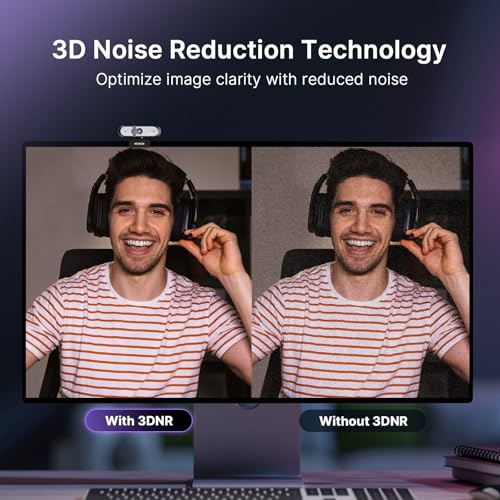
NexiGo N660P Pro 4K Webcam with Distortion-Free Lens, 1080p 60 fps Autofocus USB Streaming Camera, 3DNR, Noise-Canceling Mics & Privacy Cover, Web Cam for Gaming/Live Streaming/PC/Mac/Switch 2, Black




As an Amazon Associate we earn from qualifying purchases. Product prices and availability are accurate as of the date/time indicated.

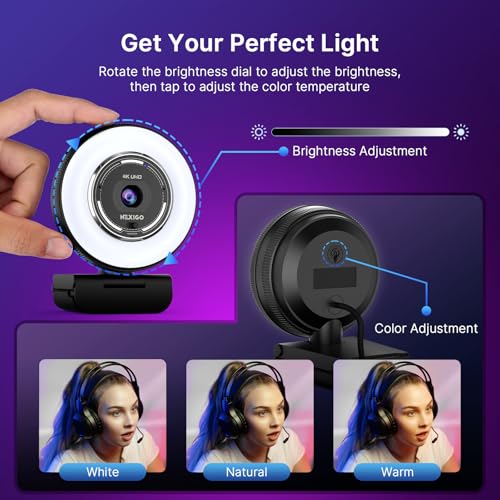
NexiGo N680E Pro 4K Webcam with Ring Light, PDAF Autofocus, 1080p 60FPS, Dual Noise-Canceling Mics, Privacy Shutter, USB Plug-and-Play for Zoom, Teams, Twitch, Google Meet




As an Amazon Associate we earn from qualifying purchases. Product prices and availability are accurate as of the date/time indicated.

Acer A640 4K Webcam with AI Noise Canceling Mic for Streaming Meetings | Sony 1/2.8" Sensor, PDAF Autofocus, 2K 1080P/60fps, A to C Adapter, Computer Camera for switch 2 Camera Teams Zoom Facetime


As an Amazon Associate we earn from qualifying purchases. Product prices and availability are accurate as of the date/time indicated.

Logitech Brio 101 Full HD 1080p Webcam for Streaming and Meetings - Black | 1080p with auto-light correction, built-in mic, privacy shutter, USB-A, compatible with Teams, Google Meet, Zoom and more


As an Amazon Associate we earn from qualifying purchases. Product prices and availability are accurate as of the date/time indicated.

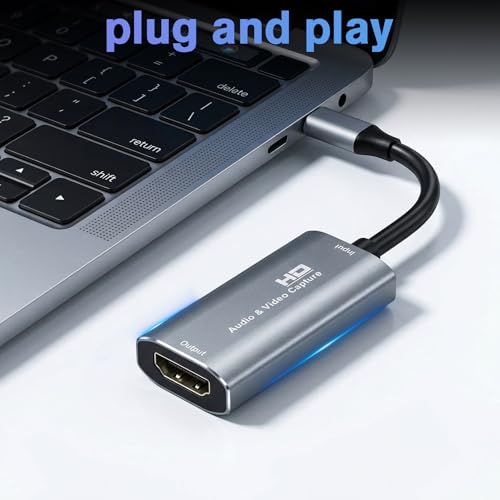
Video Capture Card, 4K USB3.0 HDMI to USB C, 1080P60FPS HDMI Capture Card for Streaming, Gaming, Video Recording Compatible with Switch, Xbox, PS4/5, OBS,iPad Mac OS Windows,Camera, Zoom(Silver)




As an Amazon Associate we earn from qualifying purchases. Product prices and availability are accurate as of the date/time indicated.

EMART Green Screen, 58x74in Collapsible Chroma Key Panel for Backdrop | Portable & Retractable Wrinkle-Resistant Backdrop with Stand for Background Removal, Streaming, Photographic Studio, TikTok


As an Amazon Associate we earn from qualifying purchases. Product prices and availability are accurate as of the date/time indicated.

Desk Ring Light with Stand for Computer, Desk Light for Video Recording | 10.5" Video Conference Lighting, Adjustable Circle Light with Phone Holder for Zoom Meeting Video Call Podcast Stream Webcam


As an Amazon Associate we earn from qualifying purchases. Product prices and availability are accurate as of the date/time indicated.
| Model | Key point from title | Price tier | Best for |
|---|---|---|---|
| EMEET S600 4K Webcam | Sony 1/2.55 inch sensor, PDAF autofocus, 1080p at 60 fps, 73 degree view | Mid-range | Streamers who want a wider sensor |
| NexiGo N660P Pro | 4K label, 1080p at 60 fps, autofocus, 3DNR, privacy cover | Mid-range | General streaming and calls |
| NexiGo N680E Pro | Ring light built in, PDAF autofocus, 1080p at 60 fps, dual mics | Premium | One-box webcam and light |
| Acer A640 | AI noise cancelling mic, Sony 1/2.8 inch sensor, PDAF autofocus | Mid-range | Streaming and meetings |
| Logitech Brio 101 | Full HD 1080p, auto light correction, built-in mic, USB-A | Budget | Simple, low-cost webcam |
| 4K USB 3.0 Capture Card | HDMI to USB-C, 1080p at 60 fps, OBS-friendly | Mid-range | Console streaming |
| EMART Green Screen | 58 by 74 inch, collapsible, wrinkle-resistant, with stand | Budget | Background removal |
| 10.5 inch Desk Ring Light | Stand, phone holder, adjustable circle light | Budget | Face lighting on a desk |
Price tiers are relative within this set, based on features in each title, since the briefs carried no current prices.
Build order: what to buy first
- Step 1, light: a ring light is the cheapest way to make any webcam look better.
- Step 2, camera: pick a webcam with autofocus and a sensor size you can verify in the title.
- Step 3, audio: a separate mic often matters more than webcam mics.
- Step 4, capture card: only if you stream a console or second PC.
- Step 5, backdrop: a green screen last, because it needs space and good lighting to work.
Green screen fit maths
A green screen only works if it fills the camera frame. The title of the EMEET S600 lists a 73 degree field of view, so we can run an estimate. The visible width at a distance equals about 1.48 times that distance (2 x tan of 36.5 degrees). The EMART panel is 58 inches wide, so it fills the frame only up to about 39 inches from the camera. If you sit 20 inches from the camera and the screen is 40 inches behind you, the camera sees about 89 inches of width at the screen, so a 58 inch panel shows edges.
| Camera to screen | Visible width at 73 degrees | Does a 58 inch panel cover it? |
|---|---|---|
| 30 in | about 44 in | Yes |
| 39 in | about 58 in | Just |
| 60 in | about 89 in | No |
These figures assume a 73 degree lens and no cropping, so treat them as estimates. A narrower view or a closer screen helps, and software cropping can hide small gaps.
The eight, one at a time
EMEET S600 4K Webcam
The title lists a Sony 1/2.55 inch sensor, PDAF autofocus, 1080p at 60 fps, two noise-reduction mics, a built-in privacy cover and a 73 degree field of view. The 4K label next to 1080p at 60 fps is a puzzle, so check which resolution runs at which frame rate. A larger sensor generally helps in dim rooms, although lighting and lens quality also play a part. The privacy cover is a small but useful extra when the camera is not in use.
Pros
- Larger sensor named
- Privacy cover included
Cons
- 4K and 1080p 60 fps claims need clarifying
- Webcam mics are modest
Who it’s for: Streamers who want a wide-angle camera with a bigger sensor.
NexiGo N660P Pro 4K Webcam
The listing mentions a distortion-free lens, 1080p at 60 fps with autofocus, 3DNR, noise-canceling mics and a privacy cover, and names gaming, live streaming, PC, Mac and Switch 2. The 3DNR wording refers to noise reduction in dim light, which can soften detail. The title does not list a sensor size, so compare reviews for low-light behaviour before you pick between the two NexiGo listings.
Pros
- Autofocus at 1080p 60 fps
- Privacy cover
Cons
- No sensor size in the title
- Noise reduction can soften detail
Who it’s for: Streamers who want a plug-in 1080p 60 fps webcam.
NexiGo N680E Pro 4K Webcam with Ring Light
A webcam with a ring light built in, PDAF autofocus, 1080p at 60 fps, dual noise-canceling mics and a privacy shutter, aimed at Zoom, Teams, Twitch and Meet. The built-in light saves desk space, but it is smaller than a desk ring light and it sits at the camera, so it can reflect in glasses. If you stream for long sessions, a light that cannot be moved separately from the camera is the main trade-off.
Pros
- Light and camera in one
- PDAF autofocus
Cons
- Built-in light is small
- Limited control over light placement
Who it’s for: Streamers with limited desk space.
Acer A640 4K Webcam
The title mentions AI noise canceling on the mic, a Sony 1/2.8 inch sensor, PDAF autofocus, “2K 1080P/60fps” wording, and an A to C adapter. The 2K and 1080p labels are confusing, so treat them cautiously. The adapter is handy for USB-C ports. It is a smaller sensor than the EMEET listing, though sensor size alone does not decide image quality. Check whether the mic noise cancelling needs an app.
Pros
- USB A to C adapter included
- PDAF autofocus
Cons
- Confusing resolution wording
- Smaller sensor than the EMEET
Who it’s for: Streamers and remote workers who want one camera for both.
Logitech Brio 101
A Full HD 1080p webcam with auto light correction, a built-in mic, a privacy shutter and a USB-A cable, aimed at streaming and meetings. The title does not list 60 fps or autofocus, so do not assume either. It is the simple choice and fits a low budget. Because the title is brief, read the product page before assuming features such as a tripod thread or a long cable.
Pros
- Simple plug-in design
- Privacy shutter
Cons
- No frame rate or autofocus in the title
- Basic built-in mic
Who it’s for: Newer streamers on a small budget.
4K USB 3.0 HDMI Video Capture Card
An unbranded capture card with HDMI to USB-C, 1080p at 60 fps and compatibility with Switch, Xbox, PS4 and PS5, OBS, iPad and Mac. The 4K claim is ambiguous: it may refer to input rather than capture. Passthrough, which lets a screen show the game without delay, is not mentioned in the title. If you want to see your game on a monitor with no delay, look for a model that clearly names it, or plan to use a splitter.
Pros
- Console-friendly
- Works with OBS per the title
Cons
- No passthrough mentioned
- Brand and 4K claim unclear
Who it’s for: Console streamers who accept a generic brand.
EMART Collapsible Green Screen
A 58 by 74 inch collapsible chroma key panel with a stand, described as retractable and wrinkle-resistant. The wrinkle-resistant claim is a seller statement, and folds can still show on camera. It is aimed at streaming and photography. Measure your wall space, since the stand and panel need room behind a chair, and keep the fabric away from heat.
Pros
- Collapsible and portable
- Stand included
Cons
- Needs space behind you
- May still show wrinkles
Who it’s for: Streamers who want background removal on a budget.
10.5 Inch Desk Ring Light with Stand
A circle light on a stand with a phone holder, described for video calls, podcasts and streams. Adjustable positioning helps. The title does not list colour temperature or brightness levels, so check the page. A phone holder is handy for checking chat or taking quick photos, and the clamp or base should be steady enough for your desk.
Pros
- Low cost
- Adjustable positioning
Cons
- No brightness figures in the title
- Small ring on a desk
Who it’s for: Streamers who want a cheap face light.
How we picked these
We are an editorial team and use published specifications, manufacturer documentation and buyer reviews. Nobody on the team used or measured these units. We chose gear that covers the main Twitch needs and spread the picks across tiers. All feature words in the titles are treated as seller claims.
What to look for in Twitch gear
Webcam resolution, frame rate and autofocus
A 1080p webcam at 60 frames per second looks smoother than 30 fps, which matters if you move on camera. A 4K sticker rarely helps on Twitch, because stream resolution is lower. Autofocus matters when you hold up items or lean in, and fixed-focus cameras can drift soft when you move. Frame rate figures often apply only at one resolution, so read the fine print.
Low light and built-in mics
A larger sensor and better lens help in a dim room, but a face light helps more. Webcam microphones are fine for calls, while a separate mic is better for a stream. If your room is dark, raise the light before you raise the camera settings, because software gain adds visible noise.
Capture card latency and passthrough
Latency is the delay between the game and the stream. Passthrough sends the signal to a screen so you can play without delay. A card without passthrough needs an HDMI splitter. Cards that capture over USB 3.0 also need a USB 3.0 port, so avoid plugging them into a crowded hub.
Green screen size and wrinkles
A panel needs even light and a distance from you so shadows do not fall on it. Hang it and let folds relax, then steam gently if the listing allows. Keep the panel evenly lit without hot spots, since patchy light makes the key edge flicker.
Ring light brightness and mounting
A ring light should be adjustable in brightness. Position it behind the camera at eye level. Avoid placing it so close that it glares, and use a diffuser if you wear glasses. Warm and cool settings change skin tone, so match them to your room lights.
Mistakes buyers make
- Buying 4K for a 1080p stream: the extra resolution is rarely visible to viewers, who watch the stream at a lower quality than your camera can output.
- Forgetting passthrough: a card that does not pass the signal adds delay to your own screen.
- Hanging a green screen on the wall: it needs space between you and the screen to avoid green spill.
- Using a ring light too bright: glare in the eyes is tiring and washes out skin, and it can reflect in glasses.
- Ignoring USB bandwidth: several devices on one hub can cause dropouts, and a capture card plus a 1080p 60 fps webcam can use a lot of bandwidth.
Verdict
For a basic starter kit, pair the Logitech Brio 101 with the ring light. For a better image, the EMEET S600 has the largest sensor named. For console streamers, add the capture card, and the NexiGo N680E suits tight desks. Add the green screen last.
Twitch gear questions
What is the first piece of gear a new Twitch streamer should buy?
Clean audio and a stable camera image matter most. If you stream from a PC you already own, a webcam with decent autofocus and microphones is a sensible first purchase, and a ring light is a cheap way to improve how it looks. A capture card matters only if you stream a console or a second PC.
Do I need a capture card to stream on Twitch?
Not if you stream games from the same PC, because software captures the screen directly. You need one when the game runs on a console or another computer. The card in this set lists HDMI to USB-C and 1080p at 60 frames per second, but check for passthrough and the supported inputs on the listing, as well as whether it needs a USB 3.0 port.
Is 4K webcam resolution useful for streaming?
Usually not at full resolution, since several titles here list 4K but also 1080p at 60 frames per second as the streaming mode. Twitch viewers mostly see 1080p or lower, and 4K needs more USB bandwidth. Focus on autofocus, sensor size and low-light behaviour, and treat the 4K label as a seller headline, then compare the actual streaming mode each webcam lists.
How big should a green screen be?
It should cover everything behind you in the camera frame. A 58 by 74 inch panel works for a seated streamer at a short camera distance, but a wide-angle camera and a deep room will show the edges. Use the fit maths in this guide to estimate the camera distance you can use.
Should the ring light be in front of me or beside me?
In front of you and just behind or around the camera is the simplest and most flattering setup, because it reduces shadows on your face. A desk ring light sits at monitor height. If it creates a glare in glasses, move it slightly to one side or reduce brightness. A small diffuser or a lower setting also helps with eye strain.
Related guides
- How To Clean Quest 3 Lenses And Facial Interface
- Micro Sd Cards For Samsung Galaxy Phones
- Vr Facial Interfaces For Glasses Wearers
Related guides
- Best Over Ear Headphones: 9 Closed, Open-Back and Bluetooth Picks Explained (2026)
- Best Monitor for Console Gaming: Eight 1080p and 1440p Screens Compared by HDMI and Refresh Rate (2026)
- Best Monitors for PS5 Pro 4K 120Hz: Eight Screens and the HDMI Bandwidth Check (2026)
- IPS vs VA Monitors: Complete Panel Guide