The best headphones for PS4 for most players are the Sony PULSE 3D Wireless, SteelSeries Arctis 7P, and HyperX Cloud II, because they cover the three things that matter most on PS4: clear positional audio over USB or 3.5mm, a mic that keeps party chat intelligible, and ear cushions you can wear for 3-4 hours without heat buildup.
If you want the best gaming headphones for PS4 without experimenting, pick PULSE 3D for full 3D Audio and system integration, Arctis 7P for longer wireless battery and a clearer retractable mic, or Cloud II for wired simplicity and long-term durability. The best headphones with mic for PS4 are not necessarily the most expensive — wired models under usually $80–$120 often have better mic consistency than wireless models at twice the range.
As an Amazon Associate we earn from qualifying purchases at no extra cost to you.
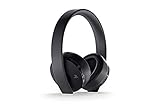


Our Top Picks
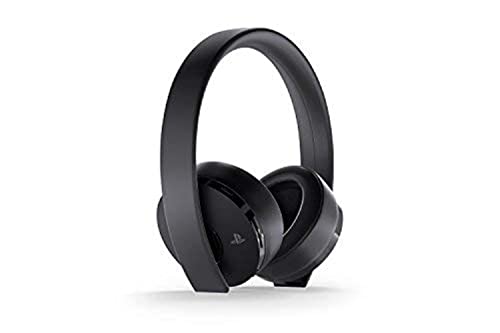


Top 3 picks at a glance
Top picks at a glance
- Sony PULSE 3D Wireless: Best for PS4 3D Audio and easiest setup, usually $80–$110
- SteelSeries Arctis 7P: Best wireless pick for chat clarity and comfort, usually $130–$170
- HyperX Cloud II: Best wired pick for durability and mic consistency, usually $80–$110
- Astro A40 TR + MixAmp Pro TR: Best for competitive control with Game/Voice balance, usually $180–$250
- Turtle Beach Stealth 600 Gen 2: Best budget wireless option, usually $90–$130
- Logitech G PRO X Wired: Best for players who want detachable Blue VO!CE mic tuning on PC/PS4, usually $100–$130
What actually matters on PS4
PS4 does not support most Bluetooth headphones for game audio and chat. You need USB dongle wireless, wired USB, or 3.5mm to the DualShock 4 controller. That one rule eliminates a lot of confusion around the best gaming headphones for PS4.
Sound quality on PS4 depends more on tuning and seal than driver size alone. A well-tuned 40mm driver with good earcup seal will give clearer footsteps in Call of Duty, Apex Legends, and Fortnite than a boomy 50mm driver that masks midrange detail. Look for a relatively neutral midrange, controlled bass, and a frequency response around 20Hz–20kHz for wired and 20Hz–20kHz to 10Hz–30kHz claimed for wireless. Claimed extension above 20kHz does not mean you hear it, but it often correlates with less harsh treble.
Mic clarity is where PS4 headsets separate. PS4 party chat compresses voice, so a mic with good noise rejection at 100Hz–10kHz matters more than studio specs. Retractable or detachable boom mics placed close to the mouth corner consistently beat built-in earcup mics. If you play in a noisy room, choose Discord-certified or bidirectional mics like the Arctis ClearCast, HyperX detachable mic, or G PRO X mic.
Head-to-head comparison
| Model | Driver / Type | Connection to PS4 | Mic | Earpad Material | Weight | Battery |
|---|---|---|---|---|---|---|
| Sony PULSE 3D | 40mm closed-back | USB dongle, 3.5mm | Dual built-in, noise cancelling | Synthetic leather over foam | 292g | Up to 12 hours |
| SteelSeries Arctis 7P | 40mm closed-back | USB-C dongle, 3.5mm | Retractable bidirectional ClearCast | AirWeave fabric + faux leather | 354g | Up to 24 hours |
| HyperX Cloud II | 53mm closed-back | 3.5mm to controller, USB sound card | Detachable condenser, noise cancelling | Memory foam leatherette + velour spare | 320g | Wired, no battery |
| Astro A40 TR + MixAmp | 40mm open/closed options | USB MixAmp + 3.5mm, optical on older PS4 | Detachable unidirectional, swappable side | Cloth synthetic leather hybrid | 369g headset only | Wired, no battery |
| Turtle Beach Stealth 600 Gen 2 | 50mm closed-back | USB dongle | Flip-to-mute uni-directional | Memory foam synthetic leather | 293g | Up to 15 hours |
| Logitech G PRO X Wired | 50mm PRO-G closed-back | 3.5mm to controller, USB DAC | Detachable Blue VO!CE 6mm | Memory foam leatherette + velour spare | 320g | Wired, no battery |
Wired models win on zero latency and no charging. Wireless USB dongle models add freedom but introduce battery management. As a worked example: if you play 3.5 hours per night, a 12-hour headset like PULSE 3D needs charging every 3 sessions (12 / 3.5 = 3.4), a 24-hour headset like Arctis 7P needs charging every 6-7 sessions (24 / 3.5 = 6.8), and a 15-hour Stealth 600 Gen 2 needs charging every 4 sessions. If you often forget to charge, wired or 20+ hour wireless saves you from mid-session disconnects.
Sound and mic breakdown by model
Sony PULSE 3D: best plug-and-play PS4 audio
PULSE 3D was made for PlayStation Tempest 3D AudioTech. On supported PS4 games like Ghost of Tsushima, The Last of Us Part II, and Resident Evil 2, directional cues for height and rear sound are easier to place than with generic stereo headsets. Bass is present but not overwhelming, which helps dialogue stay clear. The dual hidden mics are fine for quiet rooms but pick up more keyboard and fan noise than a boom mic. Choose it if you want system volume, balance, and monitor controls to work directly from PS4 without extra software.
SteelSeries Arctis 7P: best wireless mic for chat
The Arctis 7P uses a lossless 2.4GHz USB-C dongle with very low latency, plus a 3.5mm fallback to the DualShock 4. Sound is flatter than PULSE 3D, which many players prefer for footsteps. The retractable ClearCast mic is the reason to buy it as one of the best headphones with mic for PS4 — it sits close to the mouth, rejects room echo well, and flips to mute cleanly. Ski-goggle headband distributes 354g well for long sessions. Battery is rated up to 24 hours, roughly double PULSE 3D in practice.
HyperX Cloud II: best for long-session durability
Cloud II remains popular because the aluminum frame, thick stitching, and replaceable pads survive years of daily use. The 53mm drivers are tuned with slightly lifted bass and clear mids, good for single-player immersion and multiplayer cues. The detachable mic is consistent on PS4 via controller jack, with less compression artifact than many wireless mics. It includes velour pads in the box for hot rooms. No battery, no dongle pairing, no firmware worry.
Astro A40 TR + MixAmp: best for competitive control
A40 TR is an open tournament-grade headset paired with MixAmp Pro TR for USB game/voice balancing on PS4. You can turn game audio down and chat up instantly without pausing, which matters in Warzone, Siege, and Destiny raids. Soundstage is wider than closed rivals, though it leaks more sound. Mod kits allow closed-back conversion. It is bulkier and pricier, but the replaceable mic, pads, headband pads, and cables make it repairable rather than disposable.
Turtle Beach Stealth 600 Gen 2 and Logitech G PRO X
Stealth 600 Gen 2 is a straightforward wireless choice with large 50mm drivers, strong bass for cinematic games, and flip-to-mute mic. Treble is less refined than Arctis 7P, but setup is simple: one USB dongle, no controller cable. G PRO X wired is the opposite approach — neutral PRO-G drivers, excellent detachable mic, and two pad sets. On PS4 you use it via 3.5mm, so you lose PC-only Blue VO!CE filters, but the raw mic capsule still sounds clear and full.
Ear cushions and long session comfort
Material determines heat and durability more than thickness. Synthetic leatherette seals bass and isolates noise but traps heat after 90–120 minutes. Breathable fabric, velour, or AirWeave-style mesh runs cooler for 3+ hour sessions but leaks a little bass. Memory foam density matters: low-density foam feels soft initially but bottoms out; higher-density foam keeps driver distance consistent, which preserves imaging.
For glasses wearers, softer fabric pads and lower clamp force reduce temple pain. Arctis 7P, Cloud II with velour pads, and A40 TR with cloth pads are the most glasses-friendly here. For hot rooms, avoid sealed leatherette-only models without spare fabric pads. Whichever you choose, replace pads every 12–18 months with heavy use — flattened pads collapse soundstage and make bass muddy, often mistaken for driver failure.
PS4 settings that fix most audio and mic complaints
Most muddy game audio or quiet chat is a settings issue, not a headset defect. Use these values as a starting point:
- Settings – Devices – Audio Devices – Input Device: select your headset USB or Headset Connected to Controller. Set Output Device to the same headset.
- Output to Headphones: set to All Audio for single-player immersion, or Chat Audio only if you use TV/speakers for game sound and headset for voice.
- Volume Control Headphones: start at 70–80 percent, then adjust in-game master to 80–100 and lower music to 60–70 to lift footsteps and dialogue.
- Adjust Microphone Level: speak at normal volume and aim for the meter to peak in the Good range without hitting max. If teammates hear echo, lower mic level one notch and enable Sidetone at Low if available.
- In-game voice chat: set Voice Chat Volume to 70–85, Mic Open Threshold to 30–45 in a quiet room or 55–70 with fan noise, and turn off Mic Boost unless teammates say you are too quiet.
Reasoning: PS4 defaults often leave Output to Headphones on Chat Audio, which makes game sound thin through the headset. Setting All Audio routes full mix correctly. Keeping PS4 headphone volume below max avoids clipping the USB DAC, while lowering music in-game improves signal-to-noise for cues without raising overall loudness to fatiguing levels.
Which should you buy for your situation
| If you are | Choose | Why |
|---|---|---|
| PS4-only, want simplest 3D Audio | Sony PULSE 3D | Native tuning, dual-device dongle, direct PS4 controls |
| Play 3+ hours with party chat nightly | SteelSeries Arctis 7P | 24-hour battery, cool fabric pads, close boom mic |
| Hate charging, want longest lifespan | HyperX Cloud II or Logitech G PRO X | Wired, metal frame, replaceable pads and mics |
| Competitive FPS, need chat mix fast | Astro A40 TR + MixAmp | Physical Game/Voice balance, wide stage, repairable parts |
| Budget wireless for kids or second setup | Turtle Beach Stealth 600 Gen 2 | Low cost range, simple USB wireless, flip mute |
| Hot room or wear glasses | Arctis 7P, Cloud II with velour, or A40 TR | Breathable pads and lower clamp pressure |
Final rule: for PS4 in 2026, wired 3.5mm or USB-dongle wireless is still the safe path. Avoid Bluetooth-only headphones for PS4 game and chat. If clear chat is your priority, prioritize boom mic placement and pad comfort over claimed surround labels — stereo with good seal plus correct PS4 Output to Headphones setting images better than virtual surround with a poor fit.
Frequently asked questions
Can I use ordinary Bluetooth headphones with a PS4?
Usually not for game audio and chat. The PS4 requires USB dongle wireless, wired USB, or a 3.5mm connection to the DualShock 4 controller. Wireless models that use a USB dongle, such as the Sony PULSE 3D, SteelSeries Arctis 7P, and Turtle Beach Stealth 600 Gen 2, avoid the Bluetooth compatibility problem.
Which headset is best if I often forget to charge it?
Choose a wired model, such as the HyperX Cloud II, Astro A40 TR + MixAmp, or Logitech G PRO X Wired, because none requires a battery. If you prefer wireless, the SteelSeries Arctis 7P lasts up to 24 hours, compared with up to 12 hours for PULSE 3D and up to 15 hours for Stealth 600 Gen 2.
Which PS4 headset works best in a noisy room?
Choose a headset with a close-positioned boom microphone and noise rejection. The SteelSeries Arctis 7P has a retractable bidirectional ClearCast mic, while the HyperX Cloud II and Logitech G PRO X have detachable microphones. The PULSE 3D’s hidden microphones are suitable for quiet rooms but pick up more keyboard and fan noise.
Can I use the Logitech G PRO X’s Blue VO!CE features on PS4?
Not through the PS4 connection described here. With the Logitech G PRO X, you use the 3.5mm connection, so you lose the PC-only Blue VO!CE filters. The raw mic capsule can still sound clear and full, and the headset also includes PRO-G drivers plus leatherette and velour pad options.
Why do my headset cushions feel hot or make the sound muddy?
Synthetic leatherette cushions seal bass and isolate noise, but they can trap heat after 90–120 minutes. Fabric, velour, or AirWeave-style mesh runs cooler, though it leaks a little bass. Replace pads every 12–18 months with heavy use, because flattened cushions can collapse the soundstage and make bass sound muddy.
Related guides
- Best Streaming Gear for Twitch: Webcams, Capture Card, Backdrop and Light (2026)
- Best Over Ear Headphones: 9 Closed, Open-Back and Bluetooth Picks Explained (2026)
- Best Monitor for Console Gaming: Eight 1080p and 1440p Screens Compared by HDMI and Refresh Rate (2026)
- Best Monitors for PS5 Pro 4K 120Hz: Eight Screens and the HDMI Bandwidth Check (2026)