Our Short List of 3

- Best for: Gamers who want a large game library and long play sessions without storage anxiety.
- AMD Ryzen 7 7735HS processor
- NVIDIA GeForce RTX 4050 graphics with 6GB of dedicated memory
- 16GB DDR5 memory
- 1TB SSD storage

- Best for: Students and everyday users who need one laptop for gaming, classes and work.
- AMD Ryzen 7 8845HS processor
- NVIDIA GeForce RTX 4050 graphics
- 16GB memory
- 512GB SSD storage

- Best for: Buyers who want smooth 1080p gaming and a practical everyday laptop at a mid-range tier.
- AMD Ryzen 7 7445HS processor, 6 cores, up to 4.7GHz boost clock
- NVIDIA GeForce RTX 4050 graphics with 6GB GDDR6 memory
- 16GB DDR5 memory
- 512GB SSD storage
All 4 Picks at a Glance
| Product | Specs | Action |
|---|---|---|
| ASUS TUF A15 FA507NU-DS74 |
| Check price on Amazon |
| Lenovo LOQ 15 83DX00B2US |
| Check price on Amazon |
| HP Victus 15 Ryzen 7 |
| Check price on Amazon |
 HP Victus 15-fa1082wm |
| Check price on Amazon |
Shopping for a gaming laptop right now means choosing between machines that look nearly identical on the surface. Most current models in the sensible middle of the market pair a modern multi-core processor with an RTX 4050 graphics card, 16GB of memory and a fast 144Hz display, yet the details underneath decide whether a laptop stays smooth in demanding games or starts to struggle. Storage speed, memory type, screen quality and cooling all shape daily use, and two laptops with the same graphics card can feel very different after a few months.
This guide is for buyers who want a capable gaming laptop without flagship pricing: students who need one machine for classes and games, first-time PC gamers moving from a console, and anyone replacing an older laptop that can no longer keep up. Every laptop below was picked from its Amazon listing, using the processor, graphics, memory, storage and display details shown on the product page, so you can compare the four side by side.
Our Top Picks
Top 3 picks at a glance
Quick Picks
As an Amazon Associate we earn from qualifying purchases.
| Product | Best for | Key spec from title |
|---|---|---|
| ASUS TUF A15 FA507NU-DS74 | Demanding games and long sessions | Ryzen 7 7735HS, RTX 4050, 16GB DDR5, 1TB SSD |
| Lenovo LOQ 15 83DX00B2US | Balanced everyday gaming and study | Ryzen 7 8845HS, RTX 4050, 16GB, 512GB SSD |
| HP Victus 15 Ryzen 7 | Smooth 1080p gaming on a mid-range budget | Ryzen 7 7445HS, RTX 4050, 16GB DDR5, 512GB SSD |
| HP Victus 15-fa1082wm | Intel-based gaming with upgrade headroom | Intel Core i5-13420H, RTX 4050, 16GB DDR4, 512GB SSD |
How to Choose
Start with the graphics card and its power
The graphics card does most of the heavy lifting in games, so it deserves your attention first. All four laptops here use an RTX 4050 with 6GB of dedicated memory, which handles current titles well at 1080p with high settings and supports DLSS upscaling and ray tracing in games that offer them. What the headline rarely shows is the power limit the manufacturer sets for that card, because a card given more watts holds higher clock speeds for longer. Check the listing for the graphics power figure, and favour machines that pair the RTX 4050 with a cooling design built for sustained loads rather than short bursts.
Match the processor to how you use the laptop
A gaming laptop is also a general-purpose computer, so the processor matters beyond frame rates. The Ryzen 7 chips in three of these laptops offer eight cores, which keeps games, voice chat, a browser and background downloads running together without stutter. The Intel Core i5-13420H in the fourth laptop uses a hybrid design with performance and efficiency cores, which suits buyers who want strong single-core speed for older games and everyday tasks. If you stream, edit video or run heavy multitasking alongside games, lean toward the eight-core Ryzen options.
Do not settle for slow memory or cramped storage
Memory and storage decide how quickly a laptop boots, loads levels and switches between programs. Look for 16GB of memory as the minimum for current games, and note whether it is DDR5 or DDR4, since DDR5 runs faster and leaves more headroom for future titles. Storage matters just as much: a 512GB drive fills up fast when a few large games are installed, so the 1TB drive in the ASUS TUF A15 is a real advantage if you keep several games installed at once. Check whether the laptop has a second drive slot or an open memory slot before you buy.
Judge the screen by refresh rate and panel type
The display is the part of the laptop you look at every minute you play, so its quality shapes the whole experience. Every laptop in this guide has a 15.6-inch Full HD display running at 144Hz, which redraws the picture fast enough to keep fast movement smooth and reduce visible tearing in action games. An IPS panel gives wider viewing angles and more consistent colours than older panel types, which matters when you share the screen or play from different angles. If you also use the laptop for photo or video work, check the colour coverage figure on the listing.
The 4 Best Options
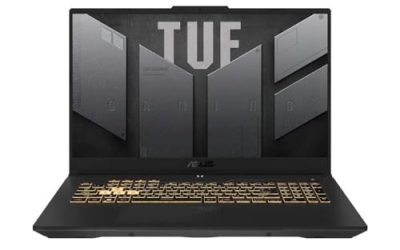
ASUS TUF A15 FA507NU-DS74
- Best for: Gamers who want a large game library and long play sessions without storage anxiety.
- AMD Ryzen 7 7735HS processor
- NVIDIA GeForce RTX 4050 graphics with 6GB of dedicated memory
- 16GB DDR5 memory
- 1TB SSD storage
Gamers who want a large game library and long play sessions without storage anxiety.
Confirm the exact configuration on the Amazon listing before ordering, since the TUF A15 family includes several similar models with different processors and storage sizes.
The ASUS TUF A15 is the pick for buyers who want the most complete package in this group and plan to keep the laptop for several years. Its Ryzen 7 7735HS processor and RTX 4050 graphics card handle current games at 1080p with high settings, while the 1TB SSD leaves room for a proper game library without constant uninstalling. The 15.6-inch Full HD display runs at 144Hz and covers the full sRGB colour range, so games look vivid and everyday content looks accurate. The TUF line is built around a tougher chassis and a cooling system designed for long sessions, which suits players who game for hours at a time.
Watch out for: Confirm the exact configuration on the Amazon listing before ordering, since the TUF A15 family includes several similar models with different processors and storage sizes.
Lenovo LOQ 15 83DX00B2US
- Best for: Students and everyday users who need one laptop for gaming, classes and work.
- AMD Ryzen 7 8845HS processor
- NVIDIA GeForce RTX 4050 graphics
- 16GB memory
- 512GB SSD storage
Students and everyday users who need one laptop for gaming, classes and work.
The 512GB drive fills up quickly with large games, so check whether you can add a second drive later or plan on managing installed games.
The Lenovo LOQ 15 suits buyers who want a balanced machine that moves easily between gaming, study and work. Its Ryzen 7 8845HS is the newest processor in this group, with eight cores that handle multitasking well, and the RTX 4050 keeps current games running smoothly at 1080p. The 15.6-inch display refreshes at 144Hz, which makes fast-paced games feel responsive, and the 16GB of memory and 512GB SSD cover everyday needs. Lenovo positions the LOQ line as a step up from entry-level machines, with a cleaner design and a keyboard that holds up well during long typing sessions.
Watch out for: The 512GB drive fills up quickly with large games, so check whether you can add a second drive later or plan on managing installed games.
HP Victus 15 Ryzen 7
- Best for: Buyers who want smooth 1080p gaming and a practical everyday laptop at a mid-range tier.
- AMD Ryzen 7 7445HS processor, 6 cores, up to 4.7GHz boost clock
- NVIDIA GeForce RTX 4050 graphics with 6GB GDDR6 memory
- 16GB DDR5 memory
- 512GB SSD storage
Buyers who want smooth 1080p gaming and a practical everyday laptop at a mid-range tier.
The listing promises a bundled mouse pad that some buyers report does not arrive in the box, so treat any bundled accessory as a bonus rather than a reason to buy.
The HP Victus 15 with the Ryzen 7 7445HS is the straightforward choice for buyers who want strong 1080p gaming performance without paying for extras they will not use. Its six-core Ryzen 7 processor boosts to 4.7GHz and pairs with the RTX 4050 and 16GB of DDR5 memory, a combination that keeps current titles smooth at high settings. The 15.6-inch Full HD IPS display runs at 144Hz with FreeSync support, which helps keep fast action free of tearing, and the 512GB PCIe Gen4 SSD loads games quickly. A backlit keyboard and a numeric keypad round out a practical design that works well for both gaming and everyday computing.
Watch out for: The listing promises a bundled mouse pad that some buyers report does not arrive in the box, so treat any bundled accessory as a bonus rather than a reason to buy.
HP Victus 15-fa1082wm
- Best for: Buyers who prefer an Intel processor and want a laptop they can upgrade with more memory later.
- Intel Core i5-13420H processor, 8 cores
- NVIDIA GeForce RTX 4050 Laptop GPU with 6GB GDDR6 dedicated memory
- 16GB DDR4-3200 memory
- 512GB PCIe Gen4 NVMe M.2 SSD storage
Buyers who prefer an Intel processor and want a laptop they can upgrade with more memory later.
This model has only one M.2 SSD bay, so you cannot add a second internal drive later; plan your storage around the single 512GB drive.
The HP Victus 15-fa1082wm is the Intel option in this group, and it suits buyers who prefer Intel processors or already use Intel-based software and accessories. Its Core i5-13420H uses eight cores across performance and efficiency designs, giving strong single-core speed for older games and responsive everyday performance. The RTX 4050 with 6GB of dedicated memory handles current titles at 1080p, and the 16GB of DDR4 memory can be upgraded through two memory slots if you want more headroom later. The 15.6-inch Full HD IPS display runs at 144Hz with an anti-glare finish, and the backlit keyboard includes a numeric keypad.
Watch out for: This model has only one M.2 SSD bay, so you cannot add a second internal drive later; plan your storage around the single 512GB drive.
Which One Fits Your Situation
You play for hours and keep many games installed
Pick the ASUS TUF A15 FA507NU-DS74. The 1TB SSD is the deciding factor here, because it holds a large library without forcing you to uninstall games to make room. The Ryzen 7 processor and RTX 4050 keep current titles smooth, and the TUF chassis and cooling are built for long sessions rather than short bursts.
You need one laptop for gaming, study and work
Pick the Lenovo LOQ 15 83DX00B2US. Its newer Ryzen 7 8845HS handles multitasking well, the 144Hz display keeps games responsive, and the cleaner design looks at home in a classroom or an office as well as on a desk at home. It is the most balanced machine in this group.
You want the best value for smooth 1080p gaming
Pick the HP Victus 15 with the Ryzen 7 7445HS. The combination of a six-core Ryzen processor, DDR5 memory and an RTX 4050 delivers strong frame rates at 1080p, and the FreeSync display keeps fast action smooth. It gives up some storage compared with the TUF A15, but it covers the core gaming experience well.
You prefer Intel and want upgrade headroom
Pick the HP Victus 15-fa1082wm. The Core i5-13420H offers strong single-core performance, and the two memory slots let you add more RAM later if games or workloads demand it. The RTX 4050 keeps current titles smooth at 1080p, so the Intel chip is the main reason to choose this one over its Ryzen sibling. Just remember the single drive bay, and plan on managing the 512GB of storage carefully.
Common Mistakes
- Buying on the graphics card name alone without checking the power limit and cooling, since the same RTX 4050 performs differently across chassis designs.
- Choosing a 512GB drive and then installing several large games at once, which leaves little room for updates and new titles.
- Picking a laptop by its processor brand instead of its core count and memory type, which matter more for smooth multitasking.
- Ignoring the display and ending up with a slow panel that makes fast games look smeared, even when the graphics card is capable.
- Ordering a similar-looking model from the same family without confirming the exact configuration on the listing, since Victus, LOQ and TUF families all include near-identical variants.
Frequently Asked Questions
Is an RTX 4050 enough for current games?
Yes, for most buyers playing at 1080p. The RTX 4050 with 6GB of dedicated memory runs current titles at high settings with smooth frame rates, and DLSS upscaling helps in demanding games. It is not the right choice if you plan to play at 1440p or higher with maximum settings, where a stronger graphics card would serve you better.
How much memory do I need in a gaming laptop?
16GB is the sensible minimum for current games. It leaves enough room for a game, voice chat and a browser running together without slowdowns. If you stream, edit video or run heavy software alongside games, look for a laptop with upgradeable memory slots so you can move to 32GB later.
Does a 144Hz display really make a difference?
Yes, especially in fast-paced games. A 144Hz display redraws the picture far more often than a standard 60Hz panel, which makes movement look smoother and helps you track fast targets. The difference is easy to notice in shooters and racing games, and it also makes everyday scrolling feel more fluid.
Should I choose AMD or Intel for a gaming laptop?
Either works well at this level, so choose based on the rest of the machine. The Ryzen 7 options here offer eight cores that suit heavy multitasking, while the Intel Core i5-13420H offers strong single-core speed. Compare memory type, storage size, display quality and upgrade options, and let those details decide.
Related guides
More from Amazon
Programs that pair well with the guide above. Offers and eligibility are set by Amazon and may change.
Free shipping on eligible items, Prime Video and more. Eligible new members can start with a free trial.
Start a Prime free trialAd-free music streaming. Eligible new subscribers can start with a free trial.
Try Music Unlimited freeA Prime membership for ages 18-24 with a trial period. Eligibility is set by Amazon.
See Prime for Young AdultsAudiobooks and podcasts to listen to on the go. Eligible new members can start with a free trial.
Try Audible freeAs an Amazon Associate we earn from qualifying purchases.