Our Short List of 3
All 5 Picks at a Glance
| Product | Specs | Action |
|---|---|---|
 Razer Blade 16 (2026) – 16-Inch QHD+ OLED, RTX 5070 Ti | Check price on Amazon | |
 MSI Stealth 16 AI+ – 16-Inch QHD+ OLED, RTX 5070 Ti | Check price on Amazon | |
 HP OMEN Transcend 14 – 14-Inch 3K OLED, RTX 5060 | Check price on Amazon | |
 Razer Blade 14 (2025) Mercury – 14-Inch 3K OLED, RTX 5070 | Check price on Amazon | |
 ASUS ROG Zephyrus G16 (2025) – 16-Inch WQXGA OLED, RTX 5070 Ti | Check price on Amazon |
Best Gaming Laptops Color Gamut
Color gamut is the range of colors a laptop screen can show, and it is the single most important display figure for anyone who cares how games and creative work look. A panel with a narrow gamut shows muted greens, flat reds, and washed-out skies. A panel with a wide gamut shows the deep greens of a forest scene, the rich reds of a sunset, and the subtle skin tones in a portrait exactly as the game artist or the camera intended. This guide covers five gaming laptops whose screens carry maker-stated full DCI-P3 coverage, the wide color space used by modern games, movies, and HDR content.
Every laptop in this guide uses an OLED panel. That is not a coincidence. OLED panels light each pixel on its own, so they reach true black, and the current generation of OLED laptop panels covers the full DCI-P3 space. No IPS gaming laptop panel we could verify on Amazon US matches that bar. The best IPS gaming panels top out at full sRGB coverage, which is a smaller color space, and they sit outside this guide for that reason.
All gamut figures in this guide are maker-stated coverage figures taken from the listing or the maker spec sheet. They were not measured by us on a physical unit, and coverage varies a little from one unit to the next. Each pick also carries a factory calibration claim, Calman Verified on the Razer models and Pantone Validated on the ASUS model, which means the panel ships with a color profile applied at the factory. For color-critical work, a hardware calibrator is still the only way to confirm a specific unit.
Our Top Picks
Top 3 picks at a glance
What to Look For
Panel type comes first. OLED is the wide-gamut choice in current gaming laptops, with per-pixel light control, near-instant response times, and deep contrast. IPS panels are brighter in some cases and cost less, but their gamut ceiling in gaming laptops is usually full sRGB, not full DCI-P3. If a listing does not name a gamut figure at all, treat the panel as standard sRGB and move on.
Gamut standard comes second. DCI-P3 is the wide cinema space, and it is the figure that matters most for games and HDR video. sRGB is the older web standard and the smaller space. Adobe RGB is the print standard, wider than sRGB in greens and cyans, and it matters mainly for print work. A panel that covers the full DCI-P3 space also covers sRGB in full, so a DCI-P3 figure is the one to chase for gaming and video.
Factory calibration comes third. Calman Verified and Pantone Validated both mean the panel ships with a measured color profile, so colors are close to accurate out of the box. A wide gamut without calibration can look oversaturated, with reds that glow and greens that look neon. Look for a listing that names the calibration, and check whether the laptop ships with more than one color profile, such as separate DCI-P3, sRGB, and Adobe RGB modes, so you can switch to sRGB for web work.
HDR certification comes fourth. VESA DisplayHDR True Black levels apply to OLED panels and describe peak brightness and black level in HDR content. True Black 1000 is the higher tier seen here, with peak brightness up to 1100 nits on the Razer models. True Black 500 and True Black 600 are lower tiers, still strong, with peak brightness around 500 to 600 nits.
Refresh rate and response time come fifth. All five picks run at 120Hz or 240Hz with a 0.2 ms response time, which is the OLED norm. A 240Hz panel is smoother in fast shooters, while a 120Hz panel is fine for story-driven games and creative work. Resolution runs from 2560 by 1600 to 2880 by 1800 across these picks, which is sharp at 14 and 16 inches.
Graphics, memory, and weight come last in this guide, because the screen is the point, but they still decide whether the laptop is usable. Every pick here carries a current-generation NVIDIA graphics chip with at least 8GB of video memory. Memory is soldered on the Razer picks and on the HP pick, so buy the memory you need up front. Weight runs from 3.59 lb to 4.6 lb, so none of these is a featherweight, and battery life on an OLED gaming laptop is modest under load.
Razer Blade 16 (2026) – 16-Inch QHD+ OLED, RTX 5070 Ti
The Razer Blade 16 (2026) is the strongest pick in this guide on both gamut proof and freshness of evidence. Its 16-inch QHD+ OLED panel runs at 2560 by 1600, 240Hz, with a 0.2 ms response time, and Razer lists it as 100 percent DCI-P3 with Calman Verified factory calibration. It also carries VESA DisplayHDR TrueBlack 1000 certification, with peak brightness up to 1100 nits, so HDR games and movies show bright highlights against true black.
Under the screen, this configuration pairs an Intel Core Ultra 9 386H processor with an NVIDIA GeForce RTX 5070 Ti laptop graphics chip carrying 12GB of GDDR7 video memory at up to 140W. That is a strong pairing for high-refresh gaming at the panel native resolution and for GPU-accelerated creative work such as video editing and 3D rendering. Memory is 32GB of LPDDR5X at 9600MHz, soldered on board and not upgradeable, so the 32GB figure is fixed for the life of the machine. Storage is a 1TB PCIe 4.0 SSD, with two M.2 slots in total, so storage can grow to 8TB. The chassis is a 14.9 mm aluminum unibody at 4.6 lb, with Thunderbolt 5, HDMI 2.1, and Wi-Fi 7. Model RZ09-05817EN3-R3U1 showed in stock on Amazon US in late November 2026, with the listing refreshed on November 28, 2026, the freshest stock signal in this guide.
MSI Stealth 16 AI+ – 16-Inch QHD+ OLED, RTX 5070 Ti
The MSI Stealth 16 AI+ matches the Razer Blade 16 on the headline gamut figure and adds a Windows 11 Pro license and NVIDIA Studio validation for creative work. Its 16-inch QHD+ OLED panel runs at 2560 by 1600, 240Hz, and MSI lists it as 100 percent DCI-P3, with VESA DisplayHDR True Black 600 certification. The panel also carries per-unit calibration through MSI True Color technology, so colors arrive close to accurate out of the box. At 4.39 lb and 16.65 mm at its thinnest point, it is the lighter of the two 16-inch OLED picks here.
This configuration runs an Intel Core Ultra 9 386H processor with an NVIDIA GeForce RTX 5070 Ti laptop graphics chip, 32GB of DDR5 memory, and a 1TB NVMe SSD. One point needs a plain statement. The listing text says the RTX 5070 Ti carries 16GB of GDDR7 video memory, while NVIDIA lists the laptop RTX 5070 Ti at 12GB. This guide follows the NVIDIA figure, and buyers should confirm the video memory figure on the listing before buying. The conflict does not touch the display, which is the reason this laptop is in the guide, but it is worth knowing before checkout.
The Stealth 16 AI+ also carries a 90Wh battery and a 4-zone RGB gaming keyboard. Trackers showed this configuration in stock on Amazon US, sold by Amazon, in late November 2026. It is a strong choice for buyers who want a wide-gamut OLED panel with a Pro license and Studio drivers for creative apps, and who prefer a slightly lighter 16-inch chassis than the Razer.
HP OMEN Transcend 14 – 14-Inch 3K OLED, RTX 5060
The HP OMEN Transcend 14 is the compact pick in this guide, and it shows that a wide gamut does not need a 16-inch chassis. Its 14-inch 3K OLED panel runs at 2880 by 1800, 48 to 120Hz, with a 0.2 ms response time, and HP lists it as 100 percent DCI-P3, with VESA DisplayHDR 500 True Black certification and peak HDR brightness of 500 nits. The panel uses edge-to-edge glass with a micro-edge bezel, and HP lists an 83.73 percent screen-to-body ratio. At 3.6 lb with a 71Wh battery, it is the most portable wide-gamut gaming laptop in this guide.
This configuration runs an Intel Core Ultra 7 255H processor with an NVIDIA GeForce RTX 5060 laptop graphics chip carrying 8GB of GDDR7 video memory, 32GB of LPDDR5x memory on board, and a 1TB PCIe Gen4 NVMe SSD. The 120Hz ceiling is lower than the 240Hz panels above, but it is a good match for the RTX 5060 at 3K resolution, and the variable refresh range from 48 to 120Hz keeps motion smooth when frame rates move. Charging runs over a 140W USB-C power adapter, and the laptop carries Thunderbolt 4 and Wi-Fi 6E.
One caution applies to the listing. It shows bundled accessory variants alongside the factory configuration, so buyers should confirm the 32GB memory and 1TB storage configuration and the Windows 11 Pro license on the exact listing they buy. The memory is on board and not upgradeable, so the 32GB figure is fixed. A tracker showed this configuration in stock on Amazon US on November 27, 2026. It is the pick for buyers who want full DCI-P3 coverage in a 14-inch machine they can carry every day.
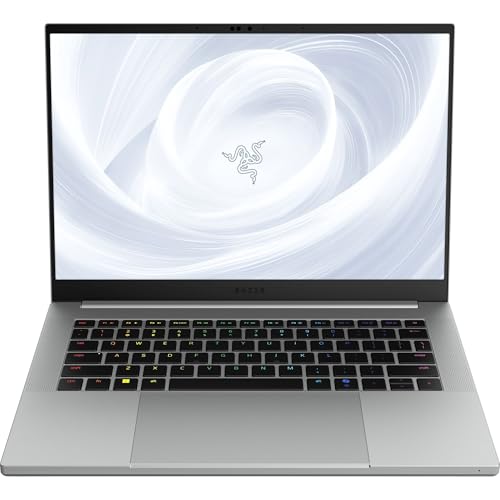
Razer Blade 14 (2025) Mercury – 14-Inch 3K OLED, RTX 5070
The Razer Blade 14 (2025) in Mercury White is the thinnest laptop in this guide at 0.62 inches, and it carries one of the strongest gamut proofs here. Its 14-inch 3K OLED panel runs at 2880 by 1800, 120Hz, with a 0.2 ms response time, and Razer lists it as 100 percent DCI-P3 with Calman Verified factory calibration, including color profiles for Rec. 709, DCI-P3, sRGB, and Adobe RGB. That profile set is the widest in this guide, and it matters for buyers who switch between games, video, and photo work. The panel also carries VESA DisplayHDR TrueBlack 1000 certification, with peak brightness up to 1100 nits.
This configuration runs an AMD Ryzen AI 9 365 processor with an NVIDIA GeForce RTX 5070 laptop graphics chip at up to 115W, 32GB of LPDDR5X memory soldered on board, and a 1TB SSD. The machine weighs 3.59 lb and carries a 72Wh battery. The model number is RZ09-05306EM3-R3U1, and the Mercury White finish is the only white laptop in this guide.
Stock needs a plain warning. A tracker showed only one new unit remaining for this configuration at the last check in late November 2026, and renewed listings circulate for the same model at lower figures. Buyers must confirm a new-unit buy option on the exact listing, not a renewed one, and should check the full model code. If the new-unit listing is gone, the Blade 16 above covers the same gamut ground in a larger chassis. For buyers who can secure a new unit, this is the best blend of portability, gamut proof, and profile choice in the guide.
ASUS ROG Zephyrus G16 (2025) – 16-Inch WQXGA OLED, RTX 5070 Ti
The ASUS ROG Zephyrus G16 (2025) closes the guide with the largest storage pool here and a Pantone Validated panel. Its 16-inch WQXGA OLED panel runs at 2560 by 1600, 240Hz, and ASUS lists it as 100 percent DCI-P3, with Pantone validation and a MUX switch with NVIDIA Advanced Optimus. The chassis is 1.49 cm thick, and the machine runs Windows 11 Pro. This configuration pairs an Intel Core Ultra 9 285H processor with an NVIDIA GeForce RTX 5070 Ti laptop graphics chip carrying 12GB of video memory, 32GB of LPDDR5X memory on board, and a 2TB SSD, which is double the storage of every other pick in this guide.
This is the weakest pick on evidence, and that needs a plain statement. The freshest Amazon listing crawl for this exact configuration is about 237 days old, with no fresh stock flag in late November 2026, and the 2026 GU606 model has replaced this configuration in the Zephyrus line. The gamut figure itself is solid, confirmed on the ASUS spec page for the GU605 family, but availability is the open question. Buyers should click the listing live first and confirm a new-unit buy option before counting on this pick.
Frequently Asked Questions
What does color gamut mean on a gaming laptop?
Color gamut is the range of colors a screen can show, measured against a standard color space. The two spaces that matter here are sRGB, the older and smaller web standard, and DCI-P3, the wider cinema space used by modern games, movies, and HDR video. A panel that covers the full DCI-P3 space can show deeper greens, richer reds, and more saturated blues than a panel that only covers sRGB. Adobe RGB is a third space, wider than sRGB in greens and cyans, and it matters mainly for print photography. When a listing names a gamut figure, check which space it names, because a 100 percent sRGB figure is a much smaller claim than a 100 percent DCI-P3 figure.
Is full DCI-P3 coverage enough for photo and video work?
For most photo and video work, yes. Full DCI-P3 coverage with a factory calibration profile, such as Calman Verified or Pantone Validated, is enough for video editing, streaming, and screen-based photo work. The gap is print work, where Adobe RGB matters, and only the Razer Blade 14 in this guide ships with a named Adobe RGB profile. Even with a wide gamut and a factory profile, a hardware calibrator is the only way to confirm a specific unit, because coverage varies a little from one panel to the next, and panels drift with age.
Does a wide gamut panel make games look better?
Usually, yes, but with one caveat. Wide-gamut OLED panels show richer colors, deeper blacks, and stronger HDR highlights than standard panels, and modern games are mastered for wide color. The caveat is older games and desktop apps that assume sRGB. On a wide-gamut panel with no color management, those can look oversaturated, with glowing reds and neon greens. That is why the color profiles matter. Switch the panel to its sRGB profile for older games and web work, and to its DCI-P3 profile for modern games and HDR video. All five picks here ship with at least a DCI-P3 profile, and the Razer models ship with separate profiles for each space.
How to Choose
Begin with size. A 14-inch laptop is easier to carry every day, and the OMEN Transcend 14 and the Razer Blade 14 are the picks for portability. A 16-inch laptop gives a larger canvas for games and timelines, and the Razer Blade 16, the MSI Stealth 16 AI+, and the Zephyrus G16 are the picks for desk-first use. Next, weigh the gamut proof. Calman Verified and Pantone Validated panels ship with a measured profile, so prefer a named calibration over a bare gamut figure when two panels match on coverage.
Then weigh the graphics tier against the panel. A 240Hz panel pairs best with the RTX 5070 Ti picks, while a 120Hz panel pairs well with the RTX 5060 and RTX 5070 picks at 3K resolution. Check the memory situation, because the Razer picks and the HP pick have soldered memory, so buy the memory you need up front, while storage can grow through the spare M.2 slot on the Blade 16. Finally, confirm the listing live before buying. Check the full model code, confirm a new-unit buy option rather than a renewed one, and confirm the memory and storage configuration, since bundled accessory variants and reseller-upgraded configs circulate for several of these models.
Disclosure: As an Amazon Associate, we may earn a commission from qualifying purchases made through links in this article, at no additional cost to you.
Related guides
More from Amazon
Programs that pair well with the guide above. Offers and eligibility are set by Amazon and may change.
Free shipping on eligible items, Prime Video and more. Eligible new members can start with a free trial.
Start a Prime free trialAd-free music streaming. Eligible new subscribers can start with a free trial.
Try Music Unlimited freeA Prime membership for ages 18-24 with a trial period. Eligibility is set by Amazon.
See Prime for Young AdultsAudiobooks and podcasts to listen to on the go. Eligible new members can start with a free trial.
Try Audible freeAs an Amazon Associate we earn from qualifying purchases.