Xbox libraries outgrow internal storage faster than almost any other console library, because a handful of modern installs can consume hundreds of gigabytes. An external hard drive is the cheapest way to stop deleting games you still want, but it behaves differently from the internal drive. Spinning drives are ideal for archiving and for playing older Xbox One titles, while Series X|S games are meant to run from the internal drive or an expansion card, so the drive you pick is about capacity and convenience rather than speed.
This guide is for players who keep hitting the “storage full” message, parents who share one console across several accounts, and collectors who rotate dozens of titles each season. Seven drives are compared here, from a 1TB portable model to a 12TB desktop unit. Judgments rely only on what each product title says, so confirm console compatibility, power requirements, and warranty on the listing. The 2026 shopping window is full of near-identical models, so capacity and form factor are the easiest ways to separate them.
Our Top Picks




Top 3 picks at a glance
Quick Picks
As an Amazon Associate we earn from qualifying purchases at no extra cost to you.


| Product | Best for | Key spec from the title |
|---|---|---|
| Seagate Game Drive for Xbox 5TB | Large library, licensed design | 5TB, USB 3.0, officially licensed for Xbox |
| Seagate Game Drive for Xbox 2TB | Mid-size archive | 2TB, USB 3.0, officially licensed for Xbox |
| WD_BLACK P10 Game Drive | Multi-console households | Portable HDD, works with PlayStation, Xbox, and PC |
| Seagate Portable 1TB | Small, flexible backup | 1TB, USB 3.0, 1-year rescue service |
| Xbox Game Drive 5TB | Xbox-branded look | 5TB, LED light bar, Series X|S and Xbox One |
| WD_BLACK D10 Game Drive 8TB | Large capacity, multi-platform | 8TB, PlayStation, Xbox, PC, and Mac |
| WD_BLACK D10 Game Drive 12TB | Giant archive on a desk | 12TB desktop drive, 7200 RPM, Game Pass month |
How to Choose
Pick capacity from your install habits
Count the games you want available at once. A 1TB drive holds a small rotation, 2TB suits most casual players, and 4TB to 5TB covers a large library of big titles. Drives at 8TB and 12TB are really archives for collectors or families with many accounts. Leave headroom of at least 15 to 20 percent, since a nearly full drive can become slow to open and cumbersome to organize.
Understand what an HDD can and cannot do
A hard drive is the economical choice for storing games and for playing Xbox One and backward-compatible titles directly. For Series X|S optimized games, the common workflow is to archive them on the HDD and copy them back to the internal SSD or an expansion card to play. If you want to play new releases straight from external storage, a solid-state drive or the console expansion card is the more appropriate product category.
Portable versus desktop designs
Portable drives draw power over USB and fit in a bag, which helps if you move between a living room and a friend’s house. Desktop drives like the 12TB model typically need their own power adapter, take more space, and are meant to stay put. Check the listing for the cable included, the USB generation, and whether a power brick ships in the box, because those items affect where you can place the drive.
Know where budget drives cut corners
Cheaper drives economize on enclosure sturdiness, cable length, and warranty terms. A 7200 RPM spindle in a desktop unit reads data faster than a typical portable drive but also runs warmer and louder. Treat any claim of “plug and play” skeptically and confirm that the drive can be formatted for Xbox use through the console, since the process erases existing contents. Back up anything important first, and avoid moving a spinning drive while it is active.
The 7 Best Options
Seagate Game Drive for Xbox 5TB
Seagate’s 5TB Game Drive is listed as an officially licensed HDD for Xbox with a USB 3.0 connection, and the title says it is meant to archive Series X|S games and play Xbox One games directly. It is the most straightforward large-capacity pick for a console-first buyer.
- Strength: 5TB of capacity under an official Xbox license.
- Strength: USB 3.0 connection and a design matched to console use.
- Trade-off: as a hard drive it is better for storage than for running newer optimized games directly.
Skip it if you also want to use the same drive on a PlayStation, or if you want an SSD for launching new releases from external storage. Players who plan to carry it between homes should check the listing for dimensions and weight first. For a family console with several profiles, this is the size where nobody has to choose which game to delete before a new release downloads.
Seagate Game Drive for Xbox 2TB
The 2TB version offers the same licensed design and USB 3.0 interface at a lower capacity, which makes it a sensible fit for players who only need to hold another dozen or so large titles. The title repeats the archive and Xbox One direct-play wording.
- Strength: official Xbox licensing and USB 3.0.
- Strength: capacity that matches a modest rotation of games.
- Trade-off: 2TB fills quickly if you install several big releases each year.
Skip it if your library is already large or growing quickly, because moving up to 4TB or 5TB later means buying again. It is better for teens with a small queue of favorites than for households sharing several accounts on one console. A typical use is parking last season’s big releases on the drive so the internal storage stays free for what you are playing this month, then copying titles back when interest returns.
WD_BLACK P10 Game Drive (4TB, 5TB, 6TB)
The WD_BLACK P10 line appears in several capacities and is listed as a portable external hard drive that works with PlayStation, Xbox, and PC. One variant bundles a one-month Xbox Game Pass. That cross-platform listing makes it attractive to households with more than one system.
- Strength: multi-platform compatibility in a portable design.
- Strength: several capacity options, from 4TB up to 6TB.
- Trade-off: it is not specifically marked as an official Xbox-licensed drive, so check the listing for setup details.
Skip it if you want the console-specific branding of the Seagate and Xbox models. Buyers shopping the Game Pass bundle should compare the included subscription terms before treating it as a value add. It is a smart pick for friends who swap a drive between a console at home and a gaming PC, since the same hardware covers both and capacity tiers let you scale up without changing brands.
Seagate Portable 1TB External Hard Drive
This 1TB Seagate drive uses USB 3.0, works with PC, Mac, PlayStation, and Xbox, and includes a one-year rescue service. It is the smallest and simplest option in the group.
- Strength: broad device support in a compact portable form.
- Strength: a one-year rescue service noted in the title.
- Trade-off: 1TB holds only a few large titles.
Skip it if you want a primary game archive, since capacity is the first thing most Xbox owners outgrow. It works better as a backup for save-adjacent files, photos, and smaller games, or as an inexpensive way to shift a few titles between consoles. A student with a laptop, a console, and little desk space might also like having one small drive that moves between devices without extra cables.
Xbox Game Drive 5TB
The Xbox Game Drive 5TB is branded for the console, includes an LED light bar, and lists compatibility with Series X|S and Xbox One. It appeals to buyers who want a drive that matches the console visually and is easy to identify.
- Strength: 5TB capacity with explicit Series X|S and Xbox One compatibility.
- Strength: LED light bar that adds a distinctive look.
- Trade-off: the title does not state the interface or warranty, so confirm both on the listing.
Skip it if you do not care about styling, because other 5TB options may cover the same needs. Anyone who keeps the console in a bedroom may find the lighting distracting at night. It is a natural fit for a living-room cabinet where the light bar is visible and the drive sits next to the console as a clearly labeled storage companion. Check the listing for a cable, power details, and any warranty terms before relying on it for a large library.
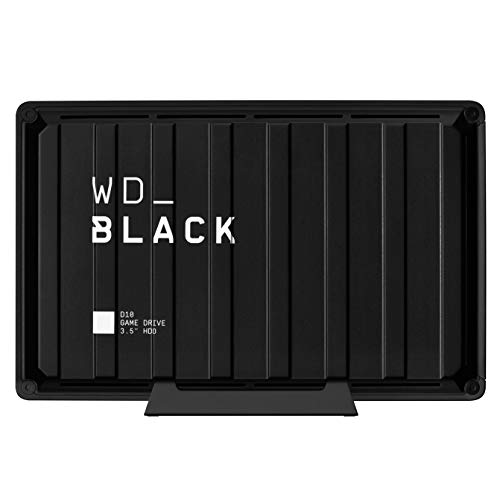
WD_BLACK D10 Game Drive 8TB
The D10 8TB is listed as a portable external HDD compatible with PlayStation, Xbox, PC, and Mac. At this capacity it works as a large archive for collectors who rotate many titles through the same console.
- Strength: 8TB of space with broad platform support.
- Strength: useful for sharing one library across multiple devices.
- Trade-off: the D10 family is often a desktop-style unit, so check whether it needs external power.
Skip it if you want a pocketable drive or a license-branded Xbox model. It is a better match for a household that treats external storage as a permanent shelf than for someone who travels with a console. Parents managing several accounts, each with a few large installs, will appreciate that archived games can stay on the drive for months and be copied back only when a child asks to play them again. Always read the listing for power and cable details.
WD_BLACK D10 Game Drive 12TB
The 12TB D10 is described as a desktop external hard drive running at 7200 RPM, built for Xbox, with a one-month Game Pass included. It is the largest option here and targets heavy collectors.
- Strength: 12TB capacity with a 7200 RPM spin speed.
- Strength: a month of Game Pass in the bundle.
- Trade-off: desktop drives usually need external power and sit in one place.
Skip it if you want a travel drive or do not plan to fill that much space. Spinning drives at this size may run warm, so leave ventilation room around the enclosure and keep it on a stable surface. The Game Pass month named in the title is a short-term extra, so judge the drive on capacity and build, not on the bundle. It best suits a dedicated game room where the console, a router, and a shelf already share one power strip.
Which One Fits Your Situation
Console-only household with a growing library
The Seagate Game Drive for Xbox 5TB is the cleanest match, with an official license, USB 3.0, and enough space to hold dozens of large titles.
Family with both Xbox and PlayStation
The WD_BLACK P10 Game Drive is a more flexible purchase because the listing shows compatibility with PlayStation, Xbox, and PC.
Collector with a permanent shelf setup
The WD_BLACK D10 12TB gives the most room, and the 7200 RPM desktop design belongs next to a console that never moves.
Light user who just needs a spare slot
The Seagate Portable 1TB or the 2TB Game Drive covers a few extra installs without a large spend.
Common Mistakes
- Expecting a hard drive to run new Series X|S optimized games directly instead of archiving them.
- Buying a small capacity and outgrowing it within a year.
- Forgetting that formatting the drive for console use erases its current contents.
- Moving or bumping a spinning drive while a game is loading.
- Ignoring power needs of desktop units and running out of outlet space behind the console.
Related guides
- How To Check Motherboard Vrm Temperature In Hwinfo
- How To Clean Quest 3 Lenses And Facial Interface
- Prebuilt Gaming Desktops Under 1000 Dollars
Frequently Asked Questions
Can a hard drive run Series X|S games?
Series X|S optimized games are designed to run from the internal drive or an expansion card, so a hard drive is mainly for archiving them. Older Xbox One titles can generally play from the external drive directly.
How much capacity is enough?
Two terabytes suits casual players and 4TB to 5TB suits large libraries. Collectors who keep many titles installed may prefer 8TB or more.
Are portable and desktop drives different to use?
Both connect over USB and are formatted through the console. Portable drives draw power from the port, while desktop units usually need a wall adapter and stay in one place.
Does the drive work on other consoles?
Several listings above mention PlayStation and PC compatibility, but a drive formatted for one console typically has to be reformatted for another. Back up important files before switching.
Related guides
More from Amazon
Programs that pair well with the guide above. Offers and eligibility are set by Amazon and may change.
Free shipping on eligible items, Prime Video and more. Eligible new members can start with a free trial.
Start a Prime free trialAd-free music streaming. Eligible new subscribers can start with a free trial.
Try Music Unlimited freeA Prime membership for ages 18-24 with a trial period. Eligibility is set by Amazon.
See Prime for Young AdultsAudiobooks and podcasts to listen to on the go. Eligible new members can start with a free trial.
Try Audible freeAs an Amazon Associate we earn from qualifying purchases.