
Yes, the PS5 supports external SSDs, but only for part of the job. A USB SSD can hold PS5 games you are not playing and can run PS4 games directly; PS5 games must be copied back to the console’s own storage before they launch. If you want extra space that PS5 games can actually run from, you need an internal M.2 NVMe SSD in the expansion slot instead. This guide explains both routes, the exact limits Sony publishes, how to size a drive for your library, and which of the four listed drives fits which situation.
Our Top Picks

Top 3 picks at a glance
Quick Verdict
| Your situation | Our verdict |
|---|---|
| You want to play new PS5 games from extra space | Install an internal M.2 NVMe SSD (PCIe Gen4, with heatsink). A USB drive cannot run PS5 games. |
| You mostly play PS4 titles or backward-compatible games | A USB SSD works well; PS4 games run directly from it. |
| Your console is full but you hate deleting finished games | A USB SSD is a good archive. Move games out, copy them back when you return. |
| You are not comfortable opening the console | Stick with USB. The M.2 install needs the side cover off and a screwdriver. |
| You also want to use the drive with a laptop or phone | A portable USB-C SSD is the flexible choice; an M.2 stick only lives in the console. |
What the PS5 Accepts and What It Doesn’t
The confusion around this question comes from two different storage features that both get called “expanding storage.” They have different rules, different speeds and different results for PS5 games, so it helps to separate them.
USB extended storage: archive for PS5 games, play drive for PS4 games
According to Sony’s PlayStation support page, USB extended storage needs a drive that is SuperSpeed USB 5 Gbps or faster, with a capacity between 250 GB and 8 TB. It must plug directly into the console, not through a hub. Only one drive can serve as extended storage at a time, and formatting it for the console erases everything on it. Sony also states that not every device is guaranteed to work.
The key limitation is on the game side. PS5 games cannot be played from the USB drive; they have to be copied back to the console’s internal storage first. PS4 games, on the other hand, can run straight from the drive. In practice that makes a USB SSD an archive for finished PS5 titles and a real play drive for the PS4 back catalog.
Internal M.2 SSD: the only extra space PS5 games can run from
Sony’s published M.2 requirements are specific. The drive must be PCI-Express Gen4 x4, NVMe, Socket 3 (Key M). Capacity can range from 250 GB to 8 TB. Sony recommends a sequential read speed of 5,500 MB/s or faster. M.2 SATA drives are not compatible. Supported form factors are 2230, 2242, 2260, 2280 and 22110.
A cooling structure, such as a heatsink and heat transfer sheet, is required. It may be built into the drive or attached separately. With cooling attached, the assembly may be up to 25 mm wide and up to 11.25 mm thick in total, which Sony splits into no more than 8.0 mm above the board and 2.45 mm below it. Single-sided cooling designs generally fit more easily.
Side-by-side comparison
| Feature | USB extended storage | Internal M.2 SSD |
|---|---|---|
| Play PS5 games from it | No (copy to internal first) | Yes |
| Play PS4 games from it | Yes | Yes |
| Interface required | USB 5 Gbps or faster | PCIe Gen4 x4 NVMe, Key M |
| Capacity range (Sony) | 250 GB to 8 TB | 250 GB to 8 TB |
| Hub allowed | No | Not applicable |
| Installation | Plug in and format | Open console, fit heatsinked drive |
| Portable to other devices | Yes | No |
Verified against Sony’s PlayStation support pages: all capacity, speed, hub, dimension and game-playability figures above. What depends on the exact model: the real-world speed of any given USB drive, and the exact heatsink height of any given M.2 SSD, so read the listing’s dimensions.
Why the “speed number” on a USB SSD mostly doesn’t matter here
A portable SSD advertised near 1,050 MB/s is about as fast as a 10 Gbps USB link can realistically go, and Sony only asks for 5 Gbps. Because PS5 games must be copied back to internal storage anyway, the practical speed that matters is how long a transfer takes, not how fast the game loads from the drive. A 5 Gbps drive and a 10 Gbps drive will both qualify; the faster one simply moves a big game back sooner. For PS4 games played from USB, an SSD generally loads faster than a spinning hard drive, though the gap depends on the title.
How to Decide
Start with the number of games you want installed at once, then match the tool to how you play. Here is a worked example with round numbers, using a rule of thumb that large modern PS5 games often run past 100 GB each (check each game’s store page for its real size).
- Check your free space. The original PS5 ships with an 825 GB drive, and tech outlets report roughly 667 GB free after the system software. Slim models list 1 TB, with less usable. Open Settings, then Storage, to see your actual figure.
- Count your active games. Suppose you rotate four large live-service or open-world games (about 100 GB each) and keep six smaller ones (about 30 GB each). That is roughly 580 GB, which fits in a typical free-space figure but leaves no room for new releases.
- Pick the problem. If the issue is “I keep deleting finished games,” a USB SSD archive solves it. If the issue is “I want eight big games ready to launch,” you need internal M.2 space.
- Size the drive. As a rule of thumb, buy at least double what you need today. Libraries grow faster than expected, and games keep getting patched upward in size.
- For M.2, check the physical fit. The drive must be Key M, PCIe Gen4, and have a cooling solution that stays within 8.0 mm above the board and 25 mm wide. A licensed or heatsink-equipped drive removes the guesswork.
- For USB, check the port. Plug directly into the console, not a hub, and prefer the rear or the front port rated for 10 Gbps if your model has one.
Many households end up using both: a heatsinked M.2 drive as the active library and a portable USB SSD as the overflow shelf.
Products That Fit
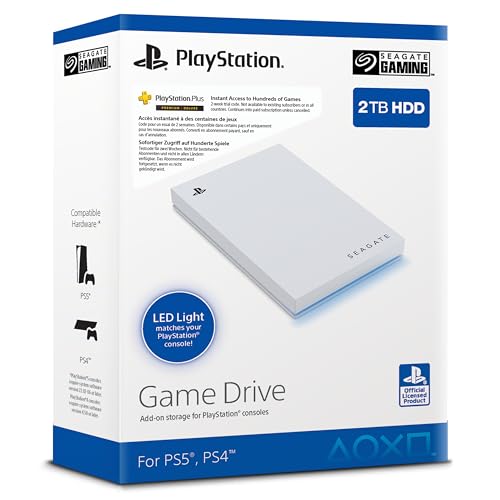
Seagate Game Drive 2TB for PS4/PS5 – the console-branded USB archive
As an Amazon Associate we earn from qualifying purchases at no extra cost to you.

This is the simplest answer to “my console is full.” The listing describes it as officially licensed, with firmware built to work across PS5 and PS4 models, and 2 TB of capacity so you can keep a large archive without redownloading. It fits the USB extended storage role in our verdict table: park finished PS5 games, run PS4 games directly from it, and copy a PS5 title back when you want to play. It is a good fit for someone who wants zero fuss and a drive that is clearly meant for a console.
- Capacity: 2 TB (per listing)
- Form factor: 2.5-inch drive, USB 3.0 interface (5 Gbps class)
- Licensed for PS4 and PS5 with LED lighting
- Weight listed around 0.37 pounds
Caveat: the listing text appears in Dutch and the drive is rated as USB 3.0, so you will not get 10 Gbps transfer speeds. Also confirm on the listing which cable ships in the box and whether the connector suits the ports on your console.
SanDisk Extreme Portable SSD 2TB for PS5 – fast portable archive

If you move games on and off the console often, transfer speed matters, and this portable SSD is aimed at that. The listing quotes read speeds up to 1,050 MB/s, which is the territory of a 10 Gbps USB link. It suits the “archive and rotate” habit: a 2 TB capacity holds a lot of finished PS5 games, and a small SSD can go in a bag to use with a laptop as well. Remember the rule from Sony: it stores PS5 games but will not run them.
- Capacity: 2 TB (per listing name)
- Up to 1,050 MB/s read speed (manufacturer figure)
- Portable SSD form factor, labeled for PS5 use
- Connector and cable details: confirm on listing
Caveat: speed claims are best-case. Real transfers of very large games will be slower than the headline number, and it cannot substitute for an internal M.2 drive when you want PS5 games to run.
WD_BLACK 1TB SN850P NVMe – the internal drive for running PS5 games

This is the one product in the group that matches the “I want PS5 games to run from extra space” situation. It is an M.2 NVMe SSD labeled as officially licensed for PS5 and ships with a heatsink, which handles the cooling requirement and the height limit Sony publishes. Choose it if you are comfortable removing the console’s side cover and want your active library on fast storage rather than shuttling files around.
- Capacity: 1 TB (per listing name)
- Interface: M.2 NVMe, up to 7,300 MB/s read (manufacturer figure)
- Includes heatsink; officially licensed for PS5
- Model number in listing: WDBBYV0010BNC-WRSN
Caveat: 1 TB fills quickly with big games, and the install is a screwdriver job. It lives in the console, so it will not double as a laptop drive.
Gigastone USB-C External SSD 1TB – flexible budget-minded storage

This one is a general-purpose portable drive rather than a console-specific product, so it sits as an alternative. The listing says USB 3.2 Gen 2 with up to 1,050 MB/s and both USB-A and USB-C connectors, which meets Sony’s 5 Gbps minimum. It works as a PS5 game archive and PS4 play drive, and it can serve a phone, laptop or tablet when the console is off.
- Capacity: 1 TB (per listing name)
- USB 3.2 Gen 2 with dual USB-A and USB-C connectors
- Up to 1,050 MB/s read (manufacturer figure)
- Console formatting required; the drive’s contents will be erased
Caveat: it is not listed as a licensed PS5 product, and Sony says not all devices are guaranteed to work. Sony’s documented requirements are met on paper, but treat compatibility as likely rather than certain. Format it and test before you move your library onto it.
Common Mistakes
- Expecting PS5 games to launch from a USB drive. They cannot; they must be copied back to internal storage.
- Buying an M.2 SATA drive. Sony requires PCIe Gen4 x4 NVMe; SATA M.2 drives are not compatible.
- Skipping the heatsink check. A bare drive without cooling does not meet Sony’s requirement, and a heatsink taller than 8.0 mm above the board will not fit.
- Plugging into a hub. Sony states the extended storage drive cannot be connected through a USB hub.
- Forgetting that formatting erases the drive. Back up anything on a drive before you use it with the console.
- Buying the minimum capacity. A 250 GB drive meets the rule but fills in a few downloads.
Questions
Can I play PS5 games directly from an external SSD?
No. USB extended storage can hold PS5 games, but you must move them back to the console’s internal storage before playing. Only PS4 games can run directly from a USB drive.
Does an external SSD make PS5 games load faster?
Not for PS5 games, since they cannot run from it. For PS4 games played from the drive, a solid-state drive generally loads faster than a hard drive, but the console’s internal drive remains the quickest place for PS5 titles.
Do I need a heatsink on an M.2 SSD for the PS5?
Yes. Sony requires a cooling structure, such as a heatsink with a heat transfer sheet, which can be built in or attached. It must stay within the published height and width limits so the drive fits under the cover.
Can I use more than one USB drive with the PS5?
You can connect several, but only one can be used as extended storage at a time. Pick the one you want in the storage settings.
Does this apply to the PS5 Slim and PS5 Pro?
The basic M.2 and USB requirements are the same across PS5 models, though the steps for removing the console cover differ. Check Sony’s model-specific instructions before you open yours.
Update History
- October 14, 2026 – Initial publication.
- Check the product page for current specifications and availability before buying.
Sources
- PlayStation support: USB extended storage on PS5 consoles
- PlayStation support: M.2 SSD requirements for PS5
- Retailer listing fields for each product named above
- Manufacturer product descriptions for the Seagate, SanDisk, WD_BLACK and Gigastone drives as shown on the listings
Related guides
- Best Speakers for Laptop: USB, 3.5mm and Clip-On Picks Compared (2026)
- Best Free MMOs on Steam: Subscription Limits, Pay-to-Win and Time Cost (2026)
- Best Free Horror Games on Steam: How to Pick One That Fits Your PC and Your Nerves (2026)
- Best Budget Webcam: Nine Low-Cost Picks and What They Give Up (2026)


