
For most gaming PCs, Kingston and Crucial memory are close enough that the right choice comes down to the exact kit: capacity, speed, latency, whether it carries an Intel XMP or AMD EXPO profile, and whether it fits your cooler and case. Neither brand is automatically faster, and both back their desktop DDR5 with a limited lifetime warranty according to the maker pages and reviewer comparison tables. This guide explains where the two lineups actually differ and how to pick between them.
As an Amazon Associate we earn from qualifying purchases at no extra cost to you.
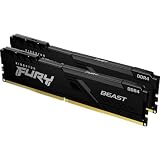
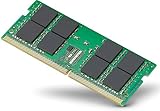
The Short Answer
Pick Kingston FURY if you want a gaming-styled module with heat spreaders, optional RGB and a wide range of speed bins. Pick Crucial if you prefer a plain, low-profile module, or a kit sold in a straightforward JEDEC-style or Pro configuration. If two kits share the same capacity, speed, timings and platform profile, the real-world gaming difference between them is usually within margin of error, so let compatibility, height and warranty terms decide.
What Each Side Is
Kingston
Kingston sells its gaming memory under the FURY name. The desktop DDR5 families include FURY Beast (the mainstream heat-spreader kit), FURY Renegade (higher-binned, aimed at enthusiasts) and RGB variants of each, plus FURY Impact in SO-DIMM form for laptops and mini PCs. Kingston states that its FURY DDR5 line is speed tested and carries a limited lifetime warranty, and its materials list Intel XMP 3.0 and AMD EXPO support. Support varies by product: Kingston’s own SO-DIMM table shows EXPO certification on some SKUs and not others, so the individual spec sheet matters.
Crucial
Crucial is Micron’s consumer memory brand. Its desktop DDR5 range includes the standard Crucial DDR5 modules at JEDEC speeds and the Crucial Pro series, which lists Intel XMP 3.0 and AMD EXPO profiles on faster kits such as DDR5-6000. Crucial also sells CUDIMM kits aimed at Intel’s Core Ultra 200S platform, which are a different product from standard Pro kits and are described by reviewers as Intel-only. Crucial modules usually have a plain, low-profile look without large heat spreaders.
Key Differences at a Glance
| Factor | Kingston FURY | Crucial (standard and Pro) |
|---|---|---|
| Parent company | Kingston Technology, builds modules with sourced memory chips | Micron, which makes its own DRAM |
| Look and height | Heat spreaders, optional RGB, taller on some kits | Plain or low-profile spreader, generally easier for tight coolers |
| Speed range | Wide, from mainstream bins to very fast enthusiast kits | JEDEC speeds up to mid-range Pro kits such as DDR5-6000 |
| Platform profiles | Intel XMP 3.0 and AMD EXPO on many SKUs, not all | Intel XMP 3.0 and AMD EXPO listed on Pro kits |
| Warranty | Limited lifetime, per the maker | Limited lifetime, per reviewer comparison tables |
| Typical voltage | Faster kits often rated above stock DDR5 voltage | Stock kits near the JEDEC level, Pro kits vary |
| RGB | Available | Generally not offered on mainstream kits |
Who Should Pick Which
Gaming builds
Games are far more sensitive to the CPU and GPU than to a small memory speed difference. A dual-channel kit of 32 GB at a sensible DDR5 speed is a common target for modern builds. On AMD Ryzen 9000 systems, including X3D chips such as the 9800X3D, reviewers often point to DDR5-6000 with low latency as a practical sweet spot because of how the memory controller and fabric clock relate. Both Kingston and Crucial sell kits at that speed, so choose the one whose timings, profile support and price tier suit you.
Creator and workstation builds
Video editing, compiling, virtual machines and large datasets care about capacity and stability more than frame rates. Here the question is whether the kit comes in the capacity you need, such as two modules of 32 GB, and whether the motherboard vendor lists it as tested. Crucial’s plain modules and Kingston’s non-RGB FURY kits are both reasonable. Pick by the motherboard’s qualified vendor list rather than brand preference.
Budget tiers
For entry-level builds, a standard JEDEC-speed kit from either brand is perfectly adequate for 1080p gaming. For mid-range builds, a DDR5-6000 kit with an XMP or EXPO profile is the usual target. For high-end builds, faster kits with tighter timings exist from Kingston’s Renegade line and similar enthusiast ranges, but gains in games are modest and platform stability limits apply. Overclocked memory profiles run above stock settings, can cause instability and may affect warranty coverage with some board or CPU makers, so keep settings conservative.
XMP, EXPO and Why Profiles Matter
DDR5 modules boot at a standard JEDEC speed unless you enable a stored profile in the BIOS. Intel XMP 3.0 and AMD EXPO are those stored profiles. Some Kingston kits ship with extra fallback profiles; KitGuru has noted additional modes such as a slower speed at lower voltage on certain kits. If your CPU is AMD, an EXPO-listed kit is the safest match. If it is Intel, an XMP-listed kit is. Many kits list both, but not every SKU does, so read the exact part number.
- Install the kit in the slots your motherboard manual names for dual channel (often the second and fourth slots from the CPU).
- Enter the BIOS and find the memory profile option. The menu name varies by motherboard maker, so follow the board manual.
- Select the XMP or EXPO profile and save.
- If the system fails to boot or crashes, clear the settings using the method in the board manual and use a slower profile.
Common Myths
- “Heat spreaders make it much cooler.” DDR5 modules generate modest heat at typical profile voltages. Spreaders help with looks and with heat at high voltages, but a plain module is fine at stock settings.
- “More RGB means faster.” Lighting has no link to speed or timings.
- “Micron-made means better.” Crucial being Micron’s brand is not a performance guarantee. The kit’s speed, timings and the memory controller of your CPU matter more.
- “Any DDR5 works on any board.” DDR5 does not fit older DDR4 boards, and some kits, such as Intel-focused CUDIMM kits, depend on platform support.
- “Faster always wins.” Past the sweet spot, game gains are small and stability can suffer.
Practical Recommendation
Start with the platform: note whether you have AMD or Intel, how much capacity you need (32 GB is a common gaming amount in 2026) and what cooler clearance your CPU cooler leaves. Then compare the two brands at that spec. If a Kingston FURY Beast and a Crucial Pro kit both list the same speed, similar timings and the right profile for your CPU, choose on height, looks and availability. Check the motherboard’s memory support list for the exact part number when you can; if the kit is not listed, many kits still work, but the list reduces risk.
Frequently Asked Questions
Is Kingston or Crucial better for gaming?
Neither is clearly better. Reviewers find similar frame rates from kits with the same speed and timings. The better choice is the one that matches your CPU platform and case.
Do both brands have a lifetime warranty?
Kingston states a limited lifetime warranty on its FURY DDR5 line, and reviewer comparison tables list the same for Crucial desktop DDR5. Terms can differ by region, so read the maker’s warranty page for the exact kit.
Will Kingston FURY work with AMD Ryzen?
Many FURY DDR5 kits list AMD EXPO support, but not every SKU does. Read the part number’s spec sheet and the motherboard’s supported memory list.
Can I mix Kingston and Crucial modules?
It is possible but not advised. Mixed kits may run at the slowest module’s speed or fail to enable a profile. A matched two-module kit is the safer approach.
Is Crucial memory slower because it looks plain?
No. Appearance does not affect speed. Check the rated speed and timings printed on the label or listed on the maker’s page.
Should I overclock memory beyond the profile?
Not for most gamers. Manual overclocking can cause instability and may void warranties with some makers. Using the stored XMP or EXPO profile is a conservative choice.


