Our Short List of 3
All 4 Picks at a Glance
| Product | Specs | Action |
|---|---|---|
 SABRENT DS-SC5B | Check price on Amazon | |
 TerraMaster D5 Hybrid | Check price on Amazon | |
 Yottamaster FS5U3 | Check price on Amazon | |
 ORICO 5-Bay RAID 9958RU3 | Check price on Amazon |
A desktop that once held a photo library, a game library, and a growing folder of video projects can run out of room faster than expected. Internal drive slots fill up, and external single-drive units multiply across a desk. A five-bay direct-attached storage enclosure gathers those loose drives into one powered box, connected to a single computer by one cable.
Five bays hold enough drives for a mirrored pair, a striped set for active work, and separate volumes for archives, while still fitting beside a monitor or under a shelf. The enclosures below were selected from manufacturer listings and Amazon product pages, with bay count, interface, RAID modes, drive support, and cooling checked against each listing. Every unit here is diskless, so drives are chosen separately.
Top 3 picks at a glance
At a Glance
| Product | Key feature | Best for |
|---|---|---|
| SABRENT DS-SC5B | 10Gbps USB-C, one controller per bay, trayless bays | Separate drives that stay independently accessible |
| TerraMaster D5 Hybrid | Two SATA bays plus three M.2 NVMe slots | Mixing bulk HDD capacity with fast NVMe storage |
| Yottamaster FS5U3 | Aluminium shell, 80mm fan, 150W power supply | Simple non-RAID expansion with large HDDs |
| ORICO 5-Bay RAID 9958RU3 | Hardware RAID 0, 1, 3, 5, 10, JBOD, and Clone | A hardware RAID set in one aluminium box |
SABRENT DS-SC5B
The SABRENT DS-SC5B is built around a simple idea: each of its five bays should behave like its own direct connection to the host computer. Sabrent fits a dedicated ASMedia ASM1351 controller for every bay, so each 3.5-inch SATA hard drive or SSD mounts as a separate disk rather than sharing one bridge chip. That design suits a desk where one drive holds active video, another holds photos, a third holds a game library, and the rest hold archives, because a busy drive in one bay does not have to block access to the others.
Connection is by USB-C at 10Gbps, with support for up to 100TB in total at 20TB per bay, trayless hot-swap bays with individual power switches, and a 120mm PWM fan that changes speed with drive temperature.
Considerations
The DS-SC5B is a JBOD-style unit, with no hardware RAID and no network access, so redundancy must come from software on the host computer. It accepts 3.5-inch SATA drives only, so 2.5-inch SSDs and M.2 drives need a different enclosure or an adapter. Drives are not included, and five large drives add weight and warmth that the fan must manage during long copy sessions.
TerraMaster D5 Hybrid
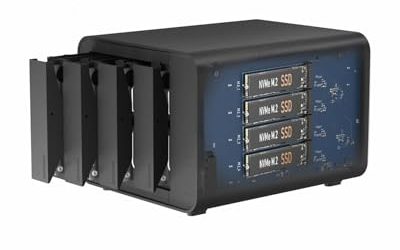
The TerraMaster D5 Hybrid takes a different route to five drive slots. Instead of five identical SATA bays, it combines two front SATA bays for 3.5-inch or 2.5-inch hard drives and SSDs with three side slots for M.2 2280 NVMe SSDs. That hybrid layout suits a creator who wants bulk capacity for finished projects and fast solid-state storage for active edits in one box, without buying two separate enclosures.
Total capacity is listed at up to 68TB, the front bays support RAID 0, RAID 1, Single, and JBOD, and the USB 3.2 Gen 2 Type-C link runs at 10Gbps, with tool-free SATA trays and support for Windows, macOS, and Linux.
Considerations
The hybrid layout is less straightforward than five identical bays, because the SATA and NVMe sides have different RAID options and different speed ceilings. All five drives still share one 10Gbps USB link, so several drives working at once will contend for that shared bandwidth. The enclosure is diskless, the NVMe slots accept M.2 2280 drives only, and owners who want a single uniform RAID array across all five slots should look at a conventional five-bay RAID enclosure instead.
Yottamaster FS5U3
The Yottamaster FS5U3 is the plainest enclosure in this group, and that plainness is its appeal. It is a non-RAID direct-attached unit with five bays for 2.5-inch and 3.5-inch SATA hard drives and SSDs, up to 90TB in total at 18TB per drive. There is no hardware RAID controller to configure, no array to rebuild, and no mode switch to set before first use. Drives appear as separate volumes, and the owner decides how to organise them in the operating system.
A 150W power supply runs five large drives at once, an aluminium-alloy shell and an 80mm temperature-controlled fan keep the chassis cool, and the USB 3.0 connection is plug-and-play and driverless on supported systems.
Considerations
This model does not support hardware RAID, so any redundancy must be created with software RAID or with a manual backup routine. The USB 3.0 link is slower than the 10Gbps USB-C links on the other enclosures here, which matters most when moving very large files or working directly from the enclosure. Drives are not included, and new drives usually need formatting and partitioning before they appear in the operating system.
ORICO 5-Bay RAID 9958RU3
The ORICO 9958RU3 is the hardware RAID option in this group. It holds five 2.5-inch or 3.5-inch SATA hard drives and SSDs, up to 110TB in total at 22TB per drive, and supports RAID 0, 1, 3, 5, 10, JBOD, Clone, and Clear modes, set with hardware controls on the unit. That range covers a striped set for active work, a mirrored pair for a working copy, and a RAID 5 set that balances capacity with protection against a single drive failure.
Connection is USB 3.0 Type-A with SATA transfer speeds up to 230MB/s listed, a 150W power supply runs five drives together, and the aluminium-alloy casing and 80mm cooling fan manage heat during long transfers.
Considerations
USB 3.0 is the slowest host link in this group, so the RAID modes help with redundancy and organisation more than with raw transfer speed. The enclosure is diskless, and RAID setup still requires care: drives in an array should match in brand, model, and capacity where possible, and a RAID set is not a substitute for a separate backup copy held elsewhere. The chassis is larger and heavier than a single-drive dock, so desk space and airflow around the unit should be planned before it arrives.
How to Choose
Count the bays against the plan, not just today. Five bays suit a mix of active work, backup, and archive. Map each bay to a job before buying, and leave one bay free if the collection is still growing.
Decide on RAID before choosing a model. Hardware RAID suits owners who want redundancy handled inside the box. JBOD suits owners who want separate volumes and will manage backups in software. A non-RAID enclosure cannot be turned into a hardware RAID unit later.
Check the host link. A 10Gbps USB-C link suits large file moves and direct editing. A 5Gbps USB 3.0 link is adequate for archives and backups, but it will feel slower with very large video files.
Match drive types to the bays. Some enclosures accept 3.5-inch SATA only, others accept 2.5-inch SATA as well, and hybrid models add M.2 NVMe slots. Confirm that existing drives fit, including drive height and interface.
Look at cooling and noise. A temperature-controlled fan, ventilation slots, and an aluminium shell help drives stay cool during long sessions. A fan that runs at a fixed high speed can become distracting on a quiet desk.
Plan power and placement. These enclosures use mains power, not bus power, so a spare outlet is needed. Leave space behind the unit for cables and airflow, and keep the fan intake clear.
Confirm operating system support. Most enclosures list Windows, macOS, and Linux support, but RAID software and drive formatting behave differently across systems. Check the listing for the exact system in use before ordering drives.
FAQ
Is a 5-bay DAS enclosure the same as a NAS?
No. A DAS enclosure connects directly to one computer by USB, and that computer controls access to the drives. A NAS connects to a network and can serve files to several devices at once. A DAS unit is usually simpler to set up and faster over a direct USB link, while a NAS suits a household or office where several people need shared access.
Do these enclosures come with drives installed?
No, the models in this guide are diskless. Drives are bought separately, installed in the trays, and formatted before use. That lets the owner choose drive capacity, drive type, and drive brand, and it keeps the enclosure usable when drives are later upgraded.
Which RAID mode suits a five-drive set?
RAID 5 is a common choice for five drives, spreading data and parity so the set keeps working after one drive fails. RAID 10 suits active work where speed and mirroring both matter, and JBOD suits separate volumes.
Can a 5-bay enclosure be used for video editing?
Yes, with the right drives and link. A 10Gbps USB-C enclosure with fast SSDs or a striped HDD set can hold active projects, while slower USB 3.0 units suit archives and backups better.
Conclusion
A five-bay DAS enclosure turns a scattered set of external drives into one organised desktop unit. The SABRENT DS-SC5B suits separate volumes with fast USB-C access, the TerraMaster D5 Hybrid suits a mix of HDD bulk and NVMe speed, the Yottamaster FS5U3 suits simple non-RAID expansion, and the ORICO 9958RU3 suits a hardware RAID set. Choose the RAID approach first, and leave room for the collection to grow.
As an Amazon Associate, we earn from qualifying purchases.
Related guides
More from Amazon
Programs that pair well with the guide above. Offers and eligibility are set by Amazon and may change.
Free shipping on eligible items, Prime Video and more. Eligible new members can start with a free trial.
Start a Prime free trialAd-free music streaming. Eligible new subscribers can start with a free trial.
Try Music Unlimited freeA Prime membership for ages 18-24 with a trial period. Eligibility is set by Amazon.
See Prime for Young AdultsAudiobooks and podcasts to listen to on the go. Eligible new members can start with a free trial.
Try Audible freeAs an Amazon Associate we earn from qualifying purchases.