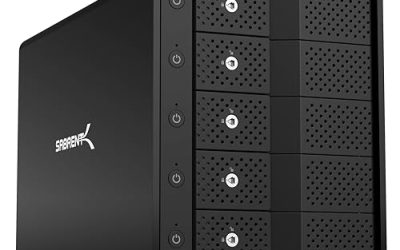
Our Short List of 3
All 4 Picks at a Glance
| Product | Specs | Action |
|---|---|---|
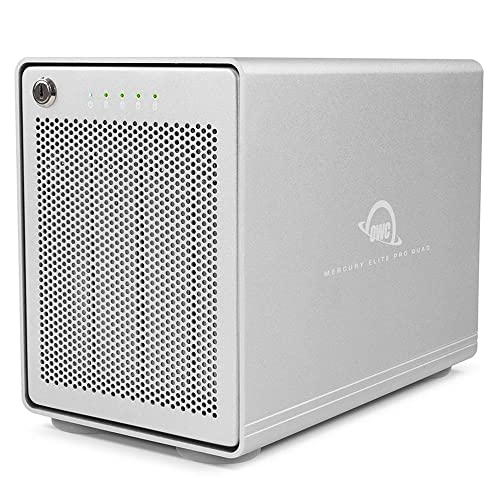 OWC Mercury Elite Pro Quad | Check price on Amazon | |
 TerraMaster D4-320 | Check price on Amazon | |
 SABRENT DS-SC4B | Check price on Amazon | |
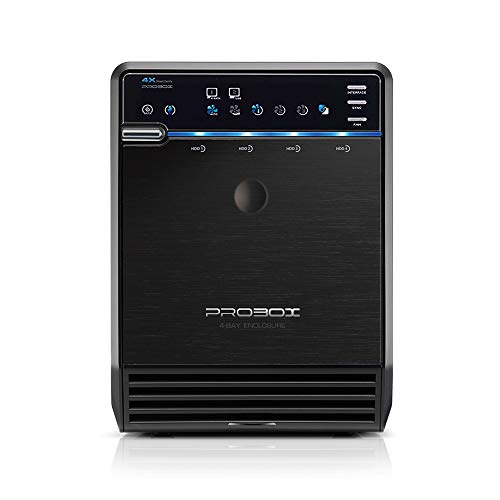 Mediasonic ProBox HF2-SU3S2 | Check price on Amazon |
Four drive bays are enough to change how a desk feels. Instead of four separate external drives, four cables, and four power bricks, one enclosure holds the set, one cable links it to the computer, and one power supply runs the whole group. For a gaming desktop, a photo workstation, or a home office that has outgrown its internal slots, that consolidation is the whole point of a four-bay unit.
A four-bay enclosure also fits where larger towers do not, sitting beside a monitor or on a shelf without dominating the room. Four bays still leave room for a sensible layout: a working drive, a mirrored copy, an archive drive, and a spare bay for a new project. The models below were chosen from manufacturer listings and Amazon product pages, with bay count, interface, RAID handling, drive support, and cooling checked against each listing. All four are diskless, so the owner supplies the drives.
Top 3 picks at a glance
At a Glance
| Product | Key feature | Best for |
|---|---|---|
| OWC Mercury Elite Pro Quad | USB-C 10Gbps, four universal SATA bays, software RAID | A fast Mac or Windows photo and video workspace |
| TerraMaster D4-320 | USB 3.2 Gen 2 10Gbps, tool-free trays, quiet 120mm fan | Four separate drives on one fast USB-C link |
| SABRENT DS-SC4B | 10Gbps USB-C, one controller per bay, trayless bays | Independent drive access with per-bay power control |
| Mediasonic ProBox HF2-SU3S2 | USB 3.0 and eSATA, four bays, simple JBOD layout | A long-running four-drive set for backups and archives |
OWC Mercury Elite Pro Quad
The OWC Mercury Elite Pro Quad is a metal four-bay enclosure built for creators who work with large files every day. Its four universal bays accept 2.5-inch and 3.5-inch SATA hard drives and SSDs, with up to 48TB of tested capacity across the set, and its USB-C port runs USB 3.2 Gen 2 at up to 10Gbps. OWC lists performance up to 947MB/s, with peak figures up to 1014MB/s in favourable drive configurations, which suits photo libraries, video timelines, and large game installs that need steady throughput.
RAID is handled in software on the host computer, through the operating system or through SoftRAID where a compatible bundle is chosen. The chassis measures about 9.4 inches long, 5.3 inches wide, and 7.3 inches high, weighs 4.75 kg without drives, and carries a one-year OWC limited warranty.
Considerations
SoftRAID is not included with the diskless 0TB configuration, so software RAID must be arranged separately if a redundant array is wanted. The enclosure is heavy without drives, and the unit needs mains power, so a spare outlet and a clear space on the desk are required.
TerraMaster D4-320
The TerraMaster D4-320 is a straightforward four-bay enclosure for owners who want four separate drives and a fast link, without RAID hardware in the way. It connects over USB 3.2 Gen 2 Type-C at 10Gbps, accepts 3.5-inch SATA hard drives, 2.5-inch SATA hard drives, and 2.5-inch SATA SSDs, and lists up to 120TB in total at 30TB per drive. Drives are hot swappable in tool-free trays, so a full drive can be pulled and replaced without powering the unit down.
TerraMaster lists read speeds up to 1016MB/s and write speeds up to 960MB/s with four drives working together, and the enclosure is driverless on Windows, macOS, and Linux. A single 120mm fan runs in smart mode at 21.0 dB(A), and the D4-320 presents each drive as a single disk, with no RAID modes built in.
Considerations
There is no hardware RAID, so redundancy must come from host software or from a manual backup routine. The listing and the specification table give slightly different capacity ceilings, so owners should confirm the largest drive size supported before buying.
SABRENT DS-SC4B
The SABRENT DS-SC4B follows the same design as its five-bay sibling, scaled to four bays. Each bay gets its own ASMedia ASM1351 controller, so every 3.5-inch SATA hard drive or SSD mounts independently and keeps its own stable connection to the host. That per-bay design suits a desk where drives are used for different jobs at the same time, because activity in one bay does not have to wait on another.
Connection is USB-C at 10Gbps, with support for up to 80TB in total at 20TB per bay, trayless hot-swap bays with individual power switches, and a rear USB-C port for daisy-chaining. A temperature-controlled fan cools the aluminium housing, and the internal power supply keeps the desk free of an external brick.
Considerations
This is a JBOD-style enclosure with no hardware RAID, so any array or redundancy must be built in host software. It accepts 3.5-inch SATA drives only, so 2.5-inch SSDs need a different enclosure or an adapter tray. Drives are not included, and the four-bay chassis still needs mains power and clear airflow around the fan intake.
Mediasonic ProBox HF2-SU3S2
The Mediasonic ProBox HF2-SU3S2 is the veteran of this group, a four-bay enclosure that has been used for years as a plain, dependable home for SATA drives. It holds four 3.5-inch SATA hard drives, connects by USB 3.0 at up to 5Gbps and by eSATA, and presents each drive as its own volume. There is no RAID controller to configure, and no network function to set up, which keeps the first installation short and the daily routine simple.
The enclosure includes a fan, a power supply, and drive trays for standard 3.5-inch drives, and it works with Windows and Mac systems. For a backup set, a media archive, or older drives that need a new home, the ProBox gives each drive a bay, a cable path, and cooling.
Considerations
USB 3.0 is slower than the 10Gbps USB-C links on the other enclosures here, so large transfers take longer and direct editing from the enclosure is less fluid. The unit supports 3.5-inch drives, so 2.5-inch SSDs and M.2 drives need another home. Drives are not included, and the enclosure is not a RAID unit, so a separate backup routine is needed for files that cannot be lost.
How to Choose
Start with the RAID question. If redundancy should live inside the box, choose a hardware RAID model or a software RAID workflow and confirm the exact modes supported. If separate volumes are enough, a JBOD or single-disk enclosure is simpler and often quieter.
Match the link to the workload. A 10Gbps USB-C link suits active projects, large photo libraries, and frequent large transfers. A 5Gbps USB 3.0 link suits backups, archives, and media playback, where sustained speed matters less than capacity.
Check drive fit before ordering. Confirm bay size, drive interface, and maximum drive capacity for each model. A 3.5-inch-only enclosure cannot take a 2.5-inch SSD without an adapter, and a hybrid enclosure has different rules for its SATA and NVMe slots.
Weigh cooling against noise. A larger fan running slowly is usually quieter than a small fan running fast. Look for a temperature-controlled fan, ventilation on more than one side, and a metal shell that helps shed heat.
Measure the desk. Four-bay enclosures vary in depth, height, and weight. Leave room behind the unit for cables, leave space above it for warm air to rise, and keep the fan intake clear of paper, fabric, and other clutter.
Confirm system support. Check Windows, macOS, and Linux support for the exact model, including any RAID software, backup utility, or driver that the workflow depends on. A unit that works well on one system may need extra steps on another.
Plan the backup separately. A four-bay enclosure, even with RAID, is still one box in one place. Keep a copy of irreplaceable files on a separate device, and test that the copy can be read back before it is needed.
FAQ
How many drives can a 4-bay enclosure hold?
Four drives, one per bay, with the exact drive size and interface set by the model. Most four-bay units accept 3.5-inch SATA hard drives and 2.5-inch SATA SSDs, while some accept 3.5-inch drives only. Check the listing for the model in use, because a drive that does not fit the tray cannot be installed safely.
Is USB-C always faster than USB 3.0 on these enclosures?
Not on its own. The link sets a ceiling, and the drives inside set the real speed. A 10Gbps USB-C link with fast SSDs will move files faster than a 5Gbps USB 3.0 link, but a 10Gbps link with slow hard drives will still be limited by those drives. Match the link and the drives together for the workload at hand.
Can a 4-bay DAS enclosure expand a gaming PC?
Yes. A four-bay unit adds room for a game library, recorded clips, mods, and backups without opening the PC case. Keep the most-played titles on the fastest internal drive, and use the enclosure for the wider library and for backups.
What should be done before installing drives?
Back up any data already on the drives, confirm that the drives are the right size and interface for the bays, and read the enclosure manual for tray fitting and formatting steps. New drives usually need partitioning and formatting before they appear.
Conclusion
A four-bay DAS enclosure is a compact way to give a desktop room to grow. The OWC Mercury Elite Pro Quad suits a fast software RAID workspace, the TerraMaster D4-320 suits four separate drives on a 10Gbps link, the SABRENT DS-SC4B suits independent per-bay access, and the Mediasonic ProBox HF2-SU3S2 suits a simple long-running archive. Pick the RAID approach first, match the link to the workload, and keep a separate backup for files that matter.
As an Amazon Associate, we earn from qualifying purchases.
Related guides
More from Amazon
Programs that pair well with the guide above. Offers and eligibility are set by Amazon and may change.
Free shipping on eligible items, Prime Video and more. Eligible new members can start with a free trial.
Start a Prime free trialAd-free music streaming. Eligible new subscribers can start with a free trial.
Try Music Unlimited freeA Prime membership for ages 18-24 with a trial period. Eligibility is set by Amazon.
See Prime for Young AdultsAudiobooks and podcasts to listen to on the go. Eligible new members can start with a free trial.
Try Audible freeAs an Amazon Associate we earn from qualifying purchases.