Our Short List of 3

- Best for: PS4 owners buying a current-generation portable drive with a USB-C connection.
- 4TB capacity
- USB-C connector
- Portable 2.5-inch design
- Sold by Amazon.com

- Best for: a simple, compact second drive or a travel drive for PS4 games.
- 2TB capacity
- USB 3.0 connection
- 1-Year Rescue Service included
- Portable 2.5-inch design
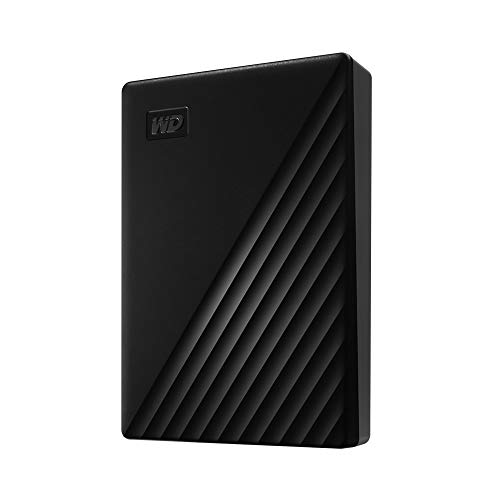
- Best for: PS4 owners with USB-A setups who want 4TB without changing cables.
- 4TB capacity
- USB 3.0 connector (USB-A)
- Portable 2.5-inch design
- Previous generation of the My Passport line
All 3 Picks at a Glance
| Product | Specs | Action |
|---|---|---|
| WD My Passport 4TB USB-C |
| Check price on Amazon |
| Seagate Portable 2TB |
| Check price on Amazon |
| WD My Passport 4TB USB 3.0 |
| Check price on Amazon |
A PS4 fills up fast once a few modern games land on it, and the internal drive leaves little room for the next download. Deleting games to make room gets old fast, and re-downloading them later wastes an evening. An external hard drive solves that without opening the console or reinstalling anything: plug it into a USB port, format it as extended storage, and move games over in minutes. The right drive holds a whole library, loads games at the pace the console expects, and stays quiet on a shelf beside the TV.
This guide is for PS4 owners who want more room without buying a new console or a faster internal drive. Every pick below is a USB 3.0 external hard drive that works with PS4 extended storage, chosen from its listing name and specifications on Amazon. Capacity, connector type, and warranty separate the good choices from the mediocre ones, and the five drives below cover small libraries, large collections, and officially licensed PlayStation hardware.
Our Top Picks
Top 3 picks at a glance
Quick Picks
As an Amazon Associate we earn from qualifying purchases
| Product | Best for | Key spec from title |
|---|---|---|
| WD My Passport 4TB USB-C | A modern USB-C setup | 4TB, USB-C |
| Seagate Game Drive for PlayStation 2TB | Officially licensed PlayStation storage | 2TB, PlayStation licensed |
| Seagate Portable 2TB | A compact everyday drive | 2TB, portable |
| WD My Passport 4TB USB 3.0 | The older USB-A generation | 4TB, USB 3.0 |
| WD_BLACK P10 Game Drive 2TB | A rugged metal game drive | 2TB, metal case |
How to Choose
Match the capacity to your library
Count the games you actually play before picking a size. A 2TB drive holds roughly forty to fifty large titles, which suits players who rotate a handful of games at a time. A 4TB drive suits collectors and households where several people share one console, since it doubles the room without doubling the footprint. PS4 supports external drives up to 8TB, so there is headroom if your library keeps growing, but buying more capacity than you will fill means paying for empty space.
Insist on USB 3.0 or better
PS4 extended storage requires a USB 3.0 connection, and the console will not accept a slower USB 2.0 drive for game storage. Check the listing for the USB version before ordering, and use the port on the front of the console for the most reliable connection. A USB-C drive needs a USB-C port or an adapter on the console side, so confirm what your setup supports before choosing between the USB-C and USB-A generations of the same drive family. A drive that meets the standard also loads games at the speed the console was designed around, so there is no stutter or delay when a game streams new areas.
Look for the right warranty and support
A hard drive is a moving part, and the warranty tells you how much the maker stands behind it. Three-year coverage on a game drive beats one-year coverage on a basic portable drive, and rescue services add value when a drive holds years of saves and downloads. Read the listing for the warranty length and any included data-recovery service, and keep the box and receipt until the drive has run for a few weeks without trouble. A longer warranty also hints at the maker’s confidence in the drive’s build, since makers do not promise three years on hardware they expect to fail in one.
Check the physical size and noise
An external drive lives next to the console, so its size and sound matter more than the spec sheet suggests. A slim 2.5-inch portable drive tucks behind the TV and draws power from the USB port, while a larger desktop-style drive needs its own power brick and a permanent spot on the shelf. Metal cases run cooler and survive knocks better than plastic shells, which matters when the drive travels between rooms or to a friend’s house. Noise matters too: a drive with a loud seek mechanism will hum through quiet cutscenes, so a quiet portable is worth choosing over a rattling desktop unit.
The 5 Best Options
WD My Passport 4TB USB-C
- Best for: PS4 owners buying a current-generation portable drive with a USB-C connection.
- 4TB capacity
- USB-C connector
- Portable 2.5-inch design
- Sold by Amazon.com
PS4 owners buying a current-generation portable drive with a USB-C connection.
confirm your setup has a USB-C port or adapter before ordering, since this is not a USB-A drive.
This is the current-generation My Passport, built around a USB-C connector for setups that have moved past USB-A. Four terabytes gives a large PS4 library room to breathe, and the drive’s slim profile means it disappears behind the console. It is the pick for anyone buying fresh in 2026 who wants the newest version of a long-running portable line, with the capacity to hold dozens of games and the media files that pile up alongside them. For players who also own a modern laptop, the USB-C connector matches the ports already on their desk, so one cable standard covers both machines.
Seagate Game Drive for PlayStation 2TB
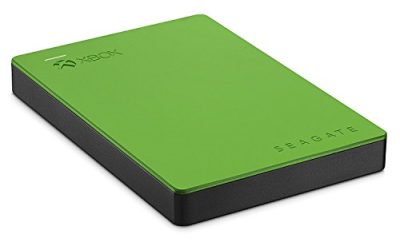
Seagate’s officially licensed PlayStation drive is the safest choice for anyone who wants zero guesswork about compatibility. It carries the PlayStation branding and is built for console storage, so it works on PS4 for games and on PS5 for PS4 games and PS5 game storage. Two terabytes is enough for a rotating library, and the drive’s compact shape fits easily beside the console without extra power cables. Players who split time between a PS4 and a PS5 will appreciate a single drive that serves both consoles, and the licensed design removes the need to check compatibility lists or forum posts before buying.
Specs
- 2TB capacity
- Officially licensed PlayStation drive
- Works on PS4 and PS5
- USB 3.0 connection
Best for: players who want an officially licensed drive with no compatibility questions.
Watch out for: 2TB fills faster than 4TB if you keep every game installed at once.
ASIN: B0CH87VY5B
Seagate Portable 2TB
- Best for: a simple, compact second drive or a travel drive for PS4 games.
- 2TB capacity
- USB 3.0 connection
- 1-Year Rescue Service included
- Portable 2.5-inch design
a simple, compact second drive or a travel drive for PS4 games.
no PlayStation licensing, so the styling is plain Seagate rather than console-branded.
The plain Seagate Portable is the straightforward pick: a compact 2TB drive that does the job without licensed branding or extra features. It is the lightest option here in terms of fuss, with a simple USB 3.0 connection and a one-year Rescue Service included for data recovery. Players who want a second drive for a bedroom console, or a travel drive for taking games to a friend’s PS4, will find it hard to beat on simplicity. Its small size also makes it easy to store when not in use, and the Rescue Service covers the data if the drive ever fails.
WD My Passport 4TB USB 3.0
- Best for: PS4 owners with USB-A setups who want 4TB without changing cables.
- 4TB capacity
- USB 3.0 connector (USB-A)
- Portable 2.5-inch design
- Previous generation of the My Passport line
PS4 owners with USB-A setups who want 4TB without changing cables.
this is the older generation, so do not confuse it with the USB-C model when ordering.
This is the older USB-A generation of the My Passport, and it remains a solid choice for consoles and setups that still run on USB-A ports. It offers the same 4TB capacity as the newer USB-C model, so the decision between the two comes down to connector, not storage. Anyone with a PS4 and a stack of USB-A cables already in the drawer will find this the more convenient of the two My Passport models. Since the PS4 itself uses USB-A ports, this generation connects directly with the cables most console owners already have at home.
WD_BLACK P10 Game Drive 2TB
The P10 is the rugged pick of this group, with a metal case built to survive being carried around and a three-year warranty behind it. It is aimed squarely at gamers, with a 130 MB/s transfer rate and a design that looks at home next to a console. The 2TB capacity suits a focused library of current favourites rather than an archive of everything ever downloaded, and the metal enclosure gives it a durability edge over plastic portables. Its 130 MB/s transfer rate keeps loading times in line with what the console expects, so games start and stream without delay.
Specs
- 2TB capacity
- Metal case
- 130 MB/s transfer rate
- 3-year warranty
Best for: gamers who carry their drive between consoles and want a metal case.
Watch out for: confirm on the product page that the listing is the P10 Game Drive model WDBA2W0020BBK before ordering.
ASIN: B09R9PDHXH
Which One Fits Your Situation
You want the newest drive available
Pick the WD My Passport 4TB USB-C. It is the current generation of the line, with the connector that new laptops and docks already use, and 4TB of room for a large library. With 4TB of room, the drive also holds the media files and captures that pile up alongside games. Just make sure your console setup can take a USB-C connection or an adapter, since the drive ships with a USB-C cable.
You want zero compatibility risk
Pick the Seagate Game Drive for PlayStation 2TB. The official PlayStation licensing removes any doubt about whether the drive works with the console, and it also covers PS5 storage duties if you upgrade later. The 2TB capacity is the trade-off for that certainty, so keep your library trimmed to the games you actually play and archive the rest elsewhere.
You need a second or travel drive
Pick the Seagate Portable 2TB. It is small, simple, and cheap enough in its class to keep as a spare, and the included Rescue Service adds a safety net. It works the same way as the bigger drives for everyday game storage, just with less room, and its light weight means it rides in a bag without adding bulk.
You want the toughest drive in the group
Pick the WD_BLACK P10 Game Drive 2TB. The metal case and three-year warranty make it the best choice for a drive that gets unplugged, packed in a bag, and plugged in somewhere else regularly. Verify the model number on the listing first, since the attribution needs a /dp/ confirmation, and keep the drive in its sleeve when it travels.
Common Mistakes
- Buying a USB 2.0 drive for game storage, which PS4 extended storage does not accept.
- Ordering the USB-C My Passport for a setup with no USB-C port or adapter.
- Confusing the two My Passport generations and ordering the wrong connector.
- Assuming a 2TB drive will hold an entire multi-year library without deleting anything.
- Skipping the warranty and rescue-service details on the listing before buying.
Frequently Asked Questions
Can I play PS4 games directly from an external hard drive?
Yes. Once the drive is formatted as extended storage, PS4 games installed on it run directly from the drive. You do not need to move them back to the internal drive to play, and the console treats the external drive as part of its storage.
How much space do I need for a PS4 game library?
It depends on how many games you keep installed. A 2TB drive holds roughly forty to fifty large titles, while a 4TB drive doubles that and suits collectors or shared consoles. Players who finish games and delete them can get by with less, while households that keep everything installed should aim higher.
Does an external drive need its own power supply?
Portable 2.5-inch drives like the ones in this guide draw power from the USB port, so they need no separate adapter. Larger desktop-style external drives do need a power brick, so check the listing if you are considering a drive that is not a portable model.
Will these drives also work on PS5?
The Seagate Game Drive for PlayStation is built for both consoles, storing PS4 games and PS5 games for later transfer. Other USB drives in this guide work on PS5 as extended storage for PS4 games, but PS5 games themselves must run from the console’s internal SSD or an installed M.2 SSD.
Related guides
More from Amazon
Programs that pair well with the guide above. Offers and eligibility are set by Amazon and may change.
Free shipping on eligible items, Prime Video and more. Eligible new members can start with a free trial.
Start a Prime free trialAd-free music streaming. Eligible new subscribers can start with a free trial.
Try Music Unlimited freeA Prime membership for ages 18-24 with a trial period. Eligibility is set by Amazon.
See Prime for Young AdultsAudiobooks and podcasts to listen to on the go. Eligible new members can start with a free trial.
Try Audible freeAs an Amazon Associate we earn from qualifying purchases.