
If your PlayStation 5 lives in an entertainment center with a tangle of charging cables, a wobbly stock stand, and controllers that are always dead when you sit down to play, you already know the problem. The PS5 — whether you own the original disc model, the Slim, or the Pro — runs hot, and closed cabinets make it run hotter. Stacking it on top of a receiver or wedging it behind a soundbar restricts airflow, which means louder fan noise, thermal throttling during long sessions, and in the worst cases, a console that simply shuts down mid-raid. Meanwhile, the DualSense controllers need their own charging routine, and leaving them plugged into the front USB ports means the console never really rests — and the ports wear out.
A cooling storage dock solves both problems with one footprint. It holds the console vertically (or horizontally, in one case below) in a stable cradle, pulls hot air out with an auxiliary fan, charges two controllers at once, and adds extras like USB hubs, headset hooks, and even screw-in security mounts. We compared eight of the most popular docks, compared prices from around $31 to around $38, and ranked them for different types of setups and budgets.
As an Amazon Associate we earn from qualifying purchases at no extra cost to you.

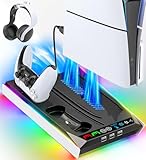
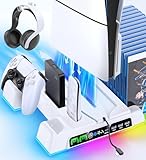

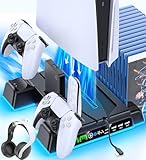


Our Top Picks

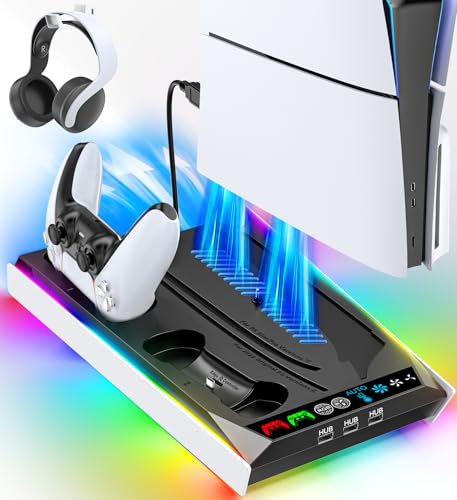
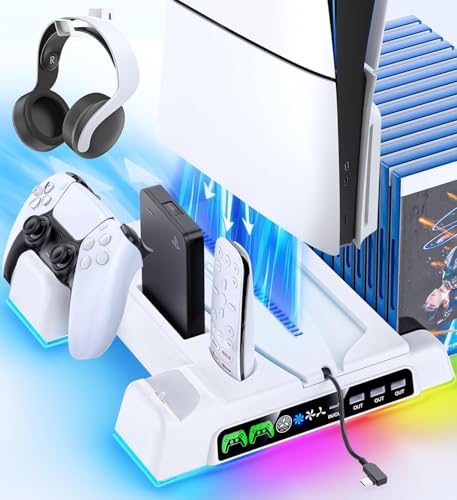


Top 3 picks at a glance
Quick Picks
| Product | Best for | Price |
|---|---|---|
| PS5/Slim/Pro Stand and Cooling Station with LED Controller Charging Station | Best overall value | Check on Amazon |
| PS5/Slim/Pro Stand for Disc & Digital Console with RGB Lights | Best for RGB lighting fans | Check on Amazon |
| Cooling Stand for PS5/Slim/Pro Disc & Digital Console | Best no-fuss pick | Check on Amazon |
| PS5/Slim/Pro Cooling Station with 3 USB Hubs | Best for peripheral-heavy setups | Check on Amazon |
| PS5/Slim/Pro Stand with 3-Level Fan (Black) | Best budget pick | Check on Amazon |
| Rysker PS5/Slim/Pro Stand with Safety Screw | Best for households with kids or pets | Check on Amazon |
| PS5/Slim/Pro Horizontal Stand and Cooling Station | Best for low shelves and DualSense Edge owners | Check on Amazon |
| PS5/PS5 Slim/PS5 Pro Stand and Cooling Station (White) | Best for white console setups | Check on Amazon |
How We Compared
We focused on docks that support all three current console variants — the original PS5, the Slim, and the Pro — in both disc and digital configurations, since compatibility is the first thing buyers get wrong. From there, we evaluated each station on four criteria: cooling (fan speed options and whether the fan adjusts automatically), controller charging (dual slots, LED indicators, and support for the DualSense Edge where noted), storage extras (USB hubs, headset holders, media slots), and stability (footprint, screw-in security, and how confidently the console sits in the cradle). Price mattered, but with every option landing between roughly $31 and $39, the differences came down to features and fit rather than cost. We did not run thermal instrumentation; our rankings reflect real-world usability, noise, and how well each dock fits into a typical living room setup heading into 2026.
The 8 Best Picks
1. PS5/Slim/Pro Stand and Cooling Station with LED Controller Charging Station — around $37
This is the dock we’d hand to most buyers. It combines a three-level cooler fan, an LED-lit dual controller charging station, and a full accessories kit into one upright unit that fits neatly beside a TV. The LED charging indicators make it obvious at a glance when your controllers are topped off, and the fan’s three levels let you choose between near-silent idle and aggressive cooling during long sessions.
- Three-level fan gives you genuine control over noise versus airflow
- LED charging indicators are bright and easy to read across the room
- It costs a few dollars more than most rivals at around $37
Skip it if you want RGB lighting or a horizontal orientation — this is a straightforward vertical dock, and the flashier options below do that better.
2. PS5/Slim/Pro Stand with RGB Lights and Auto Adjustable Fan — around $33
If your setup leans into lighting, this is the dock for you. The RGB accents frame the console nicely without washing out a dark room, and the built-in fan supports both three-level manual control and an auto mode that adjusts fan speed on its own — you set it and forget it. It also charges two controllers simultaneously and works with both disc and digital consoles.
- Auto-adjusting fan removes the need to fiddle with settings
- RGB lighting doubles as ambient room lighting
- Maximum fan speed is audible in a quiet room
Skip it if you hate light pollution in your viewing space — even at low brightness, the RGB is noticeable. Minimalists should look at pick three.
3. Cooling Stand for PS5/Slim/Pro Disc & Digital Console — around $34
This is the dock for people who want cooling and charging and nothing else. There’s no lighting show and no extra gadgetry — just a dual controller charging station, an auto-adjustable fan, and a stable cradle for disc or digital consoles. The auto mode is the star: it ramps the fan up when the console works hard and quiets down when you’re streaming or browsing.
- Auto-adjustable fan handles cooling without user input
- Clean, understated design disappears into most setups
- No USB hubs or storage extras if you want them
Skip it if your entertainment center is short on USB ports or you need a headset hook — this dock keeps things deliberately simple, and buyers with more peripherals should pick four instead.
4. PS5/Slim/Pro Cooling Station with Cooling Fan and 3 USB Hubs — around $33
Peripheral-heavy setups are where this dock earns its around $33. With three USB hubs built in, you can keep a headset dongle, a charging cable, and an external drive plugged in permanently instead of crawling behind the console every time. The cooling fan and controller charging station round out a genuinely complete package for PS5, Slim, and Pro owners in disc or digital configurations.
- Three USB hubs eliminate constant cable swapping
- Strong feature set for the price
- Fan is manual-only, no auto mode
Skip it if you already use a quality powered USB hub — you’d be paying twice for the same capability, and a simpler dock would serve you better.
5. PS5/Slim/Pro Stand with 3-Level Fan (Black) — around $31
At around $31, this is the cheapest dock in the roundup, and it doesn’t feel cheap where it counts. You get the same core formula as docks costing several dollars more: a three-level fan, dual controller charging, and support for disc and digital consoles in the standard black finish. If you just need hot air moving and controllers topped off, this is the smart-money pick.
- Lowest price of the eight without dropping core features
- Three-level fan matches pricier competitors
- Plastic feels lighter than premium picks
Skip it if you want USB hubs, a headset holder, or lighting — it’s a core-features-only dock. Budget buyers should also note that spending a few dollars more buys meaningfully more hardware.
6. Rysker PS5/Slim/Pro Stand with Safety Screw and Headset Holder — around $33
The Rysker stands out for one overlooked feature: a safety screw that anchors the console to the dock. In households with kids, cats, or an overenthusiastic dog, that screw is the difference between a wobbly console and a secured one. Add a fast charger for two controllers, a three-level fan, a headset holder, and disc/digital compatibility, and it’s a thoughtful family-friendly package at around $33.
- Safety screw keeps the console firmly anchored
- Headset holder gives headphones a proper home
- Design is more utilitarian than stylish
Skip it if your console sits on a high, out-of-reach shelf — the security feature won’t matter, and a sleeker dock would look better in an open display setup.
7. PS5/Slim/Pro Horizontal Stand and Cooling Station — around $38
Most docks force a vertical orientation, which is a problem for anyone with a wide, shallow shelf. This is the only horizontal option here, and it’s also the priciest at around $38. You get a scalable three-level cooling fan and charging support for both a DualSense and a DualSense Edge — a real differentiator for competitive players who own the premium controller and find it won’t seat in many generic docks.
- Horizontal orientation fits low media consoles
- Charges a DualSense Edge alongside a standard controller
- Highest price in the roundup
Skip it if you prefer the vertical look or don’t own an Edge controller — the premium buys flexibility you may not need, and pick one covers vertical setups for less.
8. PS5/PS5 Slim/PS5 Pro Stand and Cooling Station (White) — around $33
Most docks are black, which clashes badly with a white console. This station matches the white PS5, Slim, or Pro perfectly, and it doesn’t sacrifice features for the finish: dual controller charging, a cooling fan, a headset holder, and three USB hubs are all included. At around $33, it matches the feature count of the black hub-equipped pick while solving an aesthetic problem many docks ignore.
- White finish actually matches white consoles
- Full feature set including three USB hubs and headset holder
- White plastic can show scuffs over time
Skip it if you own a black console — the mismatch will bug you, and the black equivalent at the same price is the better call.
Buying Guide
Compatibility First
The single most common mistake is buying a dock that doesn’t fit your console generation. The original PS5, the Slim, and the Pro have different dimensions and different side-panel profiles, and some docks require swapping an adapter or screw position between them. Every dock in this roundup supports all three variants in both disc and digital configurations, which is why they made the list. If you shop outside this roundup, verify compatibility explicitly — and if you own a DualSense Edge controller, confirm the dock’s charging slots accept it, because many don’t.
Cooling: Manual Levels vs. Auto Mode
Fan-equipped docks generally offer either fixed speed levels (usually three) or an auto mode that adjusts speed based on console temperature. Manual three-level fans give you control: run level one for quiet movie nights, level three during marathon gaming sessions. Auto mode is better for set-and-forget users, ramping up only when the console needs it. One honest note: an auxiliary fan supplements the console’s own cooling — it isn’t a substitute for airflow around the console. Whatever dock you buy, leave clearance around the vents and avoid fully enclosed cabinets.
Storage Extras That Actually Matter
Beyond cooling and charging, look at your actual setup. If your console’s USB ports are all claimed by a headset dongle and an external SSD, a dock with built-in USB hubs is worth real money. If your headphones live on the floor or draped over the TV, a headset holder is a small feature you’ll use daily. Households with kids or pets should prioritize a screw-anchored dock. And if your shelf is shallow, a horizontal stand isn’t a luxury — it’s the only option that fits. Match the extras to your room rather than paying for features you’ll never touch.
Our Verdict
For most buyers, the pick one station at around $37 is the best blend of cooling control, dual controller charging, and polish. If budget rules, pick five at around $31 covers the essentials admirably. RGB lovers should grab pick two, families with curious pets should grab the Rysker, DualSense Edge owners with low shelves need pick seven, and anyone with a white console will be happiest with pick eight. Every dock here lands under $39, supports the PS5, Slim, and Pro, and charges two controllers — so you genuinely can’t go far wrong. Choose based on your room, your controllers, and your shelf, and you’ll wonder why you waited so long.
FAQ
Do cooling docks actually help a PS5 run cooler?
An auxiliary fan moves air through the console’s vents faster than passive convection, which is most useful in warm rooms or enclosed cabinets. It works best as a supplement to good placement — leave several inches of clearance around the console and never block the rear exhaust. Think of a dock as improving an already-reasonable setup, not rescuing a console buried in a closed cabinet.
Will a cooling dock fit my PS5 Slim or PS5 Pro?
All eight docks in this roundup are built for the original PS5, the Slim, and the Pro, in both disc and digital editions. Some models require a small adjustment — repositioning a screw or adapter — when switching between console versions, so follow the included instructions during setup rather than forcing the console into the cradle.
Can these docks charge a DualSense Edge controller?
Most docks in this roundup charge standard DualSense controllers in dual charging slots. Edge support is the differentiator: pick seven explicitly advertises compatibility with the DualSense Edge alongside standard controllers. If you own an Edge, don’t assume a generic dock will seat it correctly — the premium controller’s shape and contact points don’t fit every charging station.
Is it safe to leave controllers charging on the dock overnight?
Yes. These docks are designed to manage charging automatically, stopping or trickling once the controllers reach full charge, and the LED indicators show status at a glance. Leaving controllers on the dock is actually better for battery routines than letting them drain empty — just keep the dock’s own power adapter connected to a functioning outlet and avoid draping fabric over the unit while it runs.
Related guides
- Best Free MMOs on Steam: Subscription Limits, Pay-to-Win and Time Cost (2026)
- Best Free Horror Games on Steam: How to Pick One That Fits Your PC and Your Nerves (2026)
- Black Frame Insertion vs VRR: Which Smoothness Feature Should You Use?
- Best Webcams for Streaming: 11 Listings Compared by Resolution, Focus and Light (2026)








