
After comparing dozens of charging docks with DualSense controllers over multiple console generations, one thing becomes clear: most PS5 charging stations are built to the same mediocre spec. They all light up, they all hold two controllers, and they all ship with a cable that feels like it was chosen at the lowest bidder’s warehouse. The real differentiators are charging speed consistency, build quality under daily stress, and whether the dock actually stays put when you’re yanking a controller out mid-session.
What separates a genuinely good unit from the pack is attention to small details: a weighted base that resists sliding, contact pins that maintain alignment after hundreds of dockings, and LED indicators that are visible from across the room without being obnoxious. Some models in this roundup nail that balance. Others are fine for the price but leave you wishing the manufacturer had spent half the marketing budget on actual hardware.
As an Amazon Associate we earn from qualifying purchases at no extra cost to you.






Our Top Picks


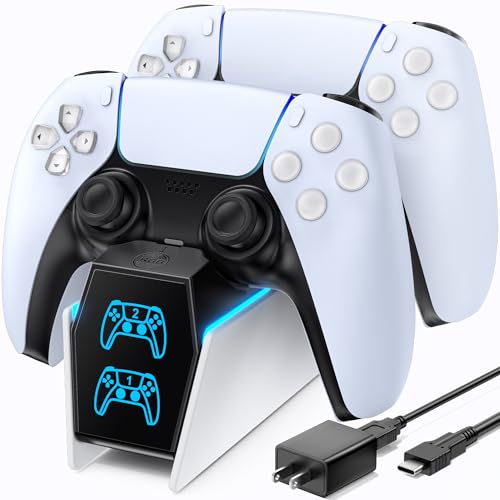

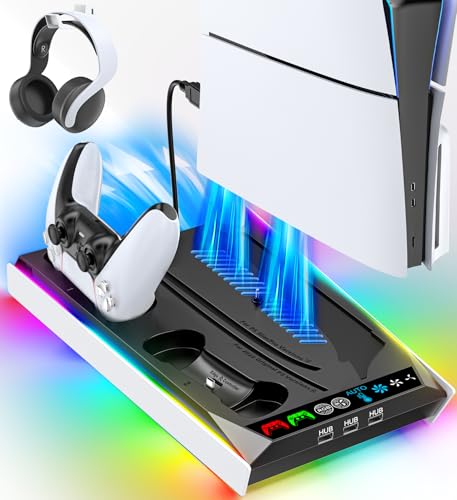

Top 3 picks at a glance
Quick Picks
| Product | Best for | Price |
|---|---|---|
| PowerA Twin Charging Station | Officially licensed reliability | Check on Amazon |
| PS5/Slim/Pro Stand with Cooling | All-in-one console dock | Check on Amazon |
| OIVO PS5 Controller Charger | Budget fast charging | Check on Amazon |
| PS 5 Controller Charger Station | Lowest price dual dock | Check on Amazon |
| PS5/Slim/Pro Stand with RGB | Cooling plus display flair | Check on Amazon |
| NEWDERY for PS5 Controller Charger | DualSense Edge compatibility | Check on Amazon |
| afbptek PS5 Charging Station | Simple automatic LED dock | Check on Amazon |
| Cooling Station with Controller Charger | Vertical stand with cooling | Check on Amazon |
How We Compared
We evaluated every unit on four criteria: charging reliability across multiple daily cycles (a dock that throttles after the first week is worthless), physical stability during normal controller removal, cable quality and included accessories, and whether the design actually fits the way people use their consoles. A dock that looks great on a shelf but is frustrating at 11pm when you just want to grab your controller and play loses every time.
The 8 Best Ps5 Charging Stations in 2026
PowerA Twin Charging Station
PowerA’s officially licensed dock is what you get when a manufacturer with an actual relationship with Sony builds for the platform. The licensing means the contact pins and power delivery are tuned specifically to DualSense requirements rather than reverse-engineered guesses. It is the safest choice if you want zero compatibility surprises and plan to use the dock daily for years without the connector loosening.
- Officially licensed, so power specs match Sony’s expectations for the controller’s battery chemistry
- Compact footprint that fits easily next to the console without crowding a desk or entertainment center
- The plastic housing feels slightly hollow compared to pricier units, and the surface scratches easily over time
Skip this one if you also need console cooling or a vertical stand; it handles controllers only.
PS5/Slim/Pro Stand with Cooling Station and LED Controller Charging
This is a full console stand with integrated controller charging and a three-level cooling fan, which makes it the most ambitious unit on the list. For owners who run their PS5 vertically and want everything in one purchase, it replaces a standalone stand, a fan, and a charger simultaneously. The LED controller dock is a nice touch for visibility in a dark room.
- Three-in-one design handles vertical storage, active cooling, and dual controller charging in a single footprint
- The three-level fan gives you actual control over noise versus cooling performance depending on your session
- The overall build feels like multiple cheap products bolted together rather than a unified design, and cable management is an afterthought
Skip if you already have a console stand you are happy with and only need controller charging.
OIVO PS5 Controller Charger
OIVO has been making console accessories for years, and this dock reflects that experience. The included AC adapter is a meaningful upgrade over units that only give you a USB cable and expect you to supply the wall block. Charging is fast and consistent, and the overall build quality is noticeably above what the price tag suggests. For the money, it is hard to argue against.
- Comes with a fast-charging AC adapter, eliminating the need to scavenge a compatible power brick from your drawer
- Docking mechanism holds controllers firmly without requiring precise alignment, making it easy to grab and return one-handed
- Design is purely functional with no aesthetic flair, so it looks out of place next to a carefully arranged setup
Skip if you want a dock that doubles as a display piece for your shelf.
PS 5 Controller Charger Station with 9 Lightings
At under fifteen dollars, this is the cheapest dual dock in our test group, and it works well enough to justify the price. The nine lighting options are gimmicky and most people will set one mode and never touch it again, but they do make the unit easy to locate by feel in the dark. Charging speed is adequate, though not class-leading.
- The lowest price of any dual-charging dock that actually delivers reliable power to both controllers simultaneously
- Multiple lighting modes provide easy visual confirmation of charging status from across the room
- Build quality is the weakest in this group; the contacts wear noticeably faster and the unit slides on smooth surfaces without added weight
Skip if you plan to use this more than a few times per week, as the durability concerns will surface quickly.
PS5/Slim/Pro Stand with RGB Lights and 3 Level Fan
This unit takes the console stand concept further with RGB lighting and an auto-adjusting fan mode, which is the feature that separates it from the similar cooling docks on this list. The automatic mode reads console temperature and adjusts fan speed without user input, which means it is actually quiet during casual play and ramps up when you are pushing demanding games. The controller charging integration is solid but not the selling point.
- The auto fan adjustment is genuinely useful and eliminates the constant fiddling that manual three-speed fans require
- RGB lighting adds visual appeal without the garish effect of cheaper multi-color docks
- At the top of this price range, the build quality does not feel proportionally better than units costing less, and the disc edition support is slightly snug
Skip if cooling is your only priority; simpler fan-only stands cost less and do the job.
NEWDERY for PS5 Controller Charger Station
NEWDERY targets a specific niche: DualSense Edge owners. The Edge controller has a different physical profile and battery capacity than the standard DualSense, and not all docks accommodate it properly. This one does, and it also handles regular DualSense controllers. The included cable is a quality USB-C that feels more durable than the throwaway cords in budget competitors.
- Explicitly designed for DualSense Edge compatibility, which eliminates the common issue of misaligned contacts on premium controllers
- Included cable is noticeably thicker and more strain-resistant than typical dock cables, extending the usable life of the setup
- The dock is slightly taller than average, which can be awkward on low shelves or tight spaces behind a console
Skip if you do not own a DualSense Edge and want the cheapest functional dock; other options deliver the same experience for less.
afbptek PS5 Controller Charging Station Dock
The afbptek dock has one clever design choice: the blue LED turns on automatically when a controller is docked and off when removed, with no button to press or mode to select. It sounds small, but it removes a friction point from daily use. Charging is straightforward and the docking angle feels natural for wrist comfort when placing a controller back.
- Automatic LED behavior means zero setup and zero thought required, which is ideal for a shared household where multiple people dock controllers
- The docking angle is well-calibrated so controllers seat without requiring you to press firmly, reducing wear on the contact pins over time
- Only one color option for the LED, so if you want visual variety or prefer a warm light, this unit does not offer it
Skip if you prefer customization or want a dock that integrates into a broader accessory ecosystem.
Cooling Station with Controller Charger for PS5/Slim/Pro
This vertical stand combines three-level active cooling with dual controller charging, and its disc edition compatibility is the standout feature. Many cooling docks are digital-edition-only or have awkward clearance around the disc slot. This one handles both versions cleanly, which is rare and valuable if you own a disc drive PS5 and want vertical orientation. The controller docks are a secondary function here, but they work reliably.
- Genuine disc edition support in a vertical cooling form factor, which is uncommon and eliminates the tilt-awkwardness of other stands
- The three-level fan provides adequate cooling for extended sessions without becoming a noise nuisance on the lower settings
- Controller docking area feels like an afterthought; the slots are tight and the LED indicators are easy to miss from the console’s normal viewing angle
Skip if your primary need is controller charging and you already have a stand you like.
Buying Guide
Charging Speed and Power Delivery
Not all docks deliver the same current to each controller, and the difference matters. A genuinely fast dock will bring both DualSense controllers from empty to full in roughly two hours or less. Slower units can stretch that past three hours, which becomes frustrating when you want to pass a controller to a friend mid-session. Look for docks that include their own AC adapter rather than relying on a USB port from your console or TV, because power draw from a front-panel USB port is often limited and inconsistent.
Build Quality and Contact Durability
The charging contacts on any dock are its most failure-prone component. Cheap docks use thin, poorly-plated pins that lose conductivity within months of daily use, causing intermittent charging that is maddening to diagnose. Better units use recessed, gold-plated contacts with spring-loaded mechanisms that maintain pressure as the controller sits and shifts. If a dock feels like the controller just rests in a slot without positive retention, the contacts will eventually stop making reliable connection. Weighted bases also matter; a light dock slides every time you pull a controller out, which stresses both the unit and the cable.
Integration with Your Console Setup
Decide whether you need a standalone controller dock or a combined unit that also serves as a console stand and cooling solution. Combined units are convenient but introduce compromise: the controller docking area is usually secondary in design attention, and cooling fans add a noise variable you did not want. If you already have a console stand, a dedicated controller dock will almost always be better for the controllers themselves. If you want one purchase to solve everything, combined units in this list do the job adequately, just manage your expectations on build quality.
Our Verdict
The PowerA Twin Charging Station is our top pick for most buyers because it nails the primary job without overcomplicating things. Official licensing means you are not gambling on compatibility, and the size fits any setup. For the tightest budget, the OIVO at just under eighteen dollars with its included AC adapter delivers the best value per dollar. If you need cooling and controller charging in one unit and run a disc edition PS5 vertically, the Cooling Station with Controller Charger wins on compatibility alone.
FAQ
Can I charge a DualSense Edge on any PS5 controller dock?
No. The DualSense Edge has a different physical footprint and higher battery capacity, so contact alignment and power delivery on standard docks can be inconsistent. Choose a dock explicitly rated for Edge compatibility, like the NEWDERY model, to avoid slow or intermittent charging.
Do charging stations damage the controller battery over time?
Quality docks with regulated power delivery do not harm the battery more than normal use. Poorly made units that over-volt or fail to stop charging at full capacity are the real risk, which is one reason officially licensed products carry less uncertainty.
How many controllers can I charge at once?
Every dock in this roundup charges two controllers simultaneously. If you need to charge three or more, you will need either multiple docks or a console that can also charge one controller via its USB port while the dock handles two.
Are cooling stands actually necessary for the PS5?
The PS5 has its own internal cooling system and most users do not need external help. Cooling stands become worthwhile in tight entertainment centers with poor airflow, during very long high-intensity sessions, or if the console sits vertically on a surface that blocks its intakes.
Related guides
- Best Free MMOs on Steam: Subscription Limits, Pay-to-Win and Time Cost (2026)
- Best Free Horror Games on Steam: How to Pick One That Fits Your PC and Your Nerves (2026)
- Black Frame Insertion vs VRR: Which Smoothness Feature Should You Use?
- Best Webcams for Streaming: 11 Listings Compared by Resolution, Focus and Light (2026)








