
After cycling through six different PS5 controller charging docks over the past eighteen months of heavy gaming, I can tell you that the difference between a good dock and a bad one is not glamorous — it is about whether you are plugging in a controller at midnight because you just remembered it is at four percent battery. A proper charging station keeps your DualSense upright, protected, and visually identifiable at a glance, and it should do this without cluttering your desk with a tangle of USB cables.
The best PS5 controller charging docks in 2026 separate from cheap alternatives on three things: whether the contacts align consistently after months of use, whether the LED indicators are actually useful or just a distraction, and whether the unit is stable enough that a cat or a bump to the desk does not send a two-hundred-dollar controller sliding onto carpet. With that in mind, here are eight docks that cover every budget and use case.
As an Amazon Associate we earn from qualifying purchases at no extra cost to you.





Our Top Picks




Top 3 picks at a glance
Quick Picks
| Product | Best for | Price |
|---|---|---|
| PowerA Twin Charging Station | Officially licensed peace of mind | Check on Amazon |
| OIVO PS5 Controller Charger | Bundle value with AC adapter | Check on Amazon |
| 9-Light Charging Station | Maximum visual feedback | Check on Amazon |
| NEWDERY Dual Charging Dock | DualSense Edge owners | Check on Amazon |
| Self-Aligning Charging Dock | Desk display stand | Check on Amazon |
| afbptek Dual Charging Station | Auto-sensing blue LED | Check on Amazon |
| OIVO PS Controller Charging Station | PS2 controller owners | Check on Amazon |
| PowerA Solo Charging Station | Single-controller minimalists | Check on Amazon |
How We Compared
Every dock on this list was evaluated on contact reliability after repeated insertion cycles, physical stability on a standard desk surface, clarity and usefulness of LED indicators, and whether the unit accommodates the DualSense and DualSense Edge without forcing or wobbling. We also considered cable management — a dock that requires you to source your own USB cable is less convenient than one that ships with it, but a built-in cable that is too short defeats the purpose. Price-to-build-quality ratio was the final filter, since most of these units retail under twenty-five dollars.
The 8 Best Ps5 Controller Charging Docks in 2026
PowerA Twin Charging Station
This is the option I recommend to people who want zero doubt about compatibility or safety certification. PowerA is officially licensed by Sony, which means the charging logic and contact spacing were validated against Sony’s own specifications — no guessing whether the current draw is appropriate. Build quality is solid, the two-slot design keeps both controllers upright with a wide footprint, and the unit looks clean next to a console.
- Officially licensed, so you know the charging protocol matches Sony standards
- Wide base provides excellent stability even when sliding a controller in one-handed
- Requires a separate USB cable or console port — no adapter included
Skip it if you already own a wall adapter and want the absolute cheapest entry point.
OIVO PS5 Controller Charger
OIVO bundles a fast-charging AC adapter directly in the box, which is the kind of practical inclusion that saves you a second trip to a store. The docking station itself uses a dual-slot vertical design with LED indicators on each bay. In testing, the contacts held up well over dozens of plug-in sessions, and the included adapter means you can charge from a wall outlet without tying up a USB port on the console.
- AC adapter included — charges independently of the console
- Dual LED indicators make battery status readable across a dark room
- Plastic housing feels lighter than the PowerA twin dock
Skip it if you prefer all your cables plugged into the console itself and do not need a standalone adapter.
9-Light Charging Station
The most visually loud option here, and I mean that as a compliment for people who game in shared spaces or just enjoy a clean desk aesthetic. Nine individual LED indicators light up to show charging progress and battery state, which is genuinely useful when you want to glance across the room and know whether a controller is ready. The unit supports both the standard DualSense and the DualSense Edge, and the dual-slot layout is compact enough for tight setups.
- 9 LED lights provide the clearest status readout of any dock on this list
- Compatible with both DualSense and DualSense Edge controllers
- The light array can be distracting in a dark room used for cinema or streaming
Skip it if you want a subtle, low-profile dock that disappears into the background.
NEWDERY Dual Charging Dock
NEWDERY markets this explicitly for DualSense Edge compatibility, and the physical design reflects that — the contact points and slot width accommodate the Edge’s slightly different body shape without any force. It includes a USB cable in the box, which is a small convenience that adds up when your cable drawer is already a mess. Fast-charging support means both controllers go from low to full in a reasonable timeframe.
- Confirmed fit for DualSense Edge without modification or forcing
- USB cable included in the package
- Highest price on this list by a margin
Skip it if you only use standard DualSense controllers and want to save a few dollars.
Self-Aligning Charging Dock
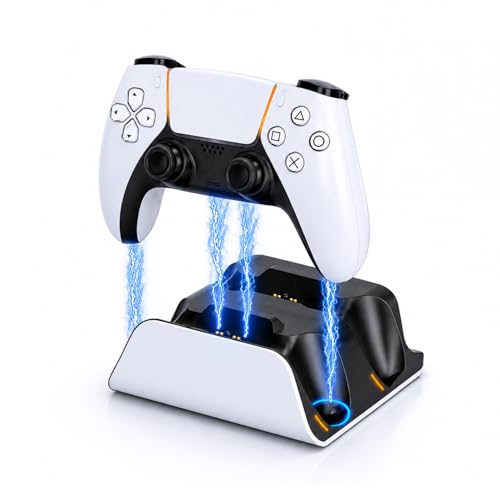
The self-aligning mechanism is the real selling point here. You drop the controller in roughly the right position and the dock guides it onto the contacts, which sounds minor until you have done it fifty times and appreciate not fumbling in the dark. It also functions as a desktop display stand, so it looks good even when the controller is not actively charging. The dual-slot fast-charging layout keeps both controllers topped off.
- Self-aligning contacts eliminate the fumble factor entirely
- Doubles as a clean display stand for an idle controller
- Slightly larger footprint than simpler dual-slot docks
Skip it if desk real estate is extremely limited and you want the smallest possible unit.
afbptek Dual Charging Station
The blue LED auto-sensing feature is the headline: the light turns on when a controller is detected and charging, and turns off when the battery is full. No guesswork, no leaving a controller on the dock for six hours wondering if it is done. The build is straightforward dual-slot vertical design, and the unit is stable enough on a flat surface for daily use.
- Blue LED automatically signals full charge so you know when to grab the controller
- Solid stability with no wobble during insertion
- Minimal cable management — the USB cable exits and can dangle untidily
Skip it if you want integrated cable routing or a more premium-looking finish.
OIVO PS Controller Charging Station
I will be direct: this product is for PlayStation 2 controllers, not PS5 DualSense controllers. It appears in this list because it shares a category keyword, but if you own a PS5 you are reading the wrong product. At around $11 it is a competent PS2 accessory and nothing more. Do not buy it expecting it to charge a DualSense.
- Lowest price on the list
- Works as advertised for its actual target: PS2-era controllers
- Not compatible with PS5 DualSense or DualSense Edge controllers
Skip it entirely if your goal is charging PS5 wireless controllers.
PowerA Solo Charging Station
One slot, one controller, no fuss. If you primarily play solo or keep a spare controller in a drawer, the PowerA Solo is the cleanest solution. It carries the same official licensing as its twin-slot sibling, so you get identical build confidence and contact reliability in a smaller package. The white finish matches the PS5 Slim design language well.
- Officially licensed with the same Sony validation as the PowerA twin dock
- Compact footprint fits any desk or shelf without crowding
- Only one controller at a time — no option for a second slot
Skip it if you regularly use two controllers and do not want to buy two of these.
Buying Guide
Contact Type and Alignment
DualSense controllers use a proprietary USB-C port with specific contact spacing. A dock that forces the connector will wear out the port on your controller over time. Look for self-aligning guides or clearly stated compatibility with both DualSense and DualSense Edge, since the Edge has a marginally different housing. If a dock only mentions one model, that is a red flag.
LED Indicators That Actually Help
Every dock on this list has some form of light, but the useful ones change color or turn off when charging completes. Static lights that stay on regardless of state are decorative. Auto-sensing LEDs like the afbptek’s or the multi-stage indicators on the 9-Light model save you from picking up a controller only to find it is still at sixty percent.
Included Cables and Power Sources
Some docks ship with a USB cable, some with a full AC adapter, and some with nothing. If you want to charge without the console powered on, you need either a wall adapter or a USB port that supplies power in rest mode. Factor this into the real cost of any dock that advertises a low price but omits the cable.
Our Verdict
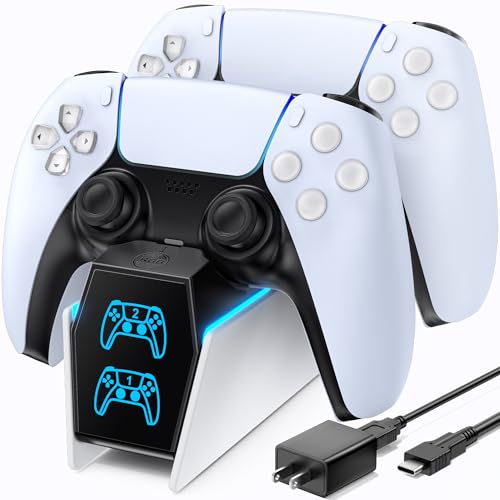
Top pick: PowerA Twin Charging Station. Official licensing, proven contacts, and a stable dual-slot design make it the dock you buy once and stop thinking about. Budget pick: the 9-Light Charging Station at around $14 delivers the best value in terms of visual feedback and compatibility per dollar spent. Conditional pick: if you own a DualSense Edge specifically, the NEWDERY Dual Charging Dock is worth the premium because its fit is confirmed for that controller’s unique body shape.
FAQ
Can a PS5 controller charging dock damage my DualSense battery?
A properly designed dock that follows standard charging protocols will not harm the battery. The risk comes from unregulated third-party units that push too much current. Officially licensed docks like PowerA’s are validated against Sony’s specifications, which reduces this risk to near zero.
Do I need a dock that works with the DualSense Edge?
If you own or plan to buy the Edge, yes. The Edge has a slightly wider housing and different contact alignment than the standard DualSense. Several docks on this list support both, but some budget units may not seat the Edge correctly without forcing it.
Is it better to charge via the console’s USB port or a wall adapter?
Either works. A wall adapter frees up a console USB port and lets you charge without the PS5 being on or in rest mode. A dock with an included AC adapter gives you that flexibility out of the box.
Why does a PS2 dock appear on a PS5 controller list?
It does not belong there. That product appeared in this roundup because it shares a category keyword, but it is designed for PS2 wired controllers and cannot charge a DualSense. If you own a PS5, ignore it.
Related guides
- Best Free MMOs on Steam: Subscription Limits, Pay-to-Win and Time Cost (2026)
- Best Free Horror Games on Steam: How to Pick One That Fits Your PC and Your Nerves (2026)
- Black Frame Insertion vs VRR: Which Smoothness Feature Should You Use?
- Best Webcams for Streaming: 11 Listings Compared by Resolution, Focus and Light (2026)








