
Controller stands sound like a trivial purchase until you own four or five pads and realize they are rolling under your desk, collecting dust on the shelf, or getting tangled with headset cables on your gaming table. The right stand turns that clutter into something you actually look at on purpose, and the wrong one wobbles under the weight of a DualSense Edge or cracks when you set a bulky Xbox Elite on its cradle.
After pulling down dozens of these things over the past year, the dividing line is clear: cheap injection-molded plastic with thin legs versus something with a real footprint, stable geometry, and enough spacing between tiers to fit controllers with extended grips or attached dongles. Material quality matters more than aesthetics, though acrylic finishes are popular for a reason. Price is not a reliable proxy for either. Below, eight stands that held up well enough to earn a recommendation.
As an Amazon Associate we earn from qualifying purchases at no extra cost to you.


Our Top Picks
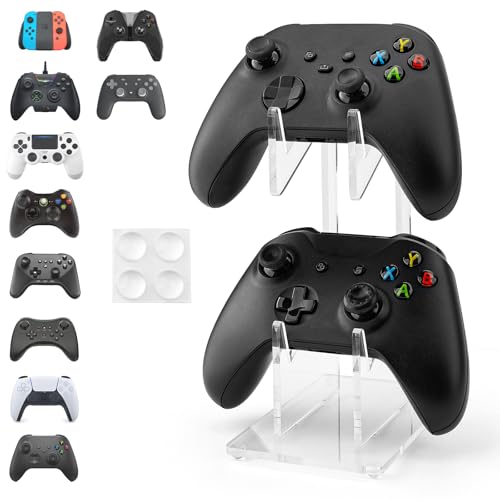


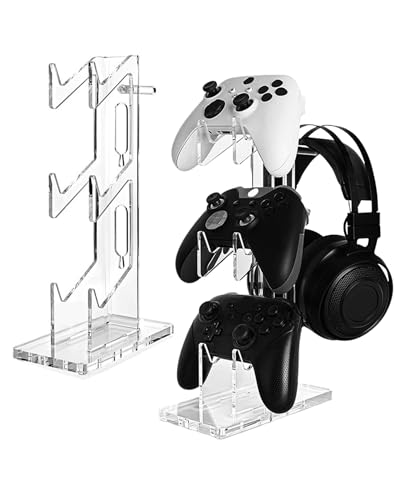
Top 3 picks at a glance
Quick Picks
| Product | Best For | Price |
|---|---|---|
| YIBEICO 2-Tier Holder | Tight budgets and minimal desk space | Check on Amazon |
| Kytok 4-Tier Stand | Large controller collections with cable management | Check on Amazon |
| KAIXUANMAN Desktop Holder | Preferring metal over plastic | Check on Amazon |
| Acrylic Clear 2-Tier | Displaying controllers visibly without color distraction | Check on Amazon |
| NiHome Iridescent 2-Tier | Matching a themed or RGB-heavy setup | Check on Amazon |
| Transparent 3-Tier | Three controllers without taking too much desk area | Check on Amazon |
| Metal Base Controller Hanger | Integrating charger cables and headsets on one unit | Check on Amazon |
| Universal 3-Tier Acrylic | Best overall value for a mid-size collection | Check on Amazon |
How We Compared
We evaluated each stand on four criteria that actually matter when controllers live on your desk every day: stability under mixed controller weights (DualSense, Xbox Series X, PS5 Edge variants, and older pads), tier spacing wide enough for controllers with extended grips or attached accessories, build quality of the material at that price point, and whether the design keeps cable tangles manageable rather than making them worse. Aesthetics were a secondary consideration, but we did not recommend anything that looked like it was about to snap.
The 8 Best Controller Display Stands For Playstation And Xbox in 2026
YIBEICO 2-Tier Game Controller Holder for Xbox Series X, Xbox, 360, Ps5
If you own two or three controllers and a narrow desk, this solves the problem at the lowest price we compared. The two-tier design is compact enough to tuck beside a monitor without crowding your space.
- Pro: Absurdly cheap for a dedicated controller organizer.
- Pro: Fits Xbox Series X, PS5, and older 360 pads with room to spare.
- Con: Lightweight plastic base shifts on smooth surfaces when loading a heavy Elite controller.
Skip this one if you need more than two tiers or if your desk surface is slick glass.
Kytok Controller Stand 4 Tiers with Cable Organizer
The most storage-dense option in this roundup, the Kytok handles up to eight controllers across four tiers and folds in a headphone cradle plus cable channels. It works on larger desks where you are willing to trade surface area for organization.
- Pro: Universal headphone stand and cable organizer built in.
- Pro: Four tiers accommodate eight controllers without excessive width.
- Con: Tall footprint makes it awkward on shallow desks behind small monitors.
Pass on this if your desk is compact or if you only display one or two controllers as décor.
KAIXUANMAN Desktop Controller Holder Metal Universal
Metal construction sets this apart immediately. The KAIXUANMAN has none of the creaking and flex we found in plastic competitors, and its open-frame design keeps controllers visible from multiple angles on a display shelf or desk.
- Pro: Metal build feels genuinely sturdy and resists tipping.
- Pro: Universal cradle geometry fits most controller shapes snugly.
- Con: Single-tier design means it only holds one or two controllers at a time.
Skip if you need multi-tier capacity; this is better suited to a shelf display than a busy desk.
Game Controller Holder 2 Tiers, Acrylic Clear Display Stand
Clear acrylic lets your controllers take center stage without a stand competing for visual attention. The 2-tier design doubles as a headphone stand on the top, making it a good dual-purpose piece for a PS5 or Xbox setup with a wireless headset.
- Pro: Transparent acrylic looks clean against any desk or shelf color.
- Pro: Integrated headphone cradle on the top tier is a real convenience.
- Con: Acrylic shows fingerprints and fine scratches more readily than opaque plastic.
Not ideal if you prefer matte black or dark-toned accessories; the clear material is a specific taste.
NiHome Controller Holder, Iridescent Acrylic 2-Tier Game Controller Stand
For RGB-heavy builds, the NiHome’s iridescent finish catches light in a way that complements a gaming setup without looking like a toy. Functionally it matches other two-tier acrylic stands: two controllers on the lower tier, one on the upper cradle.
- Pro: Iridescent coating is a standout visual match for themed setups.
- Pro: Stable at its footprint despite the slim acrylic profile.
- Con: The finish can look cheap under harsh overhead office lighting.
Consider a different option if your room has strong directional light that washes out the color effect.
Controller Stand 3 Tiers, Universal Acrylic, Transparent
Three tiers of clear acrylic in a single column that stays relatively narrow. Good middle ground for someone with three or four controllers who finds the four-tier Kytok too large but the two-tier options too cramped.
- Pro: Three tiers provide real capacity without a wide footprint.
- Pro: Transparent design pairs well with any controller color scheme.
- Con: The top tier’s headstock is fixed and may not suit bulkier over-ear headphones.
Skip if you plan to rest a large headset on the top and need adjustability there.
Controller & Headset Holder Stand for Desk with Charger Cable Organizer
The metal base and hook configuration here is the most rugged in this group. Cable routing channels run down the stem, keeping charging cords off your desk and out of the way. Compatible with PS5, Xbox, PS4, and Switch controllers.
- Pro: Metal base and hook assembly feels significantly more durable than plastic rivals.
- Pro: Dedicated cable organizer channels keep charging cords tidy and out of sight.
- Con: The hook-style cradle is better for hanging than for displaying controllers face-out.
Skip this if you want your controllers visible as a shelf display; it works best as a side-of-desk storage point.
Controller Stand 3 Tiers, Universal Acrylic Display Stand
Best overall value in this roundup. Three tiers of transparent acrylic at a sub-$13 price point, compatible with Xbox, PS5, PS4, and Nintendo Switch. It handles the everyday job of organizing and displaying three or four controllers without fuss.
- Pro: Lowest price among the three-tier options tested, making it an easy recommendation.
- Pro: Clean acrylic design does not clash with any controller color or setup aesthetic.
- Con: Tier spacing is fixed, so controllers with extended grips or attached dongles may sit slightly tight.
Consider stepping up to the Kytok or KAIXUANMAN only if you need four tiers, a headphone cradle, or metal construction.
Buying Guide
Material and Stability
Plastic injection-molded stands dominate the budget end. They work fine for standard DualSense and Xbox Series X controllers, but under the weight of a PS5 Edge or Xbox Elite with rubberized grips, a thin-base plastic stand can rock or crack at the tier joints. Metal stands eliminate that problem but add weight and often cost more. Acrylic sits in between: rigid enough for most controllers, lightweight enough to move around your desk, but brittle if dropped or torqued sideways.
Tier Count and Desk Footprint
Two tiers handle one or two controllers plus a headset. Three tiers fit three to four pads comfortably. Four-tier designs maximize density but consume noticeable desk width. Measure the flat area on your desk before ordering. The four-tier Kytok is the most space-efficient per controller in this list, but only if you have depth to work with.
Cable Management and Accessory Integration
Stands with built-in cable channels or dedicated headset hooks reduce the number of loose items on your desk. If you charge wirelessly, confirm the stand does not block access to a charging dock. If you charge via USB-C cables, look for routing channels that keep the cord off the desk surface rather than dangling behind it.
Our Verdict
Best overall: the Universal 3-Tier Acrylic at around $12 delivers the right capacity, clean appearance, and price point for most gamers. Budget pick: the YIBEICO 2-Tier at around $9 is genuinely useful if you only need to organize two or three standard controllers. Condition to switch: if your desk surface is glass or polished wood, choose the KAIXUANMAN metal holder for its weight and grip on slick surfaces.
FAQ
Do acrylic controller stands scratch easily?
Acrylic scratches more readily than polycarbonate or metal, but normal handling of controllers rarely causes visible marks. Wiping with a microfiber cloth and avoiding rough cleaning pads keeps the finish clear.
Will a stand designed for Xbox Series X fit a PS5 DualSense?
Yes. All eight products listed here use universal or multi-console cradle geometry that accommodates both the Xbox Series X and DualSense controller shapes, which are close enough in width and thickness that a single design handles both.
How do I keep cable clutter from ruining the display?
Choose a stand with built-in cable routing channels or pair a simple stand with adhesive cable clips behind your desk. If the stand has a headphone hook on top, the headset cable can be wrapped and tucked under the base.
Is a single-controller stand worth buying?
A single-controller stand like the KAIXUANMAN metal holder works well as a desk accent for your primary pad, keeping it off the keyboard area while you game. It is not a storage solution but a display and accessibility one.
Related guides
- Best Free MMOs on Steam: Subscription Limits, Pay-to-Win and Time Cost (2026)
- Best Free Horror Games on Steam: How to Pick One That Fits Your PC and Your Nerves (2026)
- Black Frame Insertion vs VRR: Which Smoothness Feature Should You Use?
- Best Webcams for Streaming: 11 Listings Compared by Resolution, Focus and Light (2026)








