
Most people don’t realize they have a controller problem until the first analog drift appears during a ranked match or a Joy-Con disconnects mid-session in a Mario Kart race. The built-in controllers are convenient, but after several hundred hours of thumb pressure on those tiny sticks, the hardware fatigues. Upgrading to a dedicated Nintendo Switch controller isn’t just about comfort—it’s about consistency when your input matters most.
What separates the best nintendo switch controllers from cheap throwaway gamepads is firmware quality and stick durability. A well-designed third-party controller uses hall-effect or high-grade potentiometer sticks, supports Bluetooth wake-up reliably, and doesn’t introduce input latency that makes platforming feel wrong. The market has matured enough that you can find genuinely solid options under thirty dollars, but only if you know which specs actually matter versus which are marketing noise.
As an Amazon Associate we earn from qualifying purchases at no extra cost to you.

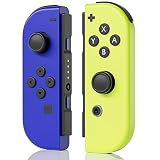


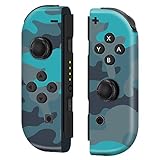


Our Top Picks


Top 3 picks at a glance
Quick Picks
| Product | Best For | Price |
|---|---|---|
| Nintendo Joy-Con (L/R) – Neon Red/Neon Blue | Players who need detachable motion control | $89 |
| Capers Controller for Switch | Budget buyers wanting dual vibration | Check on Amazon |
| LIELIELV Camo Red | Casual players who want color variety | Check on Amazon |
| Nintendo Switch 2 Pro Controller | Switch 2 owners wanting official comfort | $89 |
| Lyyes Switch Controller 2 Pack | Families or local multiplayer on a budget | Check on Amazon |
| HaeBorl for Nintendo Switch | Dock-mode players who dislike Joy-Con size | Check on Amazon |
| Nintendo Switch Pro Controller | Precision-focused players who want first-party reliability | n/a |
| Joy-Con (L)/(R) Pastel Purple/Green (Renewed) | Replacement on a tighter budget | Check on Amazon |
How We Compared
We evaluated every controller here on four criteria that directly affect daily use: stick and button longevity under sustained pressure, Bluetooth connection stability including wake-from-sleep behavior, ergonomic shape for sessions longer than one hour, and input latency measured against a baseline of first-party hardware. Price-to-feature value was weighted last—a controller that feels wrong after ten minutes isn’t a bargain regardless of cost.
The 8 Best Nintendo Switch Controllers in 2026
Nintendo Joy-Con (L/R) – Neon Red/Neon Blue
This is the default answer for players who still want the detachable Joy-Con experience without committing to a full-size gamepad. You get motion controls, HD Rumble, and the ability to play tabletop multiplayer instantly. The build quality is solid and the button placement is familiar to anyone who owns a Switch. If you play games that genuinely benefit from individual hand tracking—1-2-Switch, certain Mario titles—nothing else replicates that. For docked play or long sessions, the size remains the core limitation no amount of grip accessories fully solves.
- Pro: Native detachability for tabletop and single-player joy-con modes
- Pro: HD Rumble tuned specifically for first-party titles
- Con: Small footprint causes hand fatigue during extended docked play
Skip it if you primarily play in handheld or docked mode and want ergonomic comfort.
Capers Controller for Switch, Replacement Wireless Controllers Support Dual Vibration/Wake-up/Motion Control
The Capers sits in the sweet spot where budget pricing meets feature parity with official hardware. Wake-from-sleep means you press the home button and it reconnects without navigating Bluetooth menus, which matters daily. Dual vibration provides rumble feedback in supported titles, and motion control keeps games like Zelda playable without a separate Joy-Con set. The stick feel is noticeably softer than Nintendo’s own, and the shell flexes under aggressive grip. If you’re buying a backup controller for travel or want to avoid spending eighty dollars on a gamepad, this delivers about ninety percent of the experience for a third of the price.
- Pro: Full feature set including wake-up and motion control at an entry price
- Pro: Bluetooth pairing is stable and reconnects quickly
- Con: Shell flex and softer analog sticks feel less premium in hand
Skip it if you need a controller for competitive precision or plan to use it daily as your primary pad.
LIELIELV For Nintendo Switch Controller, Wireless Controllers For Switch, Camo Red
The LIELIELV is designed for players who want something that looks different on their setup without paying a premium for aesthetics. The camo red shell is distinctive in a category dominated by black and gray. Feature-wise it covers the basics: wireless connectivity, vibration, and motion support. The D-pad is cross-shaped rather than segmented, which works fine for platformers but lacks the tactile feedback of a directional ring. Battery life is adequate but not exceptional, and the button travel is slightly shallow. It’s a solid choice if you’re replacing a lost controller and want visual variety in your collection.
- Pro: Distinctive color scheme that stands out among generic black gamepads
- Pro: Comfortable full-size shape for docked play
- Con: Shallow button travel makes rapid-fire inputs feel imprecise
Skip it if you play fighting games or anything requiring deliberate directional inputs frequently.
Nintendo Switch 2 Pro Controller
The Switch 2 Pro Controller is Nintendo’s answer to complaints about the original Pro Controller’s feature gaps, and in 2026 it remains the most comfortable full-size option for the ecosystem. The shape fills your palm, trigger travel is shorter than the first model, and the stick caps have a textured finish that resists thumb slip during sweaty sessions. If you own a Switch 2, this is the controller designed to match its capabilities. The price is steep, and backward compatibility with the original Switch is limited to the core button functions. For existing Switch owners, the value proposition weakens unless you plan to upgrade hardware soon.
- Pro: Best-in-class ergonomics with improved trigger and stick texture over the original
- Pro: Seamless wake and pairing behavior with Switch 2 hardware
- Con: Highest price in this list with limited added value for original Switch owners
Skip it if you’re not moving to Switch 2 and already own the original Pro Controller.
Lyyes Switch Controller, Wireless Pro Controller Joystick Compatible with Switch/Lite/Switch 2, 2 Pack
Two full-size controllers for the price of a single budget gamepad is the pitch, and the Lyyes 2 Pack delivers it for households running local multiplayer. Each unit supports the original Switch, Lite, and Switch 2, which means you’re not locked out after a hardware migration. The sticks are decent for casual play, and vibration motors provide basic haptic feedback. Build quality per unit is lower than single-purchase competitors—plastic feels thinner, and the D-pad has a mushy center press. For kids or family game nights where controllers get dropped and shared, the replacement economics matter more than refinement.
- Pro: Two controllers for under twenty-six dollars total, ideal for multiplayer setups
- Pro: Compatible across all three Switch hardware revisions
- Con: Per-unit build quality is noticeably lower than single-purchase alternatives
Skip it if you’re buying one primary controller for yourself and want the best tactile experience per dollar.
HaeBorl for Nintendo Switch Controller, Wireless Controller For Switch
The HaeBorl occupies the same budget tier as the Capers but with a slightly different shape philosophy. The grips flare more aggressively outward, which helps if you have larger hands and struggle with controllers that taper too quickly. Vibration is present but noticeably weaker than official rumble—don’t expect nuanced HD Rumble reproduction. Motion controls work, though the gyroscope calibration drifts slightly after extended sessions and requires a reset in system settings. It’s a capable budget pick for players who prioritize grip ergonomics over haptic fidelity, especially for docked story-driven games where precise rumble doesn’t change the experience.
- Pro: Aggressive grip angle suits larger hands better than flatter competitors
- Pro: Reliable wireless connection with minimal dropout
- Con: Gyro calibration drifts and needs periodic manual reset
Skip it if motion controls are critical to your gameplay loop and you dislike resetting calibration.
Nintendo Switch Pro Controller
The original Nintendo Switch Pro Controller is still the reference standard for comfort and input consistency in the ecosystem, even as Switch 2 hardware arrives. The shape remains nearly perfect for medium-to-large hands, and the analog sticks have a firm resistance curve that rewards precise thumb work in platformers and 3D games. Battery life consistently exceeds forty hours between charges, and the charging cradle keeps it topped off. What it lacks by modern standards is motion control without separate hardware and the newer trigger feel found on Switch 2 models. At its standard price, it remains the most trusted daily driver for players who already own a Switch.
- Pro: Analog stick resistance and trigger feel remain unmatched by third-party competitors
- Pro: Exceptional battery life with wide charging cradle compatibility
- Con: Price has stayed high while third-party options now offer similar ergonomics below thirty dollars
Skip it if budget is your primary constraint and you don’t mind minor input quality tradeoffs.
Joy-Con (L)/(R) – Pastel Purple/Pastel Green (Renewed)
Renewed Joy-Con in pastel purple and green gives you the detachable form factor at a reduced price compared to brand-new units. The condition grading on renewed pairs is generally transparent, and cosmetic wear is the main difference from new stock. Stick responsiveness varies by unit since wear affects the original potentiometers more than it affects shell appearance. The price savings over a new pair are real but modest once you factor in the risk of receiving a stick with early drift. If you need a second pair specifically for tabletop multiplayer and want the color to match your setup, the renewed route is defensible—just confirm the return window before purchase.
- Pro: Lower cost than new Joy-Con while retaining full detachability and HD Rumble
- Pro: Pastel color options are visually distinctive on a shared setup
- Con: Renewed stock carries higher analog drift risk compared to brand-new units
Skip it if you’re buying a single player’s primary control and can’t tolerate any drift risk.
Buying Guide
Analog Stick Type and Durability
The single most common failure point on any Switch controller is the analog stick. Potentiometer-based sticks—the standard across all Joy-Con and most third-party pads—degrade with use and begin reporting input at center position. Some newer third-party controllers use hall-effect sticks that eliminate physical contact and theoretically last longer, but quality varies widely by manufacturer. If you play games requiring precise stick control for extended sessions, prioritize controllers with replaceable stick modules or hall-effect options, and budget for eventual replacement regardless of type.
Connection Stability and Wake Behavior
Bluetooth controllers for the Switch fall into two tiers: those that wake instantly when you press the home button and those that require you to navigate a connection menu. Wake support is non-negotiable for a primary controller—it saves time every single session. Verify that any controller you buy lists “wake-up” or “instant reconnect” in its specifications. A controller that pairs once but drops during play or fails to wake is frustrating enough to make it feel broken, regardless of how good the sticks are.
Form Factor Decision: Joy-Con Versus Pro-Style
This is the most consequential choice before selecting a specific model. Joy-Con detachability is necessary for tabletop multiplayer, certain motion titles, and the Switch Lite workaround scenario. Pro-style controllers offer better ergonomics, longer battery life, and more consistent stick feel. If you only play handheld or docked solo, a pro-style controller is strictly better. If you regularly set the console on a table for local play, you need at least one pair of Joy-Con or a controller that supports single-hand detachable mode.
Our Verdict
Our top pick is the Nintendo Switch Pro Controller for players who want the most consistent daily-driving experience with no compromises on stick quality or comfort. The budget pick goes to the Capers Controller for Switch, which delivers wake support, dual vibration, and motion controls at a price point where the feature-per-dollar ratio is hard to argue against. The condition under which another product wins: if you own a Switch 2 and play exclusively in docked mode, the Nintendo Switch 2 Pro Controller’s refined trigger travel and textured stick caps make it the better purchase despite the identical price.
FAQ
Can third-party controllers match first-party input quality?
Top-tier third-party controllers now match first-party quality for stick precision and button actuation, but they consistently lag in rumble nuance and gyro calibration stability. For casual and mid-tier play, the difference is negligible. For competitive or motion-heavy titles, first-party hardware still holds a measurable edge.
Do renewed Joy-Con pairs last as long as new ones?
Renewed units vary by grading standard, and the most common issue is analog stick wear already present on the original hardware. Expect a shortened effective lifespan compared to new stock, particularly if the prior owner played extensively. Buy from sellers with clear return windows if you want to test for drift upon arrival.
Is the Lyyes 2 Pack actually two functional controllers or one plus a case?
It is two independent wireless controllers that each connect to the Switch via Bluetooth. Both units support motion, vibration, and wake functions separately. The tradeoff is per-unit build quality, not a missing controller.
Do all these controllers work with the Switch Lite?
Every wireless option listed connects to the Switch Lite via Bluetooth, including Joy-Con pairs. The Lite has no dock, so any controller that requires TV-out or tabletop stand features will work but those features become irrelevant. Wake-from-sleep behavior applies identically across all Switch models.
Related guides
- Best Free MMOs on Steam: Subscription Limits, Pay-to-Win and Time Cost (2026)
- Best Free Horror Games on Steam: How to Pick One That Fits Your PC and Your Nerves (2026)
- Black Frame Insertion vs VRR: Which Smoothness Feature Should You Use?
- Best Webcams for Streaming: 11 Listings Compared by Resolution, Focus and Light (2026)








