
Our Short List of 3

- Dedicated gaming port with priority handling for the gaming machine
- 2.5G port for multi-gigabit plans and fast local traffic
- 2.0 GHz quad-core processor with 1 GB of RAM for busy homes
- Adaptive QoS, Mobile Game Mode, and Open NAT for consoles
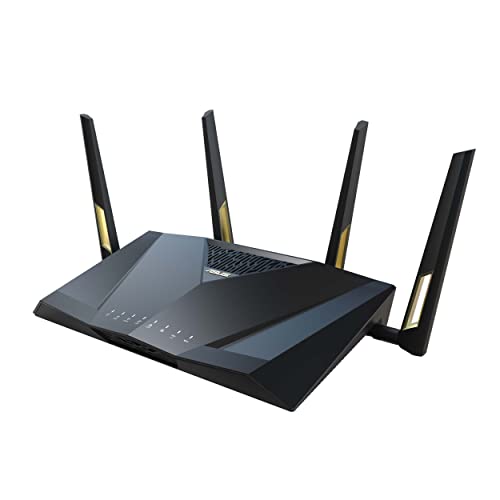
- Dual 2.5G ports for multi-gigabit internet and fast wired devices
- Largest LAN port count in this guide, suited to a room full of wired gear
- 2.0 GHz quad-core processor and AX6000 Wi-Fi 6 for busy households
- Adaptive QoS and Game Boost for gaming traffic priority

- DumaOS 3.0 with geo-filter, ping heatmap, and per-device bandwidth control
- Wi-Fi 6 AX5400 with six streams for a busy wireless household
- Four 1G Ethernet ports for a console, PC, and streaming devices
- Gaming-focused software that standard routers do not match
All 5 Picks at a Glance
| Product | Specs | Action |
|---|---|---|
| 1. ASUS RT-AX86U Pro — Best Overall Wired Gaming Router |
| Check price on Amazon |
| 2. ASUS RT-AX88U Pro — Best for Many Wired Devices |
| Check price on Amazon |
| 3. NETGEAR Nighthawk Pro Gaming XR1000 — Best for Console Traffic Control |
| Check price on Amazon |
 4. ASUS ROG Rapture GT-AX11000 Pro — Best High-End Wired Gaming Router |
| Check price on Amazon |
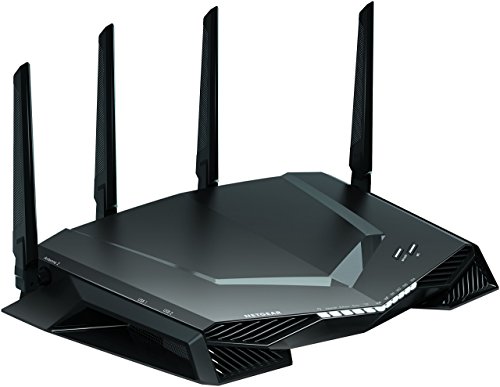 5. NETGEAR Nighthawk Pro Gaming XR500 — Best Budget Wired Gaming Router |
| Check price on Amazon |
As an Amazon Associate I earn from qualifying purchases.
Our Top Picks
Top 3 picks at a glance
The Short Answer
If you want the best wired routers for gaming, start with the ASUS RT-AX86U Pro. It pairs a dedicated gaming LAN port with a 2.5G port, Adaptive QoS, and a fast quad-core processor, which covers the wired setup most gaming PCs and consoles need. For a room full of wired devices, the ASUS RT-AX88U Pro adds a second 2.5G port and more LAN ports.
One honest note before the picks: no mainstream gaming router is wired-only. Every router below also has Wi-Fi. What makes them wired gaming routers is how they treat the cable: a dedicated gaming port that gets priority, multi-gigabit Ethernet, and software that puts game traffic first.
Our Top Picks
- Best overall wired gaming router: ASUS RT-AX86U Pro — dedicated gaming port, 2.5G port, Adaptive QoS, and a 2.0 GHz quad-core processor.
- Best for many wired devices: ASUS RT-AX88U Pro — dual 2.5G ports and the largest LAN port count in this guide.
- Best for console traffic control: NETGEAR Nighthawk Pro Gaming XR1000 — DumaOS 3.0 with geo-filter and ping controls.
- Best high-end wired gaming router: ASUS ROG Rapture GT-AX11000 Pro — tri-band Wi-Fi 6 with a 10G port and a 2.5G port.
- Best budget wired gaming router: NETGEAR Nighthawk Pro Gaming XR500 — DumaOS gaming controls and four Ethernet ports in a Wi-Fi 5 body.
Quick Comparison
| Router | Wi-Fi Class | Wired Ports | Gaming Features | Best For |
|---|---|---|---|---|
| ASUS RT-AX86U Pro | Wi-Fi 6, AX5700 | 2.5G port, dedicated gaming port, Gigabit LAN | Adaptive QoS, Mobile Game Mode, Open NAT | Most gaming PCs and consoles |
| ASUS RT-AX88U Pro | Wi-Fi 6, AX6000 | Dual 2.5G ports, multiple Gigabit LAN ports | Adaptive QoS, Game Boost, VPN Fusion | Rooms full of wired devices |
| NETGEAR XR1000 | Wi-Fi 6, AX5400 | 4 x 1G Ethernet ports | DumaOS 3.0, geo-filter, ping heatmap | Console players who want traffic control |
| ASUS GT-AX11000 Pro | Wi-Fi 6, tri-band | 10G port, 2.5G port | Triple-Level Game Acceleration, RangeBoost Plus | High-end setups and multi-gig internet |
| NETGEAR XR500 | Wi-Fi 5, AC2600 | 4 x Ethernet ports | DumaOS, geo-filter, QoS | Budget wired gaming |
How to Choose
Start with the cable, not the Wi-Fi
A wired connection removes the two things that hurt online gaming most: variable latency and interference from neighboring networks. The router still matters, because the cable plugs into it. Look for a router with a dedicated gaming port, which is a LAN port the router prioritizes above the others. Plug the gaming PC or console into that port and leave the rest of the house on the other ports.
Count the ports you actually need
Count every device you plan to wire: gaming PC, console, streaming box, network storage, and a second console. A router with four LAN ports fills up fast. If the count is five or more, either pick a router with more LAN ports, like the RT-AX88U Pro, or plan on adding a Gigabit switch later. A switch adds ports but does not add gaming prioritization, so the router still needs to be the brains of the setup.
Multi-gigabit ports matter when the plan is fast
A standard Gigabit port caps a wired connection at 1 Gbps. If the internet plan is faster than that, or if a gaming PC and a network drive move large files between each other, a 2.5G port keeps the cable from becoming the bottleneck. A 10G port, found on the GT-AX11000 Pro, is for multi-gig plans and heavy local traffic. For a standard gigabit plan, a 2.5G port is headroom rather than a necessity, and the gaming port matters more.
Gaming QoS is the feature that earns the name
Quality of Service, or QoS, decides which traffic gets sent first when the connection is busy. Gaming QoS modes push game packets ahead of downloads, streams, and cloud backups. ASUS calls its version Adaptive QoS, and NETGEAR builds its gaming controls into DumaOS. Turn the gaming mode on, tell the router which device is the gaming machine, and set the bandwidth the plan supports so the router can shape traffic correctly.
Wi-Fi class still counts
Even a wired-first buyer uses Wi-Fi for phones, handhelds, and guests. Wi-Fi 6 routers in this guide handle crowded homes better than Wi-Fi 5, thanks to OFDMA and MU-MIMO, which let the router serve several devices in the same airtime window. The XR500 is the only Wi-Fi 5 pick here, and its lower wireless class is the trade made for its lower position in the lineup.
The Picks in Detail
1. ASUS RT-AX86U Pro — Best Overall Wired Gaming Router
- Dedicated gaming port with priority handling for the gaming machine
- 2.5G port for multi-gigabit plans and fast local traffic
- 2.0 GHz quad-core processor with 1 GB of RAM for busy homes
- Adaptive QoS, Mobile Game Mode, and Open NAT for consoles
The RT-AX86U Pro is the most balanced wired gaming router in this guide. It is a dual-band Wi-Fi 6 router in the AX5700 class, with a 2.0 GHz quad-core processor and 1 GB of RAM. The wired side is where it earns the top spot: a 2.5G WAN/LAN port, a dedicated gaming port, and Gigabit LAN ports for the rest of the setup. The gaming port gets priority handling, so the gaming PC or console plugged into it jumps the queue when the network is busy.
Adaptive QoS and Mobile Game Mode round out the gaming feature set, and Open NAT helps consoles reach open NAT types without manual port forwarding. AiMesh support means a second ASUS router can extend the network later, and AiProtection Pro adds network security with no subscription attached.
Pros:
Cons:
2. ASUS RT-AX88U Pro — Best for Many Wired Devices
- Dual 2.5G ports for multi-gigabit internet and fast wired devices
- Largest LAN port count in this guide, suited to a room full of wired gear
- 2.0 GHz quad-core processor and AX6000 Wi-Fi 6 for busy households
- Adaptive QoS and Game Boost for gaming traffic priority
The RT-AX88U Pro is the pick for a gaming room where everything is wired. It is a dual-band Wi-Fi 6 router in the AX6000 class, with a 2.0 GHz quad-core processor. Per the ASUS official spec, the port layout is one 2.5G WAN port, one 2.5G LAN port and four Gigabit LAN ports — five LAN-capable wired ports in total, the largest wired count in this guide. Confirm on the listing how the ports are split between 2.5G and Gigabit on the unit being bought, since the two 2.5G ports can serve as WAN or LAN depending on configuration.
Beyond the port count, it carries Adaptive QoS, Game Boost, WPA3 security, port forwarding, WAN aggregation, and AiProtection Pro with no subscription. AiMesh support is included, so it can anchor a larger ASUS mesh later. The AX6000 class covers up to 1,148 Mbps on 2.4 GHz and 4,804 Mbps on 5 GHz with 160 MHz channels.
Pros:
Cons:
3. NETGEAR Nighthawk Pro Gaming XR1000 — Best for Console Traffic Control
- DumaOS 3.0 with geo-filter, ping heatmap, and per-device bandwidth control
- Wi-Fi 6 AX5400 with six streams for a busy wireless household
- Four 1G Ethernet ports for a console, PC, and streaming devices
- Gaming-focused software that standard routers do not match
The XR1000 is the router for a player who wants to control where game traffic goes. It is a 6-stream Wi-Fi 6 router in the AX5400 class, running DumaOS 3.0, the gaming operating system NETGEAR builds into its Pro Gaming line. DumaOS adds a geo-filter that limits matchmaking to nearby servers, a ping heatmap, and bandwidth allocation per device, which are controls most standard routers do not expose at all.
The wired side has four 1G Ethernet ports and one USB 3.0 port. There is no 2.5G port here, which is the main hardware gap against the ASUS picks. For a gigabit plan and a console or PC wired into one of the four ports, the 1G ports are enough, and the DumaOS controls are the reason to choose this router over a faster-ported alternative.
Pros:
Cons:
4. ASUS ROG Rapture GT-AX11000 Pro — Best High-End Wired Gaming Router
- 10G port plus a 2.5G port, the most wired headroom in this guide
- Tri-band Wi-Fi 6 for separating gaming, streaming, and general traffic
- Triple-Level Game Acceleration across device, router, and server
- RangeBoost Plus and AiMesh support for large homes
The GT-AX11000 Pro is the flagship of this guide. It is a tri-band Wi-Fi 6 gaming router with a 10G port and a 2.5G port, which is the most wired headroom of any pick here. The 10G port suits a multi-gig internet plan or a wired link to a fast network drive, while the 2.5G port covers a gaming PC at multi-gig speed and the gigabit LAN ports cover the rest.
Triple-Level Game Acceleration prioritizes game traffic from the device through the router to the game server, and RangeBoost Plus strengthens the wireless side for everything that is not wired. AiMesh support and subscription-free network security complete a package aimed at a high-end gaming room.
Pros:
Cons:
5. NETGEAR Nighthawk Pro Gaming XR500 — Best Budget Wired Gaming Router
- DumaOS gaming controls, including geo-filter and QoS, at the lowest position in this guide
- Four Ethernet ports for a wired PC, console, and streaming devices
- AC2600 Wi-Fi 5 is adequate for a smaller household
- Proven Nighthawk Pro Gaming design with a long track record
The XR500 is the entry point into DumaOS gaming routers. It is a dual-band Wi-Fi 5 router in the AC2600 class, with four Ethernet ports and wireless speeds up to 2.6 Gbps on its listing. The gaming controls are the same idea as the XR1000: geo-filter, QoS, and bandwidth allocation that let a player steer traffic instead of accepting whatever the network does by default.
Wi-Fi 5 is the compromise. It lacks the OFDMA and capacity improvements of Wi-Fi 6, so a crowded wireless household will feel it. But the wired side is what this guide is about, and a gaming PC or console plugged into one of the four Ethernet ports gets the same low, stable latency as on the newer picks.
Pros:
Cons:
Who Should Choose What
- One gaming PC or console, wired: the ASUS RT-AX86U Pro. The dedicated gaming port and 2.5G port cover the setup with nothing wasted.
- A whole room of wired devices: the ASUS RT-AX88U Pro. Dual 2.5G ports and the largest LAN count in the guide keep every cable useful.
- A console player who wants server control: the NETGEAR XR1000. DumaOS geo-filter and ping controls are built for that exact job.
- A multi-gig plan and a high-end room: the ASUS GT-AX11000 Pro. The 10G port and tri-band Wi-Fi 6 are headroom for a fast plan and many devices.
- A tight budget with one wired gaming device: the NETGEAR XR500. DumaOS controls and four Ethernet ports cover the wired essentials.
Common Mistakes
Buying a switch instead of a router
A network switch adds Ethernet ports, but it is not a router. It cannot replace the router, and it adds no gaming QoS or traffic controls. Buy the gaming router first, then add a switch only if the port count runs short.
Plugging the gaming device into a random port
The dedicated gaming port exists for a reason. Plugging the gaming PC into any other port gives up the priority handling that makes these routers different from standard ones. Check the label on the back of the router and use the gaming port for the device that matters most.
Leaving QoS off
Gaming QoS only works when it is turned on and configured. Enable the gaming mode, select the gaming device, and enter the real speeds of the internet plan. A QoS rule built on guessed speeds shapes traffic badly and can make latency worse.
Using old Ethernet cables
A damaged or very old cable can cap a wired connection below what the port supports. Use Cat5e at minimum for Gigabit, and Cat6 or better for 2.5G and 10G links. Replace any cable that looks worn, and keep cable runs short where possible.
Expecting Wi-Fi to match a cable
Even the fastest Wi-Fi in this guide cannot match the stability of a wired connection in a crowded home. If the gaming device sits next to the router, wire it. Save Wi-Fi for devices that move around the house.
Ignoring firmware updates
Router firmware updates fix bugs, close security gaps, and sometimes improve gaming features. Check for updates after setup and again every few months.
FAQ
Are wired routers for gaming a real product type?
Yes, with a clarification. No major gaming router is wired-only; every current gaming router also has Wi-Fi. Wired routers for gaming are gaming routers chosen and used for their wired strengths: a dedicated gaming LAN port, multi-gigabit Ethernet, and QoS that prioritizes game traffic on the cable.
Is a wired connection really better than Wi-Fi 6 for gaming?
For latency stability, yes. Wi-Fi 6 is fast, but its latency varies with interference, distance, and how many devices share the air. A wired connection removes those variables, giving a steadier connection with fewer latency spikes during matches.
Do I need a 2.5G port for gaming?
No, not for the game itself. Online games use far less bandwidth than a Gigabit port carries. A 2.5G port matters for a multi-gigabit internet plan, for large game downloads, and for moving files between wired devices at home. The dedicated gaming port and QoS matter more for in-game latency than the port speed does.
Can I use these routers with a console?
Yes. Every pick here works with a console connected by Ethernet. The NETGEAR DumaOS picks add console-friendly controls like geo-filter and Open NAT helpers, and the ASUS picks include Open NAT and Mobile Game Mode. Plug the console into the gaming port where the router has one.
How many Ethernet ports do I need?
Count the devices that will stay wired: gaming PC, console, streaming box, and network storage. Four ports cover a typical one-player setup. Five or more wired devices point to the RT-AX88U Pro or to adding a Gigabit switch behind the router. Remember that a switch adds ports but not gaming prioritization.
Will a gaming router fix a slow internet plan?
No. A gaming router reduces latency and manages traffic well, but it cannot create bandwidth the plan does not have. If the plan itself is slow, the router can prioritize game traffic over downloads, which helps, but the ceiling stays where the plan sets it.
Conclusion
The best wired routers for gaming are gaming routers that treat the Ethernet cable as the main event. The ASUS RT-AX86U Pro is the right starting point for most players, with a dedicated gaming port, a 2.5G port, and Adaptive QoS in one balanced package. The RT-AX88U Pro is the answer when the room is full of wired devices, the NETGEAR XR1000 is the answer when console traffic control matters most, the ROG Rapture GT-AX11000 Pro is the answer for multi-gig plans and high-end rooms, and the NETGEAR XR500 covers the wired essentials on a tighter budget.
Whichever pick fits the setup, the routine is the same: plug the gaming device into the gaming port with a sound Ethernet cable, turn on the gaming QoS mode, and keep the firmware updated. That is the wired setup that gives online play its steadiest connection.
Related guides
More from Amazon
Programs that pair well with the guide above. Offers and eligibility are set by Amazon and may change.
Free shipping on eligible items, Prime Video and more. Eligible new members can start with a free trial.
Start a Prime free trialAd-free music streaming. Eligible new subscribers can start with a free trial.
Try Music Unlimited freeA Prime membership for ages 18-24 with a trial period. Eligibility is set by Amazon.
See Prime for Young AdultsAudiobooks and podcasts to listen to on the go. Eligible new members can start with a free trial.
Try Audible freeAs an Amazon Associate we earn from qualifying purchases.









