
Our Short List of 3

- LG UltraGear 27GR83Q-B — Best all-rounder. 27-inch 1440p IPS, 240Hz, HDMI 2.1 for console play. See it on Amazon
- MSI MAG 274QP QD-OLED X24 — Best image quality. 26.5-inch QD-OLED, 240Hz, near-instant pixel response. See it on Amazon
- AOC Q27G3XMN — Best HDR. 27-inch 1440p Mini-LED, 180Hz, 336 dimming zones, DisplayHDR 1000. See it on Amazon
- LG UltraGear 34G600A-B — Best ultrawide. 34-inch curved 3440 x 1440 VA, 160Hz, built-in speakers. See it on Amazon
All 5 Picks at a Glance
| Product | Specs | Action |
|---|---|---|
| Our Top Picks |
| Check price on Amazon |
 2. MSI MAG 274QP QD-OLED X24 — Best Image Quality | Check price on Amazon | |
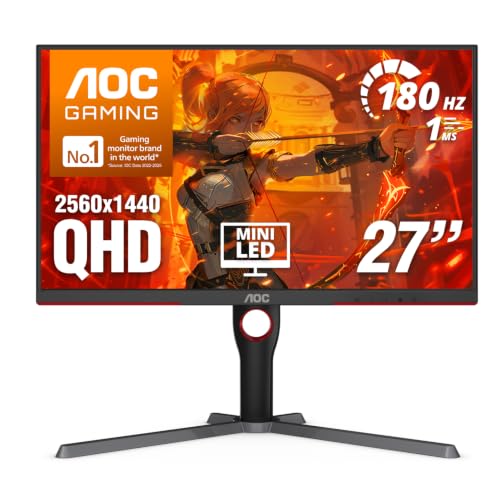 3. AOC Q27G3XMN — Best HDR | Check price on Amazon | |
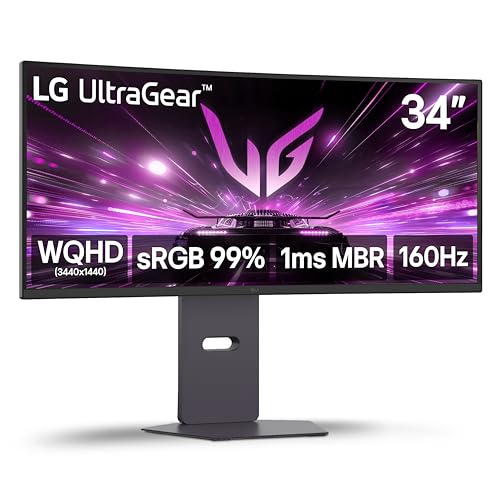 4. LG UltraGear 34G600A-B — Best Ultrawide | Check price on Amazon | |
 5. Acer Nitro XV272U W2bmiiprx — Best Value for Competitive Play | Check price on Amazon |
As an Amazon Associate I earn from qualifying purchases.
Our Top Picks
Top 3 picks at a glance
The Short Answer
If you want one monitor and you do not want to overthink it, buy a 27-inch 1440p screen with a 240Hz refresh rate. That combination is the sweet spot in this tier: the resolution is sharp enough that text and game worlds look clean, the refresh rate is fast enough for competitive shooters, and a mid-range graphics card can actually drive it at high frame rates in most games. This tier now includes more than one panel type, though: a genuine QD-OLED panel with per-pixel contrast, a Mini-LED screen with real HDR brightness, and a 34-inch curved ultrawide for immersion, all alongside the fast IPS workhorse that anchors the category.
The short version of this guide: the LG UltraGear 27GR83Q-B is the best all-rounder for a mixed PC and console desk. The MSI MAG 274QP QD-OLED X24 is the pick for image quality, with OLED contrast and color that no backlit panel can match. The AOC Q27G3XMN is the HDR pick, with a Mini-LED backlight that produces bright highlights and deep blacks. The LG UltraGear 34G600A-B is the ultrawide pick for racing, simulation and single-player games. The Acer Nitro XV272U W2bmiiprx is the value pick for competitive play, delivering the same 240Hz QHD IPS formula with a fully adjustable stand. Confirm the exact model number on the listing before ordering, since listings sometimes reuse a model family name across regional variants.
Our Top Picks
- LG UltraGear 27GR83Q-B — Best all-rounder. 27-inch 1440p IPS, 240Hz, HDMI 2.1 for console play. See it on Amazon
- MSI MAG 274QP QD-OLED X24 — Best image quality. 26.5-inch QD-OLED, 240Hz, near-instant pixel response. See it on Amazon
- AOC Q27G3XMN — Best HDR. 27-inch 1440p Mini-LED, 180Hz, 336 dimming zones, DisplayHDR 1000. See it on Amazon
- LG UltraGear 34G600A-B — Best ultrawide. 34-inch curved 3440 x 1440 VA, 160Hz, built-in speakers. See it on Amazon
Quick Comparison
| Monitor | Size and resolution | Panel | Refresh rate | Standout feature |
|---|---|---|---|---|
| LG UltraGear 27GR83Q-B | 27-inch, 2560 x 1440 | IPS | 240Hz | HDMI 2.1 for console and PC |
| MSI MAG 274QP QD-OLED X24 | 26.5-inch, 2560 x 1440 | QD-OLED | 240Hz | Per-pixel contrast, 0.03ms response |
| AOC Q27G3XMN | 27-inch, 2560 x 1440 | Fast VA, Mini-LED | 180Hz | 336-zone backlight, DisplayHDR 1000 |
| LG UltraGear 34G600A-B | 34-inch, 3440 x 1440 | VA, curved 1800R | 160Hz | Ultrawide field of view, speakers |
| Acer Nitro XV272U W2bmiiprx | 27-inch, 2560 x 1440 | IPS | 240Hz | Full ergonomic stand, low entry tier |
How to Choose
Resolution and size
At 27 inches, 1440p is the right resolution for this tier. It is noticeably sharper than 1080p at the same size, and it keeps frame rates reachable for a mid-range graphics card. The one exception is the ultrawide: a 34-inch screen at 3440 x 1440 spreads the same vertical resolution across a wider field of view, which suits immersion more than pixel density.
Refresh rate
Refresh rate is the number that matters most for competitive play. A 240Hz panel redraws the image 240 times per second, which makes motion smoother and fast turns easier to track than on a 144Hz or 165Hz screen. That only helps if your graphics card can push frame rates close to the refresh rate in the games you play. For story-driven games, the jump from 144Hz to 240Hz is less important than panel quality and contrast. The 180Hz AOC and the 160Hz ultrawide in this guide are still fast screens; they trade a little refresh rate for HDR brightness and field of view.
Panel type
IPS panels are the safe default: wide viewing angles, accurate color, and fast response times. VA panels produce deeper native contrast, which makes dark scenes look richer, but their viewing angles are narrower and some VA panels smear in fast motion. OLED is a different class entirely. Each pixel produces its own light, so blacks are truly black and the pixel response is near-instant.
Ports and console play
If the monitor will share a desk with a PlayStation 5 or Xbox Series X, HDMI 2.1 matters. It is the port that lets a console run 1440p at 120Hz. The LG 27GR83Q-B and the MSI QD-OLED both carry HDMI 2.1. The Acer Nitro reaches its full 240Hz only over DisplayPort; its HDMI ports cap at 144Hz. Check the port list on the listing against the devices you own.
Adaptive sync
Every pick in this guide supports variable refresh rate, which matches the monitor refresh to the graphics card output and removes tearing. LG and MSI list G-Sync compatibility alongside FreeSync support, the AOC lists Adaptive Sync, and the ultrawide carries FreeSync Premium. If you own an NVIDIA card, confirm G-Sync compatibility on the listing; if you own an AMD card, confirm FreeSync support.
The Picks in Detail
1. LG UltraGear 27GR83Q-B — Best All-Rounder
The 27GR83Q-B is the monitor to buy when one screen has to do everything. It pairs a 27-inch 1440p IPS panel with a 240Hz refresh rate and a 1ms response time, and it adds full-bandwidth HDMI 2.1 ports, which most 240Hz monitors in this tier do not include. That combination makes it the only pick here that serves a gaming PC and a current console equally well: a PC gets 240Hz over DisplayPort, and a console gets 1440p at 120Hz over HDMI.
Pros:
– 240Hz 1440p IPS with HDMI 2.1, so it works for PC and console on the same desk
– Wide color coverage and clean IPS image quality
– Height, tilt and pivot stand adjustment plus VESA mounting
– G-Sync Compatible and FreeSync Premium support
Cons:
– IPS contrast is ordinary, so dark scenes look grey next to the OLED and Mini-LED picks
– DisplayHDR 400 is a modest HDR badge; the screen lacks local dimming
See the LG UltraGear 27GR83Q-B on Amazon
2. MSI MAG 274QP QD-OLED X24 — Best Image Quality
The MAG 274QP QD-OLED X24 is the pick for image quality. Its 26.5-inch QD-OLED panel runs at 2560 x 1440 and 240Hz with a 0.03ms response time, which is effectively instant. Because every pixel produces its own light, black is black and bright objects stand out against dark backgrounds with no halo. The QD-OLED layer adds wide color coverage, and the listing states 99 percent DCI-P3 coverage with calibration to a Delta E under 2.
MSI backs the panel with a three-year OLED warranty and the OLED Care 2.0 suite, which includes pixel shift and panel refresh routines to manage static-image retention. The screen carries two HDMI 2.1 ports and a DisplayPort 1.4a input, so it connects to a PC and a console without a hub. A laptop without a DisplayPort output will need an adapter. It also lists DisplayHDR True Black 400 and ClearMR 13000 certification for motion clarity.
Pros:
– QD-OLED contrast and color that no backlit panel in this tier can match
– 240Hz with a 0.03ms response time for near-instant pixel transitions
– Two HDMI 2.1 ports plus DisplayPort 1.4a
– Three-year OLED warranty with the OLED Care 2.0 protection suite
Cons:
– Full-screen brightness is lower than the Mini-LED pick, and the screen suits dimmer rooms
– OLED panels need care with static desktop elements over long sessions
– The 26.5-inch active area is slightly smaller than a standard 27-inch panel
See the MSI MAG 274QP QD-OLED X24 on Amazon
3. AOC Q27G3XMN — Best HDR
The Q27G3XMN is the HDR pick, and it earns that title with hardware rather than a badge. Behind its 27-inch 1440p Fast VA panel sits a Mini-LED backlight with 336 individually dimmed zones, and the listing carries a DisplayHDR 1000 certification. That combination produces bright highlights and deep blacks in the same scene, which is what HDR is supposed to do.
The refresh rate is 180Hz over DisplayPort, with 144Hz over HDMI, and the response time is listed at 1ms. That is fast enough for competitive play, even if it is not the 240Hz of the IPS and OLED picks. The VA panel gives the screen strong native contrast, and the listing states 137.5 percent sRGB coverage. Adaptive Sync handles tearing, and the screen includes a three-year zero-bright-dot warranty.
The compromises are viewing angles and ports. VA panels shift color and contrast when viewed from the side, so this screen suits a single viewer sitting squarely in front of it. The port list is two HDMI 2.0 ports and a single DisplayPort 1.4, with no USB-C, so console players should note the 144Hz HDMI cap and laptop users will need an adapter. AOC’s spec sheet lists two HDMI 2.0 ports; confirm the count on the listing.
Pros:
– 336-zone Mini-LED backlight with a DisplayHDR 1000 listing for genuine HDR
– Strong native VA contrast for dark scenes
– 180Hz refresh rate with a 1ms response time
– Three-year zero-bright-dot warranty
Cons:
– Viewing angles are narrower than IPS or OLED
– HDMI caps at 144Hz and there is no USB-C input
See the AOC Q27G3XMN on Amazon
4. LG UltraGear 34G600A-B — Best Ultrawide
The 34G600A-B is the immersion pick. Its 34-inch curved VA panel runs at 3440 x 1440 with a 160Hz refresh rate and an 1800R curve that wraps the edges of the image into your peripheral vision. Racing games, flight simulators and open-world games feel wider and more present on this screen than on any 16:9 panel here, and the extra horizontal space is genuinely useful for work, with two windows side by side without a bezel in the middle.
The listing states a 1ms response time, FreeSync Premium support, HDR10, and a built-in speaker. The stand adjusts tilt, height and swivel, and the screen is VESA mountable. The port list includes HDMI 2.1 and DisplayPort, so a console can connect at 1440p and a PC can drive the full 160Hz.
Pros:
– 34-inch curved ultrawide field of view for racing, simulation and open-world games
– 160Hz refresh rate with a 1ms response time
– Built-in speakers and a height, tilt and swivel stand
– Extra horizontal space doubles as a productive work screen
Cons:
– Some older games do not support the 21:9 aspect ratio
– VA viewing angles are narrower than IPS or OLED
– Less competitive speed than the 240Hz 16:9 picks
See the LG UltraGear 34G600A-B on Amazon
5. Acer Nitro XV272U W2bmiiprx — Best Value for Competitive Play
The Nitro XV272U W2bmiiprx delivers the core competitive formula at the most accessible tier in this guide: a 27-inch 1440p IPS panel, 240Hz over DisplayPort, and a response time listed at 1ms with overdrive reaching 0.5ms. FreeSync Premium keeps frames smooth, and the listing states 99 percent sRGB coverage with a DisplayHDR 400 badge.
Where the Acer stands out is ergonomics. The ErgoStand adjusts height, tilt, swivel and pivot, with 360-degree swivel and a 90-degree pivot for portrait use. The listing also notes two built-in 2-watt speakers and included DisplayPort and HDMI cables. VESA mounting is supported at 100 x 100mm.
The main limit is the HDMI ports. Both are HDMI 2.0, which caps the refresh rate at 144Hz over HDMI; the full 240Hz needs DisplayPort. Console players who want 120Hz at 1440p are still covered, but PC players should plan to use DisplayPort as their primary connection. The DisplayHDR 400 badge, as with the LG, means HDR support rather than standout HDR performance.
Pros:
– 240Hz 1440p IPS at the most accessible tier in this guide
– Full ergonomic stand with height, tilt, 360-degree swivel and pivot
– DisplayPort and HDMI cables included, plus built-in speakers
– FreeSync Premium and 99 percent sRGB coverage
Cons:
– HDMI 2.0 ports cap at 144Hz; the full 240Hz needs DisplayPort
– DisplayHDR 400 is a modest HDR badge with no local dimming
– No USB-C input
See the Acer Nitro XV272U W2bmiiprx on Amazon
Who Should Choose What
Choose the LG UltraGear 27GR83Q-B if one monitor has to serve a PC and a console, or if you want the safest all-round buy in this tier. It is the only pick that gives you 240Hz on PC and full HDMI 2.1 console support in the same screen.
Choose the MSI MAG 274QP QD-OLED X24 if image quality is your priority and your room is not brightly lit. It is the best-looking screen here.
Choose the AOC Q27G3XMN if you play cinematic and HDR-heavy games, or if you watch films on the same screen. Its Mini-LED backlight is the only one here that makes HDR visibly better rather than merely supported.
Choose the LG UltraGear 34G600A-B if you play racing, simulation or open-world games and want the widest view. It is also the best pick if the monitor doubles as a work screen with two windows open.
Choose the Acer Nitro XV272U W2bmiiprx if competitive play is the priority and you want the 240Hz QHD IPS formula with the most flexible stand. Connect it over DisplayPort to get the full refresh rate.
Common Mistakes
Buying on refresh rate alone. A 240Hz panel only helps if your graphics card can push frame rates near 240 in the games you play. If your card manages 90 frames per second in your favorite title, a 144Hz or 180Hz screen with a better panel may serve you better.
Ignoring the port list. A monitor with HDMI 2.0 caps a connection at 144Hz over HDMI, and some laptops have no DisplayPort output at all. Match the ports on the listing to the devices on your desk before ordering.
Assuming every HDR badge means real HDR. Edge-lit panels with a DisplayHDR 400 listing can accept an HDR signal but cannot show bright highlights against dark backgrounds. For visible HDR, look for local dimming, a Mini-LED backlight, or an OLED panel.
Sitting too close to a 34-inch ultrawide. A curved ultrawide needs distance to work. Give it an arm’s length or more and the curve fills your vision without strain.
Forgetting the stand. A fixed or tilt-only stand can force an awkward neck angle for months. If your desk height is fixed, height adjustment and VESA mounting are worth more than a small refresh-rate bump.
Treating OLED like any other panel. OLED screens reward a little care: hide the taskbar, use a dark wallpaper, and let the panel refresh routines run. The MSI pick includes OLED Care routines and a three-year OLED warranty, but the habits still matter.
FAQ
Is 1440p enough for gaming in 2026?
Yes, for most players. At 27 inches, 1440p is sharp, and it keeps frame rates reachable for a mid-range graphics card. A 4K screen at the same size needs a much stronger card to hold high frame rates, and the visible gain in games is smaller than the jump from 1080p to 1440p.
Is 240Hz worth it over 144Hz?
For competitive shooters, yes. Motion is smoother and fast turns are easier to track. For story-driven and slower-paced games, the gain is smaller, and panel quality or HDR may matter more than the extra refresh rate.
Should I choose OLED or Mini-LED?
Choose OLED if you play in a dim room and value contrast and color above all else. Choose Mini-LED if your room is bright, if you watch HDR films, or if you leave static desktop elements on screen for long stretches.
Does a 34-inch ultrawide work for competitive games?
It works, but it is not the best tool for the job. The wider field of view suits racing and open-world games, while competitive shooters benefit more from the higher refresh rate and smaller frame of a 27-inch 240Hz screen.
Do I need HDMI 2.1 on a gaming monitor?
You need it if you connect a PlayStation 5 or Xbox Series X and want 1440p at 120Hz. For a PC connected over DisplayPort, HDMI 2.1 adds nothing, and the DisplayPort connection is the one that matters.
What should I check on the listing before ordering?
Confirm the exact model number, the panel type, the refresh rate on each port, and the stand adjustment. Listings sometimes reuse a model family name across regional variants, and ports, refresh limits and included cables can differ between them.
Conclusion
The best gaming monitors under 500 now cover every kind of player. The LG UltraGear 27GR83Q-B is the all-rounder for a mixed PC and console desk. The MSI MAG 274QP QD-OLED X24 is the image-quality pick, with contrast and color no backlit screen can match. The AOC Q27G3XMN is the HDR pick, with a Mini-LED backlight that makes bright highlights real. The LG UltraGear 34G600A-B is the ultrawide pick for immersion and work. The Acer Nitro XV272U W2bmiiprx is the value pick for competitive play with a fully adjustable stand.
Start with the games you play. A competitive shooter player on a PC should take the 240Hz IPS or the QD-OLED. A cinematic player or film watcher should take the Mini-LED. A simulation or racing player should take the ultrawide. Any of the five is a strong screen; the right one fits how you actually play.
Related guides
More from Amazon
Programs that pair well with the guide above. Offers and eligibility are set by Amazon and may change.
Free shipping on eligible items, Prime Video and more. Eligible new members can start with a free trial.
Start a Prime free trialAd-free music streaming. Eligible new subscribers can start with a free trial.
Try Music Unlimited freeA Prime membership for ages 18-24 with a trial period. Eligibility is set by Amazon.
See Prime for Young AdultsAudiobooks and podcasts to listen to on the go. Eligible new members can start with a free trial.
Try Audible freeAs an Amazon Associate we earn from qualifying purchases.









