Our Short List of 3

- Best for: Ranked players who want a 240Hz panel and flagship headroom in one machine.
- Processor: Intel Core Ultra 9 275HX
- Graphics: NVIDIA GeForce RTX 5070 Ti Laptop GPU
- Display: 16-inch WQXGA (2560 x 1600), 240Hz, G-SYNC, 500 nits, 100 percent DCI-P3, 3ms response time
- Memory: 16GB DDR5

- Best for: Players who want full-power 1080p-class performance on a 165Hz panel.
- Processor: Intel Core i7-13650HX
- Graphics: NVIDIA GeForce RTX 4060 Laptop GPU, 140W Max TGP, 8GB GDDR6
- Display: 16-inch FHD (1920 x 1200), 165Hz, 100 percent sRGB, Pantone Validated
- Memory: 16GB DDR5-4800

- Best for: Players who stream, record or multitask heavily alongside Siege.
- Processor: Intel Core i7-13650HX
- Graphics: NVIDIA GeForce RTX 4060, 8GB GDDR6, TGP 140W
- Display: 16-inch QHD, 165Hz, G-SYNC
- Memory: 32GB DDR5
All 4 Picks at a Glance
| Product | Specs | Action |
|---|---|---|
| Acer Predator Helios Neo 16 AI (PHN16-73-92B8) |
| Check price on Amazon |
| ASUS ROG Strix G16 (G614JV-AS74) |
| Check price on Amazon |
| Lenovo Legion 5i (16-Inch, 32GB) |
| Check price on Amazon |
 ASUS TUF Gaming A15 (FA507NV-EH74) |
| Check price on Amazon |
The real decision for Siege is not raw graphics muscle. The game is light to render but unforgiving to play: ranked rounds turn on stable frame rates, a fast panel, and a processor that holds its minimums when breaches, smokes and five players collide in one small room. A laptop that shines in cinematic titles can still feel sluggish here if its screen stops at 60Hz or its cooling gives up clock speed twenty minutes into a session.
This guide serves three kinds of Siege players: ranked regulars who want the fastest screen they can carry, students playing from a dorm desk, and all-round gamers who split their time between Siege and heavier titles. Every laptop below was chosen from the names and specifications on its Amazon product page, weighing refresh rate, processor strength, graphics power limits and wired networking.
Our Top Picks
Top 3 picks at a glance
Quick Picks
As an Amazon Associate we earn from qualifying purchases.
| Product | Best for | Key spec from title |
|---|---|---|
| Acer Predator Helios Neo 16 AI (PHN16-73-92B8) | Ranked players chasing the fastest panel | 16-inch WQXGA 240Hz G-SYNC display |
| ASUS ROG Strix G16 (G614JV-AS74) | Full-power play on a 165Hz screen | RTX 4060 at 140W Max TGP |
| Lenovo Legion 5i (16-Inch, 32GB) | Siege plus streaming and multitasking | 32GB DDR5 memory fitted |
| ASUS TUF Gaming A15 (FA507NV-EH74) | A durable carry for daily ranked sessions | 15.6-inch FHD 144Hz G-Sync panel |
How to Choose
Refresh Rate and Response Time Come First
Siege rewards the screen more than almost any other part. A 144Hz panel is the sensible floor for ranked play, 165Hz adds a small but real edge in tracking a leaning defender, and 240Hz suits players whose aim already lives at that speed. Response time matters alongside the headline number, because a fast panel that smears in motion hides the very pixel of movement you are watching for. G-SYNC or Adaptive Sync support is worth having too, since it smooths the frame pacing when a chaotic round dips below the panel’s ceiling.
The Processor Decides Your Minimum Frame Rate
At competitive settings, Siege leans on the processor harder than the graphics card. Strong per-core speed keeps frame rates high and steady in busy rounds, while a weaker chip shows up as stutter exactly when a site execute starts. Look for HX-class Intel chips or full-power AMD Ryzen parts rather than thin-and-light processors, and treat core counts with suspicion: Siege cares more about how fast each core runs than how many threads the box advertises. A modern six or eight performance cores is plenty when the clocks are honest.
Graphics Power Limits Matter More Than the GPU Name
Two laptops can carry the same graphics card name and perform very differently, because makers set different power limits. For Siege, a full-power RTX 4060 class card at a 140W limit is the sweet spot: it holds very high frame rates at 1080p competitive settings without the heat and bulk of flagship machines. A MUX Switch or Advanced Optimus helps as well, letting the dedicated GPU drive the internal display directly, which trims latency and lifts frame rates in CPU-bound moments. Always read the wattage on the listing, not just the badge.
Cooling and Networking Hold Frames Steady
Siege sessions run long, and a laptop that throttles after half an hour hands back the advantage its specs promised. Larger chassis with dual or triple fans, liquid metal on the processor, and unobstructed rear exhausts all help sustain boost clocks across a full evening of matches. Networking deserves the same attention: a wired Ethernet port gives ranked play a stable connection that Wi-Fi in a crowded apartment block cannot always match. Check for an RJ-45 port, and treat Wi-Fi 6 or 6E as the wireless baseline when a cable is not an option.
The 4 Best Options
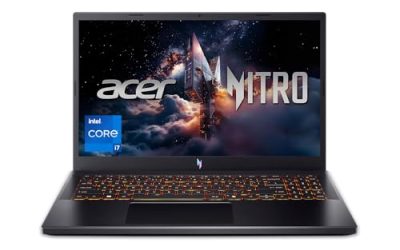
Acer Predator Helios Neo 16 AI (PHN16-73-92B8)
- Best for: Ranked players who want a 240Hz panel and flagship headroom in one machine.
- Processor: Intel Core Ultra 9 275HX
- Graphics: NVIDIA GeForce RTX 5070 Ti Laptop GPU
- Display: 16-inch WQXGA (2560 x 1600), 240Hz, G-SYNC, 500 nits, 100 percent DCI-P3, 3ms response time
- Memory: 16GB DDR5
Ranked players who want a 240Hz panel and flagship headroom in one machine.
At 5.95 lbs it is the heaviest laptop here, and several variants of this model circulate under similar names, so confirm the PHN16-73-92B8 configuration on the listing before ordering.
The Predator Helios Neo 16 AI is the pick for players who treat Siege as their main game and want the screen to be the last bottleneck. Its 16-inch WQXGA panel refreshes at 240Hz with G-SYNC and a listed 3ms response time, the fastest display in this roundup, and the Intel Core Ultra 9 275HX brings the per-core speed the Siege engine leans on when rounds get chaotic. The RTX 5070 Ti Laptop GPU is far more graphics power than Siege needs at competitive settings, leaving generous headroom for capture software or heavier games later.
Watch out for: At 5.95 lbs it is the heaviest laptop here, and several variants of this model circulate under similar names, so confirm the PHN16-73-92B8 configuration on the listing before ordering.
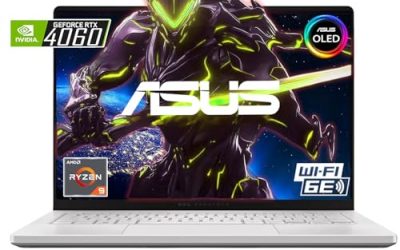
ASUS ROG Strix G16 (G614JV-AS74)
- Best for: Players who want full-power 1080p-class performance on a 165Hz panel.
- Processor: Intel Core i7-13650HX
- Graphics: NVIDIA GeForce RTX 4060 Laptop GPU, 140W Max TGP, 8GB GDDR6
- Display: 16-inch FHD (1920 x 1200), 165Hz, 100 percent sRGB, Pantone Validated
- Memory: 16GB DDR5-4800
Players who want full-power 1080p-class performance on a 165Hz panel.
The seller on this listing varies, so confirm who ships the machine and that the configuration is the G614JV-AS74 before ordering.
The ROG Strix G16 suits players who want a proven esports formula: a full-power graphics card, a fast 165Hz screen and cooling built for long sessions. ASUS lists the RTX 4060 at 140W Max TGP, the highest setting for this GPU, and pairs it with an Intel Core i7-13650HX plus liquid metal on the processor, a combination aimed at holding clock speeds steady through a full evening of ranked matches. The 16-inch FHD panel covers 100 percent sRGB with Pantone Validation, so the machine doubles well for coursework and media between games.
Watch out for: The seller on this listing varies, so confirm who ships the machine and that the configuration is the G614JV-AS74 before ordering.
Lenovo Legion 5i (16-Inch, 32GB)
- Best for: Players who stream, record or multitask heavily alongside Siege.
- Processor: Intel Core i7-13650HX
- Graphics: NVIDIA GeForce RTX 4060, 8GB GDDR6, TGP 140W
- Display: 16-inch QHD, 165Hz, G-SYNC
- Memory: 32GB DDR5
Players who stream, record or multitask heavily alongside Siege.
This 32GB configuration is sold through third-party sellers rather than Amazon itself, and warranty cover can vary by seller, so read the seller terms on the listing before ordering.
The Legion 5i is the roundup’s multitasker, built around the same Intel Core i7-13650HX and RTX 4060 pairing as the Strix but with 32GB of memory fitted, double the usual amount in this class. That extra memory suits players who keep Discord, a browser and capture tools open beside the game, or who edit clips after a session ends. Its 16-inch QHD panel runs at 165Hz with G-SYNC, a sharper screen that still refreshes fast enough for ranked play, and the 4-zone RGB keyboard and 1080p webcam round out a desk-friendly package.
Watch out for: This 32GB configuration is sold through third-party sellers rather than Amazon itself, and warranty cover can vary by seller, so read the seller terms on the listing before ordering.
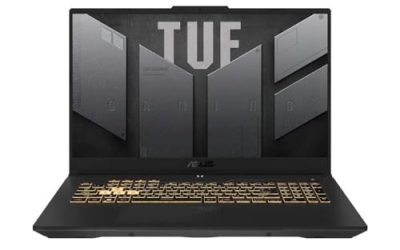
ASUS TUF Gaming A15 (FA507NV-EH74)
- Best for: Students and commuters who want a durable machine for daily ranked play.
- Processor: AMD Ryzen 7 7735HS, 8 cores, up to 4.75 GHz
- Graphics: NVIDIA GeForce RTX 4060 Laptop GPU, 8GB GDDR6, up to 140W with Dynamic Boost
- Display: 15.6-inch FHD (1920 x 1080) IPS-level, 144Hz, 100 percent sRGB, G-Sync, MUX Switch
- Memory: 16GB DDR5-4800
Students and commuters who want a durable machine for daily ranked play.
Its 144Hz panel is the slowest screen in this roundup, and TUF A15 configurations vary widely, so check the FA507NV-EH74 suffix on the listing before ordering.
The TUF Gaming A15 is the practical choice for players who carry their laptop daily and play ranked from wherever they land. The AMD Ryzen 7 7735HS and RTX 4060, listed at up to 140W with Dynamic Boost, give it the same full-power graphics setup as pricier machines here, while the 15.6-inch FHD 144Hz panel with G-Sync and a MUX Switch keeps motion clear and input direct. Two memory slots and room to grow mean it can keep up over years of patches, and the reinforced TUF build suits life in a backpack.
Watch out for: Its 144Hz panel is the slowest screen in this roundup, and TUF A15 configurations vary widely, so check the FA507NV-EH74 suffix on the listing before ordering.
Which One Fits Your Situation
You Play Ranked Most Nights
Choose the Acer Predator Helios Neo 16 AI. The 240Hz G-SYNC panel is the clearest upgrade a committed Siege player can feel, and the Core Ultra 9 275HX keeps minimum frame rates high when rounds turn chaotic. It is heavy, but a ranked-focused setup usually lives on one desk, where the weight stops mattering and the screen and processor pay off every single match.
You Play From a Dorm Room or Small Desk
Choose the ASUS TUF Gaming A15. The 15.6-inch chassis fits cramped desks and backpacks, the reinforced build tolerates daily carrying, and the 144Hz panel still delivers properly fast ranked play. Its Ryzen processor and full-power RTX 4060 leave nothing important on the table for Siege, and the Ethernet port helps when dorm Wi-Fi gets crowded in the evening.
You Stream or Record Your Matches
Choose the Lenovo Legion 5i. The 32GB of memory is the difference-maker here, giving Siege, your streaming software, Discord and a browser room to run at once without stutters. The QHD 165Hz panel also produces sharper footage for clips and VOD work, and the full-power RTX 4060 carries the encoding load while the processor keeps the game itself smooth.
You Want One Laptop for Siege and Everything Else
Choose the ASUS ROG Strix G16. Its 165Hz panel, full-power graphics and strong cooling cover Siege comfortably, while the 1TB SSD and 100 percent sRGB screen make it an easy machine to live with for study, work and bigger single-player games. It is the most balanced all-rounder here, asking for no real compromise in any direction.
Common Mistakes
- Buying by GPU name alone and ignoring the wattage limit, which decides how that card actually performs.
- Choosing a 60Hz or creator-focused laptop because the screen looks sharp, then wondering why ranked play feels delayed.
- Playing ranked over crowded Wi-Fi when the laptop has an Ethernet port and a cable would steady the connection.
- Leaving the laptop on a quiet power profile, which caps the processor and quietly lowers minimum frame rates.
- Chasing maximum graphics settings in Siege instead of the lower competitive settings ranked players use for clarity and speed.
Frequently Asked Questions
What Frame Rate Should I Aim for in Rainbow Six Siege?
Aim to match or exceed your panel’s refresh rate with headroom to spare. On a 144Hz or 165Hz screen, a stable rate above that figure keeps motion consistent; on a 240Hz panel, competitive settings at 1080p or 1200p get you there on the machines in this guide. Stability matters more than peaks, so a locked, even frame rate beats a higher but uneven one.
Is a 240Hz Screen Worth It for Siege?
For dedicated ranked players, yes. Siege is a game of small, fast movements: quick peeks, lean spam and snap aim all read more clearly at 240Hz, and the difference is easiest to feel when tracking a moving target across a doorway. Casual players will still enjoy 144Hz or 165Hz, but anyone playing competitive queues most nights will notice what the faster panel gives back.
How Much RAM Does a Siege Laptop Need?
Sixteen gigabytes is the comfortable baseline and covers Siege plus Discord and a browser without strain. Step up to 32GB if you stream, record footage, edit clips or keep many applications open at once, as the Legion 5i in this guide does. Memory speed and dual-channel layout matter too, so prefer two matched modules over a single stick when a listing states the layout.
Should I Play Siege Over Wi-Fi or a Cable?
Use a cable whenever your setup allows it. A wired Ethernet connection avoids the interference and congestion that make apartment and dorm Wi-Fi unpredictable, and Siege’s short rounds punish even brief connection spikes. All four laptops here include either an Ethernet port or fast Wi-Fi 6 class wireless, but for ranked matches the cable is the reliable choice whenever the desk sits near the router.
Related guides
More from Amazon
Programs that pair well with the guide above. Offers and eligibility are set by Amazon and may change.
Free shipping on eligible items, Prime Video and more. Eligible new members can start with a free trial.
Start a Prime free trialAd-free music streaming. Eligible new subscribers can start with a free trial.
Try Music Unlimited freeA Prime membership for ages 18-24 with a trial period. Eligibility is set by Amazon.
See Prime for Young AdultsAudiobooks and podcasts to listen to on the go. Eligible new members can start with a free trial.
Try Audible freeAs an Amazon Associate we earn from qualifying purchases.