A cheap wireless gaming mouse is judged on value, not on a fixed ceiling. The question is what you get for the tier: a sensor that tracks cleanly, a wireless link that stays steady, a battery that lasts for months, and a shape that survives long sessions. The mice in this guide deliver those fundamentals without premium extras, and the differences between them come down to shape, weight, and connection options rather than raw performance. Value here means lasting quality, not a mouse that needs replacing in six months.
This guide is for players who want wireless freedom without overspending, first-time buyers who need a reliable mouse for a new setup, and anyone replacing a worn-out pointer with something that lasts. Every mouse below was chosen from the names and specifications on its Amazon product page, with sensor strength, wireless quality, battery life, and build quality given the most weight. No product here is described by its selling figure, only by the value it delivers.
Top 3 picks at a glance


Quick Picks
As an Amazon Associate we earn from qualifying purchases.
| Product | Best for | Key spec from title |
|---|---|---|
| Razer Basilisk X HyperSpeed | Dual-mode wireless for less | 5G optical sensor, 16,000 DPI |
| Razer Basilisk V3 X HyperSpeed | Long battery life and thumb controls | 5G Advanced 18K optical sensor |
| HyperX Pulsefire Haste Wireless | Honeycomb light, small budget | Ultra lightweight, 61g, 100-hour battery |
| Razer Orochi V2 | Ultra-light travel with long battery | 5G Advanced 18K DPI optical sensor |
How to Choose
Value means lasting quality, not the lowest tier
A cheap wireless mouse earns its place by lasting, not by being the lowest tier on the shelf. Look for a named optical sensor, switches rated for tens of millions of clicks, and a battery design that does not need constant attention, since those are the parts that decide whether the mouse survives a year of daily play. Unbranded sensors and unnamed switches are the usual weak points at the low end, and they show up as spinouts, double-clicks, and dead buttons within months. Check the listing for the sensor name and switch rating before you weigh anything else.
Dual-mode wireless is the value sweet spot
The best value in a cheap wireless mouse is a dual-mode connection, because it covers two use cases for the cost of one mouse. HyperSpeed or 2.4GHz wireless handles competitive play with low latency, while Bluetooth covers laptops, tablets, and travel without using a USB port. A mouse with only one mode can still serve a single setup well, but it leaves no fallback when the situation changes. Check the listing for both modes and for a switch on the underside that moves between them without software.
Battery life decides the real running cost
Battery design decides how often a cheap wireless mouse asks for attention, and that is a running cost in time even when the cells themselves are inexpensive. Mice that run on a single AA battery can last for months and keep going with a spare cell from any shop, while rechargeable models need a cable and a free port when they run low. The headline battery figure usually assumes Bluetooth, which sips power, so check the figure for the gaming link you will actually use. Favour long-life AA models when you travel or hate cables.
Shape and weight decide whether it lasts on your desk
Shape and weight decide how a cheap wireless mouse feels after the first week, long after the unboxing excitement fades. A right-handed ergonomic shell with a thumb rest supports long sessions, while a compact symmetrical shell packs easily and suits claw grips. Weight matters too: a light mouse flicks faster in shooters, while a heavier shell steadies the aim for players who prefer a planted feel. Check the listed dimensions, weight, and button count together, since a mouse can be light and still cramped, or heavy and still comfortable.
The 4 Best Options
Razer Basilisk X HyperSpeed

The Basilisk X HyperSpeed is the value pick in this guide, because it brings dual-mode wireless and a comfortable ergonomic shape to the low tier. Its 5G optical sensor reaches 16,000 DPI, six programmable buttons cover the commands most games need, and the right-handed shell with a thumb rest supports long sessions. HyperSpeed wireless handles competitive play while Bluetooth covers laptops and travel, and a single AA battery lasts up to 450 hours on HyperSpeed, which keeps running costs low. It gives up RGB lighting and extra controls to hit its tier, but the core wireless experience is the same one that made the Basilisk line popular.
Specs
- 5G optical sensor, 16,000 DPI
- HyperSpeed wireless and Bluetooth, dual mode
- 6 programmable buttons
- Up to 450 hours on HyperSpeed wireless
- Single AA battery
- Right-handed ergonomic shape
Best for: Players who want a comfortable dual-mode wireless mouse with very long battery life at a low tier.
Watch out for: There is no RGB lighting and no wired mode, so players who want a light show or a cable fallback should look at a different mouse.
Razer Basilisk V3 X HyperSpeed
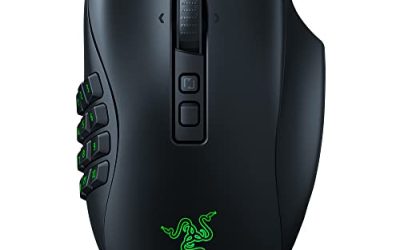
The Basilisk V3 X HyperSpeed steps up the value tier with battery life measured in months. Its 5G Advanced 18K optical sensor tracks up to 18,000 DPI, nine programmable controls cover abilities and macros, and the multi-function trigger on the thumb rest adds another input without moving your grip. One AA battery lasts up to 285 hours over HyperSpeed and up to 535 hours over Bluetooth, so charging and battery swaps become rare events. Chroma RGB lighting and a 1,000Hz polling rate round out a mouse that works as well on a laptop in a hotel as it does at a desk, and the ergonomic shape suits long sessions.
Specs
- 5G Advanced 18K optical sensor, 18,000 DPI
- HyperSpeed wireless and Bluetooth, dual mode
- 9 programmable controls, multi-function trigger
- Up to 285 hours on HyperSpeed, 535 hours on Bluetooth
- Single AA battery, Chroma RGB
- Right-handed ergonomic shape, 1,000Hz polling rate
Best for: Players who want the longest battery life and the most controls in a value wireless mouse.
Watch out for: There is no wired mode and no rechargeable battery, so the AA cell is the only power source, and the shape is right-handed only.
HyperX Pulsefire Haste Wireless
The Pulsefire Haste Wireless is the lightest mouse in this guide at 61 grams, and its honeycomb shell keeps it that way without shrinking the shape. The 16,000 DPI sensor tracks cleanly, six programmable buttons cover the essentials, and the 2.4GHz wireless link runs at a low latency that suits competitive play. A single charge lasts up to 100 hours, the PTFE feet glide smoothly, and the symmetrical shape works for claw and fingertip grips. It is the pick for players who want a fast, flicky mouse at a low tier and are happy to give up Bluetooth and extra buttons to get the weight down.
Specs
- Up to 16,000 DPI precision sensor
- 61 grams, honeycomb shell
- 2.4GHz wireless
- Up to 100 hours of battery life
- 6 programmable buttons
- Low-friction PTFE feet
Best for: Players who want the lightest mouse here and a nimble feel for fast flicks at a low tier.
Watch out for: There is no Bluetooth mode and no RGB lighting, and the honeycomb shell can collect dust in the holes over time, so keep it clean.
Razer Orochi V2

The Orochi V2 is the travel pick in this guide, and its numbers explain why. At under 60 grams it disappears into a laptop bag, yet it still carries an 18K DPI optical sensor, second-generation mechanical switches, and two wireless modes that cover HyperSpeed gaming and Bluetooth pairing. Battery life is exceptional, with up to 950 hours over Bluetooth and 445 hours over HyperSpeed from a single AA cell, so one battery can last through months of trips. The compact shape suits smaller hands and claw grips, and six programmable buttons keep the essentials close. It is the mouse to pack when every gram and every port counts.
Specs
- 5G Advanced 18K DPI optical sensor
- HyperSpeed wireless and Bluetooth, two modes
- Under 60 grams
- Up to 950 hours on Bluetooth, 445 hours on HyperSpeed
- 6 programmable buttons, on-board memory
- 2nd-gen Razer mechanical mouse switches
Best for: Travellers and small-handed players who want the lightest dual-mode mouse with the longest battery life.
Watch out for: The compact shell can feel cramped for large hands or full palm grips, so check the dimensions against your hand before buying.
Which One Fits Your Situation
You want the best value wireless mouse overall
Choose the Razer Basilisk X HyperSpeed. It keeps the ergonomic shape and dual-mode connection of the Basilisk line, with a 16,000 DPI sensor and six programmable buttons that cover most games. The 450-hour HyperSpeed battery life keeps it running for months, and the simpler feature set is the trade for the low tier.
You want the longest battery life and the most controls
Choose the Razer Basilisk V3 X HyperSpeed. Nine programmable controls, a multi-function trigger, and battery life of up to 285 hours on HyperSpeed and 535 hours on Bluetooth make it the most complete mouse in this guide. The ergonomic shape and Chroma RGB round out a mouse that covers competitive and casual play alike.
You want the lightest mouse for fast flicks
Choose the HyperX Pulsefire Haste Wireless. At 61 grams it is the lightest mouse here, the honeycomb shell and PTFE feet keep movement effortless, and the 100-hour battery covers long sessions. It suits players who lift and flick the mouse constantly rather than resting a full palm on it.
You travel constantly and pack light
Choose the Razer Orochi V2. At under 60 grams it adds almost nothing to a bag, the two wireless modes pair with any laptop or tablet you meet, and the 950-hour Bluetooth battery life means a single AA cell can outlast a whole travel season. Small hands and claw grips will find the compact shape natural.
Common Mistakes
- Buying the lowest-tier mouse available without checking the sensor name, then watching the cursor spin out on fast flicks.
- Assuming a cheap wireless mouse must have a short battery life, when AA-powered models here last for months.
- Ignoring weight and grip shape, then discovering after a week that the mouse cramps your hand.
- Choosing a Bluetooth-only mouse for competitive shooters, then blaming the sensor when the real problem is connection latency.
- Picking a right-handed ergonomic shape for a left hand, then discovering the thumb rest works against you.
Frequently Asked Questions
Is a cheap wireless mouse good enough for competitive play?
Yes, for most players. Modern budget sensors track cleanly at high speeds, wireless links run at a 1ms report rate, and switches last for tens of millions of clicks. The gap to premium mice shows up in weight, extra buttons, and battery life rather than basic aiming, so a well-chosen value mouse holds up in ranked play.
How do I know a cheap mouse will last?
Look for a named optical sensor, a switch rating, and a battery design that does not need constant attention. Those are the parts that decide whether the mouse survives a year of daily play. The parts that wear first are usually the cable, the scroll wheel, and the side grips, so check those in the listing.
Should I pick a light mouse or a comfortable shape?
Pick the shape first, then the weight. A light mouse that cramps your hand is worse than a slightly heavier one that fits, because discomfort shows up in every session while a few extra grams fade from notice. The lightest mice here still weigh 61 grams or less, so you can usually have both when the shell matches your grip.
Do cheap wireless mice need special software?
Most work straight out of the box, with the receiver handling the connection and default buttons covering the basics. Software adds button remapping, DPI stages, and lighting control, and it is worth installing once to set up profiles. Check that the software supports your operating system, since some features only work on Windows and macOS.
Related guides
More from Amazon
Programs that pair well with the guide above. Offers and eligibility are set by Amazon and may change.
Free shipping on eligible items, Prime Video and more. Eligible new members can start with a free trial.
Start a Prime free trialAd-free music streaming. Eligible new subscribers can start with a free trial.
Try Music Unlimited freeA Prime membership for ages 18-24 with a trial period. Eligibility is set by Amazon.
See Prime for Young AdultsAudiobooks and podcasts to listen to on the go. Eligible new members can start with a free trial.
Try Audible freeAs an Amazon Associate we earn from qualifying purchases.