As an Amazon Associate we earn from qualifying purchases.
A mouse that feels perfect for the first ten minutes can turn into a bar of soap by the third match. Sweat and skin oil build up on a smooth shell, your fingers start to slide on the side walls, and you compensate by squeezing harder. That extra squeeze makes your hand hotter, tires your forearm, and makes small aiming corrections jerky instead of smooth. The problem is rarely your grip alone. It is usually a mismatch between your hand, the shape of the mouse, and a finish that has nothing for damp skin to hold on to.
The good news is that sweaty hands are a design problem with design solutions. Some mice let air reach your palm through a perforated shell, so heat does not build up in the first place. Some use a matte finish that stays more predictable when it gets damp than a glossy coating does. Some include grip tape in the box, which is the most direct fix of all, because it puts a textured, high-friction surface exactly where your thumb and fingers rest. And some simply give you a larger, better-supported shape, so you do not need to clamp down to keep control.
This guide focuses on those real, listed features rather than marketing claims. Every pick below is a gaming mouse sold on Amazon US, and every pick earns its place through a specific anti-slip idea: grip tape included in the box, a honeycomb shell for airflow, a matte finish, or a roomy ergonomic shape with a textured side area. Just as important, this guide explains how to choose between those ideas, because the right answer for a fingertip player with slightly damp fingers is very different from the right answer for a palm player whose whole hand gets wet.
Top 3 picks at a glance

Why Mice Get Slippery When Your Hands Sweat
Most gaming mice are built from smooth plastic. Dry skin grips that plastic reasonably well, but sweat changes the contact completely. Moisture fills in the tiny texture of your skin and the shell, friction drops, and the mouse starts to rotate slightly in your hand during fast swipes. You notice it most when you lift the mouse to re-centre it on the pad. A lift is a moment where you rely almost entirely on your thumb and ring finger pinching the sides, and that is exactly where a damp, smooth side wall fails first.
Heat makes the cycle worse. A closed shell traps warm air against your palm, your palm sweats more, and the film of moisture gets thicker. That is why the fixes fall into three groups: reduce the heat, increase the friction, or reduce the force you need to apply. Perforated shells work on heat. Matte finishes and grip tape work on friction. Light weight and a well-fitting shape work on force. The strongest picks usually combine at least two of the three. No finish can rescue a mouse that is the wrong size, either: a shell that is too small forces your fingers to curl and pinch, and one that is too large forces your palm to stretch and press. Treat size and shape as the foundation, and the coating or tape as the layer on top.
What to Look For
Grip tape, included or supported. Grip tape is a thin, textured material applied to the buttons and side walls. It stays grippy when damp in a way bare plastic does not, and it can be replaced when it wears. A mouse that includes tape in the box saves a separate purchase and is cut to fit the shell exactly.
A perforated or honeycomb shell. Openings in the shell let air move across your palm and fingers and cut weight at the same time. The trade-off is that dust and crumbs can get inside, so these mice need a quick brush or a blast of air now and then. Some perforated models protect the electronics inside with a dust- and water-resistant coating, which is a genuinely useful feature if your palms get very wet.
A matte finish rather than a glossy one. Gloss looks clean in product photos and turns slick quickly in a warm hand. Matte finishes keep a more consistent feel as moisture builds. If a listing offers the same mouse in matte and glossy versions, the matte version is the one to choose for sweaty hands, every time.
Texture where your fingers actually rest. Rubberised or textured side areas help the thumb and ring finger during lifts. Texture on the top of the shell matters far less, because your palm and fingertips carry less of the lifting load than the sides do.
Low weight. A lighter mouse needs less pinch force to lift and reposition, so your hand can stay relaxed. Relaxed hands sweat less and aim better late in a session.
A shape that matches your grip. Palm players need length and a supportive hump. Claw players need a shorter shell with a defined rear hump to push against. Fingertip players need a small, light shell they can nudge without wrapping their palm around it at all, which also means less skin contact and less sweat transfer.
The Picks at a Glance
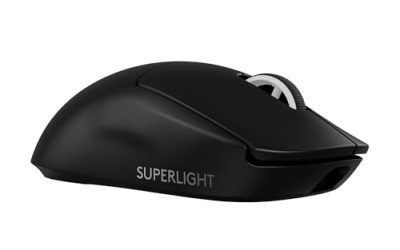
- Logitech G PRO X Superlight 2 — the strongest all-round answer, because optional grip tape is included in the box and the mouse weighs about 60 grams.
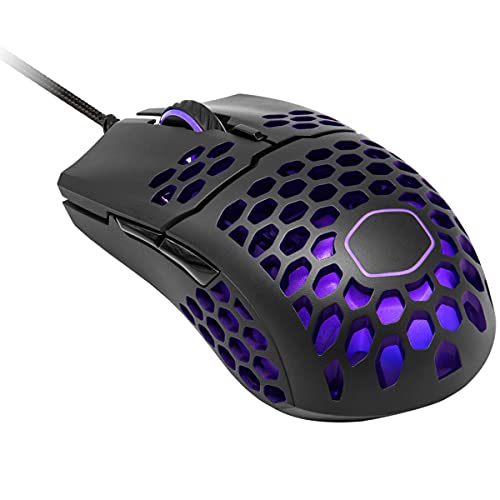
- Cooler Master MM711 — the maximum-airflow answer, with a full honeycomb shell, a matte finish, and internal protection against dust and moisture.
- Glorious Model O — a wired honeycomb option in a matte finish, with an ambidextrous shape that suits claw and fingertip grips.
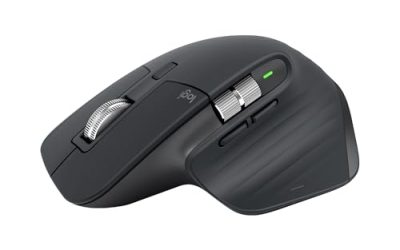
- Logitech G502 X Lightspeed — the roomy answer for larger hands and palm grip, where a bigger supported shape reduces the need to squeeze.
1. Logitech G PRO X Superlight 2 — Grip Tape in the Box

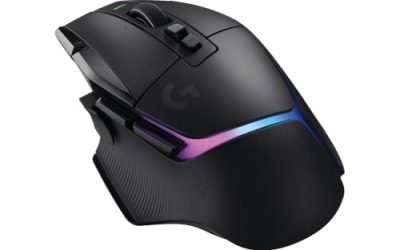
The Logitech G PRO X Superlight 2 on Amazon is the easiest recommendation here, and the reason is a small item in its packaging rather than the shell itself. Logitech includes optional grip tape with this mouse, along with a surface preparation cloth, so you can add a textured, high-friction surface to the buttons and sides without buying a separate accessory or cutting tape to shape yourself. For a player whose main problem is fingers sliding during lifts, that is the most direct fix available on any mouse in this guide.
Without the tape, the shell is a smooth symmetrical shape, so applying it is genuinely worthwhile if your hands get damp rather than merely warm. With it fitted, your thumb gains purchase, your ring finger stops drifting, and you can loosen your grip without feeling like the mouse is about to escape during a fast flick.
The rest of the specification supports a relaxed hand. The listing gives a weight of about 60 grams, light enough that repositioning takes very little pinch force. The HERO 2 sensor is listed with up to 44,000 DPI, tracking at over 888 IPS, and the mouse reports at up to 8 kHz over its LIGHTSPEED wireless connection using the receiver in the box. LIGHTFORCE hybrid switches handle the main clicks, there are five programmable buttons, and Logitech lists up to 95 hours of battery life with USB-C charging. Zero-additive PTFE feet keep the glide smooth.
This shape suits claw and fingertip grips best, and medium hands in palm grip. It is symmetrical, so left-handed players can use it too, although the side buttons sit on the left side. If your palms get extremely wet rather than your fingers, a perforated shell below will move more air across your palm. If your problem is control rather than heat, start here.
2. Cooler Master MM711 — Honeycomb Airflow With Protected Internals
The Cooler Master MM711 on Amazon attacks the heat side of the problem. Its honeycomb shell is open across the top and sides, so air reaches the skin that would otherwise sit sealed against warm plastic. In a long session that airflow is the difference between a palm that stays merely warm and a palm that gets wet enough to slide. The matte black finish on this version helps too, because it avoids the slickness that a glossy shell develops as soon as moisture appears.
Cooler Master also thought about what an open shell lets in. The listing describes a breathable honeycomb housing covering a PCBA protected with a dust- and water-resistant coating. That detail matters for this exact audience. A perforated mouse owned by someone with very sweaty palms will be exposed to more moisture than most, so internal protection is not a bonus feature here, it is the feature that makes the design sensible over years of use rather than months.
The MM711 weighs 60 grams according to its listing, uses a 16,000 DPI optical sensor, and uses Omron switches for the main clicks. Smooth-glide PTFE feet are fitted, RGB lighting appears in the scroll wheel and logo, and the cable is Cooler Master’s Ultraweave design, which is light and flexible enough that it does not drag the rear of the mouse around. That last point helps sweaty-handed players more than it might sound: cable drag makes you grip harder to compensate, so a cable that stays out of the way keeps your hand relaxed.
Choose the MM711 if your whole palm gets wet, if you play in a warm room, or if you want the coolest-feeling shell on this list. It is wired, ambidextrous in shape, and works well for claw and fingertip grips. Keep a soft brush nearby, because an open shell collects dust, and wipe the outside down regularly so sweat residue does not build up in the perforations.
3. Glorious Model O — Matte Honeycomb in an Ambidextrous Shape
The Glorious Model O on Amazon is another perforated design, and it pairs that honeycomb shell with a matte black finish, which is a combination that suits damp hands well. Air moves through the shell instead of being trapped under your palm, while the matte surface on the solid parts of the mouse keeps a steadier feel than a gloss coating would. It is a straightforward, proven formula, and it is why honeycomb mice became so popular with competitive players who play long sessions.
The listing gives a weight of 67 grams, a Pixart 3360 sensor, and Omron switches, in an ambidextrous six-button layout. Glorious describes the Model O as a lightweight mouse for FPS, MOBA, MMO and battle royale games, and the shape reflects that general-purpose intent: long enough for a relaxed claw grip, low enough for fingertip control, and symmetrical, so it does not force your hand into a right-handed posture. Players who switch grip styles between games often get on well with this kind of neutral shape.
Being wired has one underappreciated advantage for sweaty hands. There is no battery adding weight at the rear, so the balance stays centred and the mouse does not tip backwards when you lift it with a light pinch. Lifts are the moment where damp fingers fail, so a balanced, light wired mouse can feel more secure than a heavier wireless one even though it has a cable. Choose the Model O if you want airflow and a matte finish in a symmetrical shell, and you do not mind a cable.
4. Logitech G502 X Lightspeed — Roomy Shape for Bigger Hands

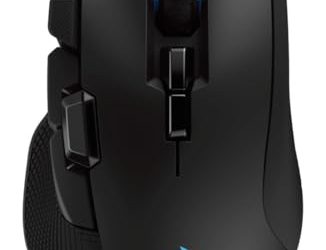
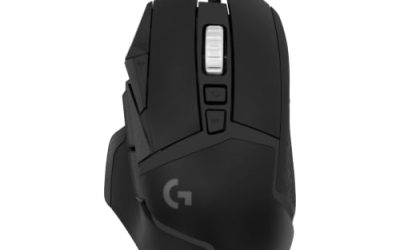
The Logitech G502 X Lightspeed on Amazon takes the opposite approach to the ultralight picks. It is a larger, sculpted, right-handed mouse, and for bigger hands that size is itself an anti-slip feature. A hand that fills a shell properly can rest on it instead of pinching it. Your thumb settles into the shaped left side, your palm is supported along the length of the mouse, and the whole hand can stay open and relaxed rather than curled around a shell that is too small. Less curling means less pressure, and less pressure means less sweat.
Logitech lists this model at about 102 grams, with 13 programmable controls, the HERO 25K sensor covering 100 to 25,600 DPI, LIGHTFORCE hybrid optical-mechanical switches, PTFE feet, and up to 140 hours of battery life in constant motion. A redesigned DPI-shift button near the thumb can be reversed or removed depending on your grip and preference, which is useful if your thumb position changes as your hand warms up. USB-C charging is fitted, and the mouse works with PC and Mac systems.
This is the pick for palm grip players, for people who play slower-paced games where control and buttons matter more than raw flick speed, and for anyone who found that a small ultralight shell made them grip harder, not less. It will not move air across your palm the way a honeycomb shell does, so pair it with the habits below, and consider adding grip tape to the side walls if your thumb still slides during lifts.
Which Approach Fits Your Hands?
If your fingers slip but your palm stays mostly dry, friction is your problem. Start with the Superlight 2 and fit the included grip tape, or add tape to a mouse you already own before replacing it. Tape is cheap, reversible, and solves more slipping than any coating change.
If your whole palm gets wet and your hand feels hot inside the first half hour, airflow is your problem. A honeycomb shell such as the MM711 or the Model O gives your palm somewhere for heat to escape, and a desk fan aimed loosely across your mouse hand helps more than most people expect.
If your hand aches or your forearm feels tired, force is your problem. Look at weight first, then shape. A mouse around 60 grams that fits your grip style will let you loosen up, and loosening up reduces both sweat and fatigue. If a small mouse makes you curl your fingers tightly, go the other way and try the larger G502 X Lightspeed shape.
If you play in a warm room with no air conditioning, combine approaches: a perforated shell, a matte finish, and a fan. No single product fully solves an environment problem.
Habits That Help Any Mouse Stay Grippy
Wash your hands with soap before a long session and dry them completely. Skin oil is as slippery as sweat, and starting clean delays the point where any shell starts to slide. Keep a small hand towel on your desk and use it between matches rather than wiping your palms on your clothes, which mostly moves moisture around.
Clean the mouse itself. Sweat residue builds into a polished film on side walls and buttons, and a mouse that was grippy when new can become slick simply because it is dirty. Wipe the shell with a slightly damp microfibre cloth, dry it, and use a soft brush on perforated shells.
Finally, check your sensitivity. Players on very low sensitivity lift and reposition constantly, which is the hardest test for damp fingers. Raising sensitivity slightly, or using a larger pad so you lift less often, reduces the number of times per match that your grip has to hold the mouse in the air.
Frequently Asked Questions
Does grip tape really help with sweaty hands? Yes, and it is usually the single most effective change. Tape adds a textured surface that keeps friction when it gets damp, whereas bare smooth plastic loses friction. Mice that include tape in the box, such as the Superlight 2 above, make it easy to try without a separate purchase.
Are honeycomb mice safe to use with very sweaty palms? They are designed with open shells, so look for internal protection. The MM711 listing describes a PCBA with a dust- and water-resistant coating under its honeycomb housing, which is exactly the detail to check before buying any perforated mouse for heavy use.
Should I choose wired or wireless? Either can work. Wireless removes cable drag, which helps you keep a light grip, while lighter wired honeycomb mice balance well. Decide based on weight, shape and finish first, then on the connection.
What if no mouse completely fixes it? Combine a grippy or perforated mouse with dry hands at the start of a session, a towel at your desk, regular cleaning, and a fan moving air across your mouse hand. If your palms sweat heavily in everyday situations too, that is worth raising with a doctor rather than solving with peripherals alone.
Verdict
For most players with sweaty hands, the Logitech G PRO X Superlight 2 is the place to start, because the included grip tape addresses slipping directly while the low weight keeps your hand relaxed. If heat and a wet palm are the real issue, the Cooler Master MM711 and its open honeycomb shell, backed by moisture-resistant internal protection, is the more targeted choice, with the Glorious Model O as a strong symmetrical alternative in a matte finish. And if your hands are large, or small mice make you squeeze, the Logitech G502 X Lightspeed offers the supported, roomy shape that lets a palm grip stay loose. Match the fix to the cause, keep the shell clean, and your aim will stop depending on how warm the room is.
Related guides
More from Amazon
Programs that pair well with the guide above. Offers and eligibility are set by Amazon and may change.
Free shipping on eligible items, Prime Video and more. Eligible new members can start with a free trial.
Start a Prime free trialAd-free music streaming. Eligible new subscribers can start with a free trial.
Try Music Unlimited freeA Prime membership for ages 18-24 with a trial period. Eligibility is set by Amazon.
See Prime for Young AdultsAudiobooks and podcasts to listen to on the go. Eligible new members can start with a free trial.
Try Audible freeAs an Amazon Associate we earn from qualifying purchases.