An RGB mouse pad does two jobs at once, so the buying decision starts with the surface under the mouse rather than the glow around the edge. A pad that is too small forces constant lifting during wide turns, a surface that is too slick makes small corrections harder, and a pad that slides across the desk breaks aim at the worst moment. Lighting should come after those practical points, not before them.
This guide is for PC gamers who want a lit desk mat that also gives the mouse room to move, holds still during play, and fits the keyboard beside it. Each pad below was selected from the name and specifications shown on its Amazon product page, with attention to size, surface material, RGB lighting, base grip, and any built-in USB connection stated on the listing.
Top 3 picks at a glance
Quick Picks
As an Amazon Associate we earn from qualifying purchases.
| Product | Best for | Key spec from title |
|---|---|---|
| Razer Goliathus Extended Chroma | A large cloth pad for keyboard and mouse under one RGB edge | Customizable Chroma RGB lighting, soft cloth material |
| Corsair MM700 RGB Extended | A wide desk mat with extra USB ports for peripherals | 930 mm x 400 mm surface, two-port USB hub |
| SteelSeries QcK Prism XL | A desk-covering cloth pad with RGB lighting around the edge | XL RGB Prism cloth, sized to cover desks |
| HyperX Pulsefire Mat RGB | An XL cloth pad with touch controls for lighting profiles | XL, RGB lighting, onboard memory for 3 profiles |
| Razer Firefly Hard V2 | A hard RGB pad for a faster glide and tidy cable routing | Customizable Chroma lighting, built-in cable management |
How to Choose
Measure the desk before choosing a size
An extended pad only helps when it fits the desk without hanging over the edge or pushing the keyboard too close to the monitor. Measure the width and depth available, leave room for the monitor stand, and check whether the pad needs to sit under both the keyboard and the mouse. A standard pad suits a compact desk and a high sensitivity, while an extended or desk-covering pad suits low-sensitivity players who move the mouse across a wide arc. Measure twice, because a pad that is even a few centimetres too wide can push the keyboard off centre.
Pick a cloth or hard surface for the way you aim
Cloth pads usually give a controlled glide with a little resistance, which helps players who track a target slowly and correct their aim in small steps. Hard pads usually feel faster and smoother, which suits players who flick between targets and want the mouse to move with very little friction. Think about whether your aim relies on steady tracking or quick snaps, then choose the surface that matches that habit instead of the finish that looks best in a photograph. A quick test swipe across the pad usually reveals which glide speed feels natural.
Check how the RGB lighting is powered and controlled
Every RGB pad in this guide needs a USB connection for its lighting, so the cable route matters as much as the colour range. Some pads use software to change effects, some use touch controls or a built-in button, and some store lighting profiles on the pad itself. Decide whether you want to open software for every change, whether a spare USB port sits within reach, and whether the cable will cross the area where your wrist rests. A pad that stores profiles on board keeps the same lighting on another PC without extra setup.
Look at the base, edges, and thickness
A pad that moves during play forces you to reset it between rounds, so a non-slip rubber base is a practical requirement rather than a minor detail. Stitched edges help a cloth pad resist fraying where the wrist rubs it every day, while thickness affects how the pad meets the desk edge and how the wrist sits during long sessions. A thicker pad can cushion the wrist, while a thinner pad keeps the mouse closer to the desk surface. A base that grips well also stops the pad creeping forward during long sessions.
The 5 Best Options
Razer Goliathus Extended Chroma
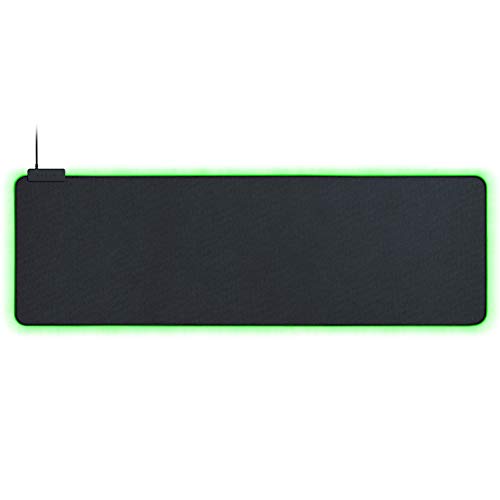
The Razer Goliathus Extended Chroma covers a wide area under the keyboard and mouse, which gives low-sensitivity players room for broad arm movements without lifting the mouse. Its soft cloth surface aims for a balance between control and speed, so tracking a target and flicking to a new one both feel possible on the same pad. Customizable Chroma RGB lighting runs around the edge, and the non-slip rubber base keeps the mat in place during fast turns.
Specs
- Customizable Chroma RGB lighting
- Soft, cloth material
- Balanced control and speed
- Non-slip rubber base
Best for: Gamers who want one large cloth pad under the keyboard and mouse, with RGB lighting around the edge.
Watch out for: The cloth surface can collect dust and drink spills more readily than a hard pad, so it needs regular cleaning to keep the glide consistent.
Corsair MM700 RGB Extended
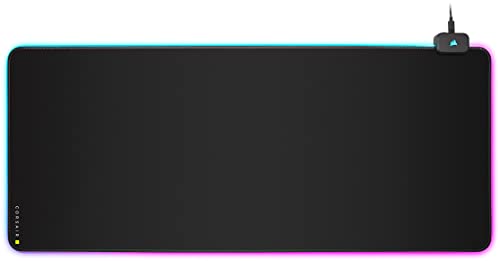
The Corsair MM700 RGB Extended is a wide desk mat that leaves room for a full keyboard, a mouse, and the sweeping movements used in low-sensitivity play. Its three-zone RGB lighting runs around the perimeter, and the two-port USB hub stated on the listing gives nearby peripherals a connection point without reaching behind the computer. The thick rubber construction helps the mat stay flat and planted, which matters when the mouse moves quickly across a large surface.
Specs
- Dynamic 360-degree three-zone RGB lighting
- Expansive 930 mm x 400 mm surface
- Two-port USB hub
- 4 mm-thick rubber construction
Best for: Gamers who want a very wide RGB desk mat with a built-in USB hub for a headset, mouse receiver, or other small peripheral.
Watch out for: The large footprint needs a deep desk, and the mat may crowd a smaller setup where the monitor stand already takes up much of the depth.
SteelSeries QcK Prism XL
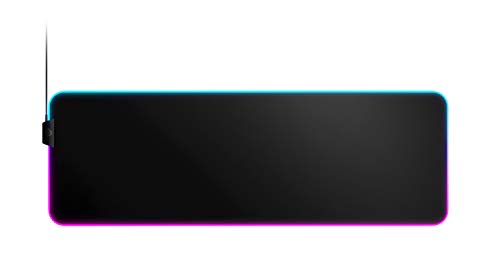
The SteelSeries QcK Prism XL is sized to cover a desk, so it suits players who want the keyboard and mouse on the same continuous surface. Its cloth construction follows the QcK line, a surface many players associate with steady tracking and a controlled glide. RGB lighting around the edge adds colour to the desk without changing the way the mouse moves, and the large size removes the boundary between a separate mouse pad and the rest of the desk.
Specs
- XL RGB Prism cloth design
- Sized to cover desks
- RGB lighting around the edge
- Cloth gaming surface
Best for: Gamers who want a desk-covering cloth pad with RGB lighting and a single, unbroken surface for keyboard and mouse.
Watch out for: A pad this large is harder to wash and slower to dry than a standard pad, so spills and dust need attention before they build up on the cloth.
HyperX Pulsefire Mat RGB

The HyperX Pulsefire Mat RGB combines an XL cloth surface with lighting controls built into the pad itself. Touch sensor profile switching lets you change the lighting without opening software, and the onboard memory stated on the listing stores three profiles on the mat. The rollable cloth surface unrolls flat for play, while the anti-slip rubber base keeps it from shifting when the mouse moves quickly across the extended area.
Specs
- XL size with RGB lighting
- Rollable cloth surface
- Onboard memory for 3 profiles
- Touch sensor profile switching
- Anti-slip rubber base
Best for: Gamers who want an XL RGB cloth pad with touch controls and stored lighting profiles, without relying on software for every change.
Watch out for: The touch sensor sits on the pad itself, so an accidental brush during play can change the lighting effect until you switch it back.
Razer Firefly Hard V2

The Razer Firefly Hard V2 takes a different route from the cloth pads above, using a hard surface for a faster, smoother glide. Its customizable Chroma lighting runs around the edge, and the built-in cable management stated on the listing helps keep the mouse cable from dragging across the desk. The non-slip rubber base holds the rigid pad in place, which is important because a hard pad cannot grip the desk through its own weight in the same way a thick cloth mat can.
Specs
- Customizable Chroma lighting
- Built-in cable management
- Balanced control and speed
- Non-slip rubber base
- Hard gaming mouse pad surface
Best for: Gamers who want a hard RGB pad with a fast glide and a tidy route for the mouse cable.
Watch out for: The hard surface offers less cushioning for the wrist than a thick cloth pad, and it can feel noisy when the mouse moves quickly across it.
Which One Fits Your Situation
You play with low sensitivity and need a wide sweep
Choose the Corsair MM700 RGB Extended when your arm does most of the aiming and you want a very wide surface with a USB hub close at hand. Its stated size leaves room for the keyboard and the mouse, and the thick rubber base keeps the mat planted during broad turns. Measure the desk first, because the mat needs real depth to sit flat.
You want one cloth surface for the whole desk
Choose the Razer Goliathus Extended Chroma or the SteelSeries QcK Prism XL when you want the keyboard and mouse on a single cloth surface with RGB lighting around the edge. The Goliathus suits a setup where a balanced cloth glide matters, while the QcK Prism XL suits a desk where covering the full surface matters more. Either choice removes the step between a small pad and the bare desk.
You change lighting often and dislike opening software
Choose the HyperX Pulsefire Mat RGB when you want to switch lighting profiles with a touch on the pad and keep those profiles stored on the mat. Its XL cloth surface gives the mouse room to move, and the anti-slip base keeps it steady during play. Keep the touch area in mind when you rest your wrist near the edge.
You prefer a fast glide and a tidy mouse cable
Choose the Razer Firefly Hard V2 when a hard surface suits your flick-heavy aim and you want the mouse cable routed through the pad. Its Chroma lighting adds colour without adding a separate light strip, and the rigid surface wipes clean more easily than cloth. A wrist rest can help if the hard surface feels firm during long sessions.
Common Mistakes
- Buying an extended pad without measuring the desk, then finding it hangs over the edge or pushes the keyboard forward.
- Choosing RGB lighting first and a surface second, then discovering the glide does not suit a tracking-heavy aim style.
- Placing the USB cable where the wrist rests, which creates a bump under the hand during every match.
- Leaving a cloth pad uncleaned until dust and crumbs change the glide across the most-used area.
- Picking a hard pad for long sessions without considering wrist comfort, or a thick cloth pad for a desk where the edge already sits high.
Frequently Asked Questions
Do RGB mouse pads affect mouse tracking?
The lighting itself does not change how an optical sensor reads the surface, because tracking depends on the pad material and texture rather than the glow around the edge. A cloth surface gives a controlled glide, while a hard surface gives a faster one, and either can track well when the surface is clean and flat. Choose the surface first, then treat the RGB lighting as a desk feature.
What size RGB mouse pad should I buy for gaming?
Measure the desk and the space your mouse actually travels during play, then choose a pad that covers that movement without hanging over the edge. A standard pad suits high sensitivity and a compact desk, while an extended pad suits low sensitivity and wide arm movements. An extended pad also works well when you want the keyboard and mouse on one continuous surface.
Can I wash an RGB mouse pad?
A cloth RGB pad should not be soaked or put through a washing machine, because its lighting and cable are built into the mat. Wipe the surface with a lightly damp cloth, let it dry fully, and keep water away from the USB connection. A hard RGB pad is simpler to wipe clean, yet its cable and connector still need to stay dry.
Does an RGB mouse pad need software to change the lighting?
It depends on the pad. Some pads use software for full control over colours and effects, while others use a touch sensor or a built-in button to switch between stored profiles. The HyperX pad in this guide stores three profiles on the mat, so it can change lighting without software. Check the listing for onboard memory or touch controls when you want lighting changes without opening an app.
Related guides
More from Amazon
Programs that pair well with the guide above. Offers and eligibility are set by Amazon and may change.
Free shipping on eligible items, Prime Video and more. Eligible new members can start with a free trial.
Start a Prime free trialAd-free music streaming. Eligible new subscribers can start with a free trial.
Try Music Unlimited freeA Prime membership for ages 18-24 with a trial period. Eligibility is set by Amazon.
See Prime for Young AdultsAudiobooks and podcasts to listen to on the go. Eligible new members can start with a free trial.
Try Audible freeAs an Amazon Associate we earn from qualifying purchases.