Call of Duty rewards fast target acquisition, steady tracking through recoil, and quick reactions in close-quarters fights, so the real decision is not which mouse looks most aggressive on a desk. It is whether a light, precise sensor and a shape that stays comfortable through long matches will help you snap to a target, hold a lane, and reset for the next engagement without fighting the hardware in your hand.
This guide is for PC players who run Warzone, multiplayer, or ranked modes and want a mouse that fits their grip, sensitivity, and desk space. Every option below was chosen from the name and specifications shown on its Amazon product page, with a focus on sensor resolution, weight, connection type, programmable buttons, and battery life where the listing states them.
Our Top Picks


Top 3 picks at a glance

Quick Picks
As an Amazon Associate we earn from qualifying purchases.
| Product | Best for | Key spec from title |
|---|---|---|
| Logitech G Pro X Superlight 2 | Competitive players who want a very light wireless mouse | 60g, 44k DPI sensor, 8kHz report rate |
| Razer DeathAdder V3 Pro | Palm-grip players who want an ergonomic wireless mouse | 63g, Focus Pro 30K optical sensor, 90-hour battery |
| Razer Viper V2 Pro | Fingertip and claw players who want a symmetrical wireless mouse | 58g, 30K DPI optical sensor, 90-hour battery |
| Logitech G502 HERO | Players who want many programmable buttons for loadouts | HERO 25K sensor, 25,600 DPI, 11 programmable buttons |
| Logitech G305 Lightspeed | Players who want a simple wireless mouse with long battery life | HERO 12K sensor, 12,000 DPI, 250-hour battery |
How to Choose
Match the shape to your grip
A mouse that suits your grip matters more in Call of Duty than a headline sensor number, because an awkward shape forces small corrections every time you aim. Palm-grip players usually need a longer, taller body that supports the whole hand, while claw and fingertip players often prefer a shorter, flatter body that leaves the wrist free to move. Hold the shape in mind as you read each listing, check whether it is symmetrical or right-handed, and picture how your fingers will rest during a long Search and Destroy round.
Choose a sensor and sensitivity range you can actually use
Call of Duty players often run a lower sensitivity for steadier aim, then use a large mouse pad for wide arm movements, so the sensor needs clean tracking at the DPI you prefer rather than an extreme maximum. A listing that states a high DPI ceiling and a modern optical sensor gives you room to set separate hip-fire and aiming-down-sights sensitivities. Pick a mouse whose stated range covers your usual setting with room to spare, then leave the maximum figure alone if you never play at that level.
Decide between wireless freedom and a wired connection
Wireless mice remove cable drag during fast flicks and wide turns, which helps when you clear a building or track a target moving across a doorway. A wired mouse removes charging and wireless pairing from the routine, and it can suit a fixed desk where the cable can be routed cleanly. In Call of Duty, either connection can work well, so choose the option that matches how often you move the mouse, how tidy your desk is, and whether you want to remember to charge a battery.
Count the buttons you will press under pressure
Extra buttons help when you want a dedicated control for a tactical item, a melee attack, a ping, or a scorestreak, yet too many buttons can lead to accidental presses during a gunfight. A five-button mouse keeps the layout simple and is often enough for players who keep most actions on the keyboard. A mouse with more programmable buttons suits players who want weapon swaps, equipment, and movement controls close to the thumb, provided each button sits where it can be reached without shifting the grip.
The 5 Best Options
Logitech G Pro X Superlight 2

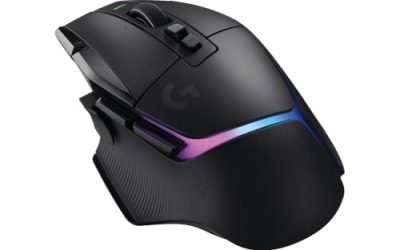
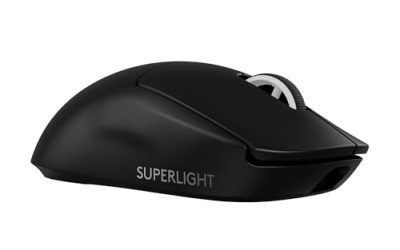
The Logitech G Pro X Superlight 2 is built around a light body and a high-resolution sensor, a combination that suits fast aim adjustments in Call of Duty. Its symmetrical shape works for players who centre the mouse under the palm or hold it with a claw grip, and the low weight makes repeated flicks less tiring across a long session. Five programmable buttons keep the layout clean, while the wireless connection removes cable drag when you sweep across a wide mouse pad to track a moving target.
Specs
- 60g pro-grade lightweight design
- 44k DPI sensor
- 8kHz report rate
- 5 programmable buttons
- USB-C charging for PC and Mac
Best for: Competitive Call of Duty players who want a very light wireless mouse for fast flicks and steady tracking.
Watch out for: The minimal button layout gives you little room to map extra Call of Duty actions to the mouse, so keyboard controls carry more of the load.
Razer DeathAdder V3 Pro
The Razer DeathAdder V3 Pro uses a familiar ergonomic shape that supports the palm during long Warzone matches, and its light body helps the mouse stay easy to lift and reposition. The optical sensor stated on the listing supports precise aiming at a wide range of sensitivities, while the wireless connection keeps the desk clear for broad arm movements. Its battery life stated on the listing also suits players who play several evenings between charges, provided they keep the charging cable within reach.
Specs
- 63g ultra-lightweight design
- Focus Pro 30K optical sensor
- Gen-3 optical switches
- HyperSpeed wireless connection
- Up to 90-hour battery life
- 5 programmable buttons
Best for: Palm-grip players who want an ergonomic wireless mouse that stays comfortable through long Call of Duty sessions.
Watch out for: The right-handed shape does not suit left-handed players, and the smooth sides may feel less secure if your hands become damp during tense rounds.
Razer Viper V2 Pro
The Razer Viper V2 Pro is a symmetrical wireless mouse that suits fingertip and claw grips, where small wrist movements do much of the aiming work. Its light body and high-resolution sensor make it easy to snap between targets in close-quarters maps, and the on-mouse controls let you adjust sensitivity without opening software mid-match. The long battery life stated on the listing also makes it a practical choice for players who switch between multiplayer, ranked play, and Warzone in the same week.
Specs
- 58g ultra-lightweight design
- 30K DPI optical sensor
- Gen-3 optical switches
- HyperSpeed wireless connection
- Up to 90-hour battery life
- USB Type-C cable included
Best for: Fingertip and claw players who want a symmetrical wireless mouse for quick target switching in Call of Duty.
Watch out for: The low, symmetrical body offers less palm support than an ergonomic mouse, so players with larger hands may need a short adjustment period.
Logitech G502 HERO

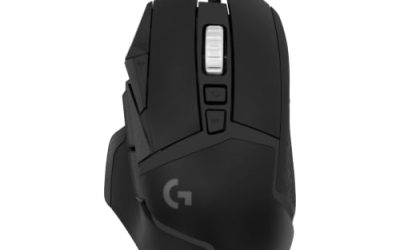
The Logitech G502 HERO takes a different approach from the ultra-light mice above, trading low weight for a broad set of controls and a shape that fills the palm. Its sensor covers a wide DPI range, and the adjustable weight system lets you add or remove tuning weights until the balance feels right for your aim. Eleven programmable buttons give you room to map equipment, melee, ping, and other Call of Duty actions to the thumb, which can reduce the number of keys you need to reach during a fight.
Specs
- HERO 25K sensor
- Up to 25,600 DPI
- 11 programmable buttons
- Adjustable weight system
- Customizable RGB lighting
- On-board memory for PC and Mac
Best for: Players who want many programmable buttons and a tunable weight for Call of Duty loadouts, scorestreaks, and equipment.
Watch out for: The body is heavier than the ultra-light wireless options here, so players who lift the mouse often may find it more tiring during fast, wide movements.
Logitech G305 Lightspeed

The Logitech G305 Lightspeed is a compact wireless mouse that suits players who want a straightforward setup without a charging routine. Its sensor covers a practical DPI range for Call of Duty, and the long battery life stated on the listing means a single battery can last through many sessions before it needs replacing. Six programmable buttons give you a small amount of extra control without crowding the sides, and the on-board memory keeps your settings with the mouse when you move it between computers.
Specs
- HERO 12K sensor
- 12,000 DPI
- 6 programmable buttons
- 250-hour battery life
- On-board memory
- Compatible with PC and Mac
Best for: Players who want a simple wireless mouse with very long battery life for regular Call of Duty sessions.
Watch out for: The sensor ceiling is lower than the flagship mice in this guide, and the compact shape may feel small for players with large hands or a full palm grip.
Which One Fits Your Situation
You play ranked matches and want the lightest possible aim
Choose the Logitech G Pro X Superlight 2 when every flick and reset matters and you want a clean, light wireless mouse. Its low weight and high-resolution sensor suit fast target acquisition, while the simple five-button layout keeps accidental presses out of ranked gunfights. Pair it with a large mouse pad so low-sensitivity arm aiming has room to work.
You play long Warzone sessions with a palm grip
Choose the Razer DeathAdder V3 Pro when comfort across several matches matters as much as tracking. Its ergonomic shape supports the palm, its wireless connection keeps the desk clear, and the long battery life stated on the listing suits evening sessions without a mid-game charge. Keep a charging cable nearby so the mouse is ready for the next session.
You use a fingertip or claw grip and switch targets quickly
Choose the Razer Viper V2 Pro when small wrist movements do most of your aiming and you want a symmetrical body that moves easily. Its light weight suits rapid direction changes on close-quarters maps, and the on-mouse controls help you change sensitivity without leaving the game. A medium-sized pad gives you enough room for quick resets.
You want extra mouse buttons and a wired setup you never charge
Choose the Logitech G502 HERO when you want equipment, melee, and other actions mapped to the thumb, or choose the Logitech G305 Lightspeed when you want wireless play with a very long battery life and a simpler layout. The G502 HERO suits a fixed desk with a routed cable, while the G305 suits players who move between computers and want settings stored on the mouse.
Common Mistakes
- Choosing the highest DPI on the listing instead of a sensitivity that lets you track a target smoothly through recoil.
- Picking a mouse by weight alone without checking whether its shape fits a palm, claw, or fingertip grip.
- Filling every programmable button before a match, then pressing the wrong control during a close gunfight.
- Using a small mouse pad with a low sensitivity, which forces constant lifting and resets during wide turns.
- Ignoring battery life or cable routing, then losing aim control when a wireless mouse runs low or a cable catches on the desk edge.
Frequently Asked Questions
What DPI should I use for Call of Duty on PC?
Start with a DPI setting that lets you turn comfortably without overshooting, then adjust in small steps after a few matches. Many players pair a moderate DPI with a lower in-game sensitivity for steadier aim, because that combination makes small corrections easier. The right setting depends on your mouse pad size, grip, and arm movement, so treat the listing maximum as headroom rather than a target.
Is a wireless mouse reliable enough for Call of Duty?
A modern wireless gaming mouse with a dedicated receiver can track smoothly in Call of Duty when the receiver has a clear path to the mouse and the battery is charged. Keep the receiver close to the mouse, avoid placing metal objects between them, and charge the mouse before a long session. A wired mouse remains a sensible choice if you want to remove charging from the routine entirely.
How many buttons do I need on a Call of Duty mouse?
Five buttons cover the basics for most players, with the two side buttons handling a useful action such as melee, ping, or a tactical item. More buttons help when you want equipment, weapon swaps, and scorestreak controls close to the thumb, yet each extra button needs a clear purpose. Map one action at a time, play several matches, and remove any control that causes accidental presses.
Does a lighter mouse always improve aim in Call of Duty?
A lighter mouse can make flicks and resets easier, especially for fingertip and claw players who move the mouse with the wrist. It does not guarantee better aim, because shape, grip, sensitivity, and practice matter just as much. If a heavier mouse feels steadier in your hand and lets you track smoothly, that fit may serve you better than chasing the lowest weight on a listing.
Related guides
More from Amazon
Programs that pair well with the guide above. Offers and eligibility are set by Amazon and may change.
Free shipping on eligible items, Prime Video and more. Eligible new members can start with a free trial.
Start a Prime free trialAd-free music streaming. Eligible new subscribers can start with a free trial.
Try Music Unlimited freeA Prime membership for ages 18-24 with a trial period. Eligibility is set by Amazon.
See Prime for Young AdultsAudiobooks and podcasts to listen to on the go. Eligible new members can start with a free trial.
Try Audible freeAs an Amazon Associate we earn from qualifying purchases.