A gaming laptop already has a keyboard and a touchpad built in, so adding a keyboard and mouse set is about fixing the two weak points of laptop play: cramped keys and a touchpad that cannot keep up with fast aim. A matched set solves both at once, and a wireless set does it without turning a portable machine into a desk-bound one. The four combo sets below pair a full keyboard with a gaming mouse in one box, and each one connects to a laptop over a shared wireless link, Bluetooth, or a cable, so you can carry one small kit and play anywhere the laptop goes.
The right set for a gaming laptop is not always the biggest or the most feature-heavy one. A laptop desk is often a kitchen table, a dorm desk, or a lap, which means footprint, weight, and battery behaviour matter as much as switch feel or sensor numbers. A compact board leaves room for wide mouse sweeps, a single shared receiver leaves the laptop’s other USB port free, and a set that can run over Bluetooth keeps working when every port is already in use. This guide compares four wireless keyboard and mouse combos on exactly those points, using only the figures each listing states.
Top 3 picks at a glance


What To Look For
One shared receiver. Every set here pairs its keyboard and mouse through a single USB receiver, which matters on a laptop where USB ports are scarce. A shared receiver means one port covers both devices, leaving the rest free for a headset, a drive, or a controller. Bluetooth is the backup: if the receiver is lost or both ports are taken, a set with Bluetooth keeps the keyboard connected while the mouse runs on the receiver, or the other way around.
Layout and footprint. A full-size board with a number pad suits strategy games and work, but it eats desk space and pushes the mouse hand further from the body. A 75 percent or 60 percent board cuts the number pad and shrinks the deck, which gives the mouse more room and makes the whole kit easier to pack. For a gaming laptop, measure the space beside the machine before choosing: a 60 percent board can save several inches of sweep room.
Battery behaviour. Wireless sets live or die on their batteries. Look for rechargeable cells in both pieces, a stated capacity in milliamp-hours where the listing gives one, and a sleep mode that powers the set down when it sits idle. A mouse that runs for many hours between charges is more useful on a laptop than one that needs a cable every night, and a keyboard with a stated long-life mouse battery is a good sign that the set was built for untethered use.
Mouse sensor and weight. The mouse does the aiming, so its sensor range and weight matter. A sensor that reaches 10,000 DPI gives plenty of headroom for high-sensitivity play, while a lighter mouse in the 60 gram range moves faster across a small pad. Side buttons add control for thumb commands, and a polling figure of 1,000 Hz means the mouse reports its position often enough for smooth tracking.
Key feel and lighting. Most wireless combo keyboards use a membrane design with a mechanical feel rather than true mechanical switches. That keeps the board quieter and thinner, which suits a laptop setup, but it means the typing feel is softer than a hot-swap mechanical board. RGB backlighting helps in dim rooms, and the ability to change brightness and lighting modes from the keyboard itself keeps you out of software mid-game.
Charging and cables. Check how each piece charges. A set that charges over USB-C with a single shared cable is easier to live with than one that needs separate cables or disposable batteries. Detachable cables also let the set run wired when the battery runs low, which is the fallback that saves a session.
Redragon S107KS Wireless Gaming Keyboard And Mouse
Redragon S107KS Wireless Gaming Keyboard And Mouse
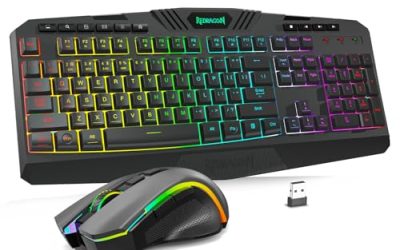
The Redragon S107KS is the most flexible set in this guide, and the strongest pick for a gaming laptop that moves between rooms. It connects in three ways — wired, 2.4 GHz wireless, or Bluetooth — and the keyboard can link to up to five devices at once, so the same board can serve a laptop, a tablet, and a phone without re-pairing. The 2.4 GHz receiver is a two-in-one design that controls both the keyboard and the mouse from a single dongle, which keeps one laptop USB port free.
The mouse is the highlight of the set. It reaches up to 10,000 DPI with a maximum polling figure of 1,000 Hz, and both figures adjust through Redragon software, which also handles macros, report frequency, RGB lighting, and button assignment. At 65 grams it is genuinely light, and the listing states a mouse battery life of up to 200 hours depending on use, which is the longest mouse battery figure among the sets here. That combination — light body, high sensor ceiling, and long battery life — suits fast-paced games on a small laptop desk.
The keyboard is a membrane board with 25-key anti-ghosting, which means up to 25 keys can register at once without dropped inputs, and 12 multimedia function keys for volume, playback, and other quick controls. It carries six RGB lighting modes, while the mouse can show over a million RGB colors, and both brightness and speed adjust from the board. The listing states the keyboard is compatible with laptops and personal computers, and the set ships with a battery included. One point to note: the listing does not state a keyboard battery figure, so the keyboard’s time between charges is something to confirm on the product page. The board is membrane rather than mechanical, which keeps it quieter and thinner, a fair trade for a set that is meant to travel with a laptop.
For laptop play, the S107KS earns its place through versatility. Tri-mode connection means it works whether the laptop has a free USB port, only Bluetooth, or a cable handy, and the five-device keyboard pairing means one board can cover a whole setup. The 65 gram mouse and the long battery figure make it the easiest set here to carry and forget about between charges.
Redragon S101M-KS Wireless Gaming Keyboard And Mouse
Redragon S101M-KS Wireless Gaming Keyboard And Mouse
The Redragon S101M-KS is the full-size option in this guide, and it suits a gaming laptop that mostly stays on one desk. Like the S107KS it runs in three modes — wired, Bluetooth, and 2.4 GHz wireless — and the 2.4 GHz receiver is a two-in-one version that controls both the keyboard and the mouse at the same time. That shared link is the key laptop feature: one dongle, one port, both devices connected.
The mouse reaches 4,800 DPI across five levels — 800, 1,200, 1,600, 3,200, and 4,800 — and the level changes with a click of the DPI button, with the indicator light flashing to show which level is active. The listing also states the DPI can be adjusted freely through software, so the steps are a guide rather than a limit. The keyboard is the roomiest here, with 10 independent multimedia keys plus 12 combination multimedia keys, which gives quick access to volume, playback, and other controls without reaching for the laptop’s own function row.
The lighting is true RGB across the keyboard and mouse, with eight backlight patterns on the board and adjustable lighting speed and brightness to match a gaming scene. The set is built for gamers who want a full board with a number pad and dedicated media controls, and the wireless design means the laptop can sit anywhere within range of the receiver without a cable tethering the desk.
For a gaming laptop, the S101M-KS makes sense when the laptop has a fixed spot and the player wants a full keyboard without giving up wireless freedom. The tri-mode connection covers every laptop port situation, the shared receiver keeps the second USB port open, and the five DPI steps cover everything from precise aiming to fast menu navigation. The board is larger than the compact sets here, so it suits a desk with room to spare rather than a lap or a tiny table.
RedThunder K10 Wireless Gaming Keyboard And Mouse Combo
RedThunder K10 Wireless Gaming Keyboard And Mouse Combo
The RedThunder K10 is a full-size wireless set built around a single shared 2.4 GHz link, and it is the most straightforward pick in this guide. The keyboard and mouse share one USB receiver, which lives in the bottom of the mouse when the set is packed away, so nothing extra needs carrying. The listing states a rechargeable 3,800 mAh battery, and both pieces charge over cable, which keeps the set running without disposable batteries.
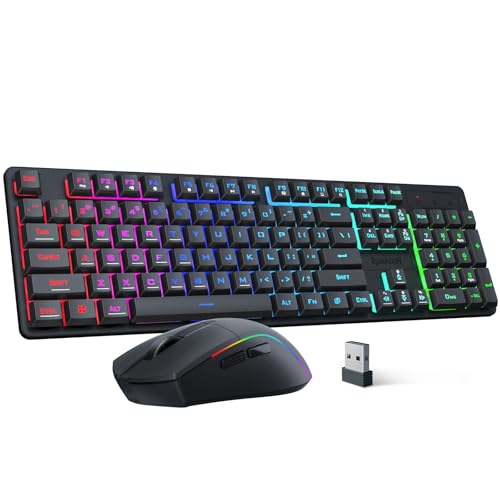
The keyboard uses a mechanical-feel membrane design with anti-ghosting keys and RGB backlighting, and the black version carries pudding keycaps that let the backlight show through the sides of the keys. The mouse is a seven-button design that reaches 3,200 DPI, which is enough for most laptop games, and the listing states the keyboard and mouse are built for PC gamers. The set is a single 2.4 GHz wireless design rather than a tri-mode one, which means it needs the receiver plugged in to work — there is no Bluetooth fallback, so the laptop must have a free USB port.
For a gaming laptop, the K10 suits a player who wants a full-size RGB set with one receiver and no fuss. The shared receiver and the storage slot in the mouse make it easy to pack, the rechargeable battery removes battery shopping from the routine, and the 3,200 DPI mouse covers casual and mid-level competitive play. The lack of Bluetooth is the trade: if the laptop’s ports are all in use, this set has no wireless fallback, so it fits best on a laptop with a port to spare.
CHONCHOW 60 Percent Wireless Gaming Keyboard And Mouse Combo

CHONCHOW 60 Percent Wireless Gaming Keyboard And Mouse Combo
The CHONCHOW 60 percent combo is the smallest set in this guide, and the clearest pick for a gaming laptop that travels. The keyboard is a 68-key board in a 60 percent layout, measuring 12.44 by 4.09 by 1.54 inches, which leaves the maximum room for mouse movement beside a laptop and packs into a bag with ease. The listing states the compact design makes the desktop cleaner and the set easy to carry, which is exactly the point of a 60 percent board.
Both pieces run on a shared 2.4 GHz wireless link through one USB adapter, with an effective range of up to 10 meters, and the adapter sits on the back of the mouse for storage. The keyboard carries a rechargeable 2,000 mAh battery and the mouse a rechargeable 500 mAh cell, and a sleep mode powers the set down when it sits idle, waking on any key. In USB mode the keyboard supports a 19-key conflict-free function, and the board carries RGB backlighting with nine lighting modes on the keyboard and a mouse that cycles through seven colors.
The listing states the combo works with PC, laptop, PlayStation, Xbox, and Mac, and it carries a 12 month warranty. The 60 percent layout drops the number pad, the function row, and the dedicated arrow keys, which is the expected trade for a board this small — some games and applications will need function-layer key combinations for keys that are missing. The mouse DPI is not stated in the listing, so players who need a specific sensor figure should confirm it on the product page.
For a gaming laptop, the CHONCHOW 60 percent set is the travel pick. It is the lightest kit here by layout, it shares one receiver, and its rechargeable batteries and sleep mode are built for use away from a desk. It suits a laptop player who values desk space and portability over a full key set, and who is comfortable using layered keys for the functions a 60 percent board leaves out.
Comparison Table
| Set | Layout | Connection | Mouse DPI | Keyboard Battery | Mouse Battery | Best For |
|---|---|---|---|---|---|---|
| Redragon S107KS | Full-size | Wired, 2.4 GHz, Bluetooth | Up to 10,000 | Not stated in listing | Up to 200 hours | Most flexible laptop setup |
| Redragon S101M-KS | Full-size | Wired, 2.4 GHz, Bluetooth | Up to 4,800 | Not stated in listing | Not stated in listing | Full board with media keys |
| RedThunder K10 | Full-size | 2.4 GHz | Up to 3,200 | 3,800 mAh rechargeable (listing) | 3,800 mAh rechargeable (listing) | Simple one-receiver setup |
| CHONCHOW 60 Percent | 60 percent, 68 keys | 2.4 GHz | Not stated in listing | 2,000 mAh rechargeable | 500 mAh rechargeable | Travel and small desks |
Frequently Asked Questions
Does a wireless keyboard and mouse combo work with a gaming laptop?
Yes. Every set in this guide lists laptop compatibility, and each one connects through a USB receiver that plugs into the laptop, with the two tri-mode Redragon sets adding Bluetooth and a wired mode as well. A shared receiver means one USB port covers both devices, and Bluetooth keeps the keyboard connected when no port is free. The only requirement is a free USB port for the receiver on the two sets that run on 2.4 GHz alone.
Is a 60 percent keyboard enough for gaming on a laptop?
A 60 percent board covers the keys most games need — letters, numbers, space, and modifiers — but it drops the number pad, the function row, and dedicated arrow keys. Games that use those keys need function-layer combinations instead, which takes some getting used to. The trade is real desk space: a 60 percent board leaves far more room for mouse sweeps beside a laptop, and it packs into a bag far more easily than a full-size board. Players who rely on a number pad for strategy games or macros should choose a full-size set instead.
Should I choose a tri-mode set or a single-mode wireless set for a laptop?
A tri-mode set is the safer choice for a laptop because it connects in three ways, so it keeps working when a USB port is taken, the receiver is misplaced, or only Bluetooth is available. A single-mode 2.4 GHz set is simpler and often lighter on the wallet, but it needs the receiver plugged in at all times. If the laptop has ports to spare and the set mostly stays on one desk, a single-mode set is fine. If the laptop moves between rooms, or its ports are already crowded, tri-mode is worth having.
How To Choose
Begin with the space the laptop sits in. If the setup is a small desk, a lap, or a bag, the CHONCHOW 60 percent set gives the most room and the easiest carry, with the Redragon S107KS as the flexible middle ground. If the laptop has a fixed desk and the player wants a full board with media controls, the Redragon S101M-KS fits, while the RedThunder K10 suits a player who wants one receiver, RGB lighting, and a rechargeable battery without extra modes to manage.
Then check the connection. A laptop with crowded ports needs Bluetooth or a shared receiver, which all four sets provide in one form or another, and the two tri-mode Redragon sets cover every situation. Finally, weigh the mouse: the S107KS has the highest sensor ceiling and the longest stated mouse battery life here, the S101M-KS has the most DPI steps for fine control, the K10 covers everyday play at 3,200 DPI, and the CHONCHOW set trades sensor figures for size. Pick the set whose layout fits the desk, whose connection fits the laptop’s ports, and whose mouse fits the games being played, and confirm the battery and DPI figures on the listing before buying.
Disclosure: As an Amazon Associate, we may earn a commission from qualifying purchases made through links in this article, at no additional cost to you.
Related guides
More from Amazon
Programs that pair well with the guide above. Offers and eligibility are set by Amazon and may change.
Free shipping on eligible items, Prime Video and more. Eligible new members can start with a free trial.
Start a Prime free trialAd-free music streaming. Eligible new subscribers can start with a free trial.
Try Music Unlimited freeA Prime membership for ages 18-24 with a trial period. Eligibility is set by Amazon.
See Prime for Young AdultsAudiobooks and podcasts to listen to on the go. Eligible new members can start with a free trial.
Try Audible freeAs an Amazon Associate we earn from qualifying purchases.