A mouse that feels too large turns every match into a hand workout. Fingers stretch to reach the side buttons, the palm drags across the pad, and fine aim starts to feel like steering a brick. For smaller hands, the fix is a mouse built on a smaller frame, with the main buttons, scroll wheel, and side buttons all within easy reach of shorter fingers.
Logitech makes several compact gaming mice that pair a small footprint with the same sensors and switches found in larger models. The five models in this guide all come from Logitech, all suit smaller hands, and all use gaming-grade sensors with programmable buttons.
As an Amazon Associate, we earn from qualifying purchases.
Top 3 picks at a glance


How to Choose
Measure your hand and match the length
Hand size is the first filter. Measure from the base of the palm to the tip of the middle finger. A hand under 17 cm long usually fits best on a mouse under 120 mm long, while a hand under 16 cm long often suits a mouse closer to 115 mm. Length matters more than width, because a mouse that is too long forces the fingers to stretch to reach the click buttons.
Pick the grip style that fits the shape
Small hands usually work best with a fingertip grip or a relaxed claw grip. In a fingertip grip, only the fingertips touch the mouse. In a claw grip, the palm rests lightly while the fingers arch over the buttons. A palm grip on a small mouse often leaves the wrist bent at an awkward angle, so palm-grip players should look for a low-profile shape with a gentle hump.
Watch the weight
Weight changes how a small mouse feels more than any other single factor. A lighter mouse needs less effort to start and stop, which helps with fast flicks and long sessions. Wired models in this guide sit near 85 grams, while the wireless models range from under 63 grams to around 99 grams with a battery fitted. If the hand tires quickly, a lighter mouse is the safer choice.
Check the button layout
Side buttons should sit where the thumb rests without stretching. On a compact mouse, two side buttons on the left edge are standard, and they should be reachable without shifting the whole hand. Extra buttons on the right edge suit left-handed players, but right-handed players may press them by accident. A DPI switch behind the scroll wheel is useful for changing sensitivity mid-game.
Decide between wired and wireless
Wired mice never need charging and tend to cost less for the same sensor, which makes them a strong choice for a desk setup that never moves. Wireless mice free the desk from cable drag and suit players who lift and reposition the mouse often, and modern wireless models report at the same speed as wired ones. Battery life matters for wireless picks: a single AA battery can last hundreds of hours, while a rechargeable model needs a charging routine.
Logitech G203 LIGHTSYNC

The G203 LIGHTSYNC is the most compact wired mouse in this guide. Its classic symmetrical shape is short and narrow, so the fingers sit close to the scroll wheel and the side buttons fall under the thumb without stretching. The LIGHTSYNC RGB lighting runs along the side stripe and the logo, with effects set through the G HUB software.
The gaming-grade sensor tracks up to 8,000 DPI, which covers the sensitivity range most players use. Six programmable buttons cover the two main clicks, the scroll wheel click, the DPI switch, and two side buttons. Onboard memory stores DPI profiles on the mouse itself, and the mouse works with both PC and Mac.
For small hands, the G203 stands out because it is short enough that the fingertips rest naturally on the main buttons instead of reaching past them. The narrow body also helps shorter fingers keep a relaxed claw or fingertip grip. One point to note is that the wired cable adds a small amount of drag, so a mouse bungee or a tidy cable route helps keep movement smooth.
| Spec | Detail |
|---|---|
| Brand | Logitech G |
| Model | G203 LIGHTSYNC |
| Sensor | Gaming-grade optical, up to 8,000 DPI |
| Connection | Wired USB |
| Programmable buttons | 6 |
| Lighting | LIGHTSYNC RGB |
| Weight | 85 g |
| Dimensions | Not stated |
| Onboard memory | Yes |
| ASIN | B07YN82X3B |
Who It Suits
This mouse suits players with small hands who want a compact wired mouse and do not want to think about batteries or charging. It is a good fit for first-time gaming mouse buyers and for younger players. It suits fingertip and claw grips best, and players who like RGB lighting without paying for a wireless model.
Logitech G305 LIGHTSPEED
The G305 LIGHTSPEED takes the same compact shape as the G203 and cuts the cable. It runs on a single AA battery and uses the LIGHTSPEED wireless connection. The HERO 12K sensor tracks up to 12,000 DPI, and six programmable buttons cover the main clicks, the scroll wheel click, the DPI switch, and two side buttons. Onboard memory stores settings on the mouse.
Battery life is a strong point here: a single AA battery can run for up to 250 hours of play. The battery sits in a small compartment under the top shell, and the wireless receiver stores inside the same compartment for travel. The mouse works with both PC and Mac.
For small hands, the G305 works well because the shape mirrors the compact G203, with a short body and a narrow waist that shorter fingers can hold without strain. The wireless freedom helps players who lift and reposition the mouse often. One point to note is that the weight depends on the battery fitted, and a heavier battery shifts the balance slightly toward the rear.
| Spec | Detail |
|---|---|
| Brand | Logitech G |
| Model | G305 LIGHTSPEED |
| Sensor | HERO 12K, up to 12,000 DPI |
| Connection | LIGHTSPEED wireless |
| Programmable buttons | 6 |
| Battery life | Up to 250 hours |
| Battery | 1 AA |
| Weight | Not stated |
| Dimensions | Not stated |
| Onboard memory | Yes |
| ASIN | B07CMS5Q6P |
Who It Suits
This mouse suits players with small hands who want wireless freedom without the weight or cost of a rechargeable pro model. It is a good fit for laptop gamers and for anyone who dislikes cable drag. It suits fingertip and claw grips, and players who value long battery life over RGB lighting.
Logitech G PRO Wireless
The G PRO Wireless is the ambidextrous pro model in this guide, built with input from professional esports players. Its symmetrical body is low and narrow, with four removable side buttons, two on each side, so left-handed players can use it as easily as right-handed players. The HERO 25K sensor tracks up to 25,600 DPI with no smoothing, acceleration, or filtering.
The mouse weighs 80 grams, which is light for a wireless model with a built-in rechargeable battery. The side buttons can be removed and the openings covered with blank plates, which helps players who only use one side. The mouse charges over micro-USB, and the battery lasts through long sessions between charges.
For small hands, the G PRO Wireless works because the ambidextrous shape is shorter and flatter than most ergonomic mice, so the fingers do not have to reach around a tall hump. The removable side buttons also help: a player who only needs the left-side buttons can remove the right-side pair. One point to note is that the micro-USB charging port is older than the USB-C port on newer models, so the included cable should be kept handy.
| Spec | Detail |
|---|---|
| Brand | Logitech G |
| Model | G PRO Wireless |
| Sensor | HERO 25K, up to 25,600 DPI |
| Connection | LIGHTSPEED wireless |
| Programmable buttons | 4 to 8 |
| Side buttons | 4 removable |
| Weight | 80 g |
| Dimensions | Not stated |
| Charging | Micro-USB |
| Onboard memory | Yes |
| ASIN | B07GCKQD77 |
Who It Suits
This mouse suits competitive players with small hands who want a pro-grade wireless mouse with a symmetrical shape. It is a good fit for left-handed players and for anyone who wants removable side buttons to tune the layout. It suits claw and fingertip grips, and players who value a proven tournament shape over the newest sensor.
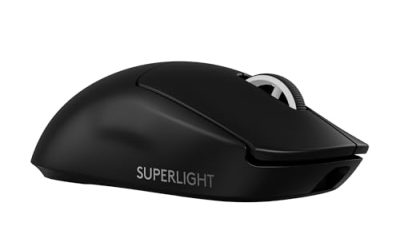
Logitech G PRO X Superlight

The G PRO X Superlight is the lightest wireless mouse in this guide, weighing under 63 grams. It keeps the same ambidextrous shape as the G PRO Wireless but removes the side buttons on the right and trims the shell to a hyper-minimal design. The HERO 25K sensor tracks up to 25,600 DPI, and five programmable buttons cover the two main clicks, the scroll wheel click, the DPI switch, and two left-side buttons.
The low weight changes how the mouse feels in a small hand: it starts and stops with very little effort, which helps with fast flicks and long aiming sessions. The shell has no holes, so the smooth surface stays easy to clean, and the large PTFE feet glide across the pad with little friction. The rechargeable battery lasts through long play sessions, and the mouse charges over micro-USB.
For small hands, the Superlight is the easiest mouse in this guide to move quickly, because the low weight lets the fingers do most of the work instead of the wrist. The narrow body and short length also keep the fingertips close to the main buttons. One point to note is that the right side has no buttons at all, so players who rely on right-side buttons should look at the G PRO Wireless instead.
| Spec | Detail |
|---|---|
| Brand | Logitech G |
| Model | G PRO X Superlight |
| Sensor | HERO 25K, up to 25,600 DPI |
| Connection | LIGHTSPEED wireless |
| Programmable buttons | 5 |
| Weight | Under 63 g |
| Dimensions | Not stated |
| Charging | Micro-USB |
| Onboard memory | Yes |
| ASIN | B087LXCTFJ |
Who It Suits
This mouse suits players with small hands who want the lightest wireless mouse Logitech makes and who play fast, aim-heavy games. It is a good fit for fingertip grip players and for anyone whose hand tires quickly with heavier mice. It suits right-handed players who only need left-side buttons.
Logitech G PRO X Superlight 2

The G PRO X Superlight 2 is the newest model in this guide, refining the original Superlight with a lighter body, a newer sensor, and a faster connection. It weighs 60 grams, uses the HERO 2 sensor with up to 44,000 DPI, and supports an 8 kHz report rate. Five programmable buttons cover the two main clicks, the scroll wheel click, the DPI switch, and two left-side buttons, and the LIGHTFORCE hybrid switches combine optical and mechanical parts for a crisp click feel. The mouse charges over USB-C.
The HERO 2 sensor tracks at higher speeds and with more precision than the original HERO 25K, and the 8 kHz report rate sends position updates eight times faster than the standard rate. In practice, that means smoother cursor movement at high sensitivity, which suits players who aim with quick wrist movements. The shell keeps the same ambidextrous shape as the first Superlight, with large PTFE feet. Grip tape is included for players who want extra hold on the smooth shell.
For small hands, the Superlight 2 is the most advanced option here, and the 60-gram weight makes it the easiest to move of all five models. The USB-C charging port also removes the cable hassle of the older micro-USB models. One point to note is that the 8 kHz report rate needs a compatible receiver and a fast computer to show its full benefit, so players on older hardware may see little difference from the standard rate.
| Spec | Detail |
|---|---|
| Brand | Logitech G |
| Model | G PRO X Superlight 2 |
| Sensor | HERO 2, up to 44,000 DPI |
| Connection | LIGHTSPEED wireless, up to 8 kHz report rate |
| Programmable buttons | 5 |
| Switches | LIGHTFORCE hybrid |
| Weight | 60 g |
| Dimensions | Not stated |
| Charging | USB-C |
| Onboard memory | Yes |
| ASIN | B09NBWL8J5 |
Who It Suits
This mouse suits players with small hands who want the newest Logitech sensor, the lightest body, and USB-C charging in one mouse. It is a good fit for competitive players and for anyone upgrading from an older Superlight or G PRO Wireless. It suits right-handed players who only need left-side buttons and who play fast-paced games.
How the Five Compare
The five mice split into two groups: wired and wireless. The G203 LIGHTSYNC is the only wired model. The other four are wireless, and they differ mainly in weight, sensor, and charging. The G305 LIGHTSPEED is the only one that runs on a replaceable AA battery, which suits players who dislike charging routines. The G PRO Wireless is the only ambidextrous model with buttons on both sides, which makes it the pick for left-handed players. The two Superlight models are the lightest of all, with the original under 63 grams and the Superlight 2 at 60 grams with the newer HERO 2 sensor and USB-C charging.
The G203 tops out at 8,000 DPI, while the G305 reaches 12,000 DPI. The G PRO Wireless and the original Superlight both use the HERO 25K sensor at 25,600 DPI, and the Superlight 2 uses the HERO 2 sensor at 44,000 DPI. Most players use a sensitivity well below these maximums, so shape, weight, and button layout matter more than the sensor ceiling.
FAQ
What size mouse is best for small hands?
A mouse under 120 mm long usually fits a hand under 17 cm, and a mouse near 115 mm often fits a hand under 16 cm. Length matters more than width. Measure from the base of the palm to the tip of the middle finger, then compare that number with the listed length before buying.
Are Logitech gaming mice good for small hands?
Logitech makes several compact gaming mice with the same sensors and switches as its larger models, including the G203, G305, G PRO Wireless, and both Superlight models. These mice use short, narrow bodies that keep the main buttons and side buttons within reach of shorter fingers. The best choice depends on grip style, weight preference, and whether a wired or wireless connection fits the setup.
Is a lighter mouse better for small hands?
A lighter mouse usually feels better in a small hand, because it needs less effort to start and stop, which helps with fast flicks and long sessions. The mice in this guide range from 60 grams to around 99 grams with a battery fitted, and the lightest models suit fingertip grip players best. Weight is a matter of taste, and some players prefer a slightly heavier mouse for stability.
Should I choose a wired or wireless Logitech mouse for small hands?
A wired mouse never needs charging and usually costs less for the same sensor, which makes it a strong choice for a fixed desk setup. A wireless mouse removes cable drag and suits players who lift and reposition the mouse often. Modern Logitech wireless models report at the same speed as wired models, so the choice should follow how the mouse is used.
Final Verdict
The best Logitech gaming mouse for small hands is the one that matches the hand first and the game second. The G203 LIGHTSYNC is the best wired pick, with a compact shape, a solid sensor, and RGB lighting. The G305 LIGHTSPEED is the best wireless pick for players who want long battery life and no charging routine. The G PRO Wireless is the best pick for left-handed players, thanks to its ambidextrous shape and removable side buttons.
For the lightest possible mouse, the G PRO X Superlight is the pick, and the Superlight 2 adds the newer HERO 2 sensor, an 8 kHz report rate, and USB-C charging. Any of the five will fit a smaller hand better than a full-size mouse.
Product and ASIN Reference
| Product | ASIN |
|---|---|
| Logitech G203 LIGHTSYNC | B07YN82X3B |
| Logitech G305 LIGHTSPEED | B07CMS5Q6P |
| Logitech G PRO Wireless | B07GCKQD77 |
| Logitech G PRO X Superlight | B087LXCTFJ |
| Logitech G PRO X Superlight 2 | B09NBWL8J5 |
Related guides
More from Amazon
Programs that pair well with the guide above. Offers and eligibility are set by Amazon and may change.
Free shipping on eligible items, Prime Video and more. Eligible new members can start with a free trial.
Start a Prime free trialAd-free music streaming. Eligible new subscribers can start with a free trial.
Try Music Unlimited freeA Prime membership for ages 18-24 with a trial period. Eligibility is set by Amazon.
See Prime for Young AdultsAudiobooks and podcasts to listen to on the go. Eligible new members can start with a free trial.
Try Audible freeAs an Amazon Associate we earn from qualifying purchases.