Diablo asks more of a mouse than almost any other game on a desk. One evening of dungeon runs can mean thousands of left clicks, constant potion and skill use, and long stretches where your hand never really leaves the shell. A mouse that feels fine in a shooter can start to ache, misclick, or run out of buttons halfway through a season.
This guide is for PC players of Diablo who want a mouse matched to that workload, whether they play a few nights a week or push deep endgame sessions. The five picks below were chosen from their Amazon product names and published specifications, with an emphasis on switch ratings, programmable buttons, and shapes that stay comfortable for hours.
Top 3 picks at a glance

Quick Picks
As an Amazon Associate we earn from qualifying purchases
| Product | Best for | Key spec from title |
|---|---|---|
| Razer Naga V2 Pro | Most skill buttons | 19+1 programmable buttons with swappable side plates |
| Corsair Scimitar RGB Elite | Fixed thumb grid | 17 programmable buttons, 18,000 DPI optical sensor |
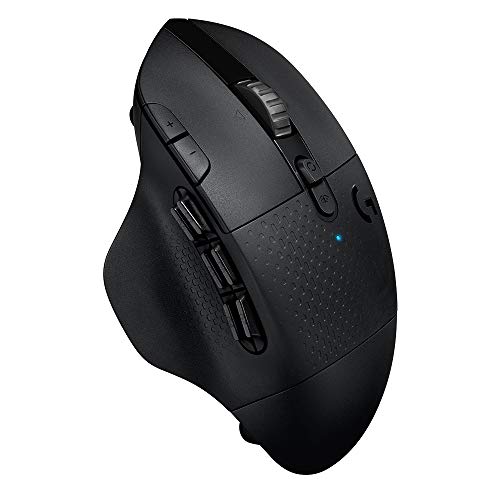
| Logitech G604 Lightspeed | Six thumb buttons, wireless | 15 programmable controls, HERO 16K sensor |
| SteelSeries Aerox 9 Wireless | Lightweight wireless grid | 18 buttons, 89g, 18K DPI TrueMove Air sensor |
| UtechSmart Venus Pro | Wireless thumb grid | 16 programmable buttons, 16,000 DPI PixArt PMW3335 sensor |
How to Choose
Switch Durability for Click-Heavy Play
Diablo turns the left button into a primary attack held down or tapped thousands of times per session, so the switch rating matters more here than in most genres. Look for a stated click lifecycle in the tens of millions, and consider how the switch works. Optical switches, like the Gen-3 switches in the Naga V2 Pro, actuate with light rather than metal contacts, which removes the classic double-click failure mode. Mechanical switches can still serve well, as the Scimitar’s 50 million click Omron switches show, but the rating should be printed clearly before you buy.
Enough Buttons for Skills, Potions, and Evade
A Diablo build typically needs a primary and secondary attack, several skills, a potion, and often an evade or town portal within instant reach. Count what your build actually uses before choosing a layout. A thumb grid of twelve buttons, as on the Scimitar or Aerox 9, can hold an entire skill bar plus consumables, while a mouse with two or three side buttons suits simpler builds where the keyboard already covers most actions. More buttons only help if you can tell them apart by touch, so textured or repositionable side buttons are worth as much as the raw count.
Shape and Weight for Long Sessions
Comfort decides whether hour three feels like hour one. Right-handed ergonomic shells, like the G604 Lightspeed and the Venus Pro, support a relaxed palm grip and reduce the pinch effort of holding the mouse. Weight shapes fatigue too: a lighter mouse such as the 89-gram Aerox 9 asks less of the wrist during constant small movements, while a heavier, planted mouse can feel steadier for players who hold position and click in place. Match the shell to your grip style and hand size rather than chasing the lightest number.
Wired, Wireless, and Sensor Basics
The sensor is rarely the limiting factor in Diablo, since every pick here tracks far beyond what isometric movement demands, but connection choice affects daily use. A wired mouse like the Scimitar never needs charging and suits a fixed desk. Wireless models remove cable drag and, in the Naga V2 Pro, Aerox 9, and G604 Lightspeed, offer both a low-latency 2.4GHz mode for play and Bluetooth for a second machine. Check the stated battery life in the mode you will actually use, because a long Bluetooth rating does not describe gaming over the faster connection.
The 5 Best Options
Razer Naga V2 Pro

The Naga V2 Pro is the pick for players whose builds outgrow a normal button layout. Its three swappable side plates let you run a twelve-button grid for a full skill bar, a six-button plate for a lighter build, or a two-button plate on nights when another game is on the menu. Gen-3 optical switches rated for 90 million clicks suit Diablo’s relentless left-click workload, and HyperSpeed wireless keeps the desk clear without tying you to a cable during long sessions.
Specs
- Sensor: Razer Focus Pro 30K optical sensor
- Buttons: 19+1 programmable buttons with three swappable side plates
- Switches: Razer Optical Mouse Switches Gen-3
- Scroll wheel: HyperScroll Pro Wheel
- Connectivity: HyperSpeed wireless, Bluetooth, and wired
- Battery life: Up to 300 hours as listed in the product name
- Model: RZ01-04400100-R3U1
Best for: Players who want an entire skill bar and potion under the thumb
Watch out for: It is a substantial mouse, and the twelve-button plate takes practice to use without looking down
ASIN: B0BGJTLFN5
Corsair Scimitar RGB Elite
The Scimitar RGB Elite suits players who want a fixed, always-there thumb grid rather than swappable parts. Its twelve mechanical side buttons sit on Corsair’s Key Slider system, so the whole panel can be repositioned to sit exactly under your thumb, a small detail that matters when you reach for the same skill hundreds of times a night. The 50 million click Omron switches and braided cable are built for extended use, and iCUE handles macros and remaps for each build you run.
Specs
- Sensor: Native 18,000 DPI optical sensor, adjustable in 1 DPI steps
- Buttons: 17 fully programmable buttons
- Side buttons: 12 mechanical side buttons with Key Slider control system
- Switches: Omron switches rated for 50 million clicks
- Connectivity: Wired
- Software: Corsair iCUE compatible
- Model: CH-9304211-NA
Best for: Players who want a permanent twelve-button grid positioned to fit their thumb
Watch out for: It is wired only, and iCUE is required to get the most from its macro programming
ASIN: B082LRMY53
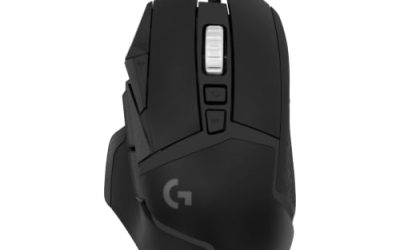
Logitech G604 Lightspeed
The G604 Lightspeed fits Diablo players who want more skill buttons than a standard layout but stop short of a twelve-button grid. Six thumb buttons put your main skills, potion, and evade under one finger’s reach, and fifteen programmable controls in total leave room for town portal and inventory shortcuts. Its dual-mode hyper-fast scroll wheel sweeps long inventory lists, while up to 240 hours of play on a single AA battery in Lightspeed mode means charging never interrupts a season.
Specs
- Sensor: HERO 16K sensor, 100 to 16,000 DPI
- Buttons: 15 programmable controls, including six thumb buttons
- Scroll wheel: Dual-mode hyper-fast scroll wheel
- Connectivity: LIGHTSPEED wireless and Bluetooth
- Battery life: Up to 240 hours in LIGHTSPEED mode on one AA battery
- Weight: 135g with battery
- Model: 910-005622
Best for: Players who want six thumb buttons for skills without a full twelve-button grid
Watch out for: It runs on a replaceable AA battery rather than a rechargeable cell, and at 135g it is a heavier shell
ASIN: B07QN369XX
SteelSeries Aerox 9 Wireless

The Aerox 9 Wireless answers a specific complaint about grid mice: most of them are heavy. At 89 grams it carries eighteen programmable buttons, including a twelve-button side panel, in a shell light enough to move constantly without the wrist ache that builds up over a long night of farming. Its AquaBarrier protection guards the perforated shell against dust and splashes, and Quantum 2.0 wireless offers both 2.4GHz and Bluetooth connections, so one mouse can cover a gaming PC and a laptop.
Specs
- Sensor: 18K DPI TrueMove Air optical sensor
- Buttons: 18 programmable buttons with a 12-button side panel
- Weight: 89g
- Connectivity: Bluetooth and 2.4 GHz wireless
- Battery life: Up to 180 hours as listed
- Protection: AquaBarrier water-resistant design
- Model: 62618
Best for: Players who want a full thumb grid without the usual grid-mouse weight
Watch out for: The perforated shell texture does not suit everyone, and the side buttons are closely packed
ASIN: B09VNPB6Q1
UtechSmart Venus Pro

The Venus Pro is the wireless grid option for players who want a full skill bar under the thumb without a cable crossing the desk. Twelve thumb-grip side buttons, angled so your thumb tip can tell them apart, hold skills, potion, and consumables, and sixteen programmable buttons in total cover macros through the UtechSmart software. Its 2.4GHz connection suits active play, the battery is rated for up to 70 hours between charges, and a USB-C cable keeps the mouse running wired while it charges.
Specs
- Sensor: PixArt PMW3335 optical sensor, up to 16,000 DPI
- Buttons: 16 programmable buttons, including 12 thumb-grip side buttons
- Connectivity: 2.4 GHz wireless and wired USB-C
- Battery life: Up to 70 hours, 1000mAh rechargeable battery
- Polling rate: Up to 1000 Hz
- Lighting: RGB with 4 programmable modes
- Model: US-D16000-WGM
Best for: Players who want a twelve-button thumb grid with wireless freedom
Watch out for: The side buttons sit at fixed angles, so smaller hands should check the grip fits before committing
ASIN: B07XP4K152
Which One Fits Your Situation
Your Build Uses More Skills Than Your Keyboard Hand Likes
If your rotation spans six skills plus a potion and you keep fumbling keyboard reaches mid-fight, move the bar to your thumb. The Naga V2 Pro is the flexible choice because its plates let you start with six buttons and graduate to twelve, while the Scimitar RGB Elite suits players who already know they want a fixed grid every night. Either way, assign the potion first and build outward from the buttons your thumb finds naturally.
You Play Long Sessions and Your Wrist Complains
Fatigue usually comes from weight and grip, not from the sensor. The Aerox 9 Wireless, at 89 grams, reduces the effort of constant small corrections, and its wireless connection removes cable drag from the equation. If you prefer a supported palm grip instead, the G604 Lightspeed’s broad ergonomic shell spreads the load across the hand. In both cases, take short breaks between runs; no shell fully replaces rest during marathon farming.
You Want One Reliable Wired Mouse and Nothing to Charge
A fixed desk setup is where a wired mouse still makes the simplest sense. The Scimitar RGB Elite gives you a permanent twelve-button grid with no battery to manage before a session. The Venus Pro is the alternative when you want that same grid most nights but wireless freedom on others, since its USB-C cable runs it wired while it charges. Both suit players who sit down, play for hours, and leave the setup untouched.
You Switch Between a Gaming PC and a Second Machine
Players who raid on a desktop and tinker on a laptop benefit from multi-connection mice. The Naga V2 Pro and Aerox 9 Wireless both pair a low-latency wireless mode for play with Bluetooth for the second machine, so the same button layout follows you across both. Set up your Diablo profile once, keep the gaming connection on the faster wireless mode, and reserve Bluetooth for the machine where instant response matters less.
Common Mistakes
- Buying a twelve-button grid for a build that only uses four skills, then never learning the extra buttons by touch.
- Ignoring the switch rating on a game where the left button may be pressed thousands of times in one evening.
- Choosing a mouse by sensor maximums alone, when shape and weight decide comfort across a long session.
- Mapping the potion to a hard-to-reach button instead of the easiest thumb position on the mouse.
- Leaving a wireless mouse uncharged before a planned session instead of checking its battery in the gaming connection mode.
Frequently Asked Questions
How many buttons does a Diablo mouse really need?
Most builds work well with the two main clicks plus four to six extra inputs for skills, a potion, and evade. That is why eleven-button mice suit many players. Twelve-button grids help builds with extra toggles, summons, or consumables, but only if you practise reaching each button without looking. Start from your actual skill bar, not from the largest layout available.
Are optical switches better for Diablo?
Optical switches suit Diablo well because they actuate with light instead of metal contact points, which removes the wear pattern behind many double-click faults. Their published ratings also tend to be high, such as the 90 million click rating on the Naga V2 Pro here. A well-rated mechanical switch can still last for years, so treat the printed lifecycle and switch type as one factor alongside fit.
Should I choose wired or wireless for long sessions?
Both work for Diablo. Wired mice never interrupt a session for charging and suit a fixed desk, while modern low-latency wireless removes cable drag and keeps movement free. The deciding detail is battery life in the faster gaming mode, not the longer Bluetooth figure. If you dislike checking charge levels at all, a wired pick like the Scimitar RGB Elite removes the question entirely.
What grip style works best for click-heavy ARPG play?
A relaxed palm or palm-claw grip usually works best, because it supports the hand through hours of repeated clicking instead of loading the fingertips. Ergonomic shells, such as the G604 Lightspeed and the Venus Pro, are built for that posture. Fingertip-grip players who move the mouse constantly may prefer the lighter Aerox 9, provided its perforated shell feels comfortable against the palm.
Related guides
More from Amazon
Programs that pair well with the guide above. Offers and eligibility are set by Amazon and may change.
Free shipping on eligible items, Prime Video and more. Eligible new members can start with a free trial.
Start a Prime free trialAd-free music streaming. Eligible new subscribers can start with a free trial.
Try Music Unlimited freeA Prime membership for ages 18-24 with a trial period. Eligibility is set by Amazon.
See Prime for Young AdultsAudiobooks and podcasts to listen to on the go. Eligible new members can start with a free trial.
Try Audible freeAs an Amazon Associate we earn from qualifying purchases.